Any chance this could be made compatible with the following two plugins?
NeMV - Class TP Rename
https://forums.rpgmakerweb.com/index.php?threads/nemv-class-tp-rename.60266/
HP Color Controller
https://forums.rpgmakerweb.com/index.php?threads/hp-color-controller.74386/#post-700201
As it is, putting Pretty Sleek Gauges above them in the load order makes it not work on player gauges, and putting it below them removes the functionality of those two plugins.
Pretty Sleek Gauges
● ARCHIVED · READ-ONLY
-
-
@Msoulwing Here's a quick fix for HP Color Controller:
https://github.com/mjshi/RPGMakerRe...SleekGauges/PrettySleekGauges_HPColorPatch.js
Place it below Pretty Sleek Gauges. Unfortunately this doesn't support changing the color of the name, too, since it's actually not touched by Pretty Sleek Gauges at all and HP Color Controller relies on a hacky way of changing the text color, and not changing it back, so whenever RPG Maker tries to draw the next object it keeps the same text color.
As for Class TP Rename, that one's a lot more... involved. Will keep you posted about that one if I get around to it. -
Probably you're going to update the thread patch links with HPColorPatch.js
For convenience, if you get around updating the thread for Patches and Addons- (directs raw link within PrettySleekGauges folder)
Patch for Yanfly Battle Status, https://raw.githubusercontent.com/m...ettySleekGauges_YEPBattleStatusWindowPatch.js
Patch for Yanfly's Absorption Barrier, https://raw.githubusercontent.com/m...kGauges/PrettySleekGauges_YanflyAbsBarrier.js -
@mjshi First of all, thanks for all your hard work.
Unfortunately, I cannot seem to get the patch to work. I've put it right below PSG in the load order, but the HP bar is not animating.
Its description ("a quick and hacky compatibility fix" etc) also does not show up in the plugin manager. It's completely blank. -
@Msoulwing That shouldn't show up as anything in the plugin manager, but make sure you've downloaded it correctly all the same. Worst case, try copy/pasting it at the very end of Pretty Sleek Gauges, it does the same thing.
-
This is what the js doc looks like:
Patch Text//-------------------------------------------------------------
// a quick and hacky compatibility fix for AceOfAces's HP
// Color Controller. Doesn't support drawing the actor's name
// in said color, but can upon request.
//
Window_Base.prototype.drawActorHp = function(actor, x, y, width) {
width = width || 186;
var color1 = this.hpbarColorPicker1(actor);
var color2 = this.hpbarColorPicker2(actor);
this.drawAnimatedGauge(x, y, width, actor.hpRate(), color1, color2, "hp");
this._gauges[this.makeGaugeKey(x, y)].setExtra(TextManager.hpA, actor.hp, actor.mhp);
}
I've tested it in a separate project to make sure it's not another plugin causing the problem.
The current load order is:
PrettySleekGauges
The patch
HPColor
I've also tried the copy/paste method. It does not appear to make a difference.
PSG applies to every gauge except the players' HP gauges. No animation, no outline, no shape.
Edit: just in case it's a settings thing, did you change any of the defaults while testing for either PSG or HPColor? -
No, I haven't. I'll take a look to see what's wrong.
-
\For some reason, it appears to be blank in the plugin settingsNo, I haven't. I'll take a look to see what's wrong.

-
Yeah, it's supposed to be blank because I didn't add any parameters or a description to it. I'll try to look into it when I'm free.
-
Thanks for the reply, I've trying that patch but it didn't work eventually.Yeah, it's supposed to be blank because I didn't add any parameters or a description to it. I'll try to look into it when I'm free.
-
Forgive my ignorance, but I have not been able to make it work. I have installed it in the rpg make mv but it does not work, I have to place some parameters or paste something in the notes.
-
Where about do you place this in the plugin list for it to work?
Also is there a configuration I'm missing? I wish to edit the text size and positioning on the enemy/actor sprites as they are currently covering most of the sprites. -
I keep getting this error whenever i start any fight. Any ideas of how ti fix it?
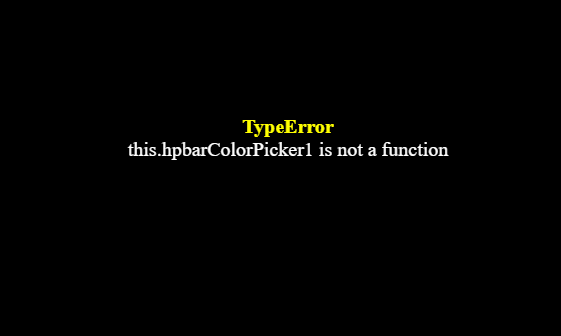
-
Hi, sorry for the late replies! I wasn't receiving emails for this post for awhile, not sure why.
Where about do you place this in the plugin list for it to work?
Also is there a configuration I'm missing? I wish to edit the text size and positioning on the enemy/actor sprites as they are currently covering most of the sprites.
You can place it anywhere but it should work better closer to the top.
What other plugins do you have, and did you make sure that the parameters show up on the plugin list + you didn't rename the plugin file?I keep getting this error whenever i start any fight. Any ideas of how ti fix it?
-
Hi! Great job here!
I was wondering if there's any possibility to hide the enemy hp bars?
Because whenever I use yanfly's action sequence and give it the command "hide battle hud" ( which hides the whole hud for quick scene ), the enemies hpgauge stills up...
Cheers!
@mjshi -
So I'm having an issue where the enemy HP bars move depending on how many enemies are in battle as seen in images(?)
HP Bars moving
But then I also noticed that if you use Yanfly's action sequence plugins, when the screen zooms, the HP Bars move because they're a static image and not 'part' of the battler (sorry if that doesn't make sense, I can elaborate if need be?)
Action Sequence Zoom
Here is a list of plugins I'm using, as well as how I currently have the Plugin set up!
Plugin Database
Plugin Setup
Thanks for any support you might be able to provide! lol -
-
@Pozinhofan Try this notetag inside enemy Notebox in the database
Code:<HideEnemyHPBar>
You can also use-
Code:<HideEnemyMPBar> <HideEnemyTPBar> -
@Pozinhofan Try this notetag inside enemy Notebox in the database
Code:<HideEnemyHPBar>
You can also use-
Code:<HideEnemyMPBar> <HideEnemyTPBar>
Hi! Thanks for replying!
My problem is actually whenever I use a skill that hides all the hud, or makes the enemy jump, the hud doesn't follow the enemy sprite. And when I hide it with "hide battle hud", it remains there.
If I use the command u gave me, I'd be hiding its hud every time, which is not the point. -
So I recently got back to my project, and decided to see if I could get a patch working.
I somehow managed to do just that, and then it stopped working again. I have no idea what I changed, and starting over from square 1 has not yielded much success.
However, I did discover that my current patch text kind of works. The gauge animates just like it should, but it only updates the color when I go in and out of combat, or between menu scenes.
This is my current patch code:
Any help with this would be appreciated.CodeWindow_Base.prototype.drawActorHp = function(actor, x, y, width) {
width = width || 186;
var color1 = this.hpbarColorPicker1(actor);
var color2 = this.hpbarColorPicker2(actor);
this.drawAnimatedGauge(x, y, width, actor.hpRate(), color1, color2);
this._gauges[this.makeGaugeKey(x, y)].setExtra(TextManager.hpA, actor.hp, actor.mhp);
this.changeTextColor(this.hpTextColorPicker(actor));
this.drawText(TextManager.hpA, x, y, 44);
this.changeTextColor(this.textColor(24));
this.drawText(actor.hp + '/' + actor.mhp, x, y, width, 'right');
}
The last four lines are there to replace the default hp numbers since I haven't found a good way to edit the font used by other means (I'm using the Sfont plugin). I should note that they keep switching from being in front of and behind the gauges between turns, which is somewhat perplexing.