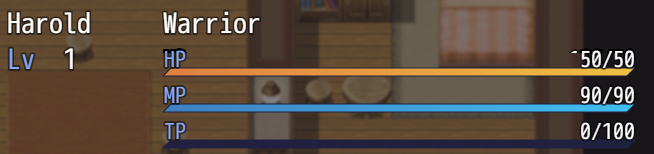
update 1.03b
- added font size option
- added animate when in formation menu option
All plugins will be moving to GitHub. New link:
https://github.com/mjshi/RPGMakerRepo/blob/master/PrettySleekGauges.js
Pretty Sleek Gauges
● ARCHIVED · READ-ONLY
-
-
Lots of minor fixes/compatibility stuff this time!
update 1.03c
- Compatibility with Yanfly Party System
- Fixed issue with fleeing not erasing the gauge
- Fixed issue with "appear halfway" not hiding the gauge
- Compatibility with Tsukihime's Enemy Reinforcements
- Fixed issue with font sizes, added a font size parameter option. Cedes to Yanfly's Battle Status Window when both plugins & the patch are used.
- Fixed issue with HP bars not reappearing when enemies heal themselves from death -
Thanks for the plugin - I really like it! I'm just having one problem with it. Sometimes the HP gauge positions are off with no apparent reason for it. From what I have gathered so far, it only happens if there are more than 1 type of enemy in the combat. If you check the picture I attached, you can see what the problem is. The middle enemy is as it should be, but the for the other two, the HP gauge is at a wrong height. I have tried changing plugin order, but no help from there. Any ideas what is wrong?
-
@Vinto9
This is a known issue-- I've been looking into it for awhile and I think the only solution might be to do multiple HP bar windows, but that would require some restructuring of the plugin.
You might want to change the order you're adding the enemies in the troops in. (so if you added in the leftmost one first, try adding it last) Try reversing it and see if it fixes it. -
@mjshi
Thanks for the tip! That fixed some of the problematic troops. For the others I actually found a quick workaround: Arrange the enemies so that they are on a slight slope so that the leftmost enemy has the highest position vertically and the rightmost enemy has the lowest position. At least for me this fixed all the issues. -
@Vinto9 Oh, nice! That's an interesting solution... I actually have a theory as to why that works-- MV draws things from the furthest away enemy, up, so it's possible that internally the highest enemy (which is considered "furthest") gets considered the "first" enemy and this plugin might be hooking onto that first and drawing the thing wrong? I'll have to look into this further, though... and it might be more complicated than I think.
If you're interested, the technical details:
SpoilerThis is how this plugin represents HP and MP: (with each green box being a window)
Because of this, fewer windows are being draw, but there could be some clashes with one guy's animated HP bar erasing another's, and such. It's probably better to switch over to Yanfly's approach:
which results in less overlap but may generate more windows. It's probably not too much of a performance cost, though, and so it's worth switching over. -
Does this work with Yanfly Options Core?
-
@definite_lee Yeah, it should. I haven't specifically tested it but I glanced over Yanfly Options and it doesn't seem to have anything that would cause a conflict with this.
-
Someone please tell how do I make the EXP Bar show in the official Alt Menu Screen?
-
I made a separate thread in the support forum, but I'll try here and delete the other thread.
So I've watched SRD's custom menu vids on YouTube to make one for myself. It's all going pretty rad.
I made a test game just to work on the menu and had only YanFly's Core plugin running along with it and that was working out fine.
Once I added Pretty Sleek Gauges, that's where things went a little weird, which you can see from the pic. It's like a phantom "gauge" that's the height of the text is masking out the actor faces. I then tried using the solo Pretty Gauge and Sleek Gauge plugins individually and came to think that it's an issue with the Sleek Gauge part of the combo plugin since it was when I used the solo Sleek Gauge plugin that the weird masking is happening.
Anyone have any thoughts as to why or what the real issue is? -
@wonderjosh3000 I have a pretty good idea of why that's happening. Because the sleek gauges are animated, it clears and redraws every frame. And so what you're seeing is essentially it clearing and redrawing over the pre-existing image, thus it looks cut off.
If you're willing to sacrifice the animated aspect of it I can do a quick fix for you where the gauges just don't update on the menu scene. PM me a barebones test file with your plugin setup and I'll see what I can do. -
@mjshi Ah that makes sense!
It would be nice to retain the animation in the menu since it looks real nice. Adds a cool flare. But I get what you're saying. So if, having the bars overylay the face graphics, it's not possible to have it animated without it clearing the graphics, we'll go with no animation in the menu.
I'll PM you the test file in a couple hours when I can! Thanks! -
So I was using this. The plugin was called main. I had to load my project into a new one and replace everything, 11/10 great job.
-
@cj0628 Are you sure you downloaded it correctly? The plugin shouldn't be called main, it should be called PrettySleekGauges.js. If you overwrote your main.js with this, rather than putting this in your plugins folder, your game wouldn't be able to run because it's missing the main function needed to run the game. You should never need to replace your main.js.
-
Cool))
-
Think it would be possible to add a "Dont Animate Numbers in Menus" parameter option? Similar to dont animate gauges in menu.
When swapping between classes the numbers get all sorts of dance crazy in the menu! -
@Silenity There should already be a parameter for that, I think. It's called Animated Numbers, just set it to false and you should be good to go.
-
@Silenity There should already be a parameter for that, I think. It's called Animated Numbers, just set it to false and you should be good to go.
Actually. I dont even know what the problem is.
I thought it was the animations.
But the numbers overlap each other and create this effect when like swapping classes.
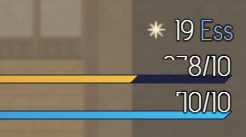
-
@Silenity
I think that might be caused by the gauges not responding super well to your larger sized font. Let me know if changing the font size to be smaller fixes it, if so, that's a bug with the plugin and I'll try to fix it when I can. -
@Silenity
I think that might be caused by the gauges not responding super well to your larger sized font. Let me know if changing the font size to be smaller fixes it, if so, that's a bug with the plugin and I'll try to fix it when I can.
I just tried it in a blank project with just Yanfly's core engine, class change plugin, and the gauges plugin.
When swapping between classes with different HP parameters. It does that effect.