Pretty Sleek Gauges

● ARCHIVED · READ-ONLY
Started by mjshi 140 posts Page 1 of 7 View original ↗
  1. From Vlue's Sleek Gauges and Rocketmancer's Prettier Gauges, comes...

    Pretty Sleek Gauges v1.03e
    by mjshi- OK for use in all projects with credit

    Get it here! (direct link)

    Sleek Gauges! Look at them go, so shiny, so cool. And they're even better
    when you can change what they look like and use them in battles!
    Features
    Vlue's Sleek Gauges;
    - Animated sliding gauges!

    Rocketmancer's Prettier Gauges:
    - Customizable gauge shapes!

    Changes from those two plugins:
    - merged a couple functions
    - added support for \ style gauges
    - fixed issue with overfilling the gauge
    - added support for enemy HP/MP gauges
    - added support for individual enemy HP gauge offsets and show/hiding
    - added actor EXP gauges
    - also implemented individual bar styles

    Here is a diff of all the changes I've made, if anyone is interested.

    Screenshots
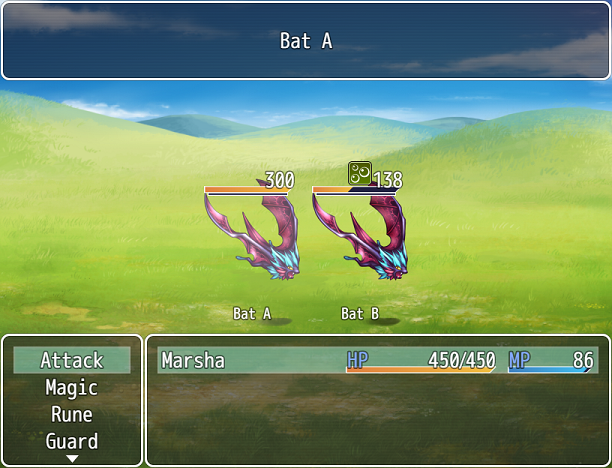
    prettysleekgauges_1_orig.png

    0faExq5.png

    Patches and Addons
    Patch for Yanfly Battle Status, direct link.
    Patch for Yanfly's Absorption Barrier, direct link.

    Version History
    1.0 plugin released
    1.01 implemented individual bar styles
    1.01a compatibility improvements
    1.01b exp gauge at 100% when max level
    1.01c bugfix for status/equip screens (when you changed actors the HP didn't refresh), improvements to update logic & frequency
    1.02 added ability to turn off critical hp/mp/tp colors
    1.02a Patch for Yanfly Battle Status and some miscellaneous customization addons
    1.03a Patch for Yanfly Absorption Barrier, & misc customizations such as enemy TP bar
    1.03b Added font size option, fixed font size issues
    1.03c Multiple minor fixes, compatibility with Tsukihime's Enemy Reinforcements and Yanfly's Party System
    1.03e Adapted Roninator2 's EXP gauge offset feature, suggested by Ultra_K, as a workaround for status icons being overlapped by the EXP bar

    Credit
    Vlue
    Rocketmancer
    mjshi
  2. Awesomme
  3. @chobokid Glad you like it ^^

    edit:
    also, this:
    update 1.01
    - implemented use of individual bar styles, so now your hp/mp/tp can all look different c:
  4. Very cool. Gonna test how it plays with Galv's bust menu. I remember having lots of problems with compatibility between Rocket's plugin and Galv's.
  5. @Silenity Thanks! If you do, try messing around with the plugin order, since the incompatibility likely arose from Galv overwriting something here or something here overwriting something in Galv's.
  6. Silly question, but did you update the Bust Menu plugin? Galv changed it to give full compatibility with Pretty Gauges. And I should know as I suggested it to him :p

    Also, amazing work, cant wait ti try this :)
  7. @Moe_Lester13 I didn't do anything specific to account for Galv's bust menu, so I don't know for sure if they're compatible, but they should be. If you run into issues in terms of compatibility with that please let me know and I'll try to add a fix for it.
  8. Hi! Using this plugin with Yanfly's status menu causes the gauges to remain on the screen when switching between the different pages. Here's a screenshot of the "Parameters" page's gauges lingering on the "Status" screen which isn't supposed to have any gauges.

    aUAuNef
  9. @Naridar Have you tried putting Yanfly's status menu above Pretty Sleek Gauges?
  10. mjshi said:
    @Naridar Have you tried putting Yanfly's status menu above Pretty Sleek Gauges?

    It already was, Pretty Sleek Gauges is at the bottom of the current setup (which only contains Yanfly scripts and PSG). Conversely, when I tried putting it at the top of the plugin list, gauges wouldn't turn into PSG's gauges but rather remain the default Yanfly-modified gauges, which as far as I can tell, can't be completely turned off.
  11. @Naridar I'll see what I can do to fix that, though it likely won't be a fix on Pretty Sleek Gauges but rather an edit of Yanfly's plugin xD

    edit: I ended up changing my plugin after all.

    update 1.01a
    Switched to using a separate function, now the only gauges that are animated should be HP/MP/TP and only those. This should help with compatibility issues.

    For the old version that uses the gauges everywhere, download it from here: http://s000.tinyupload.com/index.php?file_id=13788141153201689032
  12. update 1.01b
    I was told that there were some compatibility issues with Yanfly's Menu Core and Hime's EXP Tables with regards to stuff being cut off. Those are fixed now. Also, when your person is at max level the EXP gauge will stay at 100%.
  13. Is it possible to have the HP/MP gauges shown above or below party members like enemies? Like, is there a note tag or something to display the gauges on party members so I can get rid of the hud that obstructs the bottom 1/3rd of the screen and just have a minimalist approach to battle gauges? Because that would just make my whole year if so :p
  14. @SefirosuKuraodo
    You mean in sideview mode? No, that's not a feature currently supported for this plugin. I'll consider adding it should I have free time, but that's a pretty big feature code-wise. This plugin was created mainly for front-view, and the side-view had the HP/MP status things showing anyway, so it wasn't really a big priority to have actor HP when I was coding this.
  15. mjshi said:
    @SefirosuKuraodo
    You mean in sideview mode? No, that's not a feature currently supported for this plugin. I'll consider adding it should I have free time, but that's a pretty big feature code-wise. This plugin was created mainly for front-view, and the side-view had the HP/MP status things showing anyway, so it wasn't really a big priority to have actor HP when I was coding this.
    Totally understood, and I appreciate you taking the time to reply ^_^
  16. wow, look awesome..
    lemme try.. :3
  17. Is there any way to add an ATB bar? I'm using Yanfly's ATB, which he is no longer supporting. I don't think it would be a difficult fix. Everything else works fine, though I am getting a bit of flashing while the battle status window is updating (not a big deal). This is what my battle screen looks like. The name text is compressed from what I figure is due to the Yanfly ATB bar that's supposed to appear in the window isn't sized right. I've tried to modify the ATB plugin to stretch it and didn't work and I've tried stretching the window and it didn't work. If more info is needed or a demo is needed, please let me know. All plugins are playing nicely.

    upload_2018-3-6_12-16-13.png
  18. @dragonx777 I can take a look, but can't promise a fix (at least, not immediately).
    What does the scene look like with Pretty Sleek Gauges disabled? It'd be better if you could send or PM a demo of your project, since that way I could test things more easily.
  19. @mjshi I think I still have your email from last time. I'll send you my demo. Thanks much.
  20. Howdy!
    I find this plugin is very useful to my project. However, I've encountered this problem within the gauge in skill menu. When I change the skill menu display from the 1st char to another, the current HP value will stay the same as the 1st char's, even if the other char has higher max HP. Just tested, current MP value also have the same problem. Is there anybody who experience problem similar to this?
    These pictures were taken from a fresh project with only PrettySleekGauges is on. I apologize if there is already a solution to this and still posting it. Thanks in advance.
    EDIT: Just tested that the current value will stick to whoever selected first to access the skill menu. So if accessing the skill menu by selecting Therese, then the displayed current value will be hers when scrolling through the party.
    Y877hem.png

    KemmgJa.png