Galv's Message Busts

● ARCHIVED · READ-ONLY
Started by Galv 101 posts Page 3 of 6 View original ↗
  1. Galv said:
    Image size shouldn't affect anything but you could test that out by using a different size image to be sure.


    It might be a plugin conflict depending what's happening. Here's a quick checklist of things to try:


    http://galvs-scripts.com/errors-using-plugins/


    I changed the plugin order, and it worked! I'm so glad! Thank you, Galv <3
  2. I feel bad for posting again but.. . this happened: 

    Spoiler
    bnmbn.png

    Even though I put 1/1 for Bust priority and position, the text looks like it's ignoring the bust (yes, there's more text behind it) :C
  3. If you make the "Text X Offset" setting a higher number, does it push the text to the right more? The text position is controlled with that setting, the bust doesn't push it over.
  4. Galv said:
    If you make the "Text X Offset" setting a higher number, does it push the text to the right more? The text position is controlled with that setting, the bust doesn't push it over.


    Nop. First I put 400, then nothing. Then I put 1000, and still nothing.
  5. It could still be still another plugin conflicting with this one. You will need to do tests to try to find out which one before I can help.


    Point 8 in my error checklist:


    http://galvs-scripts.com/errors-using-plugins/


    Test message-related plugins first.
  6. ladyaliria said:
    Nop. First I put 400, then nothing. Then I put 1000, and still nothing.

    Can you take a screen shot of the plugins you're using and I'll take a look for you to see what might be causing this.
  7. Galv said:
    It could still be still another plugin conflicting with this one. You will need to do tests to try to find out which one before I can help.


    Point 8 in my error checklist:


    http://galvs-scripts.com/errors-using-plugins/


    Test message-related plugins first.


    Ok, I did some testing in another game. Apparently, this plugin conflicts with YEP_MessageCore. So in order to fix it, you need to ignore the "Text X Offset" and go to the MessageCore and switch the number from "Face Indent" with the number you wanted in "Text X Offset"~ Then it'll work perfectly. Hahah I feel a little stupid but thank you for being so kind in trying to help me :))~


    @andai I found the problem already! hehe Thank you for being so kind too!!
  8. Updated for compatibility with my Message Styles plugin - v.2.0
  9. Galv said:
    Updated for compatibility with my Message Styles plugin - v.2.0

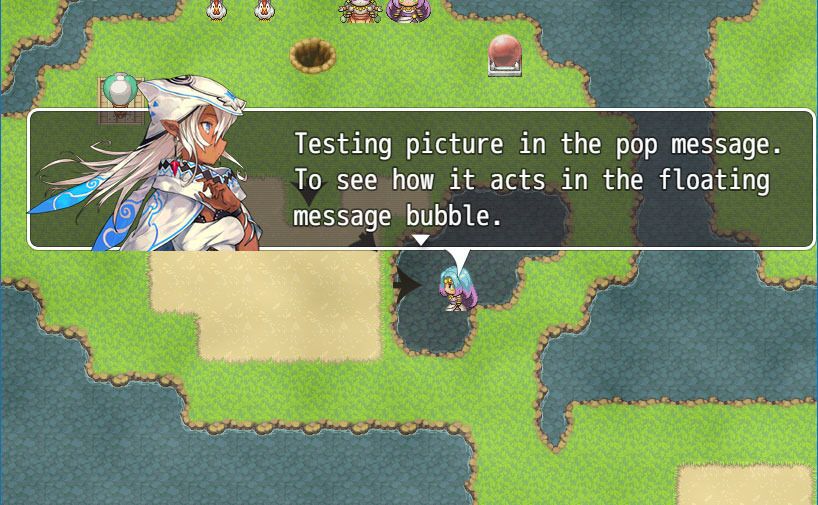
    Hmm. So, busts should work and behave like in the Message Styles plugin now too? Or are they considered two different kinds of messages?
  10. The busts will display in the floating messages now. You'll have to grab latest Message Styles plugin (1.4) for it to work - I made boo-boos by mistake haha.


    bust-test_zps6wcs4r7e.jpg
  11. I thank you very, very much for this!! Exactly what I was looking for :D
  12. Hi Galv i like your message bust Plug-in a lot, it takes me away a lot of work very nice made.


    I have an important question in the vx ace times i had done the messages with an other method(rather annoying with picture display(bigger faces than usual), text, picture delete, picture display...)
    but i could make a smooth transition that the picture with the face appears slow with 25-30 frames and then the text, with your plug-in i unfortunately can't do that effekt for me the faces come to quickly^^


    Is it possible that you could add this function to your message bust plug-in as well would be very grateful if you could do that.


    as an another example i can say that you could use this function also when a ghost appears an he beginns to speak bevor his text appears his face fades 60 frames very slow in.


    http://www.directupload.net/file/d/4329/jbd42lpc_png.htm


    http://www.directupload.net/file/d/4329/pjmgc4k4_jpg.htm


    http://www.directupload.net/file/d/4329/h55mpssg_jpg.htm


    Sry für my bad englisch.
  13. The speed the busts fade in/out with this plugin is based on how open the message window is and I don't have any plans to change this at the moment, sorry
  14. beenbaba said:
    Hi Galv,


    Great plugin thanks, although something a little off is happening.


    I run an auto event, I do a show text box and the bust appears. Then the next person that speaks doesn't have a bust so I use the plugin command BUST FALSE before their show text and it turns the bust off. Then I turn it back on using BUST TRUE for the next message, works fine. Then I turn it off again before the next message, but the previous bust still stays on screen and doesn't disappear. It does change when a new bust should appear so that works but it seems like the BUST FALSE plugin command doesn't register after the first time for some reason.


    Any ideas?


    This is happening to me as well for any events with bust shots I've tried, and the suggested fix of wait times did not solve it at all. I can add that if I finish playing through the event and it ends, the last used bust stays on the screen. I haven't yet tried leaving the area, but having to change maps just to get rid of a picture would be downright ridiculous.


    I really hope the solution isn't to just not use face files for non heroes. I would prefer to be able to do both.
  15. I have updated to 2.1 that should fix this issue for you. If it still doesn't and you said the suggested fix of wait times doesn't work then you might have to check for plugin conflict
  16. Galv said:
    I have updated to 2.1 that should fix this issue for you. If it still doesn't and you said the suggested fix of wait times doesn't work then you might have to check for plugin conflict

    The new released made the "BUST FALSE" command completely ineffectual, causing every normal face graphic to get the standard error for not having a picture to redirect to.
  17. Galv said:
    If it still doesn't and you said the suggested fix of wait times doesn't work then you might have to check for plugin conflict

    1. Did you check for plugin conflict?


    2. Does this happen for you in the plugin demo?
  18. Galv said:
    1. Did you check for plugin conflict?


    2. Does this happen for you in the plugin demo?

    I think you misunderstood my most recent post. Only the new release does this. The old one didn't. Which means that something you did in the new release caused this bug, though whether plugin conflicts have anything to do with it is unclear as of yet.


    To clarify, this is a different bug from the first one altogether.
  19. XVoid said:
    I think you misunderstood my most recent post. Only the new release does this. The old one didn't. Which means that something you did in the new release caused this bug, though whether plugin conflicts have anything to do with it is unclear as of yet.


    I'm trying to help you here, please let me know if you checked for plugin conflict and if it happens for you in the demo of the new release.


    Ahh, I managed to replicate it now - thanks, will work on a fix.


    EDIT: Fixed with update 2.2
  20. Galv said:
    I'm trying to help you here, please let me know if you checked for plugin conflict and if it happens for you in the demo of the new release.


    Ahh, I managed to replicate it now - thanks, will work on a fix.


    EDIT: Fixed with update 2.2


    I got the same bug through a different route after several days of the plugin working normally. It appears the "BUST FALSE" command doesn't work and thus the "pictures/blabla.png not found" error triggers if you've already used a bust shot once in autorun events. I'm still testing myself so I'm not positive this is the exact cause, but it's a place to start looking until I have more concrete findings.


    EDIT: after a bit of rooting around, it seems like it was a problem with the event before it, not with the plugin. Sorry.