I have a lot of Chrono Engine scripts I've written over the past year so I will be organizing them here, and regularly adding new ones. Feel free to share your own!
How to add controller support to Chrono Engine:
By default the following gamepad buttons are mapped in the engine:
Code:
Input.gamepadMapper = {
    0: 'ok',        // A
    1: 'cancel',    // B
    2: 'shift',     // X
    3: 'menu',      // Y
    4: 'pageup',    // LB
    5: 'pagedown',  // RB
    12: 'up',       // D-pad up
    13: 'down',     // D-pad down
    14: 'left',     // D-pad left
    15: 'right',    // D-pad right
};
In the Chrono Engine plugin settings it's simple enough to assign or change buttons among the default keys
METHOD 1
To add the missing controller buttons (Start/Select, LT/RT), or overwrite those buttons, or if you want to add new keyboard keys, create a new plugin file (create a new file in a text editor like Notepad and save it as a .js file. You can name this file whatever you want because it has no parameters. Paste the following code in it and add the plugin to your project after Chrono Engine.
Code:
You will need to edit what's in the ' ' quotation marks of each key to what you want it to do, and update the plugin parameters in Chrono Engine to refer to that command instead of the button/key name. This is because Chrono Engine can only take one reference at a time in those plugin parameters, and 'a', 'b' , 'x' and 'y' mean different things for the keyboard and gamepad.Game_Temp.prototype.loadInput = function() {
//keyboard
Input.keyMapper[65] = 'item';//A key
Input.keyMapper[67] = 'c';//C key
Input.keyMapper[68] = 'shield';//D key
Input.keyMapper[83] = 'skill';//S key
//gamepad
Input.gamepadMapper[0] = 'ok'; //A
Input.gamepadMapper[1] = 'cancel'; //B
Input.gamepadMapper[2] = 'skill'; // X
Input.gamepadMapper[3] = 'item'; // Y
Input.gamepadMapper[4] = 'pageup'; //LB
Input.gamepadMapper[5] = 'pagedown'; //RB
Input.gamepadMapper[6] = 'lt';//LT
Input.gamepadMapper[7] = 'shield';//RT
Input.gamepadMapper[8] = 'start';//start
Input.gamepadMapper[9] = 'select';//select
};If you want to add keyboard keys, you need the key's keycode number. To get the keycode use this link
Then add it in the Input.keyMapper[x] section above
As you can see in the Chrono Engine plugin settings below I have the Shield button set to 'shield'. In the plugin we just made we have the D keyboard key and RT gamepad key set to 'shield' so pressing either of those will use the shield in game.
Rebinding keys during the game:
You can remap keys or buttons during the game using the script calls for a key or gamepad button. For example, if I want to remap the S key to the use an item I just redeclare it in a script call. Running these scripts during gameplay will only apply the rebind for the current gameplay session, you will have to reapply it every time the game is loaded.
Input.keyMapper[83] = 'item';//S key
If I want to set the X gamepad button to item
Input.gamepadMapper[2] = 'item'; // X gamepad button
Method 2 (Old)
Note: This is an old method that had issues with registering a button being held down (e.g. the shield)
I use, Hakuen Studio Button Common Events because it offers support for all the buttons on common controllers.
The list of scripts you'll need is:
Use item: $gamePlayer.commandRasItem()
Use weapon: $gamePlayer.commandRasWeapon()
Use skill: $gamePlayer.commandRasSkill()
Use shield (note: doesn't work in a common event, you need to redirect the button if it's RT/LT/Start/Select): $gamePlayer.battler()._ras.guard.active = true; $gamePlayer.updateGuardDirection();
Skill menu: $gamePlayer.commandToolMenuSkill()
Item menu: $gamePlayer.commandToolMenuItem()
Main menu: SceneManager.push(Scene_Menu)
Create a common event for each button. Name it after the button, then put in the script for what you want the button to do.
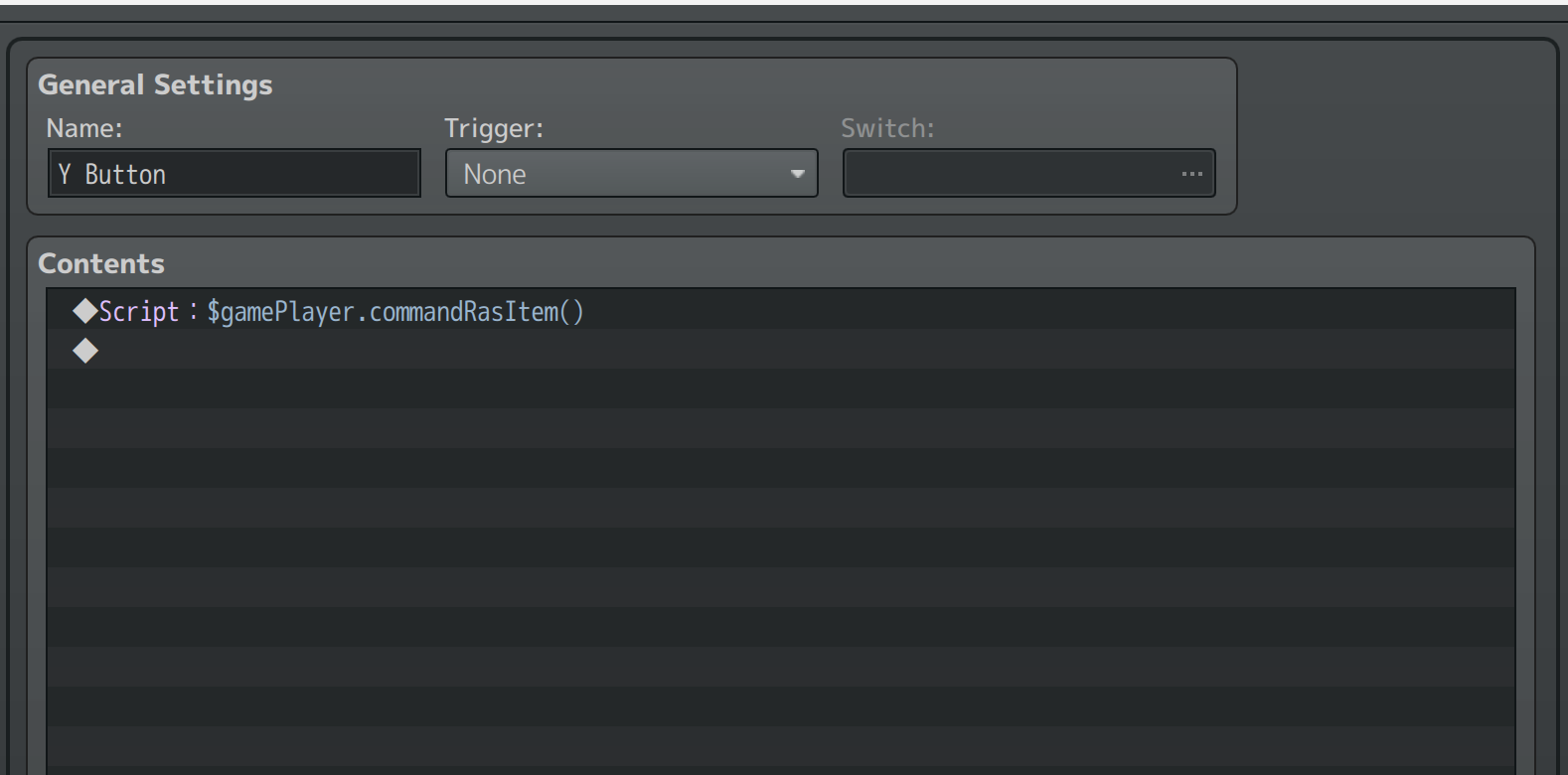
Go to the plugin settings for Eli Button Common Events and add your buttons
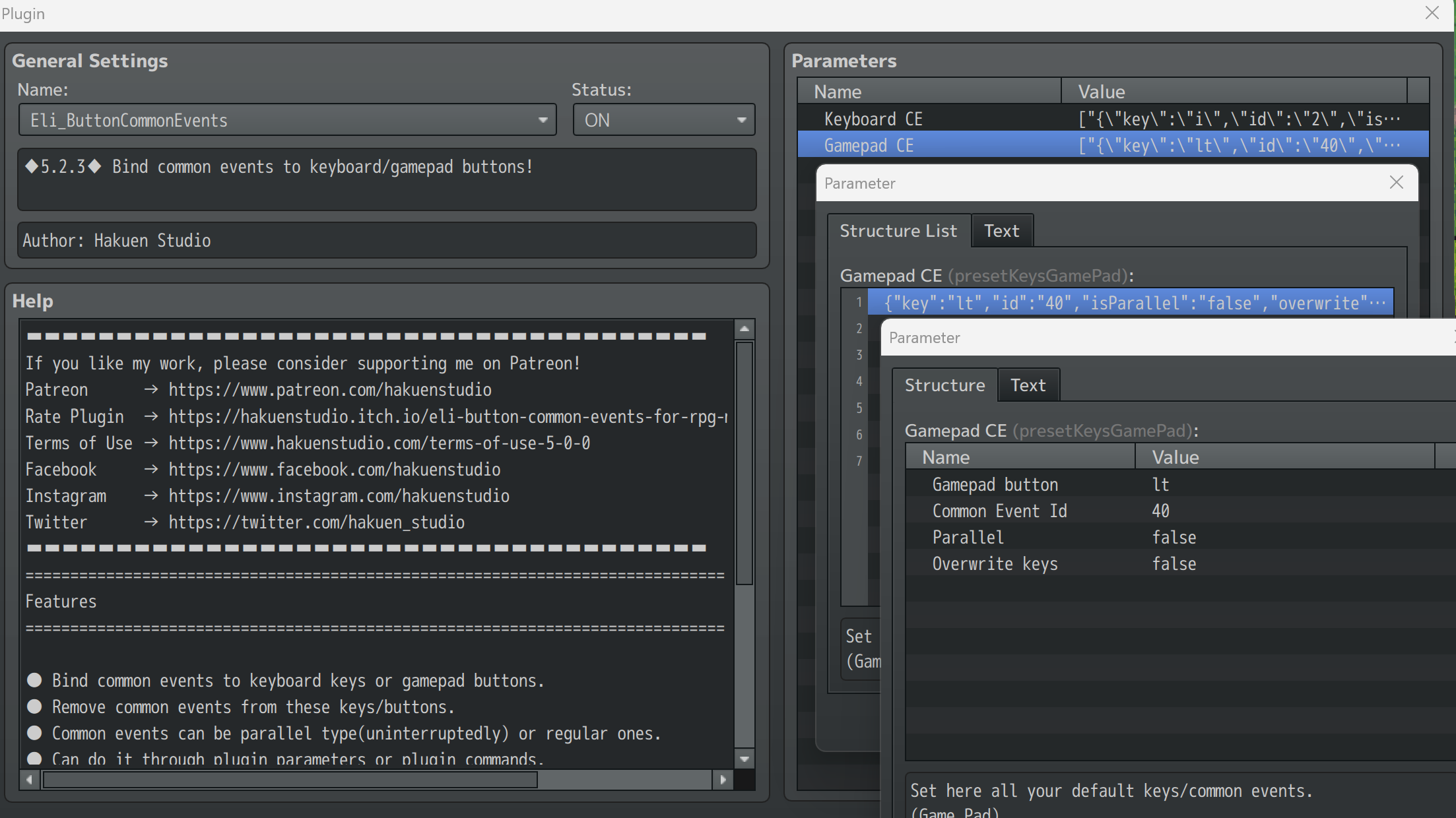
That's it! Plug in your controller, then start a new playtest. It may not work if you plug it in after you start the game. Also, make sure you are testing from a new game and not a save file as plugin settings may not take effect on a save file.
An additional script that someone requested to make dashing share the 'Ok' button. This overwrites an engine method so you need to copy and paste it in .js file and add it as a plugin to your project.
I use, Hakuen Studio Button Common Events because it offers support for all the buttons on common controllers.
The list of scripts you'll need is:
Use item: $gamePlayer.commandRasItem()
Use weapon: $gamePlayer.commandRasWeapon()
Use skill: $gamePlayer.commandRasSkill()
Use shield (note: doesn't work in a common event, you need to redirect the button if it's RT/LT/Start/Select): $gamePlayer.battler()._ras.guard.active = true; $gamePlayer.updateGuardDirection();
Skill menu: $gamePlayer.commandToolMenuSkill()
Item menu: $gamePlayer.commandToolMenuItem()
Main menu: SceneManager.push(Scene_Menu)
Create a common event for each button. Name it after the button, then put in the script for what you want the button to do.
Go to the plugin settings for Eli Button Common Events and add your buttons
That's it! Plug in your controller, then start a new playtest. It may not work if you plug it in after you start the game. Also, make sure you are testing from a new game and not a save file as plugin settings may not take effect on a save file.
An additional script that someone requested to make dashing share the 'Ok' button. This overwrites an engine method so you need to copy and paste it in .js file and add it as a plugin to your project.
Code:
//Make Dashing share the ok button
Game_Player.prototype.isDashButtonPressed = function() {
    var shift = Input.isPressed('ok');
    if (ConfigManager.alwaysDash) {
        return !shift;
    } else {
        return shift;
    }
};
HP Bars over the Enemies!
RPG Maker MV + MZ Chrono Engine HP Bars over Map Enemies by AquaEcho
Make status effects work in ABS mode (also see Yanfly Buffs and States Core patch below):
By default status effects don't work in ABS mode because they use turns and turns don't happen in ABS mode. This will force a "turn" to happen every 60 frames (1 second). Create a parallel common event and give it a switch that would be on whenever there are enemies on the map, or any time your party can have a status effect. If there are no enemies or anything that can inflict status on your party you don't need this script to be running so you can switch it off.
Copy/Paste version
JavaScript:
for (var i = 0; i < $gameMap.allEnemiesOnMap().length; i++) {
char = $gameMap.allEnemiesOnMap()[i];
battler = $gameMap.allEnemiesOnMap()[i].battler();
 if(battler.isStateAffected(4)){battler.gainHp(-Math.floor(battler.mhp*.10));}
if(battler.isDead() && battler.isEnemy()){char.setDeadEnemy(char, battler); $gameParty.gainGold(battler.gold());
var oldLevel = $gameParty.leader()._level; $gameParty.leader().gainExpCN(battler.exp());
if ($gameParty.leader()._level > oldLevel) {$gamePlayer.requestAnimation(Number(Moghunter.ras_levelAnimationID));}}
battler.startDamagePopup(); battler.updateStateTurns(); battler.updateBuffTurns();
battler.removeStatesAuto(1); battler.removeStatesAuto(2);}
JavaScript:
for (var i = 0; i<$gameMap.players().length; i++){
player = $gameMap.players()[i].battler();
if(player.isStateAffected(4)){player.gainHp(-Math.floor(player.mhp*.10));}
player.startDamagePopup(); player.updateStateTurns(); player.updateBuffTurns();
player.removeStatesAuto(1); player.removeStatesAuto(2);
}If an enemy dies from poison, the leader will get XP for it (tracking who inflicted the poison would be a lot more complicated so I just defaulted to the leader).
CROSS ENGINE
Cross Engine is basically Chrono Engine on steroids. It adds a lot of new features like pixel movement through Altimit, character animations with any # of frames, diagonal movement frames, aimed attack targeting, Zelda enemy scripts, compatibility patches with other plugins and more. It's what I use and I highly recommend it.
If you are using Cross Engine with MZ you may need to use one of the MZ ports of Altimit like TyrusWoo's.
Fighting Followers / CPU Party Members
You can have CPU party members that attack alongside you! Full guide on page 2 of this thread! The guide uses Cross Engine.
Offset a tool upward for Tall Characters
See post on page 2
Line of Sight / Vision Cones for Enemies (Cross Engine method)
See post on page 3
Make a tool have no knockback (original thread):
Copy and paste this in a new plugin file or one you've added the other fixes/scripts in this thread to.
In the tool event page put comment: tool_knockback_power : 0
Code:
//If tool_knockback_power is set to 0 don't make the target jump
ToolEvent.prototype.executeKnockback = function(target,battler) {
    if (this._tool.knockbackPower!=0){
        this.setKnockbackDuration(target,battler);
        this.setKnockbackDirection(target,battler);
       target.battler().clearRasCombo();
    }
};
Make your own HUDs (Scripts for SRD HUD Maker)!
See post in the Beginner Guide
Patches for Yanfly Plugins
Yanfly Buffs and States Core:
Yanfly Item Core:
This script comes courtesy of Restart and is taken from his Cross Engine. Please follow his terms of use for Cross Engine if you use it. If you are already using Cross Engine it's included in its file. Note: this script may conflict with Yanfly Party Manager (?)
Make sure to turn on Midgame Note Parsing in Yanfly Item Core or it won't work.
Code:
//Yanfly Buffs States Core ChronoEngine Fix
Yanfly.BSC.Game_Action_executeDamage = Game_Action.prototype.executeDamageCN;
Game_Action.prototype.executeDamageCN = function(target, value) {
    value = this.onPreDamageStateEffects(target, value);
    value = this.onReactStateEffects(target, value);
    Yanfly.BSC.Game_Action_executeDamage.call(this, target, value);
    value = this.onRespondStateEffects(target, value);
    value = this.onPostDamageStateEffects(target, value);
};
Yanfly Item Core:
This script comes courtesy of Restart and is taken from his Cross Engine. Please follow his terms of use for Cross Engine if you use it. If you are already using Cross Engine it's included in its file. Note: this script may conflict with Yanfly Party Manager (?)
Make sure to turn on Midgame Note Parsing in Yanfly Item Core or it won't work.
JavaScript:
//compatibilty patch for yanfly itemcore
Game_Map.prototype.setup = function(mapId) {
    _mog_toolSys_gmap_setup.call(this,mapId);  // not defining this because I am leaping over mog's edit of this funciton
    //if we have the event spawner in play, make sure that we bracket both
    //ends of it, so we don't overwrite yan events with mog events
    if (Imported.YEP_EventSpawner)
    {
        this._events[CrossEngine.MaxEventSpawn+Yanfly.Param.EventSpawnerID]=undefined;
    }

    this._treasureEvents = [];
    this._battlersOnScreen = [];
    this._enemiesOnScreen = [];
    this._actorsOnScreen = [];
    $gameSystem._toolsOnMap = [];
    $gameTemp.clearToolCursor();
    //console.log($gameSystem._toolsData);// with itemcore, this always returns an empty array []
    //without itemcore, it returns 'null', then an the proper item  list, so clearly _toolsdata isn't getting set right
    //I assume the 'null' gets overridden by one of yanfly's blanket definitions, and since I can't find that
    // I'm just testing to see if the list is empty.  If it is, grab the tools again
    // it seems to work!
    //if (!$gameSystem._toolsData) {this.dataMapToolClear()};
    if (!$gameSystem._toolsData) {this.dataMapToolClear()
        }else{ if ($gameSystem._toolsData.length == 0) {this.dataMapToolClear()};
        }
    for (var i = 0; i < $gameParty.members().length; i++) {
        var actor = $gameParty.members()[i];
        actor.clearActing();
        $gameSystem._toolHookshotSprite = [null,null,0];
    };
};
Bugfixes
Copy and paste these scripts in a .js file in your plugins folder and add it to your game in the plugin manager at the bottom of the list.
General bugfixes
Softlock on Victory in Chrono Mode
Courtesy of bass2yang. Original thread:
The game doesn't switch to the next party member if the player dies from touch damage
MV - TouchDamage(true) Chrono engine problem
Courtesy of bass2yang. Original thread:
Code:
Game_Chrono.prototype.checkBattleResult = function() {
    var clearParameters = false
    if (this.isAllPartyDead()) {
        // Clear out all skills that are hanging over
        $gameMap.enemiesF().forEach(x=>{
            x.battler()._chrono.action = null;
            x.battler().clearRasCast();
        });
        this.clearCommandPhase();
        $gameSystem.clearChronoEscape();
        AudioManager.fadeOutBgm(3);
        $gameSystem._chronoMode.phaseDuration = 120;
        $gameSystem._chronoMode.phaseEndPhaseDuration = 120;
        clearParameters = true;
        // Move the phase change to the bottom so that all things can clear out
        $gameSystem._chronoMode.phase = 6;
    } else if (this.isAllEnemiesDead()) {
        // Clear out all skills that are hanging over
        $gameMap.players().forEach(x=>{
            x.battler()._chrono.action = null;
            x.battler().clearRasCast();
        });
        this.clearCommandPhase();
        $gameSystem.clearChronoEscape();
        AudioManager.fadeOutBgm(3);
        $gameSystem._chronoMode.phaseDuration = 120;
        $gameSystem._chronoMode.phaseEndPhaseDuration = 120;
        clearParameters = true;
        // Move the phase change to the bottom so that all things can clear out
        $gameSystem._chronoMode.phase = 4;
    };
    if (clearParameters) {this.forceClearBaseParameters()}
The game doesn't switch to the next party member if the player dies from touch damage
MV - TouchDamage(true) Chrono engine problem
Chrono Engine in MZ bugfixes:
If using Chrono Engine with FOSSIL you may get the errors this.digitWidth is not a function and cannot read property length of undefined
See the MZ section in the beginner guide for fixes
Chrono Mode in MZ
See Schala Z System
Notes on Chrono Engine and Event Spawners
Chrono Engine does not always work with other event spawners because Chrono Engine itself is an event spawner (the tools and skills are spawned to the map when you use them). What can happen for example is if you spawn an enemy with Galv spawner then use your tool right after, or the tool/skill is being erased off the map at the same time, the wires get crossed as to what the last spawned event is and you'll have reference "cannot be found" errors. Restart has a fix for Yanfly's spawner in Cross Engine that makes it so all Chrono Engine tool events take IDs of 1000+, so does Ritter's spawner (what I use), so they're not fighting for the same event IDs as their own spawner. However, Yanfly's spawner (and morpher) reportedly doesn't carry over notetags of spawned events, so if you need notetags you may need to purchase Ritter's spawner (which can also replace Yanfly Event Morph).
Misc features from other threads
Add random percent chance blocks and counters when receiving damage (original thread)
Spawn multiple events (items, hearts, money) on enemy death (original thread)
Hookshot/Boomerang additions (original thread)
Boss phases/HP triggers (original thread)
Adding more attack, skill and item hotkeys (original thread)
Editing sound effects (original thread)