MV - How to add more commands in Chrono engine ABS?

● ARCHIVED · READ-ONLY
Started by Vladar458 35 posts Page 1 of 2 View original ↗
  1. Normally, in Chrono engine, you can only have 4 commands at the same time: Weapon, Shield, Skill and Item.
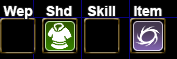
    The commands
    imagen_2025-07-13_140008849.png
    I would like it to have it like in Falcao Pearl ABS in RPG Maker VX Ace, where there are 2 skill commands, and 4 item commands. How I could edit the plugin to have it like that?
  2. You use a button common events plugin like Hakuen Studio's one then in the common event page put $gamePlayer.act(x)
    Where x is the tool event number

    If you want to display an icon on the screen for the new button you'd have to use SRD HUDMaker or Aerosys Gab Windows or another HUD plugin.
  3. AquaEcho said:
    You use a button common events plugin like Hakuen Studio's one then in the common event page put $gamePlayer.act(x)
    Where x is the tool event number

    If you want to display an icon on the screen for the new button you'd have to use SRD HUDMaker or Aerosys Gab Windows or another HUD plugin.
    Hakuen Studio's one seems to be for MZ. I think it doesn't work for MV.
  4. The plugin need a base one to work like with Yanfly's? Because I'm trying to test it and is not working.
  5. Yes, you need to have Eli Book installed
  6. AquaEcho said:
    Yes, you need to have Eli Book installed
    Thank you, now it's working perfectly. And I think I understand that plugin perfectly, but how I would make the HUD Maker work like they are the actual commands for the Chrono engine plugin?
  7. Do you have the plugins in the same order as in the guide? Could you press F8 or F12 and see if there is any error in the console?
  8. AquaEcho said:
    Do you have the plugins in the same order as in the guide? Could you press F8 or F12 and see if there is any error in the console?
    Yes, they are in the same order, and very high in the list. And I fixed the black screen, I just had to put in false the Game Reconstruction option, but the other issue is still there.
  9. Vladar458 said:
    Also, the game give me an error when I try to recreat the ToolHud Icons
    What error and what does the console show (press F8 or F12)?
  10. AquaEcho said:
    What error and what does the console show (press F8 or F12)?
    Sorry for taking this long to answer, I have been busy. This is the error.
  11. That's not the console and it's also cropped. Press F8 or F12. The console gives a lot more information on where the error is coming from
  12. AquaEcho said:
    That's not the console and it's also cropped. Press F8 or F12. The console gives a lot more information on where the error is coming from
  13. I need the console log when the error is on the screen. That log is from when there is no error on the screen.

    Do you have WAY Core and WAY EvalText installed above the SRD plugins?
  14. AquaEcho said:
    I need the console log when the error is on the screen. That log is from when there is no error on the screen.
    The error is on screen. What happen is it seems Super Tools Engine can't read this code: \\I[${$dataWeapons[$gameParty.leader()._equips[0]._itemId].iconIndex}]
  15. I edited my above post but do you have WAY Core and WAY EvalText installed above the SRD plugins?
  16. AquaEcho said:
    I edited my above post but do you have WAY Core and WAY EvalText installed above the SRD plugins?
  17. Well, I can't reproduce your error. This code is the exact script copy pasted straight out of my project just now:
    \\I[${$dataWeapons[$gameParty.leader()._equips[0]._itemId].iconIndex}]

    1752682012464.png

    The issue might be related to that Pixi deprecation error you get because I don't have that error.