YEP Battle Status Window Extension

● ARCHIVED · READ-ONLY
Started by DreamX 218 posts Page 5 of 11 View original ↗
  1. Hi, DreamX! I was wondering if there was any way to remove the Window from  your plugin? I have another plugin that @Lantiz made me that sets all my windows to the Dim view (like you can set up in the conversation window editor). However, your extension forces the Window view to appear (turning yours off and leaving Yanfly's base makes it Dim rather than Window).


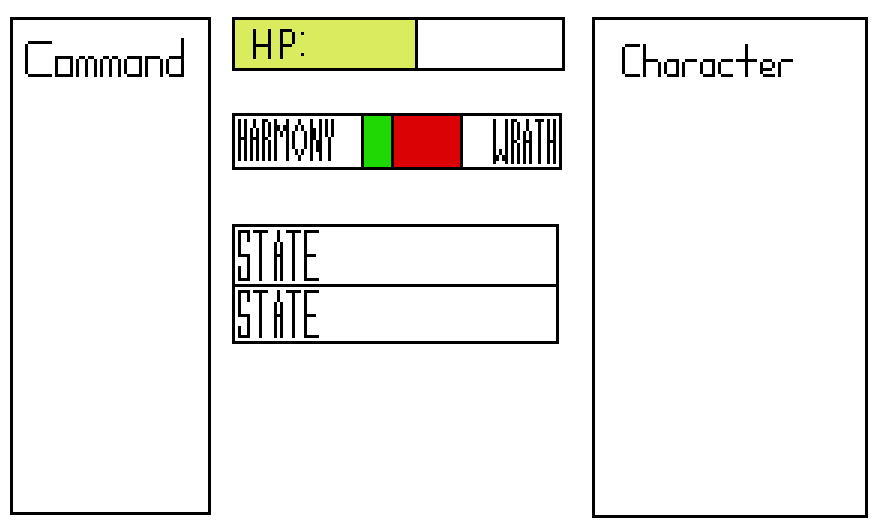
    Also, if I could get it set up similar to this, that would be awesome (The character will never have Wrath and Harmony at the same time, this is just to show that one fills in left-to-right while the other fills in right-to-left and that they're supposed to meet at the center. I'm afraid I really am lost in the parameters for this plug-in, I'm afraid... :/

    Ideal.PNG
  2. Feliaria said:
    However, your extension forces the Window view to appear (turning yours off and leaving Yanfly's base makes it Dim rather than Window).


    Have you tried to import my plugin afer DreamX's one?
  3. Lantiz said:
    Have you tried to import my plugin afer DreamX's one?


    Either placement causes the same thing.
  4. v1.5:


    Fixed Frontview Animation On Center
    Added Frontview Animation On Battler Pic parameter @LeoHeart
    Added opacity parameters to party command, actor command, battle skill, battle item, help, and battle log windows @mrdankles

    Feliaria said:
    Hi, DreamX! I was wondering if there was any way to remove the Window from  your plugin? I have another plugin that @Lantiz made me that sets all my windows to the Dim view (like you can set up in the conversation window editor). However, your extension forces the Window view to appear (turning yours off and leaving Yanfly's base makes it Dim rather than Window).


    Also, if I could get it set up similar to this, that would be awesome (The character will never have Wrath and Harmony at the same time, this is just to show that one fills in left-to-right while the other fills in right-to-left and that they're supposed to meet at the center. I'm afraid I really am lost in the parameters for this plug-in, I'm afraid... :/

    Please give me a link to that plugin.

    masterlobo said:
    DreamX, thanks a lot!


    I managed to make the screen look mostly like I wanted it to :)


    A few questions tho:


    1. Is it possible to disable or change the behavior of the left & right keys? I don't need party commands (so I don't want to move Left) and Right key skips the actor, which is pretty non intuitive when you only have two actors, and your second one is Auto-Battle. I guess this is more on Yanfly's script than yours, but I was wondering if yours has a param for those things.


    2. The spacing param and the dummy windows visually work great, but when enemies attack, the animations are locked to the 'original' positions of the actors. Since I have a ton of space between my actors, it always looks as if they are hitting the left side actor. Is there any workaround for this?

    1. Sure, I'll look into that.


    2. Fixed in latest update

    Lnik3500 said:
    Ok thank you :D  


    New quick question again sorry :p  


    What is Battle Status Spacing? I tried changing the value and it didn't change anything, maybe a problem on my part?


    Also, what is the default height of 1 actor? Is it the same as the Default Battle Status Item?


    And Lastly, Would you consider making a documentation so I don't ask those quick questions? :p


    Thank you and srry fro imposing on you :)  

    Most of the parameters should be sufficiently documented already. I did forget to make a description for battle status spacing. It is the horizontal spacing between the actor's rectangles in the window. The default height of an actor is the same as the default battle status item height.
  5. @DreamX any idea about how to make the party command window be the height of the number of rows? Unfortunately I couldn't find a command to put there that works...
  6. Waterguy said:
    @DreamX any idea about how to make the party command window be the height of the number of rows? Unfortunately I couldn't find a command to put there that works...

    If you know the amount of commands ahead of time, you can use use


    this.fittingHeight(x)


    with x as the number of rows


    If you dont know the amount of commands ahead of time, you can put this into a plugin:

    Code:
        a_Window_PartyCommand_setup = Window_PartyCommand.prototype.setup;
        Window_PartyCommand.prototype.setup = function () {
            a_Window_PartyCommand_setup.call(this);
            this.height = this.fittingHeight(this._list.length);
        };
  7. You sir, are awesome. 
  8. @DreamX oops, I meant the Actor Command Window... Does that make a difference? Besides where to put it and changing the function name in the plugin, I mean?


    Well, first option was kind of a failure... I thought it was funny, but the window got so tall it wasn't even possible to see the top commands.


    Second option was the opposite, it was so short there wasn't any way to see the options.
  9. Waterguy said:
    @DreamX oops, I meant the Actor Command Window... Does that make a difference? Besides where to put it and changing the function name in the plugin, I mean?


    Well, first option was kind of a failure... I thought it was funny, but the window got so tall it wasn't even possible to see the top commands.


    Second option was the opposite, it was so short there wasn't any way to see the options.

    What do you mean by "first option" and "second option"?
  10. First option was your suggestion of putting this.fittingHeight(x) in the plugin parameter. Putting 5 or 1, both got that tall.


    Second option was the external plugin you suggested - changing Party to Actor every time since I had told you Party instead of Actor by accident.


    It is not that important, I just wanted the characters that got 4 command choices to have the box 4 commands tall and the ones with 5 choices to have it 5 commands tall. So I can make them all 5 anyway, if I can't make it change.
  11. Waterguy said:
    First option was your suggestion of putting this.fittingHeight(x) in the plugin parameter. Putting 5 or 1, both got that tall.


    Second option was the external plugin you suggested - changing Party to Actor every time since I had told you Party instead of Actor by accident.


    It is not that important, I just wanted the characters that got 4 command choices to have the box 4 commands tall and the ones with 5 choices to have it 5 commands tall. So I can make them all 5 anyway, if I can't make it change.

    Okay, for actor command, try this:


    a_Window_ActorCommand_setup = Window_ActorCommand.prototype.setup;
    Window_ActorCommand.prototype.setup = function (actor) {
    a_Window_ActorCommand_setup.call(this, actor);
    this.height = this.fittingHeight(this._list.length);
    this.refresh();
    };


    Keep in mind this won't change the y value of the window.
  12. It worked. Thank you.
  13. @DreamX I was making the actor's sideview battlers appear in frontview... now with the new update they aren't appearing anymore.


    How do I put them back? Or where can I find the previous version of the plugin if I can't?
  14. Waterguy said:
    @DreamX I was making the actor's sideview battlers appear in frontview... now with the new update they aren't appearing anymore.


    How do I put them back? Or where can I find the previous version of the plugin if I can't?

    I tested the Front Actor Sprite parameter in YEP Battle Engine Core and I do see them. What your problem might be is that actors are under the window and under something covering them, like their face image. Trying hiding the faces temporarily and tell me if you still cant see them.
  15. @DreamX yeah, they were under the window instead of right above it.


    I'm adjusting the Y so they show up properly now.
  16. Waterguy said:
    @DreamX yeah, they were under the window instead of right above it.


    I'm adjusting the Y so they show up properly now.

    Okay, cool.
  17. @DreamX, you must be getting pretty annoyed at me at this point...


    Is there somewhere in the plugin that if we change performance takes a beating?


    Because, I just noticed it was this plugin now, but when I turn it on the game goes to 1-2 fps constantly. With it off it got lows of 10 fps sometimes when showing animations, but that's it.
  18. Waterguy said:
    @DreamX, you must be getting pretty annoyed at me at this point...


    Is there somewhere in the plugin that if we change performance takes a beating?


    Because, I just noticed it was this plugin now, but when I turn it on the game goes to 1-2 fps constantly. With it off it got lows of 10 fps sometimes when showing animations, but that's it.

    I've not experienced that.


    If you could use this to create a demo showcasing the problem and upload it to dropbox.com, that would be immensely helpful for me to fix it.