Is it possible to adjust 1 actor box,s height? I would like my 3 actors to take up all the window to not have blank spaces.
Or it could be a way to separate my windows height by 3 so it uses all the space... Sorry if I'm not clear...
I'm not sure I understand. Can you give me a picture example?
Btw, here are some ways to move the actor command window next to the inputting actor's space in the status window (use parameters):
(To the left side)
Actor Command X:
SceneManager._scene._statusWindow.x - this.width
Actor Command Y:
SceneManager._scene._statusWindow.y + SceneManager._scene._statusWindow.itemRect($gameParty.battleMembers().indexOf(BattleManager.actor())).y
I haven't tested this out with a vertical status window but it should probably work.
(Above)
Actor Command X:
Math.min(Graphics.boxWidth - this.width, SceneManager._scene._statusWindow.x + SceneManager._scene._statusWindow.itemRect($gameParty.battleMembers().indexOf(BattleManager.actor())).x)
Actor Command Y:
Graphics.boxHeight - SceneManager._scene._statusWindow.height - this.height
I've tested this one, it should look like this:
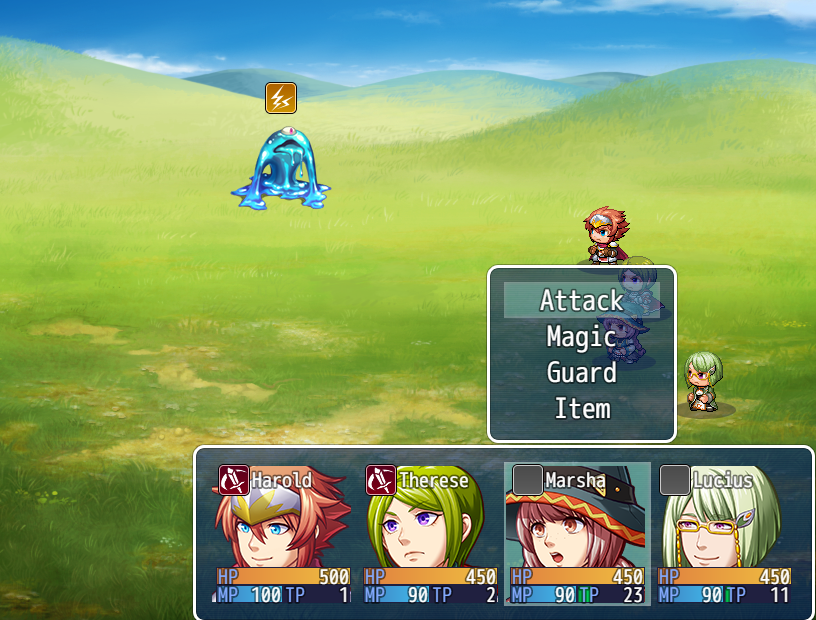
@Feliaria use ctrl+s to download
@DreamX seems that i've found an issue with your extention and YEP Absorption Barrier, the barrier is not being displayed.
View attachment 48090
Okay, I'll take a look at this will mention you when it's fixed/implemented.
@kovak I've implemented barrier display from yanfly's plugin in the newest update just now, it uses the same parameter values as the hp bar.
