Ultra Mode 7 [RMMV & RMMZ]

● ARCHIVED · READ-ONLY
Started by bblizzard 1291 posts Page 5 of 65 View original ↗
  1. KaYsEr said:
    Oh, that's why it "worked for me" I guess :) (And, like @blizzard88 I use an external parallax plugin for regular non M7 maps so I didn’t see the glitch.)


    Amazing! You're great. This is a motivating work you've done already, wait until people in the community see some cool example of maps done with it and it might become popular. First time ever that Mode7 is reliable on the RPG Maker series, that's something! ;)

    Yeah sorry, my bad. When I first responded I hadn't tested it enough to realize the 'issue' was only occurring on non-Mode 7 maps.
  2. KaYsEr said:
    That one is so generous with the deceleration/delay thing, that you’ll see all the events on your map look like they have no business on that map and want to go away ahah. It’s the same problem that makes “Doodadds” plugin from @Yanfly unusable with that kind of camera. Let’s hope you’ll be able to find a trick.
    Would be amazing and could make your plugin even more badass! ;)

    I second this, it would be really awesome if you could manage to make the doodads usable, since you wouldn’t need to be constantly using events for the other objects to have the effect.


    Also does anyone has any tips on how to make houses, walls, pillars, etc, look good whit ultra mode 7?


    Ps. I’m sorry but i found it really funny that you kept tagging the wrong guy
  3. @SergioV7 If somebody else made a doodad script, integrating them to work with my Mode 7 shouldn't be too much of a problem. Can you just link the script again?

    IDK about the best way of making those look good without resorting to 3D models. I guess pillars could still work as billboard sprites or doodads, but houses are nasty.
  4. bblizzard said:
    @SergioV7 Can you just link the script again?

    This is the doodads script i was taalking about, its pretty good!

    http://yanfly.moe/2016/09/17/yep-116-grid-free-doodads-rpg-maker-mv/


    bblizzard said:
    IDK about the best way of making those look good without resorting to 3D models. I guess pillars could still work as billboard sprites or doodads, but houses are nasty.

    Are you using 3D Models?
    If so, how?

    i have been looking for tutorials but i havent found any.
  5. No, I'm not using any 3D models. xD Actually the script wouldn't work too well with 3D models without some changes (like setting up a depth buffer). And I would like to keep the script simple and keep everything as just a Mode 7 functionality, because 3D is a whole other beast. And it's a huge beast. I really don't wanna go there. xD If somebody wants to use my script as a base and wants to make plugins that turn it into a full-fledged 3D environment, be my guest. But I personally don't have the time for this. xD
  6. Oh My Have to save this link (here) that @IguanaGuy simply sent to me
  7. I finally got around to playing FFIV - The After Years and I noticed something very interesting. While it's primarily a 3D game, a lot of the smaller assets on maps are 2D billboard sprites (rocks, stones, bushes, etc.). They usually look just off enough to notice, but not to bother or look out of place. They managed it well with the right camera angle and the right graphic perspective. Of course most things like pillars and houses are done in 3D so there's that. xD
  8. bblizzard said:
    I finally got around to playing FFIV - The After Years and I noticed something very interesting. While it's primarily a 3D game, a lot of the smaller assets on maps are 2D billboard sprites (rocks, stones, bushes, etc.). They usually look just off enough to notice, but not to bother or look out of place. They managed it well with the right camera angle and the right graphic perspective. Of course most things like pillars and houses are done in 3D so there's that. xD

    Have you played the PSP version? Final Fantasy IV Complete Collection. The entire game uses 2D sprites and maps, and it has good examples of Mode 7 maps.

    They are 2D too, but things like castles, airships, chocobos, and some other structures remains as if they were 3D objects. You plugin does the same, along with camera options, so it is very similar to that game.

    Maybe you can get more ideas from the PSP version. Also, it has the three games: FF4, Interlude (special chapter) and The After Years.

    By the way, are you still working on the optimization for bigger maps and the looping options? Would like to use your plugin once finished.
  9. No, I'm playing the Steam version. I bought it like 2 years ago on a sale or something like that, but haven't had the chance to play it yet. I'll dig up some Youtube videos to check it out.

    I've been crazy busy with some stuff in the past weeks so I haven't touched the script since the last update. I hope that I'll find some time over the course of June.
  10. bblizzard said:
    I'm pretty sure you keep tagging the wrong person. xD
    Ahah, thank you autosuggestion! ;p Sorry about that, good thing this is not an active account.
    Don't worry I wont make any mistake when giving you credits in the game!! :)

    Hey here is a quick WiP of my subterranean areas taking advantage of mode 7:
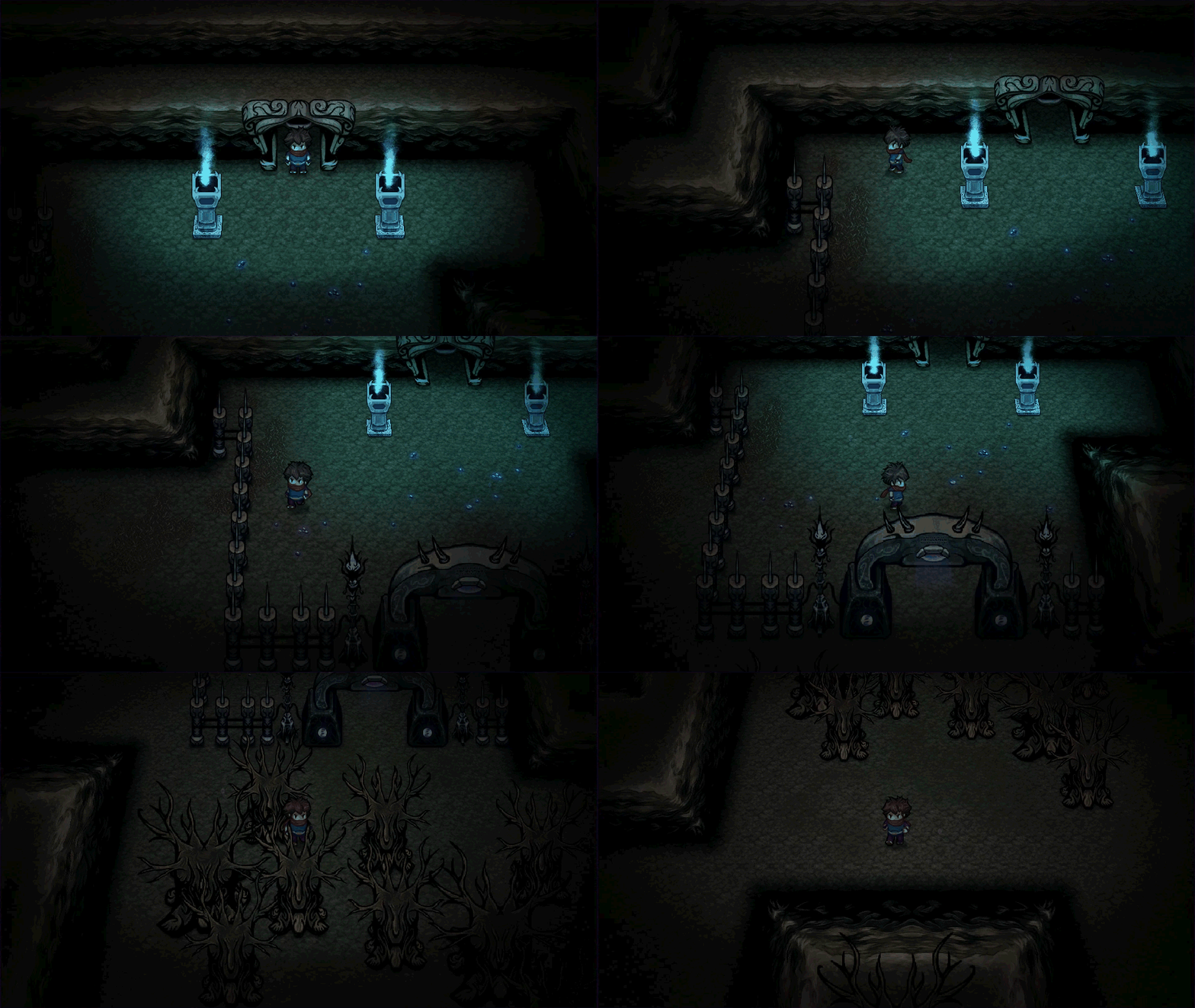
    mode7koru_underground.gif
    Choppy gif though (15fps I think), you can check a different smoother (30fps) video version uploaded on FB at the price of some compression artefacts, but tick the HD button:


    (And you get 60fps on Twitter but it’s even more compressed >__<)

    Anyway, I’ll upload something clean on YT when I’m done with the Art Direction, still some new GFX to create and some post process etc.

    Now after a while working with the plugin I can give a better feedback, as you can see even with the normal MV camera (without any delay) we can still feel minor “stuttering” on events (when scrolling) even if it’s acceptable compared to when using a smooth camera, let’s hope you’ll be able to lower the effect, fingers crossed! :)

    There is a feature you should add though because it’s very important, it’s about the events “popping out” of the ground in 3D, I realized we don’t have any option to tag some specific events to NOT behave like this (and instead be flat, on the ground like tilesets), why that? Well let’s say you want to create a “standing switch” on the ground (like the basic cliché one in RTPs ^u^), it’s impossible since the switch would pop out the ground like it’s in front of the camera instead of being on the ground, and it wouldn't be practical (even if it's possible) to use a tile instead since it's supposed to be interactive.

    My suggestion would be to be able to “tag” specific events we want to behave like this with a word like “flat” in a comment or as a note, something like that.
  11. Dayum, that map looks awesome. xD I'm glad I was able to help you with my script create something like this. :)

    The problem with flat events is that events are still rendered as normal sprites and not part of the Mode 7 map. :/ I'll see what I can do since I do agree that this is quite important. Maybe I could make it work with an extra layer and let sprites push their vertices into that layer rather than rendering them as normal sprites. I'll put it on my TODO list for now.
  12. Had I known about this script 1 year ago, I would've used it for my upcoming game! Keep it up, looks amazing and full of potential!!

    AP
    Pixelent
  13. Wait a minute, is that what is used in Don't Starve?
  14. Pixelent Games said:
    Had I known about this script 1 year ago, I would've used it for my upcoming game! Keep it up, looks amazing and full of potential!!

    AP
    Pixelent

    I released the script less than 2 months ago so you couldn't have used it for your game anyway. xD But you can use it for your next. :)

    Marquise* said:
    Wait a minute, is that what is used in Don't Starve?

    IDK. As I said, it's been released only 2 months ago. How old is Don't Starve?
  15. Way older than that but with your mapping style it looks ... wait;

    I love that type of view point ^^

    I would prefer to use it for RPGM anyway! ^^
  16. bblizzard said:
    Dayum, that map looks awesome. xD I'm glad I was able to help you with my script create something like this. :)

    The problem with flat events is that events are still rendered as normal sprites and not part of the Mode 7 map. :/ I'll see what I can do since I do agree that this is quite important. Maybe I could make it work with an extra layer and let sprites push their vertices into that layer rather than rendering them as normal sprites. I'll put it on my TODO list for now.

    Thank you! :)
    Can't wait to see your next version. Take care! ;)
  17. Hey, how do I make the fade colour black instead of white? I use black as an outside of map colour in my game so I'd like to have it transition to black instead of white.

    @KaYsEr Holy e! Your game looks fantastic.
  18. @AdamSakuru At around line 785, there should be this line:

    Code:
    vec3 white = vec3(color.a, color.a, color.a);\n\

    Change it to:

    Code:
    vec3 white = vec3(0, 0, 0);\n\

    I'll add customization for colors later at some point.
  19. So that was the solution. I tried changing 'white' to 'black' but that didn't work. Thanks!
  20. Awesome work. Character sprites were a huge pain for my mode7 plugin so I'm itching to look at your code for how you approached it.