Terrax Lightning doesn't give you shadows as far as I know, you'll need another script for this (if anyone knows a good one, I'd like it), and to make the lights you do need a tint on the map as far as I know (be free to correct me)
Ultra Mode 7 [RMMV & RMMZ]
● ARCHIVED · READ-ONLY
-
-
i know it doesn't im using quasi's simple shadows for that, the problem is i cannot figure out how to make a dark map, i should just ask it on the thread of that plugin.Terrax Lightning doesn't give you shadows as far as I know, you'll need another script for this (if anyone knows a good one, I'd like it), and to make the lights you do need a tint on the map as far as I know (be free to correct me)
-
Terrax's?i know it doesn't im using quasi's simple shadows for that, the problem is i cannot figure out how to make a dark map, i should just ask it on the thread of that plugin.
I think you need to set the player's light first, putting in an event's notebox something like Light 250 #FFFFFF
For the color I used a plugin command in an auto event that erased itself, Tint set #3333cc, 3333cc the tint I wanted for the screen. -
meh, it doesn't work, it's probably an error with how the script is and the mode 7 system (or i am not doing something rightTerrax's?
I think you need to set the player's light first, putting in an event's notebox something like Light 250 #FFFFFF
For the color I used a plugin command in an auto event that erased itself, Tint set #3333cc, 3333cc the tint I wanted for the screen.
here's what is in the event that is supposed to change the tint set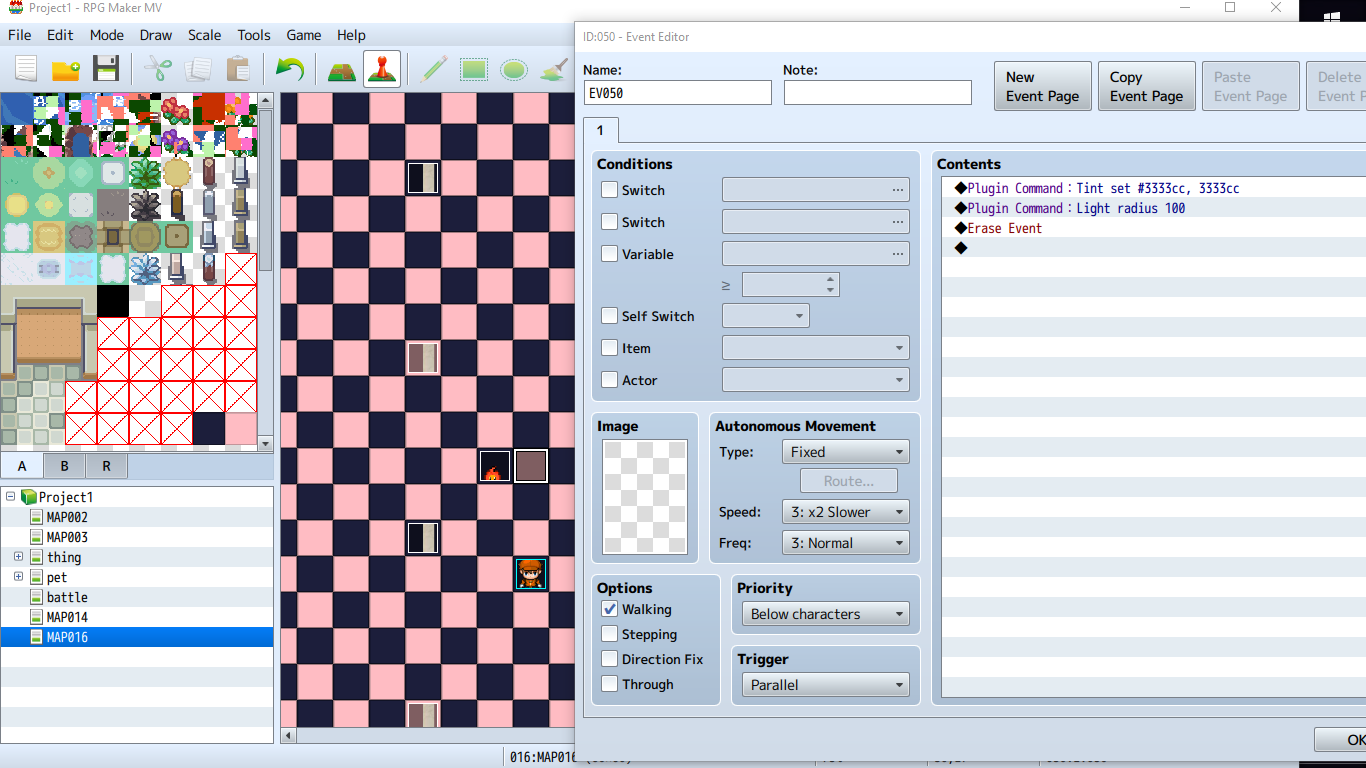
-
You are doing it wrong.
in the plugin command, use just Tint set #3333cc
And instead of putting the Light 250 #FFFFFF in a plugin command, put it in an event's notebox. you know, that box right to the right of the name box. -
the event next to that one is the one that is supposed to be the light, it has a light tag set in it's notebox. and still, changing that hasn't done anything. have you tested if the plugins both work together?You are doing it wrong.
in the plugin command, use just Tint set #3333cc
And instead of putting the Light 250 #FFFFFF in a plugin command, put it in an event's notebox. you know, that box right to the right of the name box. -
Nope.
But it wouldn't work anyway if you are using the light plugin wrong, so...
Does the light plugin work properly without the mode7 on that map?
Did you try changing the order? -
nope, still not working, could you provide screenshots of what you did? (i mean, i most likely am using it wrong, i have not been able to find anything about how to set it up after looking.)Nope.
But it wouldn't work anyway if you are using the light plugin wrong, so...
Does the light plugin work properly without the mode7 on that map?
Did you try changing the order? -
I did this:
Put the light code in the plugin event (in this case Fire with radius 0, because for some reason at least the version I got doesn't move properly if the event is not the player), and in an autorun (in this case the same event) I set the screen's tint and player radius (player radius is 0 in this case because it is a cutscene and player is invisible)Spoiler -
okay, so it does work together with the mode 7 script (although there is some shifting of the light when it moves to the outer edges of the screen. but it does work. (i'll figure something out for that on my own.)I did this:
Put the light code in the plugin event (in this case Fire with radius 0, because for some reason at least the version I got doesn't move properly if the event is not the player), and in an autorun (in this case the same event) I set the screen's tint and player radius (player radius is 0 in this case because it is a cutscene and player is invisible)Spoiler
screenshot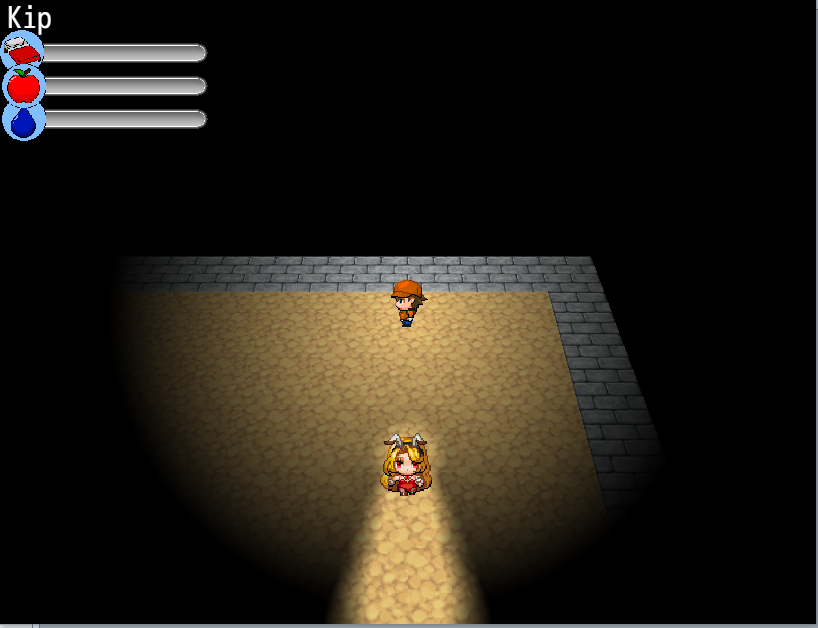
-
Jonforum, please avoid double posting, as it is against the forum rules. You can use the "Edit" function on your posts to add additional information you've forgotten or respond to multiple people. You can review our forum rules here. Thank you.
This plugin is very interesting to experiment with :) -
yeah, i've had a good amount of fun with it. im making a 3d map based battle system using it. unlike the mode 7 script for vx ace this system is much better at handling a lot of events on screen[dpost]Jonforum[/dpost]
This plugin is very interesting to experiment with :) -
Thank you for your answer @blizzard88 :)
My apologies about the video thing, it was caused by a corrupted file.What happens when you try to play back a video? Because I didn't really touch anything regarding that. o.o
I'll check the screen shake later, it's likely an easy fix.
Screen shake is still a valid glitch though.
Some camera related plugins can give us problems, the built-in “scroll map” function in MV works as intended, but when using another camera-control plugin, it can lead to incompatibilities, try that popular one for example: http://sumrndm.site/camera-core/
The options to control the camera (like to scroll it at specific X-Y position or Event ID’s position etc) lead to some kind of weird shake/freeze and then directly the result (we’re supposed to see the camera moving at user-specified duration) and sometimes instead of moving to a target the camera locks where it is.
Well to be honest it’s mostly caused by the kind of camera plugin I just talked about, the same coder made a “smooth camera” plugin to go as an add-on: http://sumrndm.site/smooth-camera/I'm not 100% sure what you mean with the event being jaggy.
This plugin is the one that gives the best results with your Mode7 but we can still feel the “problem”, if you focus your attention on an event you’ll see it’s not totally “anchored” on the ground and has a tendency to shake a bit. It’s especially visible if you use something big that is supposed to be “super rooted” in the ground like a tree for example. You’d see the roots of the trunk not totally “synchronized” with the scrolling map.
To be fair even without any of those “smooth camera” plugin it’s still possible to slightly see this problem, the slower your character moves the more visible it gets, smooth camera plugins have a slow deceleration thing going on which is probably why it makes that problem more obvious.
If you want to see what I’m talking about in the most visible way, simply try this other “smooth camera” plugin, it’s plug and play:
https://galvs-scripts.com/2015/11/27/mv-cam-control/
That one is so generous with the deceleration/delay thing, that you’ll see all the events on your map look like they have no business on that map and want to go away ahah. It’s the same problem that makes “Doodadds” plugin from @Yanfly unusable with that kind of camera. Let’s hope you’ll be able to find a trick.
Would be amazing and could make your plugin even more badass! ;) -
I'll check it out later at some point. Since character sprites are rendered still like billboard sprites, there's a limit to how accurate the sprites can be displayed on a 3D renderered map. Maybe I can do some things to reduce the issue, but i'm not sure it's possible to remove it entirely. ¯\_(ツ)_/¯
-
Hey, I found another bug with your plugin.
For some reason it makes the parallax scrolling function not work. So when I set the parallax to a sky and tell it to scroll by an X amount and/or Y amount in the map properties, it stays still when you run the game.
I tested this in a fresh project just to double check that this wasn't happening because it wasn't playing well with one of the other plugins I'm using in my project. -
Reducing would already be great :) Worst-case scenario it would be good enough if we turn OFF camera smoothing. Good luck, can't wait to see your next version! ;)Maybe I can do some things to reduce the issue, but i'm not sure it's possible to remove it entirely.
This is strange it works for me. Whether it's the vanilla MV control with only one parallax (using "map properties") or a multi parallax situation with a plugin. (Don't forget to have a look in the Mode7 plugin settings, there is something about the X and Y scrolling so perhaps you changed the numbers by accident or something...)So when I set the parallax to a sky and tell it to scroll by an X amount and/or Y amount in the map properties, it stays still when you run the game. -
This is strange it works for me. Whether it's the vanilla MV control with only one parallax (using "map properties") or a multi parallax situation with a plugin. (Don't forget to have a look in the Mode7 plugin settings, there is something about the X and Y scrolling so perhaps you changed the numbers by accident or something...)
I didn't touch those numbers. And again, in a fresh project this is still occurring.
I did some more testing inside of the plugin demo project file itself and found the following.
BUG REPORT:
- When on a non-Mode 7 map, a horizontal only scroll for the parallax doesn't work.
- When on a non-Mode 7 map, a vertical only scroll for the parallax does work, but it adds in a horizontal scroll for some reason. The same result occurs on a non-Mode 7 map that has a horizontal AND vertical scroll value for the parallax. Changing the value of the horizontal scroll doesn't seem to do anything to affect the speed/direction of the horizontal scroll. Even if you set it to, say, 50.
- Horizontal and vertical scrolling parallaxes work as they should on Mode7 maps.
http://www.mediafire.com/file/8j5963fratraupr/Ultra Mode7 BUGS.zip -
@AdamSakuru Thanks for the bug reports. I use a customized parallax setup in my game so I didn't pay too much attention in the version I released. I'll make sure to fix it and add parameters that let you control the vertical and horizontal scroll depending on the pitch and yaw angles on the maps (since it really makes sense in a 3D map xD).
@KaYsEr I'm sure I can do something to at least reduce the issue and you can keep using the plugin. Worst case scenario, I can write some code that attempts to detect the plugin and use customized code to resolve all compatibility issues. It's not the first time I've done something like this. xD And it's not that hard either. -
Oh, that's why it "worked for me" I guess :) (And, like @blizzard88 I use an external parallax plugin for regular non M7 maps so I didn’t see the glitch.)Horizontal and vertical scrolling parallaxes work as they should on Mode7 maps.
Amazing! You're great. This is a motivating work you've done already, wait until people in the community see some cool example of maps done with it and it might become popular. First time ever that Mode7 is reliable on the RPG Maker series, that's something! ;)@KaYsEr I'm sure I can do something to at least reduce the issue and you can keep using the plugin. Worst case scenario, I can write some code that attempts to detect the plugin and use customized code to resolve all compatibility issues. It's not the first time I've done something like this. xD And it's not that hard either. -
@KaYsEr I'm pretty sure you keep tagging the wrong person. xD
Yeah, I mean it was relatively simple when I realized the RMMV literally just uses shaders internally. All I needed to do is sit down for 50-100 hours to write the code and debug it. And this is actually literally the reason why it's so effective in RMMV. All previous RMs literally use specialized 2D game engines. RMMV is the first time a generic rendering engine is used which can be modified to actually render 3D properly. :) And I mean rendering it natively through the GPU instead of relying on rasterizing a 3D view onto a 2D texture or bitmap and then rendering that texture or bitmap within the 2D system (this is the approach that was used on XP, VX and VXA and also the reason for performance issues due to the CPU having to handle the rendering).