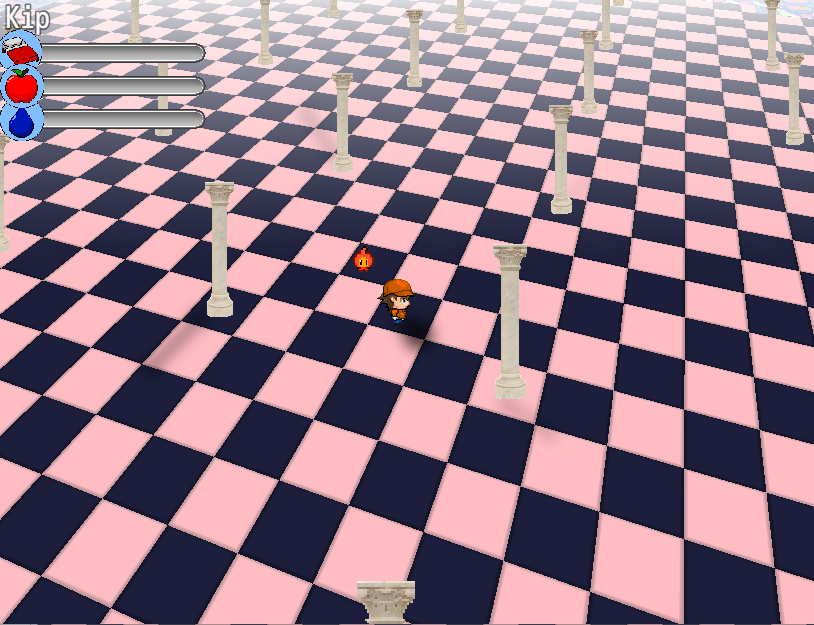
The floating events thing was just me not properly hiding events that were off the near clipping plane which caused them to wrap around and basically have a negative coordinate. xD I had to do a dirty trick and set them to offscreen coordinates, because the old code was messing with the visibility of the sprites (which in turn broke vehicles). If anything, it uses more RAM now. xD It doesn't matter. I'll optimize this properly in a later version anyway, probably at the same time when I do looping maps.
Ultra Mode 7 [RMMV & RMMZ]
● ARCHIVED · READ-ONLY
-
-
Amazing work in that new version dude, congratulation!
Well your new update got rid of that problem now, I think it had something to do with the other parallax thing you fixed.Can you link the script? It depends on how the script was written.
I switched to another camera smoothing plugin giving more customization options anyway, I did that because the "easing" we often have on that kind of camera makes the "3D events" in your mode7 plugin "shake" a bit, but I found a way to make it acceptable by fine-tuning the camera.
I noticed that even if you want to get a “normal 2D view” by setting the angle at 0 instead of 45°, we can still see the “3D texture” effect, spoiling the surprise of seamlessly going 3D by changing the angle over time. Too bad, I remember on old mode7 VXACE scripts that it was possible to totally deactivate mode7 on a map and turn it ON whenever we want it, like when going in an airship on a worldmap etc. You think it could be possible to have this kind of approach here and not necessarily the need to tag each map but more like a plugin command to turn it on? Or maybe the tech here is too different and you had to go with that approach.
Other than that I don't have any feedback, since @Espilonarge already covered everything else. I can confirm that performances are quite down on my machine when moving around indeed.
Something funny I noticed though, if you add the Yanfly plugin giving you the ability to deactivate the "FPS sync" via the option menu (and you use it to turn it OFF) then the game runs great even with many events. I have yet to try a build on a weaker computer to verify how it goes but it’s encouraging.
Here is the plugin if you want to try on your side: http://yanfly.moe/2016/03/10/yep-81-fps-synch-option/
The thing is, I only have this plugin for the rare occasions I have to capture a video of the game (gives better performances) but I don't plan to add it in my final release, it's a bad idea. Turning OFF that FPS-sync option on new 120hz screens will make your game run at double speed, and soon enough everybody will have 120hz screens or even more, it's not reliable to use this. (Or even add it as an option, some gamer could use it to cheat by running the game at double speed on purpose.)
I wish we could have something detecting the user screen refresh rate and activate the FPS-sync when above 60hz, would be great.
Well, I thought it could still be useful to tell you about that observation I made, to be honest many performance issues with MV (not necessary linked to your mode7 plugin) can change depending on what screen you use. I know it's strange but I don't get the same "feeling" whether I playtest on my monitor or TV (minor stuttering from time to time) despite being on the exact same machine and both screen being 60hz (maybe one is like 59,9 or something.) Odd. -
Amazing work in that new version dude, congratulation!
Well your new update got rid of that problem now, I think it had something to do with the other parallax thing you fixed.
I switched to another camera smoothing plugin giving more customization options anyway, I did that because the "easing" we often have on that kind of camera makes the "3D events" in your mode7 plugin "shake" a bit, but I found a way to make it acceptable by fine-tuning the camera.
Yeah, I assumed as much. xD
I noticed that even if you want to get a “normal 2D view” by setting the angle at 0 instead of 45°, we can still see the “3D texture” effect, spoiling the surprise of seamlessly going 3D by changing the angle over time. Too bad, I remember on old mode7 VXACE scripts that it was possible to totally deactivate mode7 on a map and turn it ON whenever we want it, like when going in an airship on a worldmap etc. You think it could be possible to have this kind of approach here and not necessarily the need to tag each map but more like a plugin command to turn it on? Or maybe the tech here is too different and you had to go with that approach.
Actually you can get that done easily by manipulating the camera distance. Just do the math on how far you need to set the camera away to replicate the original MV view as if it was 2D. You have a triangle with the sides A, B and C. A is half the width of the screen, B is the distance and C is the hypotenuse. The angle between B and C is half the FOV. Just do B = A / atan(FOV / 2).
Something funny I noticed though, if you add the Yanfly plugin giving you the ability to deactivate the "FPS sync" via the option menu (and you use it to turn it OFF) then the game runs great even with many events. I have yet to try a build on a weaker computer to verify how it goes but it’s encouraging.
Here is the plugin if you want to try on your side: http://yanfly.moe/2016/03/10/yep-81-fps-synch-option/
The thing is, I only have this plugin for the rare occasions I have to capture a video of the game (gives better performances) but I don't plan to add it in my final release, it's a bad idea. Turning OFF that FPS-sync option on new 120hz screens will make your game run at double speed, and soon enough everybody will have 120hz screens or even more, it's not reliable to use this. (Or even add it as an option, some gamer could use it to cheat by running the game at double speed on purpose.)
I wish we could have something detecting the user screen refresh rate and activate the FPS-sync when above 60hz, would be great.
Well, since MV was made to work with fixed timing (1 / 60th of a second) rather than using the actual time between frames (which van vary depending on the frame rate), you won't really be able to run it on 120Hz without speed issues. Unless you rework tons of code obviously. ._. I assume that's what the plugin actually does. Or it skips frames or something. I can only speculate without looking at the actual code. xD
Well, I thought it could still be useful to tell you about that observation I made, to be honest many performance issues with MV (not necessary linked to your mode7 plugin) can change depending on what screen you use. I know it's strange but I don't get the same "feeling" whether I playtest on my monitor or TV (minor stuttering from time to time) despite being on the exact same machine and both screen being 60hz (maybe one is like 59,9 or something.) Odd.
Yeah, different screens and different GPUs with different drivers can cause all sorts of crazy issues. -
It would just need to load the file, upload it to the shader and change the shader code to offset pixels depending on the height map. But I would like to keep this script "simple" and not overdo it with features. More features mean more potential issues with other scripts.
Still is there a way you could add this in the future? -
Most likely not, sorry.
-
I see, well thanks anyway :)Most likely not, sorry.
-
I was running through the differing scripts that i had in my project and found that the plugin has an incompatibility with khas ultra lighting. is it all lighting systems that are incompatible? (i can understand why they would thinking it over) i'd like to know, although not needed i was looking into putting a lighting system into the project.
-
did you try changing the plugin order?I was running through the differing scripts that i had in my project and found that the plugin has an incompatibility with khas ultra lighting. is it all lighting systems that are incompatible? (i can understand why they would thinking it over) i'd like to know, although not needed i was looking into putting a lighting system into the project.
-
this was about a month ago so i cannot remember, i'll have to do so at some point to see if it has any changes in results.did you try changing the plugin order?
-
Most likely yes, because lighting uses images that go over the map. Since I render the map in a different way, the lighting won't be applied properly. Actually there's a visual problem in combining lighting with Mode 7. Since's it's 3D it can only affect the map, not the characters so it can't go over the characters. Basically Mode 7 is logically incompatible with classic lighting scripts.
-
Yes, that is what i had thought would be the issue, mainly becuase of the same issues that had come with the vx ace version of khas's system and the mode 7 system for that edition of rpg maker.Most likely yes, because lighting uses images that go over the map. Since I render the map in a different way, the lighting won't be applied properly. Actually there's a visual problem in combining lighting with Mode 7. Since's it's 3D it can only affect the map, not the characters so it can't go over the characters. Basically Mode 7 is logically incompatible with classic lighting scripts.
would you have any suggestions for how to go about lightning? (im just curious.) -
The only thing that could be done would be proper 3D lighting , but I don't recommend that since it will start being CPU intensive very quickly.
-
ah, i see. i suppose i could do some simple screen overlay thing to produce a "dark" area like in the pokemon games. other than that i don't really have anything else to input. thanksThe only thing that could be done would be proper 3D lighting , but I don't recommend that since it will start being CPU intensive very quickly.
-
@Poppie360 >> You can try Terrax lighting plugin, that one works rather “fine” if you’re not too generous with the pitch angle. You will obviously still have some kind of shift, getting bigger when moving away from the light, but it’s barely noticeable if you use a big light and, again, if you don’t use a big pitch angle.
The default 45° might be a little too much anyway, I don’t know about everybody’s personal resources (gfx) but I found that for me, around half that number is already great to have a nice 3D effect while not having a pixelated ground/event at the bottom of the screen. Maybe for a classic worldmap, 45° works better.
And if you really want to have perfectly stable lights on screen, like a red halo around some red light for example, simply use an event/character with that light directly on it. It’s a good way to bypass Terrax limitations if one of your light is too small.
@bblizzard
Sorry man, I read your answer when you wrote it (thank you!) but I thought I’d be quicker to be done with stuff I’m creating for my game so I could show you at the same time I reply.
Well I think I’ll use your plugin for ONE specific area in the game, the overworld’s subterranean areas! I’m almost done with most of my resources and all the tests that were needed.
Here is a glimpse back when I was starting:
I have some feedbacks from what I see so far, I found that the function to “shake the screen” doesn’t work with your plugin (the map doesn’t shake, only the events) and the video playback function doesn’t work I think. This is minor (not vital) stuff anyway, just to let you know in case there is an easy fix. Speaking of easy fix, what about giving us the option to choose between black and white for the “fading color” (the horizon thing) because now we only have white and I can’t use it in an underground situation, I think with black and white you’ll cover most situation, even if any color choice would be even better. And of course having the events below the effect and not above it. :cutesmile:
Beside that I’m very happy with the results and I can’t wait to show you how it looks, I made specific resources to match the 3D effect with a specific pitch angle and it looks great! The only minor drawback would be that we can still feel the events can be a little bit “jaggy” at time, maybe some kind “rounding numbers” thing that you could improve in the future in order the get a super smooth result? That would be amazing.
B)
This and as mentioned before by @Espilonarge some (minor in my case) performance things, to be honest I tried on a rather weak computer and was surprised to see that a 80x80 map was still holding on decently. Congratulation! I don’t know about bigger maps yet, I heard it's more problematic on super big maps like 256x256. But speaking of map size, do you think it would be possible to lock the camera BEFORE we can see the edges of the maps, as you already know we can see the limits of a map (and then we see the parallax on the sides) when we move to the edges and it can break immersion.
It’s an easy fix of course, simply put empty and/or unpassable tiles around the edges and you’re good, too bad it makes the maps way bigger for no reason (and might not help with performance issues?) but yeah, again it’s minor issues. It’s already great as it is. Sorry for the wall of text, next time I’ll show visual stuff instead!! :) -
@Poppie360 >> You can try Terrax lighting plugin, that one works rather “fine” if you’re not too generous with the pitch angle. You will obviously still have some kind of shift, getting bigger when moving away from the light, but it’s barely noticeable if you use a big light and, again, if you don’t use a big pitch angle.
The default 45° might be a little too much anyway, I don’t know about everybody’s personal resources (gfx) but I found that for me, around half that number is already great to have a nice 3D effect while not having a pixelated ground/event at the bottom of the screen. Maybe for a classic worldmap, 45° works better.
And if you really want to have perfectly stable lights on screen, like a red halo around some red light for example, simply use an event/character with that light directly on it. It’s a good way to bypass Terrax limitations if one of your light is too small.
@bblizzard
Sorry man, I read your answer when you wrote it (thank you!) but I thought I’d be quicker to be done with stuff I’m creating for my game so I could show you at the same time I reply.
Well I think I’ll use your plugin for ONE specific area in the game, the overworld’s subterranean areas! I’m almost done with most of my resources and all the tests that were needed.
Here is a glimpse back when I was starting:
I have some feedbacks from what I see so far, I found that the function to “shake the screen” doesn’t work with your plugin (the map doesn’t shake, only the events) and the video playback function doesn’t work I think. This is minor (not vital) stuff anyway, just to let you know in case there is an easy fix. Speaking of easy fix, what about giving us the option to choose between black and white for the “fading color” (the horizon thing) because now we only have white and I can’t use it in an underground situation, I think with black and white you’ll cover most situation, even if any color choice would be even better. And of course having the events below the effect and not above it. :cutesmile:
Beside that I’m very happy with the results and I can’t wait to show you how it looks, I made specific resources to match the 3D effect with a specific pitch angle and it looks great! The only minor drawback would be that we can still feel the events can be a little bit “jaggy” at time, maybe some kind “rounding numbers” thing that you could improve in the future in order the get a super smooth result? That would be amazing.
B)
This and as mentioned before by @Espilonarge some (minor in my case) performance things, to be honest I tried on a rather weak computer and was surprised to see that a 80x80 map was still holding on decently. Congratulation! I don’t know about bigger maps yet, I heard it's more problematic on super big maps like 256x256. But speaking of map size, do you think it would be possible to lock the camera BEFORE we can see the edges of the maps, as you already know we can see the limits of a map (and then we see the parallax on the sides) when we move to the edges and it can break immersion.
It’s an easy fix of course, simply put empty and/or unpassable tiles around the edges and you’re good, too bad it makes the maps way bigger for no reason (and might not help with performance issues?) but yeah, again it’s minor issues. It’s already great as it is. Sorry for the wall of text, next time I’ll show visual stuff instead!! :)
cool! i'll have to check it out. the last mode7 system that i had used (with vx ace) had this weird bug were the layer the lights were on were rendered as a 2d plane parallel to the screen. from the picture you showed me it looks like it'll work well. -
I have also noticed this plug in has issues with galvs diagonal movement, as in for the animations part, say you move up right,
instead of always displaying the up right animation, it randomly displays any other of the diagonal anims -
I have also noticed this plug in has issues with galvs diagonal movement, as in for the animations part, say you move up right,
instead of always displaying the up right animation, it randomly displays any other of the diagonal anims
Just move this plugin (mode7) above Galv's diagonal movement and you'll be fine.
In fact, mode7 should be as high as you can in the list, to avoid this kind of "priority conflict", it's not a real bug.
(Whenever you find a problem with any plugin, it's always a good start to simply change the priority order in your plugin list before posting about an issue ;) Many problems come from this.) -
Just move this plugin (mode7) above Galv's diagonal movement and you'll be fine.
In fact, mode7 should be as high as you can in the list, to avoid this kind of "priority conflict", it's not a real bug.
(Whenever you find a problem with any plugin, it's always a good start to simply change the priority order in your plugin list before posting about an issue ;) Many problems come from this.)
Thanks, I forgot i had to do that hahaha -
I have some feedbacks from what I see so far, I found that the function to “shake the screen” doesn’t work with your plugin (the map doesn’t shake, only the events) and the video playback function doesn’t work I think. This is minor (not vital) stuff anyway, just to let you know in case there is an easy fix.
What happens when you try to play back a video? Because I didn't really touch anything regarding that. o.o
I'll check the screen shake later, it's likely an easy fix.
Speaking of easy fix, what about giving us the option to choose between black and white for the “fading color” (the horizon thing) because now we only have white and I can’t use it in an underground situation, I think with black and white you’ll cover most situation, even if any color choice would be even better. And of course having the events below the effect and not above it. :cutesmile:
Actually I plan on adding the functionality that you can add multiple colors and distances for fading. Since this would go into the plugin config, I have yet to figure out a way to make this easy to use. >.< Partially because it should be in the plugin config and partially because it needs to go into the note config of the map.
The only minor drawback would be that we can still feel the events can be a little bit “jaggy” at time, maybe some kind “rounding numbers” thing that you could improve in the future in order the get a super smooth result? That would be amazing.
B)
I'm not 100% sure what you mean with the event being jaggy. Could you show me in a video? It's always a mess when trying to make 2D assets work smoothly in a 3D environment. xD
This and as mentioned before by @Espilonarge some (minor in my case) performance things, to be honest I tried on a rather weak computer and was surprised to see that a 80x80 map was still holding on decently. Congratulation! I don’t know about bigger maps yet, I heard it's more problematic on super big maps like 256x256.
Yeah, most people started having issues only on larger maps. I haven't forgotten about this, I'm just super busy with some things right now. xD
But speaking of map size, do you think it would be possible to lock the camera BEFORE we can see the edges of the maps, as you already know we can see the limits of a map (and then we see the parallax on the sides) when we move to the edges and it can break immersion.
It’s an easy fix of course, simply put empty and/or unpassable tiles around the edges and you’re good, too bad it makes the maps way bigger for no reason (and might not help with performance issues?) but yeah, again it’s minor issues. It’s already great as it is. Sorry for the wall of text, next time I’ll show visual stuff instead!! :)
Yeah, edges will always be a problem. The main problem with them is that depending on camera angle and viewing distance, the edges change, ie. where you can see the edges changes. This is especially true if you use rotation like I use it in my game. The best way to handle this is to make a border manually. I actually need a 50 tile border to hide any edges in my game due to rotation and curvature of the map. This means my maps have a minimum size of 101x101. xD
Don't worry about the wall of text. xD Your game looks pretty good so far. I'm glad my script could help you pull it off. :)
I have also noticed this plug in has issues with galvs diagonal movement, as in for the animations part, say you move up right,
instead of always displaying the up right animation, it randomly displays any other of the diagonal anims
Yup, as I mentioned in the FAQ, the script could have compatibility issues with map movement scripts. I'll look into it later and try to figure out a way to make them compatible. If you don't use rotation, you can technically delete a piece of code and it should already work:
Code:var UltraMode7_Sprite_Character_prototype_characterPatternY = Sprite_Character.prototype.characterPatternY; Sprite_Character.prototype.characterPatternY = function() { if (!$gameMap.useUltraMode7) { return UltraMode7_Sprite_Character_prototype_characterPatternY.call(this); } var direction = this._character.direction(); var angle = $gameMap.ultraMode7Yaw; if (angle >= 45 && angle <= 135) { switch (direction) { case 2: direction = 4; break; case 4: direction = 8; break; case 6: direction = 2; break; case 8: direction = 6; break; default: break; } } else if (angle > 135 && angle < 225) { direction = 10 - direction; } else if (angle >= 225 && angle <= 315) { switch (direction) { case 2: direction = 6; break; case 4: direction = 2; break; case 6: direction = 8; break; case 8: direction = 4; break; default: break; } } return (direction - 2) / 2; };
I could actually make this piece optional since most people won't use rotation of the map and won't need this. -
@Poppie360 >> You can try Terrax lighting plugin, that one works rather “fine” if you’re not too generous with the pitch angle. You will obviously still have some kind of shift, getting bigger when moving away from the light, but it’s barely noticeable if you use a big light and, again, if you don’t use a big pitch angle.
The default 45° might be a little too much anyway, I don’t know about everybody’s personal resources (gfx) but I found that for me, around half that number is already great to have a nice 3D effect while not having a pixelated ground/event at the bottom of the screen. Maybe for a classic worldmap, 45° works better.
And if you really want to have perfectly stable lights on screen, like a red halo around some red light for example, simply use an event/character with that light directly on it. It’s a good way to bypass Terrax limitations if one of your light is too small.
@bblizzard
Sorry man, I read your answer when you wrote it (thank you!) but I thought I’d be quicker to be done with stuff I’m creating for my game so I could show you at the same time I reply.
Well I think I’ll use your plugin for ONE specific area in the game, the overworld’s subterranean areas! I’m almost done with most of my resources and all the tests that were needed.
Here is a glimpse back when I was starting:
I have some feedbacks from what I see so far, I found that the function to “shake the screen” doesn’t work with your plugin (the map doesn’t shake, only the events) and the video playback function doesn’t work I think. This is minor (not vital) stuff anyway, just to let you know in case there is an easy fix. Speaking of easy fix, what about giving us the option to choose between black and white for the “fading color” (the horizon thing) because now we only have white and I can’t use it in an underground situation, I think with black and white you’ll cover most situation, even if any color choice would be even better. And of course having the events below the effect and not above it. :cutesmile:
Beside that I’m very happy with the results and I can’t wait to show you how it looks, I made specific resources to match the 3D effect with a specific pitch angle and it looks great! The only minor drawback would be that we can still feel the events can be a little bit “jaggy” at time, maybe some kind “rounding numbers” thing that you could improve in the future in order the get a super smooth result? That would be amazing.
B)
This and as mentioned before by @Espilonarge some (minor in my case) performance things, to be honest I tried on a rather weak computer and was surprised to see that a 80x80 map was still holding on decently. Congratulation! I don’t know about bigger maps yet, I heard it's more problematic on super big maps like 256x256. But speaking of map size, do you think it would be possible to lock the camera BEFORE we can see the edges of the maps, as you already know we can see the limits of a map (and then we see the parallax on the sides) when we move to the edges and it can break immersion.
It’s an easy fix of course, simply put empty and/or unpassable tiles around the edges and you’re good, too bad it makes the maps way bigger for no reason (and might not help with performance issues?) but yeah, again it’s minor issues. It’s already great as it is. Sorry for the wall of text, next time I’ll show visual stuff instead!! :)
can't get the shadow to show up, do i need to tint the screen or anything? (i have also found a shadow script that works pretty good with it)the flame thing is supposed to be the light source, it is set at a forty five degree angle. can't figure out what else to do....screenshot