Rosedale Collision Altering Plugin [MV & MZ]

● ARCHIVED · READ-ONLY
Started by chaucer 340 posts Page 12 of 17 View original ↗
  1. chaucer said:
    This is... highly unusual D: sorry for the inconvenience.. can you try redownloading the app.. and try again? if that does not work please pm me asap! I will work with you to get to the bottom of this!
    I did redownload it and it still throws the syntax error black screen on launch. It's the Itch version which hasn't updated since January. Is it the same version across all marketplaces?
    chaucer said:
    Hmmm that's odd... it should not re-calculate path unless the path is explicitly blocked.. that is odd D: I'll do some more testing on this thanks for the report ^^; Also to prevent the pause you can try adjusting the chunk size in the parameters!
    I got it to continuously recalculate by passing the player's coordinates through intermediary game variables, which themselves were updated every 10 frames through a parallel event e.g.
    this.findPathTo($gameVariables.value(1), $gameVariables.value(2))

    Also there is no chunk size in the parameters?
  2. AquaEcho said:
    I did redownload it and it still throws the syntax error black screen on launch. It's the Itch version which hasn't updated since January. Is it the same version across all marketplaces?
    it is indeed D: give me a moment I will pm you shortly to try to assist you with the issue sorry for the inconvenience u_u
    AquaEcho said:
    I got it to continuously recalculate by passing the player's coordinates through intermediary game variables, which themselves were updated every 10 frames through a parallel event e.g.
    this.findPathTo($gameVariables.value(1), $gameVariables.value(2))

    Also there is no chunk size in the parameters?

    Oh i see, so your using the findPathTo function more than once, that would definitely do it lol.

    Also your in 1.6.11 o__o; this is why you do not have a chunk size that was added in 1.8.0+ basically, it allows the game to take more than 1 frame to calculare a route, this basically mitigates any frame dips, but it also causes the event to delay a frame or two to search for the path across multiple frames. so the event will still pause, but the games frame rate will not tank during the search. In other words, the event will still pause, but the rest of the game will not. :)

    Anyways I'm gonna pm you with some info right now.
  3. will you update itch page too with the newer version once ready?
  4. ShadowDragon said:
    will you update itch page too with the newer version once ready?
    The Itch page apparently is the same as the other versions. The Collision Tool prompts you to update itself to the latest version when you launch it. Chaucer helped me get it working again, I just had to clear the cached files.
  5. I can update the itch.io page. but, it takes me a long time to re-compile the tool for every possibe platform.. maybe I should make a tool to compile tools for me haha..

    Also yeah aqua is right, you can update the plugin directly from within the tool, even if i recompile the tool, the updates are cached in your computer, and it would more than likely prompt you to update still anyways. :x

    Also I am looking to switch from nwjs to a new webapp software, It will significantly decrease software size, and also will allow for easier self updates. so there MAY be a new version of the tool coming soon.

    Also I am nearly finished adding features to the plugin itself, I believe at this point it is nearly feature complete, I am just tying together smaller/missing features at this point..

    After the plugin is complete I will still do my best to do bug fixes, and compatibility requests!

    However, after it is complete, I will be adding features that come from the tool!
    Some of the features I plan to add to the tool are as follows..

    1. Copy Paste Collider Data for the Entire tileset.
    2. Copy Paste Collider Data for an Entire Letter Sheet( including parallaxes ).
    3. Stair direction adjuster( this one is.. gonna be pretty simple. so basically there will be a selector to mark a tile as a stair in the tool.. you can select either horizontal, for stairs moving left/right OR vertical for stairs moving forward/backward. For the stairs moving up/down, you will be able to set a modified move speed value, to slow down the move speed when climbing stairs, this would simulate a longer travel time moving up/down the stairs. As for horizontal stairs.. you will be able to easily set the angle of the stairs that move left/right, that way when the player travels left/right on stairs, or slopes, it will automatically shift the players left/right movements to the correct angle of the stairs! ).
    4. Colliders for Doodad plugins in MV/MZ.
    5. Tooltips on hovering over buttons( so that you can hover over an item for a second to fid out what it does ).
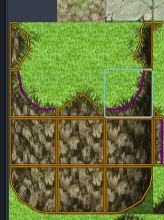
    6. This one is a maybe.... but... I am looking into a way to set a height value to tiles... However I MIGHT not do this as it could be.. much more trouble than it's worth.. But it would be nice, to be able to set height values of the player.. I.E. a cliff( picture below ), the ground on top of the cliff could have a height value of 3, and the default floor tile could have a value of 0, this way when automatic jump off cliff feature is used. it will know how many tiles down to drop the player when jumping off clifs from the side. Also this could be used for things like bridges, etc.. it would allow searching colliders based on the HEIGHT of the player to allow more realistic height... sorry I'm probably rambling at this point... Also again, this is... really not simple at all..
    1721055629226.png

    Also if the player repeats the cliffs mid section several times.. it would make the whole height value inaccurate anyways.. so this is just in the idea phase still....

    7. lastly... I DO wanna take a crack at allowing editing auto-tiles... but they are... such a hassle to do D: lol... it'll be a hassle for the end user as well but still gonna give it a shot.. as this is something... I feel that is important.

    Well the update will be out a bit later today. but... here is a quick list of what's been updated, I jumped several versions here ^^;
    Code:
     ● Version : 1.8.1
     ● Date : 14/07/2024
       ✩ Fix - errors with characters not existing in collision check.
       ✩ Fix - errors with map not existing in collision check.
    
     ● Version : 1.8.2
     ● Date : 14/07/2024
       ✩ Fix - Fix issue with vehicles syncing with player too early
       ✩ Fix - Fix issue with ship colliders not being read correctly.
       ✩ Fix - Fix issue followers moving eratically after unboarding vehicle.
    
     ● Version : 1.9.0
     ● Date : 14/07/2024
       ★ Add - script call moveAtAngle, updated to allow specifying the distance.
       ★ Add - ability to disable mouse movement via parameters
       ★ Add - plugin command to set & resize rect collider for player.
       ★ Add - plugin command to set & resize circle collider for player.
       ★ Add - plugin command to set & resize rect collider for followers.
       ★ Add - plugin command to set & resize circle collider for followers.
       ★ Add - plugin command to set & resize rect collider for event.
       ★ Add - plugin command to set & resize circle collider for event.
       ✩ Fix - mouse movment inaccuracy when screen is zoomed in.
  6. I didn't know that, but good to know it can be updated from the tool :)
    you do a really awesome job making this.

    I just need to recompile my tilesets a bit from parallax.
  7. Yeah, to update the tool( the tool will get updates for itself, and then also fetch the latest plugin version and cache it, so that it can be used to the version used in a project ). To update the tool, click "About" in the project select section of the tool. Then click "Check For Updates", this will then check for updates( but make sure you are using the latest available tool from itch.io, or steam, older versions, may encounter issues ). It will check for available updates, fetch, and apply them, and then, it will prompt you to restart the tool.

    After the tool restarts, your projects listed in the tool, will display the plugin version that the project is currently using, if the color of the version is green, it means you are up to date, and there's nothing to do. but if the projects plugin version is red, you can click in the project( 1 time ), then, use the "Update Project" button, to apply the cached plugin version that the tool has, to the currently selected project.

    I hope this is helpful.

    Also after you update the tool, it SHOULD have an auto update feature applied to it. So that anytime the tool is booted up, it wil auto search for updates, and if there is an update available it will notify you and ask if you would like to update immediately.

    ShadowDragon said:
    I didn't know that, but good to know it can be updated from the tool :)
    you do a really awesome job making this.

    I just need to recompile my tilesets a bit from parallax.

    I appreciate the kind words ^^; and I wish you luck on your project :D Also 1.9.0 will be released today, I just need to finish my testing, also added a couple more features as well. namely, I expanded the moveAtAngle function for move routes, now you can specify an angle AND a distance to travel, before it would automatically travel in a distance of 1 tile, but now you can set it to any value.

    Another feature is a Transfer Player plugin command. this... seems redundant but i have had a few requests, for allowing to transfer the player via float values.. I.E. Transfer the Player to X:2.75 Y:3.20 etc.
    So this new Transfer command will accept float values, thus allowing precise transfer locations ^^ I can definitely see the use for this, so I added it in. There are still.. more features that I will add later.. but nothing too crazy at this point.. I am trying to find a way to add a "Disable Grid Movement" and "Enable Grid Movement" command... but..

    It's not as easy as just flipping the pixel movement switch off or on.. cause... again, if events are not aligned with the grid... then it will completely break that even after the chaange is made. Also If there are events using custom pixel movement specific features in a move route, then things may crash, or just break... so.. I dont know how feasible adding this would be.. I know this was a requested feature but.. I don't have the knowledge to easily do this, as it would require a ton of edge casing for many little things..
  8. I use 1.5.4 from itch, didn't use it for a while, so I hope it will update without issues.
    otherise, I report back and how to fix it ^^
    as I mess around with the demo on that tool so I know sure how it works
    before placing it into my project as I'm doing my main town still as I want it to look
    nice, so some of the mechanics might break or throw errors from this tools.

    but if that happens, I report it to see how it can be patched :)
  9. @chaucer I might have a way when to flip pixel to grid movement :D
    it might not work, as most events I think are grid based.

    what if you have a notetag or comment if exist on the page <gridmove>
    so it will follow the grid, as I hope this one to work with TSR_MoveEvent
    and throw, so it can follow the grid with push/pulling the event?

    it's just a suggestion so maybe a <grid movement> in datamap for
    actor grid movement to so everything on that map follow grid movement?
  10. I think you may have misunderstood, ^^; the request made was to be able to turn off pixel movement completely, in the middle of an existing map. Not for a specific event to not use pixel movement, but for the game as a whole to not use it :x

    The problem with this, is that if I disable pixel movement on a pixel movement map, after it's already been active, and events have moved..

    This COULD mean that events are out of alignment with the grid... and when the grid is turned back on, it will break that event completely.. it will be un-collidable, as well as un-triggerable.. Now I COULD snap the events to the grid.. it's a rather inelegant solution though, which on it's own, is a huge factor in why I would prefer not to do this... But it WOULD ensure that the events are fully functional..

    On top of this, if I disable pixel movement, and the event is in the middle of using some function I.E. a set destination, or a path find, or something else exclusive to pixel movement... there's a chance it could error out the game entirely, or again, break the event, even if i had snapped the event to the grid as mentioned before. and i can account for the ones that I know off the top of my head, but.. there are some people that I know delve deeper into the code than what I've commented in the help file, and use functions that aren't listed in the help. Which could make things a bit more complex for me to try to address all possible outcomes.. Which even further compels me to opt for not adding this in.. :/ I apologize.. It's not that it's not possible, it's just I am unable to think of a solution that feels.. not so... janky... Also that isn't going to potentially break a project/cause both the player, the dev, and me further headaches later down the road. D;
  11. What's the correct way to make an event chase the player? :kaohi:
  12. Well, the best way.... is currently not implemented yet lol... I plan to add a new "chaseCharacter" function which is accessible to events... but currently it is not yet added... :/ there is only one for followers, and this is.. something that will ONLY work for followers...

    At this point in time. you have... two options...

    So the first way, with "setDestination", is not super accurate, it will move the character in a STRAIGHT LINE to the target( in this case, the target is the player, also this is not valid code, you need to replace "ID" with the actual id of the event.. ), this does NOT account for collisions with walls! Which means, that the event could potentially run into walls and get stuck on them if the completely obstruct the path from the event to the player.

    JavaScript:
    $gameMap.event( ID ).setDestination( $gamePlayer.x, $gamePlayer.y );

    The second method available currently.... would be real path finding.. Now, path finding is much more accurate, I.E. It will AVOID walls, and smartly calculate the shortest route to the player! However, it has some caveats as well. The main being that it is expensive to calculate these paths! The second, being that it will FORCE the event to MOVE ON THE GRID, which means it can be a bit less accurate, if you have a lot of small colliders blocking a large tile.

    Code:
    $gameMap.event( ID ).findPathTo( $gamePlayer.x, $gamePlayer.y );

    Now.... in BOTH situations, just calling this once, is a bad idea... as, if you just call this, then the player moves, obviously, the event will move to where the player WAS and NOT to where the player actually IS.

    BUT calling this every single frame( especially the path finding ), is VERY bad, as it will cause some lag( and actually break the path finding in some cases, causing the event to just stand still ).

    So... you SHOULD run this in a parallel process.. imo... and have a script check...
    THIS IS the condition you should check for when using "setDestination"! It will ONLY move the destianation when the player moves.
    JavaScript:
    !Vector2.equals( $gamePlayer.position, $gameMap.event( ID )._destination.end )

    AND THIS is what you should use.. for when using path finding!
    JavaScript:
    $gameMap.event( ID )._path.length > 0 && !Vector2( $gamePlayer.position, $gameMap.event( ID )._path[$gameMap.event( ID )._path.length - 1] )

    But the path find check... again... may break path finding in general if using chunk based searches.

    therefore it's not a very decent solution... well...

    I was already working on the collision plugin( doing bug fixes mostly.. ), so I guess it wouldn't be too tedious at this point to add a new chase function before i release the next update( which will be coming today )...
  13. Thanks for the help! I'm very grateful you helped me before too! Because of you and your plugins, my horror game will be avaliable on August 5th!
  14. Awesome! I look forward to seeing your game released( if possible pm me a link to it and I'll be sure to purchase it when i get a chance! )! ^^ I wish you tons of luck on your launch! also, the chase function is NEARLY complete, I just have one minor thing left to take care of! I needed to build this feature technically anyways.. so.. I guess no better time than now.
  15. chaucer said:
    Awesome! I look forward to seeing your game released( if possible pm me a link to it and I'll be sure to purchase it when i get a chance! )! ^^ I wish you tons of luck on your launch! also, the chase function is NEARLY complete, I just have one minor thing left to take care of! I needed to build this feature technically anyways.. so.. I guess no better time than now.
    The game will be completely free! I will send it to you when ready!
  16. HIME_EventTriggerLabels works when the mapTag <pixel> not presented, if it is, it doesn't trigger at all!
    I place this plugin above and below it, but wont trigger as I use this one for below events.
  17. I'm using two tiles for the event as a car, and the collision of the hitbox doesn't turn or face the direction of the event. Is there an option to do this so that when the event turns horizontal, the tiles follow? the collision stays vertical(same), although the car is turning left and right.

    <hitbox: 0, 0, 48, 92>

    The picture below belongs to Skurge. I'm using his picture as an example.


    1723072031567.png
    https://forums.rpgmakerweb.com/index.php?attachments/car-restructuring-png.281921/
  18. Hello!
    I really love this plugin, as it is very inuitive.
    Here are a few notes if you would like to read them.

    Event colliders resizing
    I'm unsure if it has been mentionned but it would seem the resizing of event colliders is not working.

    1724313399707.png

    Left is the player, right is the event.
    I set the event to the same proportions as the player, and it does edit its hitbox to a circle instead of a square, however it does not resize it.

    I haven't taken a look at how this is done in the plugin, but just in case you would be using a variable (for whatever reason) I did try to enable floating numbers before resizing it, which doesn't change the behavior.


    If this is known, sorry ^^
    Still a very nice tool nontheless!

    Collision glitch
    I also found a glitch (probably dued to how the game handles refreshing) where if the hitbox does not allow the player to go through tights spots, dashing will allow the player to do it anyways.
    1724314121234.png
    As you can see, the player barely cannot go through here, however, dashing allows the player to squeeze through.
    I assume it's because the new position is updated based on player input, so if the player is dashing it would be incremented more than it should, meaning for the plugin the new value is beyond the collision and thus the player can move.

    Suggestion
    Also, may I suggest an offset functionnality for the Region ID restrictions? (Again, if it hasn't been done already)
    As region ID's are not events, you can't resize them or offset their values, which lesser the control you have over it.
    Say you want your character to be able to touch the water with her feet, or have her head show over water spots.

    I'm aware there are workarounds, but I still think it would be a nice touch.
  19. Hello all! sorry for the... long delay... again... I have been very hard at work on this plugin though! it has jumped several versions, I will try to respond to everyone as I can ^^;

    dunedj said:
    What's the correct way to make an event chase the player? :kaohi:

    I have since added a script call to allow chasing a character! Lookig now though it seems i forgot to add it to the help file o_o; I apologize it's hard to keep track of this haha.. but in a move route, simply use...

    JavaScript:
    // chase event 11..
    this.chaseTarget( $gameMap.event( 11 ) )
    
    // OR to chase player.
    this.chaseTarget( $gamePlayer );


    ShadowDragon said:
    HIME_EventTriggerLabels works when the mapTag <pixel> not presented, if it is, it doesn't trigger at all!
    I place this plugin above and below it, but wont trigger as I use this one for below events.
    Interesting I never heard of this plugin I will add this to my todo list ^^; apologies, but it'd be far easier if you could post the bug reports/feature requests/compatibility issues in the rosedale studios plugin suppor section, as it's far easier for me to keep track of them, currently i get them from several different places and sometimes i forget to write them down.. D: I don't mean to forget but, sometimes it happens( in this case it's arlready in my list though so your good! Just for future reference, if possible ^^; ).


    riceyo84 said:
    I'm using two tiles for the event as a car, and the collision of the hitbox doesn't turn or face the direction of the event. Is there an option to do this so that when the event turns horizontal, the tiles follow? the collision stays vertical(same), although the car is turning left and right.

    <hitbox: 0, 0, 48, 92>

    The picture below belongs to Skurge. I'm using his picture as an example.


    View attachment 314016
    https://forums.rpgmakerweb.com/index.php?attachments/car-restructuring-png.281921/
    Event Hitbox resizing is now possible via plugin command. :) Sory it's not the per direction you asked for but it should allow you to get the job done ^.^ I hope if you still feel it's insuficient, please let me know ^^;( just realized from the below post this is broken sorry Q__Q it SHOULD be fixed soon!

    EDIT: I cannot replicate this not working pming you for more info sorry D;


    Artille said:
    Hello!
    I really love this plugin, as it is very inuitive.
    Here are a few notes if you would like to read them.

    Event colliders resizing
    I'm unsure if it has been mentionned but it would seem the resizing of event colliders is not working.

    View attachment 315423

    Left is the player, right is the event.
    I set the event to the same proportions as the player, and it does edit its hitbox to a circle instead of a square, however it does not resize it.

    I haven't taken a look at how this is done in the plugin, but just in case you would be using a variable (for whatever reason) I did try to enable floating numbers before resizing it, which doesn't change the behavior.


    If this is known, sorry ^^
    Still a very nice tool nontheless!

    Collision glitch
    I also found a glitch (probably dued to how the game handles refreshing) where if the hitbox does not allow the player to go through tights spots, dashing will allow the player to do it anyways.
    View attachment 315424
    As you can see, the player barely cannot go through here, however, dashing allows the player to squeeze through.
    I assume it's because the new position is updated based on player input, so if the player is dashing it would be incremented more than it should, meaning for the plugin the new value is beyond the collision and thus the player can move.

    Suggestion
    Also, may I suggest an offset functionnality for the Region ID restrictions? (Again, if it hasn't been done already)
    As region ID's are not events, you can't resize them or offset their values, which lesser the control you have over it.
    Say you want your character to be able to touch the water with her feet, or have her head show over water spots.

    I'm aware there are workarounds, but I still think it would be a nice touch.

    For your first issue, sorry I will have this fixed in the next version! I will try to have it out asap after this message is posted... so check for an update within an hour or so and it should be fixed >.<; sorry for the inconvenience!

    For your second issue, this occurs because currently, I do not ray cast for collisions, while I COULD do this i wanted this plugin to be as performant as possible.. but I suppose, I can add an option to improve collision accuracy by using raycasts to prevent scenarios such as this, however, it will most probably be at a slight performance hit( not much though, but really, really, low end pc's may notice this ).

    As for the third issue! This has been added!! I have added region restrictions to the plugin, but it will also be improved in the future :) So keep an eye out if it's not suitable for your needs.


    kakatototo said:
    I purchased it from the Maker Store
    https://plaza.komodo.jp/products/rosedale-コリジョン設定プラグイン

    But the current version is 1.5.2.
    I want 1.10.2, what should I do?

    * So to update the plugin, you need to go to the Collision Tool, click the "About" button, then click "Check for Updates"
    * It will restart the tool, after confirming the update.
    * After restarted, (single click), on your project in the tool, then click "Update Project"

    Your plugin version SHOULD now be 1.13.0! :D


    Also Here's the plugin's change log since my last post Q_Q sorry
    Code:
    * ● Version : 1.10.0
    * ● Date : 30/07/2024
    *   ★ Add - "<grid>" map note tag, see help file for more info.
    *   ★ Add - "chaseTarget" function for events( ONLY events, see help file).
    *   ★ Add - Ray cast functions now detect circles as well.
    *   ✩ Fix - collision for Rectangle x Polygon( better accuracy & performance ).
    *   ✩ Fix - issue with events being untriggerable if player is through.
    *   ✩ Fix - followers distance greatly increases when running.
    
    * ● Version : 1.10.1
    * ● Date : 16/09/2024
    *   ✩ Fix - issue with triggering events.
    
    * ● Version : 1.10.2
    * ● Date : 17/09/2024
    *   ✩ Fix - bug with triggering through and below priority events.
    *   ✩ Remove - unecessary console log used for debugging.
    
    * ● Version : 1.10.3
    * ● Date : 17/09/2024
    *   ✩ Fix - nearby empty events stopping valid events from starting
    *   ✩ Change - raycast for trigger check to 5 rays instead of 3.
    
    * ● Version : 1.10.4
    * ● Date : 17/09/2024
    *   ✩ Fix - compatibility with MZPlusPrimeParallax.js.
    
    * ● Version : 1.11.0
    * ● Date : 18/09/2024
    *   ★ Add - support for YEP_EventHitbox
    *   ✩ Fix - raycast for event trigger now fires from center outward.
    *   ✩ Fix - raycast for circles not working properly.
    *   ✩ Fix - unboarding vehicles clipping.
    *   ✩ Fix - cannot board vehicles.
    
    * ● Version : 1.11.1
    * ● Date : 19/09/2024
    *   ✩ Fix - Player got stuck on events when through, via move route.
    *   ✩ Fix - disabling mouse not working in MV.
    
    * ● Version : 1.11.2
    * ● Date : 19/09/2024
    *   ✩ Fix - Placement for YEP_HitboxResize plugin placement missing.
    
    * ● Version : 1.12.0
    * ● Date : 20/09/2024
    *   ★ Add - Vehicle 8 directional support via plugin parameters.
    *   ★ Add - Multiple no jump regions.
    *   ✩ Fix - 4 directional vehicles sprite handling for diagonal movement.
    *   ✩ Fix - 4 directional characters being set to diagonal directions.
    *   ✩ Fix - jumping onto a slippery region sent player flying.
    *   ✩ Fix - no jump regions not working properly after 1.8.0..
    
    * ● Version : 1.13.0
    * ● Date : 21/09/2024
    *   ★ Add - Split Traction( start speed ), and friction( stop speed )..
    *   ★ Add - Support for MZPlusPrimeParallax plugin..
    *   ✩ Fix - crash on character collisions in some situations.