ODW - Multi-Language System Plugin

● ARCHIVED · READ-ONLY
Started by r66r 145 posts Page 7 of 8 View original ↗
  1. Hi @remainderstudios

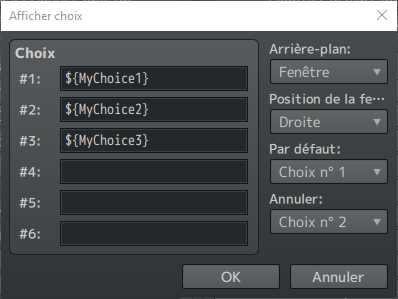
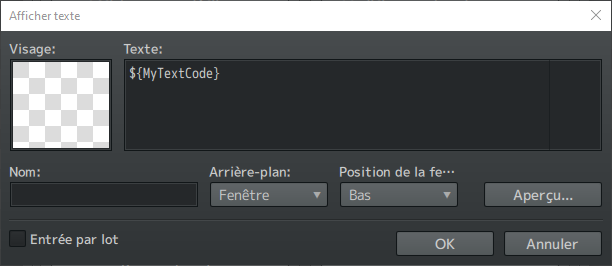
    To translate messages from the "show text" or "show choice" box, you just have to write your text code as you do for the database fields, and put these text codes into one of your language JSON files. What I do is to create a dedicated maps.json file per languages for the text I used in map events... but you're free to do as you want.

    Spoiler
    Show Text
    1717708827026.png

    Show Choice
    1717708879949.png
  2. remainderstudios said:
    Good day, I have a question:

    I understood very well about translating texts from the database and all that but I can't find anywhere how to translate dialogue texts? (message box).

    example:


    View attachment 307603

    the previous text in English, how do I make that same text appear in another language (Portuguese for example)? where do I write that same line of dialogue in that other language? thanks.

    Hi,

    you´ve to put different folders like english, french, german or whatever into the languages-folder of your project.

    1717760207534.png

    Then you need to open the plugin and add the different languages, in my case it´s english (en) and german (de) right now:

    1717760340500.png

    Once it´s done, add JSON-files into your language folder and select them into the plugin within the different languages. I for example just copied the english-scripts into the german-folder and renamed them with "DE" in the end.

    1717760403514.png
    1717760731567.png
    1717760422177.png
    1717760432922.png

    At last you write the plugin-line into the text of the RPG maker:
    1717760924488.png1717760553358.png

    And the text you want to write should look like the following command-line in the JSON-file:

    German-file:
    1717760602519.png
    English-file:
    1717760788969.png


    If you want it to appear into another language, just rewrite the red text and save the same JSON-file with a different name in the other language-folder.

    So in short, you need to creat different language-folder in your gamefiles, you need to copy and rename the JSON-files and just have to translate behind your command-line in the language you want. All you´ve to do now is to set the command-line into the textbox of the RPG-maker, but beware that the text is not too long per line, otherwise it won´t be shown correctly ingame.

    I hope it helps.
  3. Hello @r66r I love your plugin!
    Seems very good and easy to use.

    I have some question about it, how I can call the script to use in conditional branch via event?
    I want to use to specific case, like picture A only available when player use "en" and B using "jp" version.

    Another question, is possible I can setting different font from 1 language?
    i.e when i call number I want to use specif font to all language.
    and we can adjust the font size, outline, and font color.
  4. Hi @rondchild

    Thanks for the message.

    If you want to use conditional branches with scripts, you simply have to use one of these two functions:

    1720206047904.png

    Edit: and for the second question about the custom font, sorry it's not possible at that moment. Maybe I have to find a solution to select the font on the fly. But there are some plugins that ca do that, like Eli Font Manager plugin.
  5. Thanks for the fast respond!
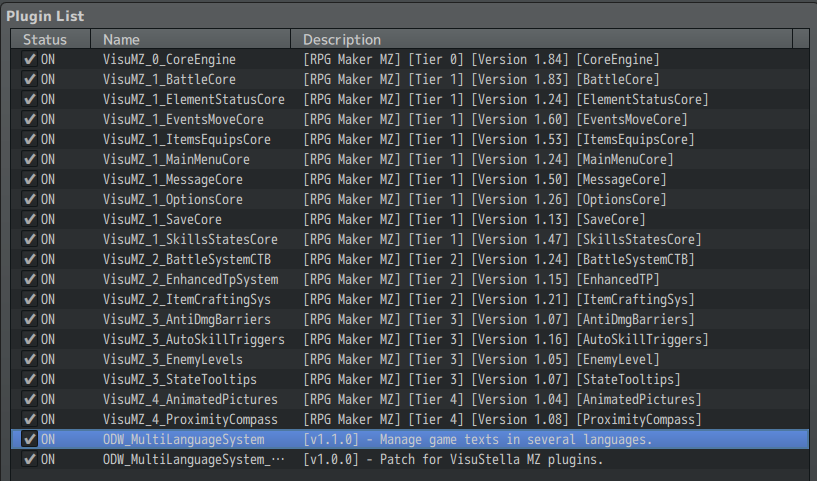
  6. Hi, I have a problem with adding the language swap option into VS_OptionCore (again). This time, the option is added properly (like, it doesn't crash, and displays like expected - other than the language name being absent, and the generic ON/OFF appearing instead), it just refuses to work at all, at most breaking itself by nudging the "OFF" or "ON" straight towards the right edge and removing the icon of the option. I tried following the tutorial included in the VisuStella Patch for this plugin, I tried copying the option from my previous project where it worked, same result. Here is the list of plugins I'm using (I am currently in the process of configuring them, from top to bottom, and I'm currently starting with OptionsCore):Zrzut ekranu 2024-09-11 195132.png
    Here is the option string that worked in previous versions of OptionsCore and MultiLanguageSystem:
    Code
    Code:
    {"Symbol:str":"languageIndex","Icon:num":"20","TextStr:str":"Untitled","TextJS:func":"\"return ODW.MLS.getOption();\"","Accessibility":"","ShowJS:func":"\"// Return Boolean\\nreturn true;\"","EnableJS:func":"\"// Return Boolean\\nreturn true;\"","ExtJS:func":"\"// Return Value\\nreturn 0;\"","Functions":"","DrawJS:func":"\"// Declare Constants\\nconst index = arguments[1];\\nconst title = this.commandName(index);\\nconst rect = this.itemLineRect(index);\\nconst halfWidth = rect.width / 2;\\n// Draw Command Name\\nthis.resetFontSettings();\\nthis.changePaintOpacity(true);\\nthis.drawTextEx(title, rect.x, rect.y, halfWidth, \\\"left\\\");\\n// Draw Status Text\\nthis.drawText(this.statusText(index), rect.x + halfWidth, rect.y, halfWidth, \\\"center\\\");\"","ProcessOkJS:func":"\"// Perform Actions\\nthis.processOk();\"","CursorRightJS:func":"\"// Perform Actions\\nthis.cursorRight();\"","CursorLeftJS:func":"\"// Perform Actions\\nthis.cursorLeft();\"","Data":"","DefaultJS:func":"\"// Declare Constants\\nconst symbol = arguments[1];\\n// Perform Actions\\nConfigManager[symbol] = 0;\"","SaveJS:func":"\"// Declare Constants\\nconst config = arguments[0];\\nconst symbol = arguments[1];\\n\\n// Return Value\\nconfig[symbol] = ConfigManager[symbol];\"","LoadJS:func":"\"// Declare Constants\\nconst config = arguments[0];\\nconst symbol = arguments[1];\\n\\n// Return Value\\nConfigManager[symbol] = config[symbol];\""}
    Here is the option string that I tried making with the new versions, according to the guide:
    Code
    Code:
    {"Symbol:str":"languageIndex","Icon:num":"189","TextStr:str":"","TextJS:func":"\"return ODW.MLS.getOption();\"","Accessibility":"","ShowJS:func":"\"// Return Boolean\\nreturn true;\"","EnableJS:func":"\"// Return Boolean\\nreturn true;\"","ExtJS:func":"\"// Return Value\\nreturn 0;\"","Functions":"","DrawJS:func":"\"// Declare Constants\\nconst symbol = arguments[0];\\nconst index = arguments[1];\\nconst title = this.commandName(index);\\nconst rect = this.itemLineRect(index);\\nconst quarterWidth = rect.width / 4;\\nconst halfWidth = rect.width / 2;\\nconst value = this.getConfigValue(symbol);\\n\\n// Draw Command Name\\nthis.resetFontSettings();\\nthis.changePaintOpacity(true);\\nthis.drawTextEx(title, rect.x, rect.y, halfWidth, \\\"left\\\");\\n\\n// Draw Status Text\\nthis.drawText(this.statusText(index), rect.x + halfWidth, rect.y, halfWidth, \\\"center\\\");\"","ProcessOkJS:func":"\"// Declare Constants\\nconst symbol = arguments[0];\\nconst value = this.getConfigValue(symbol);\\n\\n// Perform Actions\\nthis.processOk();\"","CursorRightJS:func":"\"// Declare Constants\\nconst symbol = arguments[0];\\nconst value = this.getConfigValue(symbol);\\nconst lastValue = value;\\n\\n// Perform Actions\\nthis.cursorRight();\"","CursorLeftJS:func":"\"// Declare Constants\\nconst symbol = arguments[0];\\nconst value = this.getConfigValue(symbol);\\nconst lastValue = value;\\n\\n// Perform Actions\\nthis.cursorLeft();\"","Data":"","DefaultJS:func":"\"// Declare Constants\\nconst config = arguments[0];\\nconst symbol = arguments[1];\\n\\n// Perform Actions\\nConfigManager[symbol] = 0;\"","SaveJS:func":"\"// Declare Constants\\nconst config = arguments[0];\\nconst symbol = arguments[1];\\n\\n// Return Value\\nconfig[symbol] = ConfigManager[symbol];\"","LoadJS:func":"\"// Declare Constants\\nconst config = arguments[0];\\nconst symbol = arguments[1];\\n\\n// Return Value\\nConfigManager[symbol] = config[symbol];\""}

    Both refuse to work now, and either I'm stupid and completely oblivious to how the instructions should be done (especially in terms of the
    Code:
         // Draw Status Text
         this.drawText(this.statusText(index), rect.x + halfWidth, rect.y, halfWidth, "center");
      - JS Process OK:
         // Perform Actions
         this.processOk();
      - JS Cursor Right:
         // Perform Actions
         this.cursorRight();
      - JS Cursor Left:
         // Perform Actions
         this.cursorLeft();
    part) or it just doesn't work in the most recent versions.

    Edit: Here is a barebones project with only the few plugins I mentioned and are needed so that you can test this yourself too:

    BTW, I noticed that MessageCore introduced its own language translation option, but I prefer this plugin - not only I have used it ever since I started using plugins in RPGMMZ, but also this plugin uses a .json format (which for me looks way more elegant) instead of MessageCore's .csv. Especially as this plugin nicely seperates languages into subfolders and allows me to seperate strings into seperate files, instead of clumping everything together into a single .csv.
  7. Hi @Jacie0krece

    I'll take the time to look into it as soon as my IRL situation allows. In the meantime, have you tried using version 1.0.4 of my plugin to see if you have the same problem? This is to check if it comes from my update to version 1.1.0 or if it comes from the VS plugin update instead. Is there any message in the console (F8) about this problem?

    Otherwise, the VS plugin offers default options. Have you looked at how they're scripted? Are there any changes from the way this was configured before? Note that the part of the code you highlighted was based on what the VS plugin offered for basic options like Always Dash => ON OFF.

    On a side note, thanks for the positive feedback on my plugin. :LZSsmile:
  8. I have made a new project, this time with 1.0.4 of this plugin (and the same version of OptionsCore), and yeah, it works perfectly fine on that version. However, I have a problem - when I try downgrading the plugin in my game, it refuses to load, with an error about an "unexpected token u in json". Well, at least I don't have to really worry about the language option for now, as I'm only making the English texts for now, and I'll translate all that later, when my game is largely complete.
  9. Thanks for the report. I'll check the issue with the v1.1.0 and try to resolve it. Maybe it's because of the json error that it isn't working as expected. Stay tuned... but happy you could find a workaround with the v1.0.4.
  10. The problem with that unexpected token u in json only happens if I try downgrading to 1.0.4 in that project, even after removing the 1.1.0 version of the plugin and replacing all the related settings in the 1.1.0 version.
    Here is the detailed error from the console:

    Code:
    rmmz_managers.js:2036 SyntaxError: Unexpected token u in JSON at position 0
        at JSON.parse (<anonymous>)
        at Object.$.loadDatabase (ODW_MultiLanguageSystem.js:522)
        at Scene_Boot.start (ODW_MultiLanguageSystem.js:841)
        at Function.SceneManager.updateScene (rmmz_managers.js:2107)
        at Function.SceneManager.updateMain (rmmz_managers.js:2063)
        at Function.SceneManager.update (rmmz_managers.js:1942)
        at Function.Graphics._onTick (rmmz_core.js:811)
        at TickerListener.emit (pixi.js:9093)
        at Ticker.update (pixi.js:9548)
        at Ticker._tick (pixi.js:9298)

    Still, I don't need the language option for right now, so I can wait until it's fixed. (and the bug with 1.1.0 not working with OptionsCore is even in an project where I managed to downgrade to 1.0.4 without issues)
  11. Jacie0krece said:
    The problem with that unexpected token u in json only happens if I try downgrading to 1.0.4 in that project, even after removing the 1.1.0 version of the plugin and replacing all the related settings in the 1.1.0 version.
    Here is the detailed error from the console:

    Code:
    rmmz_managers.js:2036 SyntaxError: Unexpected token u in JSON at position 0
        at JSON.parse (<anonymous>)
        at Object.$.loadDatabase (ODW_MultiLanguageSystem.js:522)
        at Scene_Boot.start (ODW_MultiLanguageSystem.js:841)
        at Function.SceneManager.updateScene (rmmz_managers.js:2107)
        at Function.SceneManager.updateMain (rmmz_managers.js:2063)
        at Function.SceneManager.update (rmmz_managers.js:1942)
        at Function.Graphics._onTick (rmmz_core.js:811)
        at TickerListener.emit (pixi.js:9093)
        at Ticker.update (pixi.js:9548)
        at Ticker._tick (pixi.js:9298)

    Still, I don't need the language option for right now, so I can wait until it's fixed. (and the bug with 1.1.0 not working with OptionsCore is even in an project where I managed to downgrade to 1.0.4 without issues)
    Sorry for the long delay in responding. Regarding the above issue, please delete the config.rmmzsave file after you've reverted to v1.0.4 and made sure you've updated the plugin settings. It'll work afterwards.

    Spoiler
    1726999039446.png

    With regard to the compatibility of v1.1.0 with the VS Options Core plugin, the code indicated in the help doesn't seem to work as is. I'm going to analyze the case and propose a fix of this help to make it work. Note that this is not a bug in my plugins, just the code to be put in the VS Options Core plugin settings that need to be changed.

    Edit @Jacie0krece: since v1.1.0, you had to use the following symbol => mlsLanguageIndex. I had to contextualize the configuration parameter to avoid incompatibilities with other plugins.

    Spoiler
    1727081919450.png
  12. r66r said:
    Sorry for the long delay in responding. Regarding the above issue, please delete the config.rmmzsave file after you've reverted to v1.0.4 and made sure you've updated the plugin settings. It'll work afterwards.

    Spoiler
    View attachment 318389

    With regard to the compatibility of v1.1.0 with the VS Options Core plugin, the code indicated in the help doesn't seem to work as is. I'm going to analyze the case and propose a fix of this help to make it work. Note that this is not a bug in my plugins, just the code to be put in the VS Options Core plugin settings that need to be changed.

    Edit @Jacie0krece: since v1.1.0, you had to use the following symbol => mlsLanguageIndex. I had to contextualize the configuration parameter to avoid incompatibilities with other plugins.

    Spoiler
    View attachment 318477
    The change to mlsLanguageIndex worked, and now the option is working as it should (well, excluding the fact that I currently have only English defined :rswt). Thank you for help!
  13. Hello! very nice plugin, how i do a line break?
  14. Hi @Black Mamba

    Simply use "\n" where you want to break the line.

    Code:
    {
    "code": "Text line 1\nText line 2"
    }
  15. Hello! Are there any plans to add plugin commands or a similar feature that would allow to change the language without going through the settings? It would also be great to have a popup window at the game's startup for language selection. I used this plugin to add multiple languages into my game, but most of the players never noticed that they can change it. :kaoback:

  16. Hi @babagaga404

    Unfortunately, I don't have any plans for that at the moment, my focus being on creating a collection of several new plugins for my future game development.

    I've already thought about adding plugin commands, but the context is too random to change the language on the fly... especially with a custom ui in game.

    In my opinion, the most feasible solution would be to add a language selection scene between the splash screen and the title scene. However, I still need to think hard about a generic solution that would be suitable for the majority while avoiding complexity.

    On a side note, my future plugin allowing the use of a map as a title scene, instead of the default static title scene, would meet this need by programming events or picture buttons to change language via script calls. So the question for me is where to put my development time.
  17. hey @r66r , sup?

    do you know why when we are using choices with IgnisTextDatabase plugin, have a limite of letters that we can use? I mean, if I use more than 13 letters (in choices), the word become disform. how can we fix that?
  18. Hi @Napalm

    In principle, I don't support other plugins, although there is a dedicated thread for the Ignis Text Database plugin.

    However, the problem is quite simple and is not related to the plugin, but to the way RMMZ works. In this case, the width of the choice item is calculated from the width of the text supplied at the time of its creation. In your case, the supplied text ${...} must be 13 characters long, which means that the “translated” text, if larger, is simply condensed into the available space. As a test, try setting ${..} text to 20 characters or more, and the “translated” text should display better.

    See also this post for an example of what I mean: https://forums.rpgmakerweb.com/inde...ti-language-system-plugin.141442/post-1383954
  19. Hi @babagaga404

    I made a try to implement the language selection at the game startup. You can test it through my jam game here. However, as some player reported to me, I have to optimize the popup to better explain how to select a language.

    Anyway, can you tell me if it's that kind of popup you wish to have for your games? If yes, I think I'll be able to release a new version of the multi-language plugin before X-mas with that feature.

    Thanks for your feedback.
  20. r66r said:
    Hi @babagaga404

    I made a try to implement the language selection at the game startup. You can test it through my jam game here. However, as some player reported to me, I have to optimize the popup to better explain how to select a language.

    Anyway, can you tell me if it's that kind of popup you wish to have for your games? If yes, I think I'll be able to release a new version of the multi-language plugin before X-mas with that feature.

    Thanks for your feedback.
    Hello!
    This is the type of popup menu I was hoping for! It’s a bit unintuitive, but I believe that adding some explanations via parallax for example will resolve this. I think it would be better if that popup menu was more like a list, so player could see all available languages at once, but I guess that might be a lot more harder to implement. In any case, thank you for your hard work!