OcRam - Passages plugin (MZ/MV)

● ARCHIVED · READ-ONLY
Started by OcRam 528 posts Page 14 of 27 View original ↗
  1. Valiumator said:
    It still shows the same "undefined is not a function".
    I took a screenshot of this, I thought it might help:
    View attachment 129882
    Thank you for the report!

    EDIT: Reason was that engine couldn't find webgl rendering

    I will fix this to the next version.
  2. Heyo @OcRam

    I ran into an issue, I'm using Yanfly's event spawner and it seems every time I spawn an event in it automatically gets placed on the highest floor - on the same layer as Region 19 tiles (above the player). Reminded me of the issue I had with 'spawning' in a new follower when adding player 2 (what I did for that is below, per your recommendation).

    Spoiler
    1580066252071.png

    So, I tried adding the plugin command and various different versions of it to force the newly spawned event onto the lower floor, but I wasn't able to get it to work. Probably because the ID is unknown and it requires using
    Code:
     floor_level $gameMap.LastSpawnedEventID() low

    Do you have any suggestions to make it work?

    Thank you for your time.
  3. Hello!

    I've got another question:

    Is it possible to still keep events working that are on the same field as region 19?

    To be concrete:
    I'm using your plugin to make "sideway-doors", so I can walk under the wall only at a specific tile from left and right:
    door.png

    This works really good.
    However, I'd like to block the way at first and only release it after pressing "Enter".

    I tried several things but just didn't get it to work.
    A blocking event is ignored by the region, so this doesn't work.

    Do you have any suggestions how this could be accomplished?

    Greetings,
    Kirimoar
  4. DeadlyEssence01 said:
    Heyo @OcRam

    I ran into an issue, I'm using Yanfly's event spawner and it seems every time I spawn an event in it automatically gets placed on the highest floor - on the same layer as Region 19 tiles (above the player). Reminded me of the issue I had with 'spawning' in a new follower when adding player 2 (what I did for that is below, per your recommendation).

    Spoiler
    View attachment 132233

    So, I tried adding the plugin command and various different versions of it to force the newly spawned event onto the lower floor, but I wasn't able to get it to work. Probably because the ID is unknown and it requires using
    Code:
     floor_level $gameMap.LastSpawnedEventID() low

    Do you have any suggestions to make it work?

    Thank you for your time.
    Thank you for the message,

    There was similar support case with Galvs spawner and it was fixed like this: $gameMap._events[$gameMap._lastSpawnEventId]._higherLevel = false;

    Kirimoar said:
    Hello!

    I've got another question:

    Is it possible to still keep events working that are on the same field as region 19?

    To be concrete:
    I'm using your plugin to make "sideway-doors", so I can walk under the wall only at a specific tile from left and right:
    View attachment 132296

    This works really good.
    However, I'd like to block the way at first and only release it after pressing "Enter".

    I tried several things but just didn't get it to work.
    A blocking event is ignored by the region, so this doesn't work.

    Do you have any suggestions how this could be accomplished?

    Greetings,
    Kirimoar
    Thank you for the message,

    I would use event comment line: <trigger_always> or <lower> to assign blocking event to same floor level with player.
  5. Hello again,

    Wow, I'm feeling stupid now...

    I already tried it with that commands - but I thought they have to be written into the "Notes"-Field on the top of the event.

    However - it has to be written as a comment on the event page (as stated in the description, definitely my mistake...).

    Thank you so much, it works perfectly :thumbsup-right:
  6. I had a similar issue with Yanfly event spawner and fixed the issue with $gameMap._events[$gameMap.LastSpawnedEventID()]._higherLevel = false;
  7. Latest version - (v4.05 released 2020/02/10):
    • OcRam_Core v1.02 added (and is required)
    • Game Over bug fixed (didn't clear cache properly)
    • Fixed fallback from 'WebGL' mode to 'Canvas' mode

      NOTE: OcRam_Core v1.02 is included in this patch - IF you use my other plugins, copy and paste core script to the begining of the first (top most) imported plugin.
      OcRam core section
      ocram_core.png
  8. OcRam said:
    • OcRam_Core v1.02 added (and is required)
    After testing the latest version in both my project and a new test project, they both give the "same" error.

    ReferenceError: $twh50_OC is not defined

    The issue is related to line 211 in this section.

    Sprite_Character_OC.prototype.updatePosition = function () {
    this.x = this._character._realX * OcRam.twh[0] + $twh50_OC[0];
    this.y = this._character._realY * OcRam.twh[1] + OcRam.twh[1] - this._character.jumpHeight();
    if (!this._character._isObjectCharacter) this.y -= 6;
    if (this._character._altitude) this.y -= this._character._altitude;
    this.z = this._character.screenZ();
    };
  9. Espilonarge said:
    After testing the latest version in both my project and a new test project, they both give the "same" error.


    The issue is related to line 211 in this section.
    Thank you for the super fast report @Espilonarge ,

    I have now hotfixed v4.05 (version is same, but I added credits for you)

    Also credits for @Valiumator and @NikkiKaji for reports!
  10. Hello. Has anyone had success in getting this Passages plugin to play nicely with pixel movement and followers? I use SAN's AnalogMove Plugin and regardless of region, when using Passages, followers are always drawn on top of tiles. This plugin is wonderful and it would be great to have these working well together.
  11. Secondarily, is it possible to only draw a B tile above the player and not the A tile, when both are used in mapping? Using default setup and region 19, I get this result when tiles are not perfectly square.

    This is the region setup.
  12. OMGerm said:
    Hello. Has anyone had success in getting this Passages plugin to play nicely with pixel movement and followers? I use SAN's AnalogMove Plugin and regardless of region, when using Passages, followers are always drawn on top of tiles. This plugin is wonderful and it would be great to have these working well together.
    OMGerm said:
    Secondarily, is it possible to only draw a B tile above the player and not the A tile, when both are used in mapping? Using default setup and region 19, I get this result when tiles are not perfectly square.

    This is the region setup.
    Thank you for the messages,

    I have only tested this with Galv's pixel movement and If I remember correct it should also work with Altimit Pixel Movement, I'll check SAN AnalogMove if there's some workaround.

    Use region Id 18 (if using default regions) for B-E tiles. 19 are ment for A tiles only.
  13. Region 18 worked great, thank you for the suggestion! And thanks for taking a look at AnalogMove, I really appreciate that. Here are additional pictures:

    Region Setup: These are regions used with default settings for Passages plugin.

    OcRam_Passages ON: You can see the follower having tiles drawn above him. SAN_AnalogMove is ON.

    OcRam_Passages OFF: You can see the tiles drawn normally. SAN_AnalogMove is ON.

    SAN_AnalogMove OFF: You can see the tiles drawn normally. OcRam_Passages is ON.

    It's almost as if the followers are not receiving the fact that we're on an upper level. I would assume similar behavior when dragging followers through "hidden paths."
  14. I hate having to ask for help when I feel like the answer is so obvious. But I've gone through all 14 pages here, and also tried the <lower> comment etc. But for the life of me I cannot get this to work.

    So, in simplest form. I have a fence gate that is two tiles high, and what I want is for my character to not be able to go through the gate until I hit enter, then I want it to open and for them to walk through.

    With this set up:
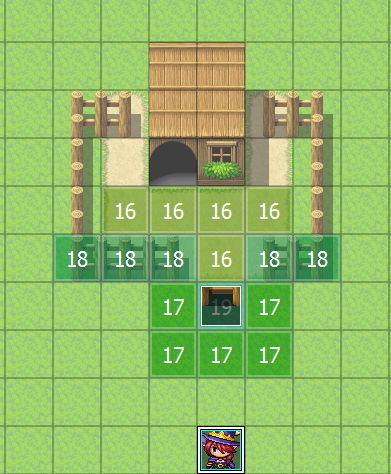
    1.png
    I have managed to do EVERYTHING on my list...minus one thing...the character cannot walk through the gate! I have put <lower> comment inside the gate event I have tried <trigger_always> but nothing works.

    I think it's because the gate is two blocks high. I'll add more screenshots to help give as much information as I can.

    To whoever can help me thank you and if it can't be done or I'm doing something wrong. I apologies profoundly for wasting everyone's time. I'm just so frustrated. OTL;;;

    Edit: I don't want the gate to be an automatic event, where you hit enter and it forces your character through and then automatically closes the gate. How I have my event set is you open the gate, then your character can walk all around, and then go back down and close the gate whenever they like.

    My issue is just with this plugin it does great with making the fence/gate appear in front of the character and behind the character when they enter or exit the gated area. My issue is that I CAN have the gate stop the player from entering when it is closed, but when I activate the event which opens the gate...my player can't walk through. : (
  15. Adira said:
    -snip-
    View attachment 136287
    -snip-
    You may need to re-read the instructions regarding how this plugin works. I can at least help solve your primary issue though.

    1) Always place a "Through On" at the start of a door/gate event and "Through Off" at the end of it otherwise it will ~always prevent~ your character from ever being able to walk ~through~ the door/event (the engine doesn't automatically "know" how to do this unless you "command" it do it). It's sort of a Common-Mistakes-101-Of-Making-RPG-Games scenario (it sometimes gets the better of us).

    1583719688921.png

    2) If you're using the default RTP tilesets that comes with MV, the fences are a part of A2 which RegionID 18 (Cover Tiles) only affects tilesets B-through-E that are placed on A1-through-A5 tilesets. In an odd sense, you shouldn't have to use ~any~ regions to do any of this.

    What you would need is to find a plugin that can give automatic adjustment to showing if a fence is in front or behind a player/event (equivalent to automatically switching between ★ and ○ depending on the Y-placement of player/events).
  16. Espilonarge said:
    What you would need is to find a plugin that can give automatic adjustment to showing if a fence is in front or behind a player/event (equivalent to automatically switching between ★ and ○ depending on the Y-placement of player/events).

    First of thank you for taking the time to reply! I didn't want my character to go through automatically but rather be able to open and close the gate at will and move around freely. However, I do feel like you are right, that I should look for another plugin instead of trying to force this one to do what I want. Sorry for wasting everyone's time, please have a wonderful day everyone.

    And I also felt that I was following the instructions wrong too. I'm not sure why I struggle when everything I need is there, but I just find understanding things no matter how many times I read them is an issue in all aspects of my life. Thank you again though for taking the time to try and help me it means a lot.
  17. I'm sorry to continue with questions/issues, but in addition to my ask regarding SAN_AnalogMove I seem to have the same problem as another user on page 10 when using tall sprites. This is in a clean (fresh) project:
    sEDcOez.jpg
    You can see the followers being drawn on top of and underneath the other party members when changing levels (region 16 and 17). Can anyone confirm this plugin working with tall sprites?
  18. OMGerm said:
    I'm sorry to continue with questions/issues, but in addition to my ask regarding SAN_AnalogMove I seem to have the same problem as another user on page 10 when using tall sprites. This is in a clean (fresh) project:
    sEDcOez.jpg
    You can see the followers being drawn on top of and underneath the other party members when changing levels (region 16 and 17). Can anyone confirm this plugin working with tall sprites?
    Thank you for the message,

    I took a look at the SAN AnalogMove -plugin and there's no easy way to get it to work. I was wondering if it's written for RMMV 1.5.x version? But I'll get back to you if I get to work (not so easy way :) ).

    Tall sprites might cause some issues (even without this plugin - for example star (*) tiles).

    I have solved this issue with on touch events and removed region ids. Events must have plugin commands "floor_level -1 high" (acting as region id 17) and "floor_level -1 low" (acting as region id 16). But be aware that events must be handled also "manually" if this method is used.

    As a conclusion - I'll add new plugin parameter "Use tall sprites" to counter this issue. It will change followers floor level when ever player floor level is changed. Until next time!
  19. OcRam said:
    Thank you for the message,

    I took a look at the SAN AnalogMove -plugin and there's no easy way to get it to work. I was wondering if it's written for RMMV 1.5.x version? But I'll get back to you if I get to work (not so easy way :) ).

    Tall sprites might cause some issues (even without this plugin - for example star (*) tiles).

    I have solved this issue with on touch events and removed region ids. Events must have plugin commands "floor_level -1 high" (acting as region id 17) and "floor_level -1 low" (acting as region id 16). But be aware that events must be handled also "manually" if this method is used.

    As a conclusion - I'll add new plugin parameter "Use tall sprites" to counter this issue. It will change followers floor level when ever player floor level is changed. Until next time!

    Hello and thank you for taking the time to investigate these and provide a response to me. You have made a wonderful tool. Your suggestion to manually edit the floor level via "player touch" events fixes the issue with tall sprites. Amazingly enough, this also appears to fix part of the issue with SAN_AnalogMove. Forcing the level change for followers seems to be a step in the right direction, though the lower level appears to be working incorrectly. I have a feeling that once you implement this toggle, the AnalogMove compatibility with followers will be close to complete.

    The problems I see are with interactions when moving from the "player touch" event for "floor_level -1 low" to then moving under a bridge (region 18), etc. does cause additional issues. I'm guessing your toggle will account for all regions, but this might be important for you to know.

    Mx4ZjMo.jpg

    Further testing shows that the following setup works, with a single frame of graphical error before the "player touch" registers. It's nearly perfect, allows for the lower level to register with the player/follower, and seems to be minimally invasive, though events will have to be "manually" moved levels as well. Hopefully this is helpful to your work.

    GK8Zozo.png
  20. Latest version - (v4.06 released 2020/03/14):
    • OcRam core v1.04 (requirement for all of my latest plugins)
      ...And prepares this plugin for OcRam demo project

    • Now compatible with OcRam_Layers (v2.01)!
      YES! You may now have passages even if you do parallax mapping!

    • New plugin parameter "Use tall sprites" (credits to @OMGerm for reporting this issue!)
      But this alone won't guarantee tall sprites to be 'glitchless' you also need to design your maps for tall characters.