Game & Map Screenshots 12

● ARCHIVED · READ-ONLY
Started by slimmmeiske2 1772 posts Page 77 of 89 View original ↗
  1. Lomaxient said:
    3D to 2D REVOLUTION!! - please watch (still experimenting before creating a proper tutorial and assets)

    I have felt a bit beat down endlessly mapping in 2D. Pixel art is such a chore. I'm a very visually focused person and I'm just not feeling the results of many of my maps. While I don't have any ambition to create a 3D game, I've always been a 3D artist. It's high time I bit the bullet and polished my 3D skills to their former glory. The thought of creating every asset in 3D was too daunting, especially given the amount of work I've put into 2D level creation. Working in 2D, the limitations on creative freedom & the time consumption are just too much to bear.

    I hope this isn't too out of place. It's almost a tutorial, but this is the very early days of a new approach. This could be the start of something wonderful. It's just a seed. I hope you can imagine where this might go. There's some wrong info in this. I'm still working things out.

    I know this looks weird and it's technical, long & maybe boring. I really think I'm on to something special though. This is the seed of something so good. It works, it's free. I hope to give the project away as an asset, but I'm still ironing out the kinks. It's gonna be well wicked!


    This is very interesting. I like to use a lot of 45+25 degree angles on the sprites I draw, and it can really make working out the orthogonal perspective a headache. This is definitely making me consider experimenting with blender to do a bit of a hybrid 3D/2D approach. I'd still draw it, but even having a model reference to trace would help with some things a lot.
  2. Sharing some level images from my project I’m working on. They’re mostly done. Any constructive feedback is appreciated.

    Thanks!

    Spoiler
    IMG_6880.jpegIMG_6881.jpegIMG_6882.jpeg
  3. @Manji297 I'm having some difficulty with perspective. It's perhaps most obvious in your third image. To my eye that looks much more like a 2d platformer perspective than RM's 2.5d perspective. But perhaps that's what you're aiming for?
  4. @Kes I’m aiming for 2.5D. Maybe if I include images of the characters on the map it will be clearer. I just shared the parallax maps of the scenes. Specifically, the shadow of the trees are parallax. The rest is default engine.

    Edit: here are images with character walking sprites to hopefully better convey the scenes. They look so small with the full map.

    Maybe screen shots for the game play would work better.

    Spoiler
    IMG_6886.jpeg
    IMG_6885.jpegIMG_6884.jpeg
  5. @Manji297 The maps call to mind some of the redwood forest I have seen (not that this is one). Perhaps taking a look at some pictures taken from the hiker's perspective can help you spot anything you feel you may like to add.

    Mildly Unrelated Redwood Forest Facts
    Redwood forests have multiple microclimates within the trees themselves. Due to their towering height, there are some forest creatures that only live within certain parts of the canopy. They are also called cloud forests, as they generate their own clouds.
  6. Thorn_Bee said:
    @Manji297 The maps call to mind some of the redwood forest I have seen (not that this is one). Perhaps taking a look at some pictures taken from the hiker's perspective can help you spot anything you feel you may like to add.

    Mildly Unrelated Redwood Forest Facts
    Redwood forests have multiple microclimates within the trees themselves. Due to their towering height, there are some forest creatures that only live within certain parts of the canopy. They are also called cloud forests, as they generate their own clouds.
    I didn’t know that! That is so cool. And yes, it is trying to imitate a redwood forest. I’ll look at some hiker photos! Thanks @Thorn_Bee
    .
  7. Manji297, I'm a little confused about what I'm seeing, but I have to say you really have your own style and I like that.
  8. @Saneterre thanks for saying you like that I have my own style. the pictures being confusing seems to be a common theme for the feedback. I’ll have to think about that. I’m not sure if it is my style, or if using a gif of game play would allow for better feedback regarding the levels. I have no clue how to make them, but with my limited brain power I’m sure I can figure it out

    Thanks!
  9. I'm sure it's less confusing while in-game
  10. emcautley_ said:
    This is very interesting. I like to use a lot of 45+25 degree angles on the sprites I draw, and it can really make working out the orthogonal perspective a headache. This is definitely making me consider experimenting with blender to do a bit of a hybrid 3D/2D approach. I'd still draw it, but even having a model reference to trace would help with some things a lot.
    I was and still am tempted to delete the post for various reasons. There's a number of issues that I ran into while experimenting in Blender. I'll give you a list of the drawbacks.


    1. 2D pixel art graphics are crisp and clean. A Blender render always looks blurry next to a 2D sprite.
    2. The RPG maker perspective is more queer than I first thought. Small objects are not elongated or sheered like ground planes are. So essentially small objects need to be positioned around an elongated map, then parented to a plane that gets rotated 45 degrees on the X axis. While I have a method for this, it gets a bit fiddly.
    3. The sheer volume of assets created for the RPG maker style is mountainous. The thought of recreating even a portion of them in 3D defeated me.
    4. The polygon count and the number of high quality PBR materials could very quickly become overwhelming and resource draining. If you take the 3D route I would largely avoid PBR materials.

    I suppose if you're good with Blender and unlike me, you're not a year deep into your project, it may still be worth pursuing. I'm still convinced that it can be done & has certain advantages, but personally I'm reverting back to the tedium of 2D pixel art.
  11. Playing around in a new tileset:
    Cavern.jpg
  12. @Nicke I like the tileset. I was wondering, though, if it came with (or you could edit in) an extra tile going down into the depths. By this I mean that you have two areas where the floor opens up into a large hole, but the tiles, especially the front one, don't give much impression of depth to the hole because they don't fade down.

    I don't think I've explained that very well. Here is an example. I am not suggesting that you need as many down tiles as here because needs vary. It's just an illustration to augment my poor word description.

    1733125235697.png
  13. Lomaxient said:
    I was and still am tempted to delete the post for various reasons. There's a number of issues that I ran into while experimenting in Blender. I'll give you a list of the drawbacks.


    1. 2D pixel art graphics are crisp and clean. A Blender render always looks blurry next to a 2D sprite.
    2. The RPG maker perspective is more queer than I first thought. Small objects are not elongated or sheered like ground planes are. So essentially small objects need to be positioned around an elongated map, then parented to a plane that gets rotated 45 degrees on the X axis. While I have a method for this, it gets a bit fiddly.
    3. The sheer volume of assets created for the RPG maker style is mountainous. The thought of recreating even a portion of them in 3D defeated me.
    4. The polygon count and the number of high quality PBR materials could very quickly become overwhelming and resource draining. If you take the 3D route I would largely avoid PBR materials.

    I suppose if you're good with Blender and unlike me, you're not a year deep into your project, it may still be worth pursuing. I'm still convinced that it can be done & has certain advantages, but personally I'm reverting back to the tedium of 2D pixel art.
    Unfortunately, experimenting myself, I might be coming to the same conclusion.

    I agree that 2D pixel art and blender graphics don't match well, but that wasn't an issue for me. My plan was to make basic 3D models in blender and essentially "trace" them into hand-drawn art, so I'd get all the benefits of them matching the style of my existing assets, while also not needing to do a whole bunch of perspective-planning. Even with the time spent making them in Blender, for particular assets, like vehicles or complicated mechanical pieces, this might save a lot of time (especially if I took the same asset and draw it from multiple angles).

    Unfortunately, although I can see Blender has pretty simple orthogonal camera options that make quickly turning a shape to isometric easy, typical RPG Maker projects (my own concluded) aren't in isometric perspective. They're in what I think is called oblique-top down. You can see in my screenshot, my attempt at making Blender's camera work. Although it can mirror RPG Makers top-down oblique perspective with simple settings, it doesn't really work properly. The cube is tilted and shortened due to the angle of the camera. To truly fit RPG Maker, it should be showing both the front and top's true square size.

    Sadly for now, I can't find a way to get this type of perspective working in the program.
  14. Was trying to make something with some tile sets I picked up but ended up just throwing a map together with the basic assets after getting a bit frustrated lol

    Gave me some pretty good inspiration for a project now though.

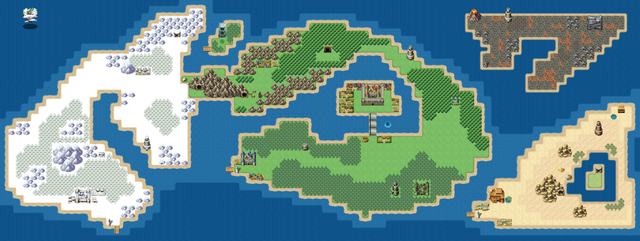
    World Map
  15. @megonaught486 Could I suggest that you make your map just a few tiles bigger so that you can give an irregular coastline to those continents that are on the edges? It looks a bit odd to have everything ending with dead straight lines. An alternative (or addition) would be to make indents in the coastline as a way of breaking up those straight lines.
  16. Kes said:
    @megonaught486 Could I suggest that you make your map just a few tiles bigger so that you can give an irregular coastline to those continents that are on the edges? It looks a bit odd to have everything ending with dead straight lines. An alternative (or addition) would be to make indents in the coastline as a way of breaking up those straight lines.
    That's actually a great suggestion Kes!

    I was so focused on the center I completely missed that haha, it really makes it look off lol.
  17. emcautley_ said:
    Although it can mirror RPG Makers top-down oblique perspective with simple settings, it doesn't really work properly. The cube is tilted and shortened due to the angle of the camera. To truly fit RPG Maker, it should be showing both the front and top's true square size.

    I don't at all want to push you down the 3D route, because I've found multiple issues with the perspective in Blender, but the problem you're describing here is the exact issue that I addressed in the video I posted on page 77 of this thread (Posted November 21st).

    The real pain though is that while land and houses are not foreshortened, individual, smaller object like barrels, flowers, trees and crates are.

    Anyway the trick is to set up a lattice modifier to stretch land and houses and then tilt the scene by 45 degrees towards the camera.
  18. Crater Map
    Here is a map of a crater that I've been working on just for fun to get back into the swing of things and mapping practice. I haven't added any of the trees, bush, treasure, or npc elements yet. This is using Garakuta's converted and modified 2k/2k3 tiles for MZ.

    1734884403423.png

    Additional disclaimer/credit, if the map looks familiar then you probably saw it in an old seemingly abandoned project on these forums from the MV-era called Clarity's Edge that was done in MV's RTP as I was trying to recreate it in the 2k/2k3 RTP as part of the mapping practice with the tiles.

    Lomaxient said:
    I don't at all want to push you down the 3D route, because I've found multiple issues with the perspective in Blender, but the problem you're describing here is the exact issue that I addressed in the video I posted on page 77 of this thread (Posted November 21st).

    The real pain though is that while land and houses are not foreshortened, individual, smaller object like barrels, flowers, trees and crates are.

    Anyway the trick is to set up a lattice modifier to stretch land and houses and then tilt the scene by 45 degrees towards the camera.
    After watching your video through a different source (aka google) and playing around with it... I think the blurriness comes from the Anti-Aliasing. There are a few videos about turning 3d animated models into 2d spritesheets that I watched, and the characters didn't seem to come out as Anti-Aliased, but they are created by writing a python code to export them so I wonder if there is more potential that way if combined with your perspective. Made a python code to turn off the anti-aliasing or use something like nearest neighbor... regardless I think there will still be touch-up work on them. Also, it seems like they often use low-poly models for this method.
  19. I'm struggling to make my city scenes look fuller and more varied. The below is an example. There are fountain and smoke animations and NPCs, but I'm curious if anyone has ideas for other objects that can be interspersed around to fill up empty spaces and all visual interest. For lore reasons, there is no night in this town, so lampposts aren't needed (sadly, as they are a good space filler!)
    !FountainSq.png
  20. @Ophiucus Games
    Would there be a couple of benches in that park? Birds, both flying around and pecking at the ground if there are no dogs or cats in the area. Would one or more of the houses have flower pots on the ground around the building?

    I noticed that 2 of your paving slabs in front of the big house are a tile down from the wall, unlike all the others.