Game & Map Screenshots 12

● ARCHIVED · READ-ONLY
Started by slimmmeiske2 1772 posts Page 75 of 89 View original ↗
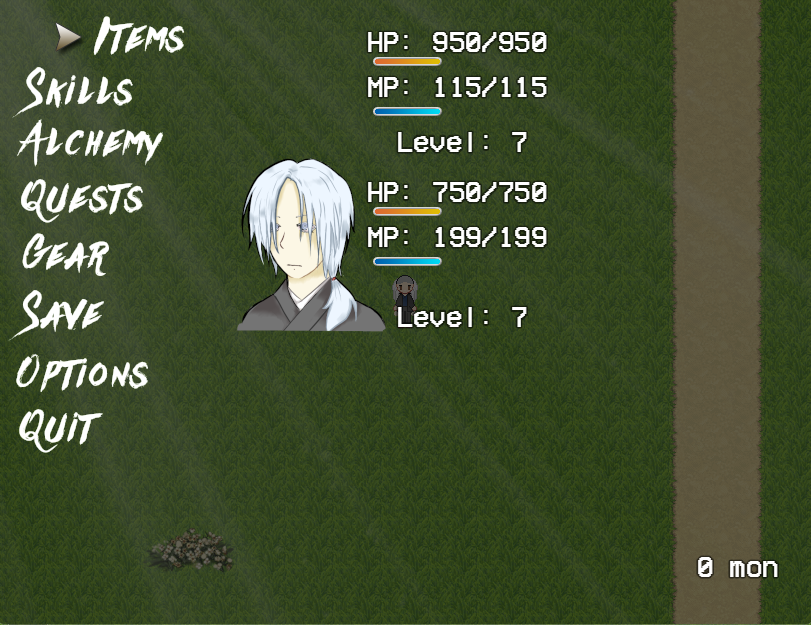
  1. I'm doing a picture menu in the style of the default Maker menus, just for an extra touch of customization, and it's turning out pretty okay-ish? I don't know, critique is greatly appreciated. No face for the other character yet, so I just kinda left it blank for now. Eventing this was a NIGHTMARE, but most of it is done.

    Cursor and bars are from Moghunter's "Classic" pack :3
    1728550397417.png
  2. @StardustSailor I think it is coming along very nicely. And I know the challenges of making custom menus.

    Personally, I would recommend moving the character portraits and information over more to the right. When you move to other menu options down the list and they push to the right, the words are going to be very close to the portraits.

    I would also ask myself if the menu information needs to be quite so big. It certainly doesn't hurt anything so it isn't a big deal as long as you have the space you need and it doesn't look too crowded on the screen.

    I like your font choice too for the list of menu options.
  3. StardustSailor said:
    I don't know, critique is greatly appreciated
    One thing that I find a bit weird is the contrast between the high-res font for the options and the pixel-y font for the stats. Either would look fine on its own, but they just don't fit together for me. Maybe consider a smoother font for the stats?
  4. ZombieKidzRule said:
    @StardustSailor I think it is coming along very nicely. And I know the challenges of making custom menus.

    Personally, I would recommend moving the character portraits and information over more to the right. When you move to other menu options down the list and they push to the right, the words are going to be very close to the portraits.

    I would also ask myself if the menu information needs to be quite so big. It certainly doesn't hurt anything so it isn't a big deal as long as you have the space you need and it doesn't look too crowded on the screen.

    I like your font choice too for the list of menu options.
    Thank you so much for the tips! I'm very glad it's looking okay. You're right, I'll definitely move the character info a bit to the right, especially since the right part of the screen is looking pretty empty right now. Thanks again! <3

    Mac15001900 said:
    One thing that I find a bit weird is the contrast between the high-res font for the options and the pixel-y font for the stats. Either would look fine on its own, but they just don't fit together for me. Maybe consider a smoother font for the stats?
    Unfortunately, the plugin I'm using to display the variables uses the default GameFont. I tried the fancier fonts, but they really don't look good or readable when there's more text... I'll see what I can do about that. Thank you so much for the tip!
  5. CREATING A TREE FACTORY.

    Something a little different. This is all about trees and forests, mainly for parallax mappers and people that want to create a game with with a fairly typical RPG style.

    The main reason for posting this is to identify the asset sources included at 6:20 mins in. I hope to create a "tree/forest creation tool" for others to use. The depth of that tool depends on how many of the original assets I can identify.

    I hope the presentation isn't too sloppy, rambling and long.
  6. Still haven't quite finished my tree factory thingy, but here's a foresty bit that I built. Gonna add something like 50 to 100 pre-made trees to the builder project.
    Still gotta find out where the original tree leaves and trunks originated from if I'm to post it as an asset for communal use.
    forest.jpg

    P.S. in the spoiler below you can see the progress of the full tree making factory (where it's at so far).
    There's now more than 20 different trunks, 6 leaf types, extra branches, independent shadows, + flowers and fruit (not shown in the demo).
    Tree Factory
    Tree Factory 1.jpg

    EDIT: As it turns out the vast majority of this of this work originates from PandaMaru. She does not allow mods of her work to be reposted, so unless I can contact her to get the necessary permissions, the toolkit will not be made publicly available anywhere. I've also heavily watermarked the spoiler to ensure her work cannot be stolen.

    It is my intention to give back to the community, not abuse it. My intention is now to gift it to her for free and allow her to sell it for her own profit. If she is unwilling to participate, that's just how it is.
  7. I've been working on the bamboo grove level lately. Also added a ton of slight visual tweaks to make everything prettier (and more green). Pixifilters save lives, as does SRDude's HUD Maker (which I'm using to make anything but the HUD).

    Zrzut ekranu 2024-10-20 101155.png
  8. @StardustSailor Two things stand out to me.

    The first thing I noticed, and you probably can't control this, is the perfectly shaped, round shadows under the big trees, dead looking tree, and mushrooms. These shadows look incredibly odd to me and they aren't consistent with the shadow of the building. And the sprites don't seem to cast any shadows.

    Many people might not even notice, but shadow inconsistencies bother me so I just thought I would point it out.

    The second thing I noticed is what appear to be random, little, brown "dots" in the lower trees and there are several on the path. Not sure what those are, but they look out of place.
  9. StardustSailor said:
    Pixifilters save lives, as does SRDude's HUD Maker
    Ohh gosh yes! Hud Maker is so insane, sooo cool! What's this Pixifilters thing though?
    p.s. love the roof on that building.
  10. ZombieKidzRule said:
    The first thing I noticed, and you probably can't control this, is the perfectly shaped, round shadows under the big trees, dead looking tree, and mushrooms. These shadows look incredibly odd to me and they aren't consistent with the shadow of the building. And the sprites don't seem to cast any shadows.

    Many people might not even notice, but shadow inconsistencies bother me so I just thought I would point it out.

    The second thing I noticed is what appear to be random, little, brown "dots" in the lower trees and there are several on the path. Not sure what those are, but they look out of place.
    Hmm, maybe I can do something about the shadows. Do you think it would look better if the shadows just weren't there? If that's the case, I can probably erase them manually.

    As for the dots, it doesn't look good in static screenshots probably, but they're animated little petals that fall on the screen like weather particles c:

    Lomaxient said:
    Ohh gosh yes! Hud Maker is so insane, sooo cool! What's this Pixifilters thing though?
    p.s. love the roof on that building.
    Yes yes and so much yes! Pixi filter controller is a plugin that lets you add filters to your game. You can get it here!
  11. @StardustSailor Ah, I didn’t think about some sort of animated particles. That makes sense.

    And for me personally, inconsistent shadows bother me more than no shadows. But that is just me and could be an unpopular opinion.
  12. StardustSailor said:
    Pixi filter controller is a plugin that lets you add filters to your game. You can get it here!
    OOOOOOOOOOOOkaaaayyy... Umm maybe interest piqued slightly. a fair bit. noooo... I shall not commit. must... keep... it ... simple..... ahhhh
  13. Is it normal/okay for a town to have a river at both the top and bottom of its entrances, or does it look weird? If so, how would you change it - just have one side be only trees? This is JUST the outline btw, obviously I know I still would need to add in many many details and changes. Just trying to get a better feel for how to outline towns.
  14. Here is a video showcasing my progress so far in my open world game.


    Things finished:

    8 frame movement walking sound effects, and individual equipment showing on the player.

    Day night cycle that changes brightness / color depending on the time of the day.

    Weather system that will randomly rain for a randomish duration, and will turn off indoors. If in snowy regions it will snow, if in desert regions it will dust storm.

    Random music draws from the area you are in, town music, dungeon music, exploration music. Will choose between songs depending on where you are.

    Placeable fire to cook on, and bedroll to sleep on (will progress time).

    Enemy respawns controllable to the area. Default of 20 minutes, so when you encounter enemies on the map they will only respawn 20 minutes after killed.

    Lighting system with parallax maps and working lantern with fuel gauge.

    Weight system based on player STR stat, AGI controlls the cooldown of your dash, increases dodge rate, attack speed, and accuracy.
  15. @jonthefox I wouldn’t say it is unusual. It could be an island in the stream (just ask Kenny Rogers and Dolly Parton). Or it could just be that two rivers come close together before diverging. Or they could be canals. I would just say that the water ways look more man made than natural due to the perfectly straight lines. And the width would seem to indicate a small water way and not a river.

    @Danatoth Looking very nice!
  16. Danatoth said:
    Here is a video showcasing my progress so far in my open world game.

    So good! Bravo!
    The sounds and menus look great. The mechanics are wicked. Obviously your forests don't look as good as mine, but that's just because I'm the god of forests now! :stickytongue:

    Can't wait to see what you've got coming next.
  17. Lomaxient said:
    So good! Bravo!
    The sounds and menus look great. The mechanics are wicked. Obviously your forests don't look as good as mine, but that's just because I'm the god of forests now! :stickytongue:

    Can't wait to see what you've got coming next.
    Well if you ever figure out the licensing for your trees, I'd definitely be interested in using them. There aren't a lot of options out there.

    Edit: @Lomaxient The original post for those trees found here says "Please don't repost resources, link back to this thread or my homepage." and "If you alter or build upon the material, you must distribute your contributions under the same license as the original." So I think there are 2 ways to interpret this. 1: That if you post your tree generator thing IN that thread with the same license you should be fine as that covers the rules.
    2: Since you alter or build upon the material that you must distribute your contributions under the same license. It doesn't say that you cannot post your altered or built upon material.

    From what I'd take away from that is it would be okay to release what you have and list it under the same license and link to the original thread. You are not reposting resources since you've altered them, so from what I'm gathering on what is said in that thread it'd be okay? It says specifically "If you alter or build upon the material, you must distribute your contributions under the same license as the original." So this reads as it is okay to distribute your contributions.
  18. Danatoth said:
    Well if you ever figure out the licensing for your trees, I'd definitely be interested in using them. There aren't a lot of options out there.

    As far as public posting goes, I'm not going to share any of the work without explicit permission of Celianna. I have tried contacting her, but to date have not had a response. Some of the original sources are paid assets. I really want to share them, but more importantly I don't want to screw valued members of the community over.

    Most of these trees do not appear in her freely shared assets.
  19. @Danatoth and @Lomaxient

    I recall Celianna saying explicitly that edits to her paid for resources could not be publicly shared.
  20. Hope this isn't too boring. More trees. It's my first crack at a large forest. I'm still not really happy with my method for laying down forests yet. I think I need to expand and prefabricate more variations and clumps in the "factory". Still, not bad...

    Bad Lands Forest.jpg