Avy's MZ Stuff

● ARCHIVED · READ-ONLY
Started by Avery 2034 posts Page 40 of 102 View original ↗
  1. Avery,
    I know this is not the right place to make requests, but no one better than you to help me!

    I've looked everywhere I could and never found it.
    I need a portal, a station teleport. Could you please create one for me?

    Here are some examples of what it would look like:
    1679234316104.png
    1679234387534.png
    1679234406959.png

    for the plot of my game, it has to be a portal like this, on the ground, like the images above,

    but there are other types of very beautiful portals too, with rings and doors, like this:

    1679234483260.png1679234350980.png1679234512796.png
    1679234574049.png

    could you please help me with this drawing? I would be eternally grateful!
    thank you master!
  2. Robert Reina said:
    this is not the right place to make requests
    Period.

    I released a tutorial on editing VX Ace human sprites to fit MZ. It requires a little more time and attention than other edits, but for those who want to bring back some of their favourite "oldies", this might be very useful!

    As with most of my tutorials, the result I made there is free to use as long as you follow my terms in the start post, PLUS in this case you have to own VX (Ace), since this is obviously an edit of Ralph ;3
    RalphAvery.png
  3. I feel really stupid, but if someone has a few minutes, could anyone explain how to use the larger character folder assets like the fountains that are posted earlier in this thread.

    I downloaded everything from this thread and when I finally got around to trying to test some things to see what they look like, I realized I don’t know how to use some of them.

    It looks like the fountains are like 6-9 events large and I don’t understand how you actually put them in a game. I tried putting pieces of them in multiple events, but I couldn’t make them flow.

    Can anyone give me a quick, simple explanation or maybe point me to a tutorial.

    @Avery Sorry if this isn’t the right place to ask or if I missed one of your tutorials. I am happy to try to post somewhere else.

    Again, sorry for being dense and thanks for any help anyone can provide!

    EDIT: For anyone who sees this and has a similar problem as me, I figured out that I needed to rename the PNG to add the $ at the front to make the entire image selectable for 1 event. Then I also needed to add blank events to keep the player from walking under the fountain. So I have a 3x3 grid of events with only 1 having the actual fountain image. That isn't perfect since the party can still walk under a couple of small pieces of the fountain, but at least I got it to work.

    Again, sorry if this wasn't an appropriate post for this thread and a huge thanks for Avery for all their incredible work!
  4. Now that my thread is full of large images that have nothing to do with my resources I guess I need to make a large screenshot to get the attention to today's resources:
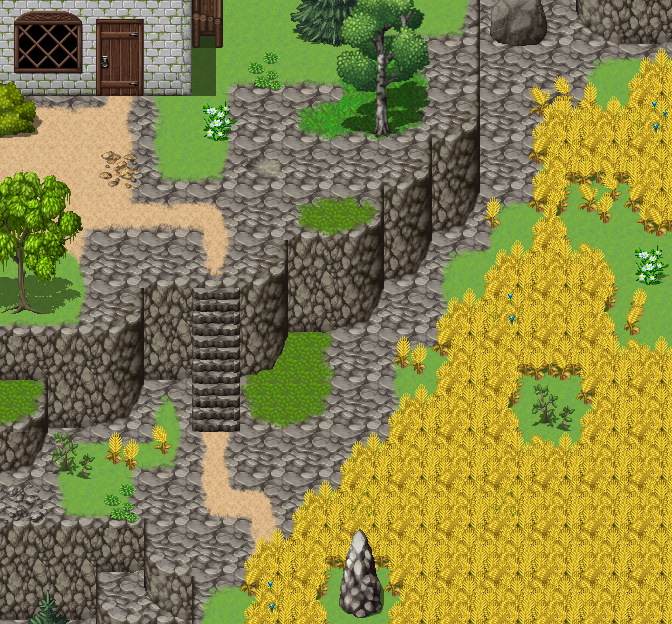
    1679524297875.png
    On the map I made for Making a map II I had used Cyanide's grain autotile, which is wonderful, but actually I had just used it because it is sooo tedious to make a proper looking looping one and I avoided it so far xD
    So this autotile comes in two versions, blocky and round, depending on how you need your crops to be:
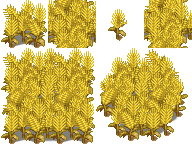
    AveryGrainsMZ.png
    They also come with some separate ones (you can see how I bascially made 8 different looking stalks? to get a less uniform look xD) so you can kinda have them fade out a little:
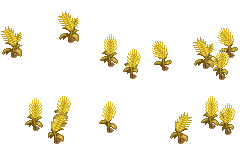
    AveryGrainsBMZ.png
    You can place them on B and you can also clump and place them in other patterns as well :)
    When I go hiking near the fields I often see those random single grain stalks? in the meadows next to the fields and I thought it would be a really nice touch to have them :3

    Also I just want to kinda make some advertisement for my own stuff, I have some new tutorials lately, the newest two being pet summoning and porting Ace faces to MZ. No worries, I still have a life, those tutorials were prewritten and I never got around to release them (at some point I thought they might be advent days as well or so... welp), and so there will be more in the near future. Not that I won't write new ones as well, but since I am open to do more, feedback on them would be really helpful... you know, to know what's helpful ;3
  5. I may never use those wheat field tiles... but I can't help myself. Well done!
  6. LOVE THE GRAINS!!! I really appreciate your attention to detail. :)
    Happy weekend!

    -MIA
  7. Avery said:
    Now that my thread is full of large images that have nothing to do with my resources I guess I need to make a large screenshot to get the attention to today's resources:
    View attachment 256878
    On the map I made for Making a map II I had used Cyanide's grain autotile, which is wonderful, but actually I had just used it because it is sooo tedious to make a proper looking looping one and I avoided it so far xD
    So this autotile comes in two versions, blocky and round, depending on how you need your crops to be:
    View attachment 256879
    They also come with some separate ones (you can see how I bascially made 8 different looking stalks? to get a less uniform look xD) so you can kinda have them fade out a little:
    View attachment 256880
    You can place them on B and you can also clump and place them in other patterns as well :)
    When I go hiking near the fields I often see those random single grain stalks? in the meadows next to the fields and I thought it would be a really nice touch to have them :3

    Also I just want to kinda make some advertisement for my own stuff, I have some new tutorials lately, the newest two being pet summoning and porting Ace faces to MZ. No worries, I still have a life, those tutorials were prewritten and I never got around to release them (at some point I thought they might be advent days as well or so... welp), and so there will be more in the near future. Not that I won't write new ones as well, but since I am open to do more, feedback on them would be really helpful... you know, to know what's helpful ;3
    OMG I need these. You just gave me an idea for a funny quest that involves a wheat field and a talking frog.... TIME TO GO PLOTTING!!!
  8. Omg, so pretty, we are used to that your work is always first class, but I need to tell you that to let you know that your work realy is matter @Avery! Thank you.
  9. Some of the People designs in the default characters actually work amazingly for heroes as well - just that they lack the proper graphics.
    I made the SV battler for People 4_8 already, but to unleash her full potential as heroine, rival, important NPC or sweet but dangerous enemy, she was still lacking a static battler and some emotions. And today she is the 45th of the 200 default chars, that have all the graphics made and therefore being as versatile as they can be!
    People4_8BattlerAvyMZ.png
    Her base image was already quite dynamic, but after some extra care she got a balanced, dynamic and proportional fitting battler to match her!
    beforeafter.png
    And here are her emotions!
    People4_8EmosetAvyMZ.png

    People4_8AveryMZ (1).pngPeople4_8AveryMZ (7).pngPeople4_8AveryMZ (6).pngPeople4_8AveryMZ (5).pngPeople4_8AveryMZ (4).pngPeople4_8AveryMZ (3).pngPeople4_8AveryMZ (2).png
  10. The emo set is extremely good, but could I make a suggestion?
    At first I could see no difference between the 3rd & 4th face on the top row. It was only after peering at it for a while that I realised no. 3 was crying. Perhaps if the tears were just a tiny bit more definite? Not a lot, just a smidgen to highlight what they are.

    The totally fed-up "I've had enough of you lot" expression of no. 8 made me smile.
  11. She's one of my favorites. Thank you for bringing her to completion.
  12. I released the tutorial matching the faceparts that you can already find in this thread.
    And since I am already talking about the generator, I hope you also read this one about upping your generated faces.

    Puh, that is quite an amount of tutorials, and I kinda feel like I should make a collection post or something? By now I have quite a lot tutorials, and even though some are a bit older, I feel like I cover a lot of important basics... hm.

    Anyways, after posting the tutorial I felt like I could use some more practise and added this neat pair of eyes:
    1679946631550.png

    Face
    FG_Eyes_p31_c2.pngFG_Eyes_p31_c1_m002.png
    Variation
    icon_Eyes_p31.png
  13. Those cave tiles are the result of three tutorials that I wrote about how you can make something like this yourself!
    Round Cave walls
    Nicer Caves I
    Nicer Caves II
    If there is anything you would want to see in a part III (you see, there is still some space), let me know. Besides that, as every other tutorial result, those are free to use under my usual terms :)

    PS.: If you have not seen it yet, I have a ton of tutorials that will even expand further in the near future :3 Here I am open for suggestions as well^^
    Dungeon_E.png
  14. ZombieKidzRule said:
    For anyone who sees this and has a similar problem as me, I figured out that I needed to rename the PNG to add the $ at the front to make the entire image selectable for 1 event. Then I also needed to add blank events to keep the player from walking under the fountain.
    There are also "Event hitbox" plugins that allow you to define the size of an event.
  15. Another emoset for you all!
    Give the zombie a new role with this set of emotions for him!
    Maybe he has a last glimpse of who he was before he turned just before he dies or maybe he never lost all his self and kept some personality!
    ... or he is far gone and attacks you with red glowing eyes. Whatever you want it to be ;D
    Monster_2AveryMZEmoset.png

    Monster_2_AveryMZ_ (7).pngMonster_2_AveryMZ_ (6).pngMonster_2_AveryMZ_ (5).pngMonster_2_AveryMZ_ (4).pngMonster_2_AveryMZ_ (3).pngMonster_2_AveryMZ_ (2).pngMonster_2_AveryMZ_ (1).png
  16. Wow, the Zombie faces came out really good. Awesome job!
  17. With 68% of my spreadsheet here filled (not only by me, but I guess since I am the one caring for the sheet I put in some extra effort to gather and create content for it...), I am starting to guess at which point it will cap... I know for sure I will not randomly make SV battlers for most of the big monsters, even most of the monsters... and probably not wanna draw their busts either. But every now and then I just like to open it and see how much the community (and I, it would be a lie if I did not include that xD) have come with it.
    It just makes me happy to think about all the games it might have impacted and improved in one way or another. At least I like to think that, maybe barely anyone looks at it, who knows xD

    For some things we already have resources that I consider remaking for one reason or another. Here the case was simple: there is the etanara charset for the SF_Cyborg, but since I was planning to make the SV battler on the generator base anyways, I thought, welp, I can also use the base to make a charset and a down battler, that way I have all three in one style and they match each other and can be used as a set with the battler.
    Thought and done, here we go: three new things for the list, 2 more cells marked green.
    SFCyborgTVAveryMZ.pngSFCyborgTVDAveryMZ.png

    SF_CyborgSVAveryMZ.png
  18. Oh my gosh you have been busy! It's surprising how much I have missed in such a short amount of time. I don't know how you manage to get these out so quickly!

    I am in love with the wheat autotile. I was creating a farmland a few months back and am curious how it would look with your wheat autotile. :)

    And I am so checking out that Pet Summoning tutorial at my next opportunity! I had wanted to implement summoning in my battles, but was having incompatibilities with SumRndmDude and Yanflys plugins. So excited to get that pet Summoning working.
  19. With the picture to battler conversion I already found many ways to make them look more like the default battlers, but I like to think that I improving and my techniques are getting better.
    People 4_4 already was my postergirl in the emoset tutorial, and she already has everything else, with a lovely SV Battler from antega34.
    I tried to get her from innocent and static to more powerful and dynamic and I think I nailed that here! She is also the first if these conversions with an actual from scratch redraw, in this case her ponytail.
    And I must say, with that battler, I can see her standing up against the party after they wronged her.
    Or turning out to be a powerful witch in disguise who has had enough. Or being a secret agent who is about to kick the party's ass because they blew her cover.
    Or maybe you use a system with static front view battlers and she is your cleric?

    Do you have a role for that default character in your game? If so, who is she?

    Here is the before and after:
    comp.png
    And just the battler:
    People4_4BattlerAveryMZ.png