VisuStella Sample Project & MZ Core Plugins

● ARCHIVED · READ-ONLY
Started by VisuStella 961 posts Page 42 of 49 View original ↗
  1. Tuomo L said:
    How do I remove the A, B and such letters from my battlers when I have multiple enemies? I have a monster made from several parts and don't want the other body parts to be labeled.
    How many parts do you have? Would it be simple enough to make each part a separate enemy unit?
  2. Does anyone have a list of premade action sequence attacks from visustella plugin?
    I have a lot of skills i need animated but they never turn out right
  3. NaosoX said:
    There's a few in the visustella sample. Check your common events.
    As a tip, please make one post and continue that post.
    Ive been trying to help you solve your issue, but you have been creating multiple posts.
    One thread had a suggestion which gave you a link to an action sequence sample pack as well.
    https://forums.rpgmakerweb.com/inde...tion-sequence-visustella.142249/#post-1229902
    they are different questions, not all the same

    cant find any text files in the sample folder that has pre made action sequence
  4. jedite1000 said:
    they are different questions, not all the same

    cant find any text files in the sample folder that has pre made action sequence
    Why are you looking for text files? For both VS's sample project and the project Trihan linked, the action sequences are in the Common Events in the project itself. You can just copy the plugin commands into your own Common Events.
  5. NaosoX said:
    How many parts do you have? Would it be simple enough to make each part a separate enemy unit?
    I did, but then it automatically puts A, B and such on them.
  6. Is there a way to restore targeting for aoe spells? I want the targeting scope back, just like single target spells do. Except now visustella plays the spell automatically.
  7. How do I make Gold Window wider? I have longer name for my currency than Gold, so having more than just 1000 gets cut off.
  8. Core Engine > Menu Layout Settings > Scene_Menu > Gold Window >
    Code:
    const width = this.mainCommandWidth();
  9. NaosoX said:
    Core Engine > Menu Layout Settings > Scene_Menu > Gold Window >
    Code:
    const width = this.mainCommandWidth();

    It doesn't seem to change anything, I tried to put it to 1000 or that width + 500 but it stays same.
  10. Put after ()... so... this.mainCommandWidth() + 500)
  11. Hello,

    I'm using Visustellas DoodadsSystem (1.00) and DoodadsEditor (1.02) of course. Everything works fine, but I have one huge problem:

    Typical User-End problem xD I solved it myself. Had nothing to do with the plugin... I was the problem xD
  12. Plugin Elements and Status Menu Core.
    Can you add plugin parameters to override the name of character parameters (general, x and s parameters) ?
    This is required for localization plugins.
    Thank you.
  13. Hello all, I wanted to confirm this before reporting it as a bug (if it is one).
    The following steps I've done:

    MZ version is 1.4.0
    Core Engine: 1.50
    Battle Engine: 1.50
    Set up a brand new and clean project.
    Set up the battle screen to: Side-View

    I wanted to add animated enemies by using the sprite sheets so I went ahead and added the following note tag.

    Enemy note tag
    <Sideview Battler: Actor1_1>

    This changes the enemy sprite to use the sprite sheet however, I did notice something interesting.

    If the enemy has a magic skill that has a 'Hit Type' of 'Magical Attack' the enemies will go into a casting animation frame even before the battle has started or before the enemy has made a choice to attack.
    If the 'Hit Type' is set to 'Physical Attack' the casting animation no longer exists but will instead use the attack animation.

    (Unfortunately, this doesn't solve the problem as I'll be using Magic Evasion as part of the battle mechanics and Magic Evasion only works with Hit Type of Magical Attack)

    I don't know if this was intended but I was hoping for the enemy to be in an idle animation at all times when the battle starts.
    But applying a magic skill to any enemy with 'Magical Attack' as the 'Hit Type' will randomly cause them to go into a pre-casting mode animation frame.

    I've tried the following note tag but it does nothing to set the enemy to idle/walk animation.

    <Sideview Idle Motion: walk>

    If anyone else is having this problem, or know a way to fix this any help would be greatly appreciated.
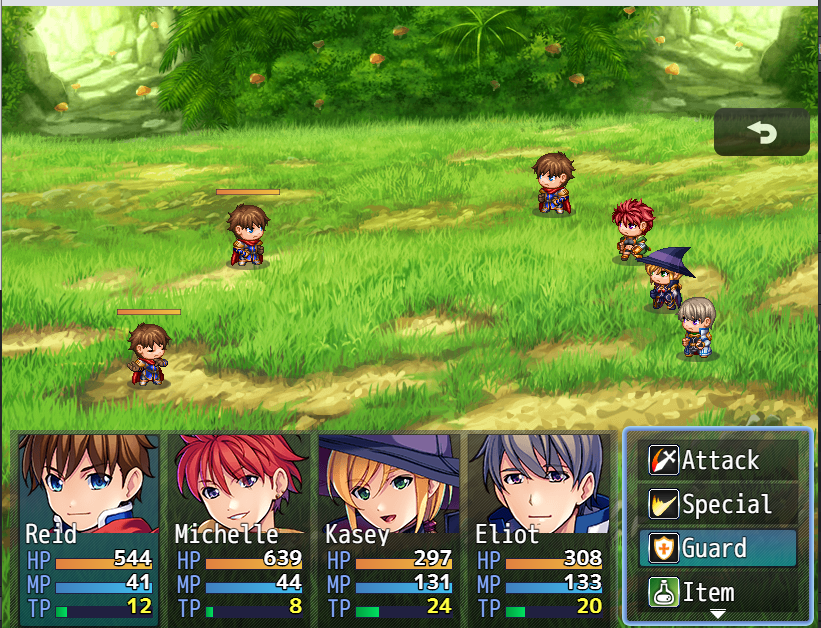
    SV pre casting animation.png
  14. In MZ, we can set bigger resolution, but it is capped at 2000, so no 4k (or 3440x1440) is possible. (if you ask, why I need such bit extreme resolution - it is for minigame to my wife for Christmass and I like if it fits her screen in proper resolution.
    ---

    I hoped for solution to be in this VisuStella core plugin (as I was used with MV and Yanfly core plugin to solve default RPG maker limitations).

    In help section of plugin is a part called: "Larger Resolutions" - but with no explanation - how to set it.
    I upgraded from MV to MZ yesterday so I am still in a "confused" mode how new plugin system works :).

    EDIT: If it is not possible by this plugin then it is not a big deal. I can finish my game in MV this year, I got tempted by Christmass sale and thought new(old-recycled) layer system is a huge time saver for me I wanna to try :p.
  15. Kilitar said:
    In MZ, we can set bigger resolution, but it is capped at 2000, so no 4k (or 3440x1440) is possible. (if you ask, why I need such bit extreme resolution - it is for minigame to my wife for Christmass and I like if it fits her screen in proper resolution.
    ---

    I hoped for solution to be in this VisuStella core plugin (as I was used with MV and Yanfly core plugin to solve default RPG maker limitations).

    In help section of plugin is a part called: "Larger Resolutions" - but with no explanation - how to set it.
    I upgraded from MV to MZ yesterday so I am still in a "confused" mode how new plugin system works :).

    EDIT: If it is not possible by this plugin then it is not a big deal. I can finish my game in MV this year, I got tempted by Christmass sale and thought new(old-recycled) layer system is a huge time saver for me I wanna to try :p.
    Not sure if you tried this yet but you can set the resolution in the 'System 2' tab in the settings.
  16. Galkamik said:
    Not sure if you tried this yet but you can set the resolution in the 'System 2' tab in the settings.
    Tried. Everything above 2000 is reverted to 2000, that is what I meant by "capped at 2000".