VE - Fog and Overlay

● ARCHIVED · READ-ONLY
Started by Victor Sant 64 posts Page 1 of 4 View original ↗
  1. victor-engine-script-title.png
    fog-and-overlay-name.png


    This plugin allows to create overlay that can be used for fogs and other visual effects. They behave very similar to a parallax, but have more freedom on their placement.
     
    Download:
    Victor Engine - Fog and Overlay
     
     
    Credits:
    Author: Victor Sant
     
    Terms of Use
  2. Yey Victor is back!!
  3. Finally a fog plugin! I was hoping for this.

    Only a point: in the Plugin Commands, you put "FogEffect id name opacity blend hue depth". I think that blend and hue positions are inverted.
  4. King Gerar said:
    Only a point: in the Plugin Commands, you put "FogEffect id name opacity blend hue depth". I think that blend and hue positions are inverted.
    It seems to be so, my bad. Fixed the instructions. Thanks for the warn.
  5. Finally, I can have fog in battles! I was hoping you were going to port your fog/overlay script from ACE over to MV. Thanks for this one.
  6. How do you make the fog go away? It keeps showing up even when I leave the map. I'm using mapnotes to create it
  7. lonewolph said:
    How do you make the fog go away? It keeps showing up even when I leave the map. I'm using mapnotes to create it
    There was a small issue with notetag fogs not clearing, i've fixed that, update the plugin and see if everything is fine now.
  8. Plugin dont work

    Dear Victor, where can I read the full instructions for setting up your plugin? "Help" section in the plugin does not respond to my questions:

    1. What type of image files supported (BMP, zhpg, PNG)?

    2. Which project folder I have to put a graphics file?


    Install 2 plugins: Basic Module and Fog and Overlay

    Prepared 2 files: fog.png and fog.jpg (256 * 256 px)

    I put both files in a folder: img (root), parallaxes, pictures (3 folders for check)

    I wrote the code in a note to the map:

    <fog effect> id: 1 name: 'fog' opacity: 160 hue: 100 move x: 3 move y: 2<fog effect>...and... plugin dont work.

    Where I made mistakes?
  9. @PTS

    By the tag you posted, i can say that you're using the outdated version.

    The outdated version, beside the issue that lonewolph posted. had a small mistake on the instructions.

    The tags have a "/" on the last "<fog effect>". so the correct is "</fog effect>"

    The correct tag would be:

    <fog effect>id: 1name: 'fog'opacity: 160hue: 100move x: 3move y: 2</fog effect>Anyway, update your plugin, otherwise, even if you get it to work, you will experience the same bug as the reported.

    About your questions:

    1. png is the only format supported by MV by default.

    2. From the instructions on the help. 

    Code:
    * - Creating Fogs* The fog images must be placed on the folder img/fogs/ (you must create this* new folder).
  10. Victor Sant said:
    @PTS

    By the tag you posted, i can say that you're using the outdated version.

    The outdated version, beside the issue that lonewolph posted. had a small mistake on the instructions.
    my first post was to be approved, so I was not able to respond in time. I solved the problem by reinstalling the plugins. Thanks for the comment. Your plugin works well!
  11. Nice script. Gonna give a look to learn how to manipulate better sprites. Hopefully I will able to recreate my "Perfect Fog" script, that is not than a mere adaptation of XP fog. If I do something like this...Credits to you, of course.
  12. Thanks, Victor, this looks very promising. If I'm understanding correctly the "fixed overlay" feature, though, it doesn't seem to be working. Whether my file is titled "fog" or "!fog", the fog overlay moves with the map. These are my settings:

    <fog effect>

    id: 1

    name: '!Fog' (have also tried 'Fog')

    opacity: 102

    zoom: 300%

    move x: -1

    move y: -1

    </fog effect>

    The fog appears correctly, except that no matter what I do, it moves with the map, which doesn't look very realistic. Any idea how to fix this? Thanks!
  13. I think you're misurstanding how the "fixed" fog woks.

    When fixed, the fog moves with the map, as it was "locked" with it. Without it, when you moves the fog moves slightly different, it's excatly the same behavior as a parallax.

    With the "move x" and "move y" you will not see the difference. Try removing those two, and you will see what it's about.
  14. Hi,


    i have some problems with your plugin.


    1. Plugin command dont work. Ex: FogEffect 1 Sky 160 50 0 0 (FogEffect id Name opacity hue blend depth) - texture fog is not displayed


    but fog work well from map note. Ex (2 layers):


    <fog effect>
    id: 1
    name: 'Sky'
    opacity: 100
    hue: 100
    move x: 1
    move y: 1
    </fog effect>
    <fog effect>
    id: 2
    name: 'Sky2'
    opacity: 50
    hue: 100
    move x: 0
    move y: -1
    </fog effect>


    2. BUT i have critical error!


    Start game - its Ok. I see two layers of fog


    Then I save game, exit to main title, then load = TypeError


    PS: other plugins disabled. Switch On only 2 yours plug: Basic Module 1.05 and Fog 1.02


    error.PNG


    error2.PNG


    UPD: if i close game and them start again with load - work well...
  15. @PTS Thanks for the report.


    1. I tested here and you Plugin Command is working fine. Remember that the event must be executed for the fog to be displayed.


    2. Found the issue and fixed, update the plugin and tell me if it solved your issue.
  16. Victor Sant said:
    @PTS Thanks for the report.


    1. I tested here and you Plugin Command is working fine. Remember that the event must be executed for the fog to be displayed.


    2. Found the issue and fixed, update the plugin and tell me if it solved your issue.


    Thanks for the answer!


    2. Save-Load - work fine! Tnx for fix.


    1. About command - I forgot to switch the trigger... Oops... ))  PlugCommand FogEffect 1 Sky 160 50 0 0 - work!


    but I want to clarify two points:


    a. PlugCommand "FogMove id x y"

    FogMove.png


    Ex: FogMove 1 1 -1 (id = 1, x offset =1, y offset = -1) Valid? Because the fog is not moving. Trigger is set to "parallel"


    The same thing happens with FogOpacity command (Ex FogOpacity 1 90 0) - opacity is not change


    b. In the bottom of the plugin code, where a block with examples, I see: FogEffect 1 Sky 160 0 100 0
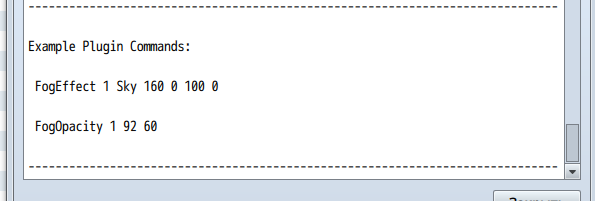

    command-exsampls.png


    value 100 can not be the value 100, because this parameter is responsible for blend: "...(0: normal, 1: addition, 2: subtraction)..."


    this little misunderstanding, but someone can get confused ;)

  17. The problem is with the parallel event, it's calling the FogEffect repeatdely and reseting the postion (the FogEffect resets the fog).


    Use the Erase Event command to avoid calling the commands repeatdely.


    And thanks for telling about the mistake on the instructions.
  18. Victor Sant said:
    The problem is with the parallel event, it's calling the FogEffect repeatdely and reseting the postion (the FogEffect resets the fog).


    Use the Erase Event command to avoid calling the commands repeatdely.


    you are absolutely right! tnx!
  19. I have a problem, but only when trying to use fog during the battle ... so I go into the battle, this error appears ... I pressed F8 to try to see the problem, but the screen went blank ... What did can be ?

    Erro - VE FOG - Notes.png

    Erro - VE FOG.png
  20. @Feli The plugin was updated. Check to see if your issue is solved.