Ultra Mode 7 [RMMV & RMMZ]

● ARCHIVED · READ-ONLY
Started by bblizzard 1291 posts Page 56 of 65 View original ↗
  1. Winshifter said:
    is an issue with this plugin, not theirs
    Actually it's VisuStella.

    Bblizzard discovered what was happening. I don't know if anyone reported it or not, but VisuStella coded a function in a way that causes the issue. If they changed it then the issue should not happen.

    This is what Bblizzard said
    In the Tilemap.Renderer._createInternalTextures there is a bug that creates the wrong texture. A PIXI.BaseTexture is created, but a PIXI.BaseRenderTexture should actually be created. MZ's default methods also creates a PIXI.BaseRenderTexture.

    Putting MZ default code for this function below Visustella will fix the issue. But that shouldn't be required. Visustella should fix the code.
  2. Haha, you beat me to it.

    Yes, VisuStella is creating the wrong kind of texture in their code. There is a fair chance that this causes issues with some other more exotic plugins as well. Maybe something with passing the tilemap textures through a filter or maybe custom setups and formats for tilemaps. There could be the types of plugins that would trigger the issue just as UM7 does.
  3. Roninator2 said:
    Actually it's VisuStella.

    Bblizzard discovered what was happening. I don't know if anyone reported it or not, but VisuStella coded a function in a way that causes the issue. If they changed it then the issue should not happen.

    This is what Bblizzard said
    In the Tilemap.Renderer._createInternalTextures there is a bug that creates the wrong texture. A PIXI.BaseTexture is created, but a PIXI.BaseRenderTexture should actually be created. MZ's default methods also creates a PIXI.BaseRenderTexture.
    I know what Bblizzard said, but if you or him goes to Visustella and tell them that, they will say what I said. For them it's not an issue, their plugins work in tandem with each other, and whatever incompatibility it has with plugins not created by them, those are responsability of the creator of that plugin, not Visustella's. For Visustella, what they did works, and it's not an issue, it becomes an issue if two or more Visustella's plugins create problems with each other.

    I'm telling you this because of experience with them, if you are a plugin creator and one of Visustella's plugings is incompatible with yours, you have to make the compatibility, they won't, it's in their terms, read them, they literally threw me those at my face once when an official plugin from MZ became incompatible, they said that RMMZ is responsable to make the compatibility, not them.
  4. If they don't want to fix it, that's of right as devs. But the bug is in their code and that's a simple fact.

    Winshifter said:
    if you are a plugin creator and one of Visustella's plugings is incompatible with yours, you have to make the compatibility

    Is that what they said? Because if they did, I will post the fix here (and maybe even include it in the instructions of UM7 similar to one other plugin that requires custom code).
  5. This is what Visustella told me back then
    Yanfly said:
    We don't provide compatibility support for the plugins provided with the software. We only do inhouse support for VisuStella MZ only as per the terms:

    5. VisuStella is not responsible for problems found in your game due to unintended usage, incompatibility problems with plugins outside of the VisuStella MZ library, plugin versions that aren't up to date, nor responsible for the proper working of compatibility patches made by any third parties. VisuStella is not responsible for errors caused by any user-provided custom code used for custom control effects including advanced JavaScript notetags and/or plugin parameters that allow JavaScript code.

    I apologize for any inconvenience this causes.

    They clarified even further after some other person complained that the incompatibility was with official plugins.

    Yanfly said:
    I mentioned that we don't provide compatibility support for plugins made outside of our library even if they came with the official software.
  6. Good enough for me.

    @Mark_Lecarde Put this code as a plugin right below VisuMZ Core (but above UM7):

    Code:
    Tilemap.Renderer.prototype._createInternalTextures = function() {
        this._destroyInternalTextures();
        for (let i = 0; i < Tilemap.Layer.MAX_GL_TEXTURES; i++) {
            const baseTexture = new PIXI.BaseRenderTexture();
            baseTexture.resize(2048, 2048);
            baseTexture.scaleMode = PIXI.SCALE_MODES.NEAREST;
            this._internalTextures.push(baseTexture);
        }
    };

    Full credit goes to the MZ team! This is DEFAULT MZ CODE! By using this code as a plugin, you are simply undoing the damage / bug that VisuMZ Core did.

    Please keep in mind that using this code will ignore VisuMZ's option for pixelated / linear filter tilemap textures (I don't remember the exact name). But don't worry: UM7 has a separate option for that and was written in a way that doesn't break / override the original code like VisuMZ Core does.

    @Winshifter Oh, I also wanted to address this here:

    Winshifter said:
    because that "issue" is a non issue because it is meant for something else they do down in the code...meaning some other plugin of theirs.

    That's actually a very interesting point that I wanted to mention. The texture they are using (BaseTexture) is actually a superclass of the proper texture (BaseRenderTexture) that the default MZ code uses. So they have removed functionality, not added it or modified it. I don't think there's a scenario where using BaseRenderTexture over BaseTexture should create any issues for any plugin ever (except for maybe some very badly written code that would have performance issues because of the differences in these 2 types of textures).

    EDIT Oh, also: I accept the apology of the Visustella devs for the inconvenience. I'm not angry. I'm just disappointed because they could be doing better.
  7. bblizzard said:
    That's actually a very interesting point that I wanted to mention. The texture they are using (BaseTexture) is actually a superclass of the proper texture (BaseRenderTexture) that the default MZ code uses. So they have removed functionality, not added it or modified it. I don't think there's a scenario where using BaseRenderTexture over BaseTexture should create any issues for any plugin ever (except for maybe some very badly written code that would have performance issues because of the differences in these 2 types of textures).
    Maybe so, but their plugins not only add functionality, they fix bugs that are already present in the base code...well, more like things they consider bugs or will eventually become bugs for them.

    Also, currently Visustella is working in adding lighting options, weather options and also some motions in terrains and other graphical stuff. I can know for a fact they have been working on that for at least 3 weeks, but I can easily deduce that they have been working on that for more than a month already. I'm not really an expert in coding for textures, I really don't get that part of the engine, but expect your plugin to keep being broken because of Visustella's plugins, they sometimes add things ahead of other of their plugin releases in their current ones.
  8. Considering their trajectory, with how they would rather make more plugins than address compatibility issues.
    VisuStella will probably make their own mode 7 plugin down the line. :LZSlol:
  9. The fix for VisuMZCore works like charm, thanks for the work!

    And with this message, I wanted to tell you how impressed I am with your plugin and your skills as a developer. I looked into it a few times, and I'm impressed by how well-written it is!
  10. Well, I really can't say much more about the situation since I haven't really been involved / keeping pace with it. As a matter of fact, I didn't even know about VisuMZ until it was posted here. xD

    Writing new code is cool and all, but sometimes you have to go back a bit and fix your old stuff, too. In any case I hope they will eventually decide to fix that bug in their code.

    I thought about it a bit more trying to figure out why it would manifest exactly like that. The only thing I could think of was some weird behavior with a light source (because of circular area where there are no bugs) and maybe something weirdness with a stencil / depth buffer. I haven't really looked much into the VisuMZ code whether it was creating a GL light or not (I didn't find any code that would do that in a quick glance). Tiles in UM7 are rendered in actual 3D space so that would explain that effect really well. But it's weird that it would manifest only when a non-render texture was used for the tileset graphic. Anyway, without any further research all I say is mere speculation.

    Aerosys said:
    And with this message, I wanted to tell you how impressed I am with your plugin and your skills as a developer. I looked into it a few times, and I'm impressed by how well-written it is!

    Well, I've been programming for over 16 years at this point (excluding my first experiences with coding when I was 14 years old, lol) so it makes sense. xD Thanks.

    I learned a lot over the years. But I think there's still a lot more to learn.

    EDIT: You should see my serialization library and my network library, both written in C++. xD

    The serializer is the nastiest piece of code I ever had to write. It was so difficult that I had a to use just the C++ preprocessor to generate code to figure out whether I was writing all those convoluted macros well or not.

    The network library was the most well-designed code I ever wrote iMO. I think I did a really good job in putting together all the classes with multiple inheritance and making sense of the API without writing messy code.
  11. Hello again, @bblizzard !

    So far, the Ultra Mode 7 in my MV project is working good, and even better since I did some progress with the optimization and worldmap edits to avoid framerate issues.

    I just noticed a little thing I don't know how to solve or which kind of parameters do I need to adjust in order to make the characters look good in the map.

    As you know, in RPG Maker MV/MZ, the characters have a little Y offset that places them a few pixels up in the tile (except for those in which name begins with ! exclamation mark), just like in this picture:
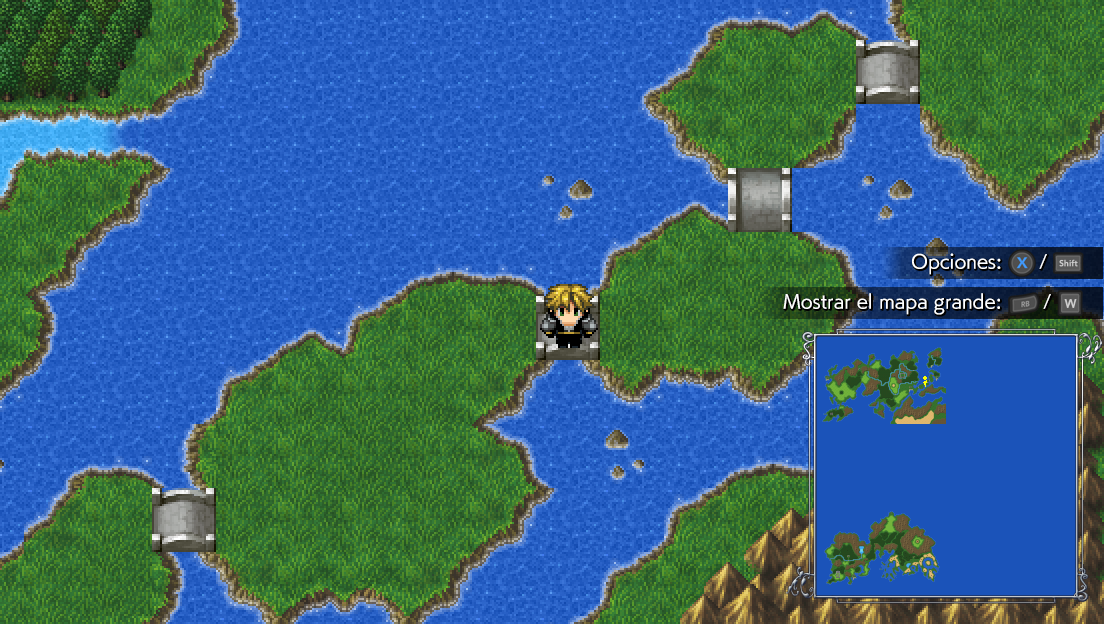
    Desktop Screenshot 2022.04.03 - 02.28.55.35.png

    As you can see, the character is placed a few pixels up, so the feet doesn't touch the base of the bridge there.

    However, once I enable the Ultra Mode 7, that offset is lost, and the character is placed at the bottom of the tile, like in the following picture:
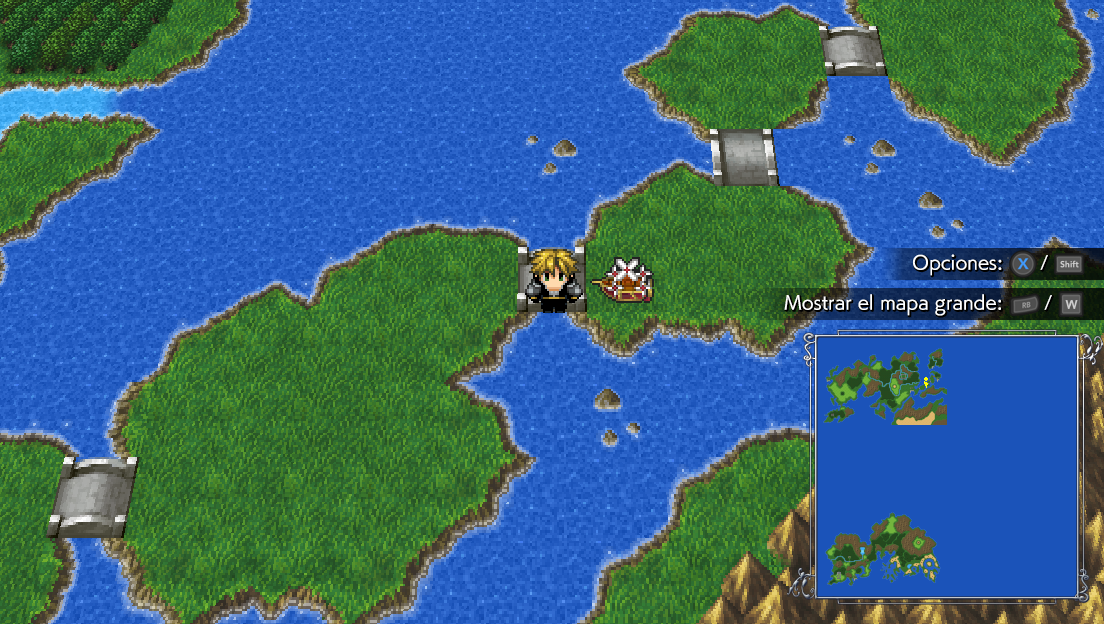
    Desktop Screenshot 2022.04.03 - 02.27.40.52.png

    I tried with different settings within the plugin, like the Camera Distance, the Pitch or even the Base Scale Z for the sprites to be drawn, but none of them seem to changing a thing. Whatever I do, the character is placed at the bottom of the tiles, losing that little Y offset.

    These are the settings I'm using with the plugin right now:
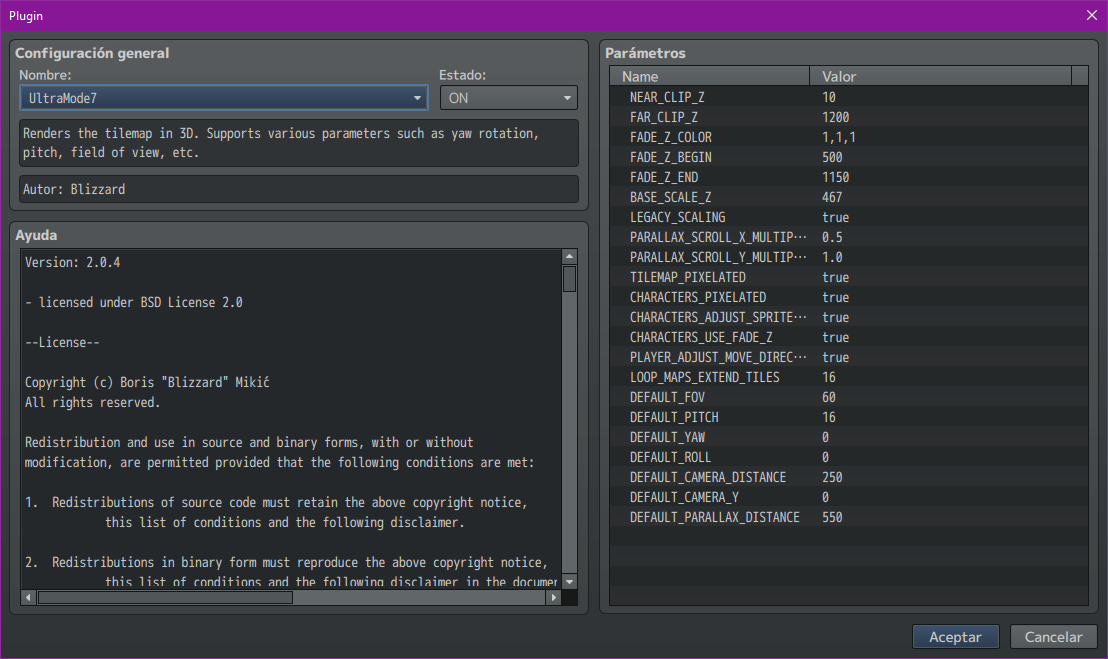
    1648947103719.png

    It only happens with the Mode-7 maps and with the main character and the vehicles (not NPCs or other events). This issue is not seen any other map that is displayed normally. What do you think it could be the reason for that?

    Thanks in advance for the help!
  12. Hi! hello! does anyone know why the char positions are off when using the plugin with mz?
    they appear to be moving in the position of the passable map, how it is by default and not how the map is actually displayed with ultramode 7. Just in case this was an error with my own project, I tried a new freshly made project, which unfortunately resulted in the same error.

    The plugin is awesome and has quite literally inspired me to start making games again.
    anyway thanks for the help in advance~.
  13. ougitou1 said:
    Hi! hello! does anyone know why the char positions are off when using the plugin with mz?
    they appear to be moving in the position of the passable map, how it is by default and not how the map is actually displayed with ultramode 7. Just in case this was an error with my own project, I tried a new freshly made project, which unfortunately resulted in the same error.

    The plugin is awesome and has quite literally inspired me to start making games again.
    anyway thanks for the help in advance~.

    Are you using the newest version? I did fix it some issues regarding that during the MZ port. If yes, could you make a demo the shows the issue? I can take a look at it then. Somebody else did report the problem back in v2.0.0, but I could never reproduce it.

    Oscar92player said:
    Hello again, @bblizzard !

    So far, the Ultra Mode 7 in my MV project is working good, and even better since I did some progress with the optimization and worldmap edits to avoid framerate issues.

    I just noticed a little thing I don't know how to solve or which kind of parameters do I need to adjust in order to make the characters look good in the map.

    As you know, in RPG Maker MV/MZ, the characters have a little Y offset that places them a few pixels up in the tile (except for those in which name begins with ! exclamation mark), just like in this picture:

    View attachment 221860

    As you can see, the character is placed a few pixels up, so the feet doesn't touch the base of the bridge there.

    However, once I enable the Ultra Mode 7, that offset is lost, and the character is placed at the bottom of the tile, like in the following picture:

    View attachment 221861

    I tried with different settings within the plugin, like the Camera Distance, the Pitch or even the Base Scale Z for the sprites to be drawn, but none of them seem to changing a thing. Whatever I do, the character is placed at the bottom of the tiles, losing that little Y offset.

    These are the settings I'm using with the plugin right now:
    View attachment 221862

    It only happens with the Mode-7 maps and with the main character and the vehicles (not NPCs or other events). This issue is not seen any other map that is displayed normally. What do you think it could be the reason for that?

    Thanks in advance for the help!

    Yeah, there were some issues because of that Y offset and positioning. I actually never added a proper solution for it in the public version of UM7. I'll add a global option for that then with the default value that MZ uses.
  14. bblizzard said:
    Yeah, there were some issues because of that Y offset and positioning. I actually never added a proper solution for it in the public version of UM7. I'll add a global option for that then with the default value that MZ uses.

    Thanks, bblizzard, you are a life-saver. I should have said that I was running the plugin on the MV version, which is the program in which I was testing the Ultra Mode 7.
  15. bblizzard said:
    @Oscar92player Done.

    Thanks for all your effort, bblizzard! Your plugin is truly a masterpiece, and the results are outstanding. Personally, this is the best Mode-7 plugin out there for MV and MZ.
  16. @Oscar92player Thank you. :D That means a lot to me because this is exactly what I was trying to make: The best Mode-7 plugin out there. :D
  17. bblizzard said:
    Are you using the newest version? I did fix it some issues regarding that during the MZ port. If yes, could you make a demo the shows the issue? I can take a look at it then. Somebody else did report the problem back in v2.0.0, but I could never reproduce it.


    Yeah, there were some issues because of that Y offset and positioning. I actually never added a proper solution for it in the public version of UM7. I'll add a global option for that then with the default value that MZ uses.
    Oh! that would explain a lot as I'm still using one of the earlier versions of rmmz. the reason being that I didn't want to update until I was finished with my current project since updating may cause compatibility issues and whatnot. its a bummer though cause I've been trying to implement the same isometric type style for so long now and had almost given up on it till I found ultra mode 7. Its a pity that it doesn't work with my version. (1.0.1 btw) even enabling legacy scaling didn't seem to have any effect.
  18. ougitou1 said:
    Oh! that would explain a lot as I'm still using one of the earlier versions of rmmz. the reason being that I didn't want to update until I was finished with my current project since updating may cause compatibility issues and whatnot. its a bummer though cause I've been trying to implement the same isometric type style for so long now and had almost given up on it till I found ultra mode 7. Its a pity that it doesn't work with my version. (1.0.1 btw) even enabling legacy scaling didn't seem to have any effect.

    Yeah, I wrote this code based on RMMZ v1.4.3 IIRC. IDK how much the MZ devs changed the core code since v1.0.1.
  19. For some reason this has caused my damage tiles to shift over one square.