MV - SRPG Engine MV - Plugins for creating Tactical Battle System

● ARCHIVED · READ-ONLY
Started by RyanBram 3313 posts Page 36 of 166 View original ↗
  1. old
    Yew Bowman said:
    well, I tried adding those plugins and still get that same error
    View attachment 150105
    View attachment 150107
    if u have all plugins you need, and if all plugins are in the right order,then there is only the option, that there is a plugin Incompatiblety or a wrong Setting.
    sry i got no other ideas on that ..

    If u want u can put your Project in a ZIP file and send me the UploadLink with private message, then i can look into the whole thing..
    ( i still think its something with the pluginManager Setup atleast thats my best guess)
    -a safe_file in the map where u test this problem would be usefull

    (you can also delete other maps for your privacy, in this test project kopie,i need only the map where u test this in your project)

    sorry i dont know how to help in other ways..

    edit.

    I investigated in the project..:

    enemy id 1.png
    It happens after the attack happen OR if the event should walk.. (different situation)

    i used 2 projects:
    -nr1 the edited where i moved 1 actors position
    -nr2 the default project where i changed nothing

    ( i edited on both the PluginManager but that made no difference in this case.. Yep battlecore has to be above the 123act sequence pack)

    -Nr1 crashes later when another enemy
    ( also enemy id1) should move

    -Nr2 crashes after the attack happened

    I cant tell why this happens ,but i hope this video could help to find it out..


    after tryin this, i think it has nothing to do with the PluginManager, i tried to enable/disable all plugins and even added ux range and ux curser in another project copy but that didnt change anything.

    Edit 2
    -> could it be a conflict because of how Regions are set?
    Images are from the Default Project
    (nr2 in this example)
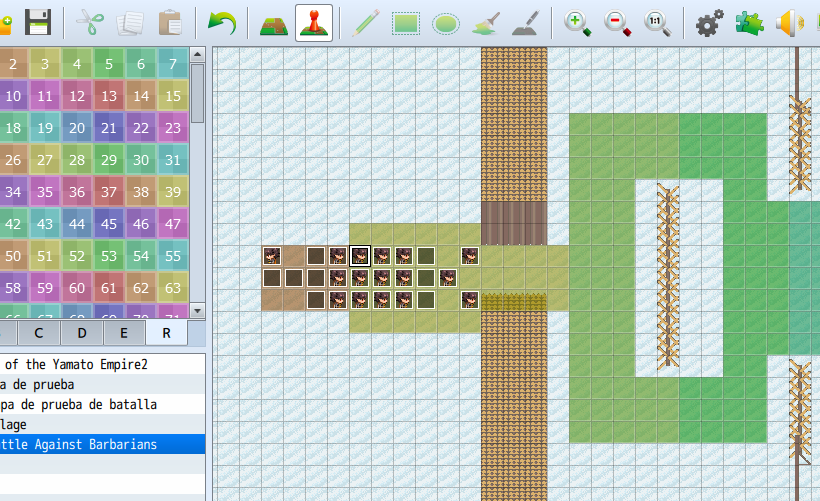
    Screenshot_3.png
    mounted lancer.png

    edit 3

    another edit of version nr 2(default) ,lets call it Nr3.

    -nr.3: changed position of actor 1 again

    --> enemy can attack actor first time, and in another turn the same enemy attacks the actor again and error happens
    ... it tried this with the same regions and with another test with more regions but ,that made no difference on the error
    => and i got still no idea why this happens sry..

    edit 4
    i tried using different attacks instead of only the aoeType "Line"
    .. :
    Screenshot_3.png
    normal attack = no bugs
    Aoe "plus" = no bugs
    (with range=0 and aoeRange=2 to simulate an attack which is similar to "Line"... i also tried aoeRange=3 also no bug)
    --
    AOE "Line" = bug (range 1 _ aoeRange 2)
    AOE "Cone" = bug but a few turns later (range 1 _ aoeRange 2)
    ----------
    i didnt used all aoe type i just wanted to know if there is an AOE that doesnt bug..

    _

    Edit 5

    - i was able to replicate that bug with the UpdatedDemo2.3
    --> i gave a similar "line" skill to the Slime
    (bugs at first attack)

    Replicated bug in Demo2.3 images
    Screenshot_4.png

    Screenshot_5.png
    Screenshot_6.png
    @Doktor_Q
    --> so i guess it has something to do with the AOE Plugin..
    mostly with how AI handles some of the AoeTypes ..

    (but i cant say why "line" triggers the bug faster than "cone" for example, or why in some cases "line" works first and bugs later)

    ->tested in UpdatedDemo2.3 "cone" works but if actor is closer to enemy it bugs

    Video Cone Buged if Actor is near Enemy
  2. Dopan said:
    old text
    if u have all plugins you need, and if all plugins are in the right order,then there is only the option, that there is a plugin Incompatiblety or a wrong Setting.
    sry i got no other ideas on that ..

    If u want u can put your Project in a ZIP file and send me the UploadLink with private message, then i can look into the whole thing..
    ( i still think its something with the pluginManager Setup atleast thats my best guess)
    -a safe_file in the map where u test this problem would be usefull

    (you can also delete other maps for your privacy, in this test project kopie,i need only the map where u test this in your project)

    sorry i dont know how to help in other ways..

    edit.

    I investigated in the project..:

    enemy id1
    View attachment 150133
    It happens after the attack happen OR if the event should walk.. (different situation)

    i used 2 projects:
    -nr1 the edited where i moved 1 actors position
    -nr2 the default project where i changed nothing

    ( i edited on both the PluginManager but that made no difference in this case.. Yep battlecore has to be above the 123act sequence pack)

    -Nr1 crashes later when another enemy
    ( also enemy id1) should move

    -Nr2 crashes after the attack happened

    I cant tell why this happens ,but i hope this video could help to find it out..
    Video test Bug Trigger


    after tryin this, i think it has nothing to do with the PluginManager, i tried to enable/disable all plugins and even added ux range and ux curser in another project copy but that didnt change anything.

    Edit 2
    -> could it be a conflict because of how Regions are set?
    2 imgs
    Images are from the Default Project
    (nr2 in this example)
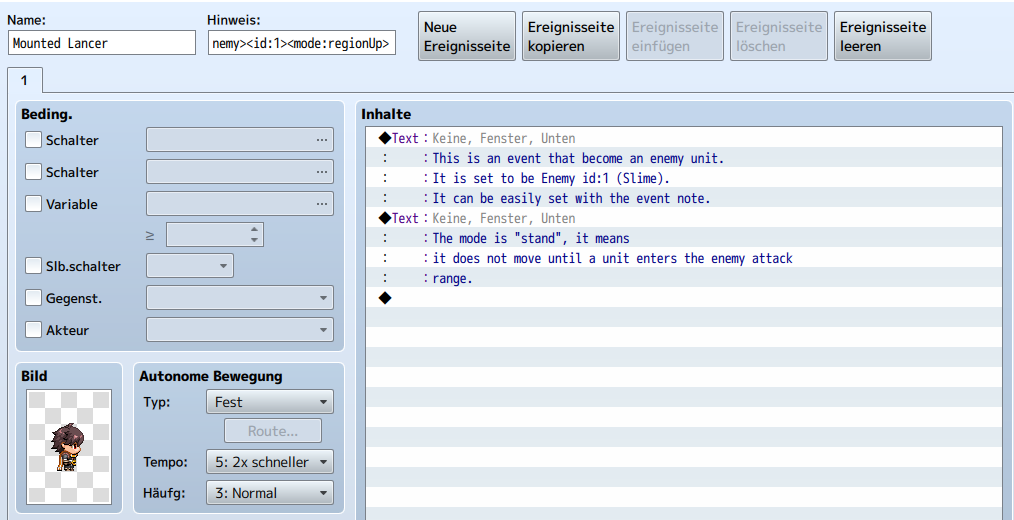
    View attachment 150134
    View attachment 150136

    edit 3
    video error (project test nr3)

    another edit of version nr 2(default) ,lets call it Nr3.

    -nr.3: changed position of actor 1 again

    --> enemy can attack actor first time, and in another turn the same enemy attacks the actor again and error happens
    ... it tried this with the same regions and with another test with more regions but ,that made no difference on the error
    => and i got still no idea why this happens sry..

    edit 4
    i tried using different attacks instead of only the aoeType "Line"
    .. :
    skill edit image eg "Plus
    View attachment 150153
    normal attack = no bugs
    Aoe "plus" = no bugs
    (with range=0 and aoeRange=2 to simulate an attack which is similar to "Line"... i also tried aoeRange=3 also no bug)
    --
    AOE "Line" = bug (range 1 _ aoeRange 2)
    AOE "Cone" = bug but a few turns later (range 1 _ aoeRange 2)
    ----------
    i didnt used all aoe type i just wanted to know if there is an AOE that doesnt bug..


    Edit 5

    - i was able to replicate that bug with the UpdatedDemo2.3
    --> i gave a similar "line" skill to the Slime
    (bugs at first attack)

    Replicated bug in Demo2.3 images
    View attachment 150155

    View attachment 150156
    View attachment 150157
    @Doktor_Q
    --> so i guess it has something to do with the AOE Plugin..
    mostly with how AI handles some of the AoeTypes ..

    (but i cant say why "line" triggers the bug faster than "cone" for example, or why in some cases "line" works first and bugs later)

    ->tested in UpdatedDemo2.3 "cone" works but if actor is closer to enemy it bugs

    Video Cone Buged if Actor is near Enemy

    well geez, that was unexpected!
    I seriously thought I screwed up something but was a bug in the programming all along. Thanks tho, if you manage to solve the bug tell me.
  3. @Dopan I have a hypothesis that I'll try testing- I think it's based on directional AoEs, where the direction it would use from its starting position is different from the one it will use after movement. The error happens if the incorrect direction wouldn't hit anything- this explains why "plus" works, "line" fails, and "cone" sometimes fails- the plus ignores direction, and cone is directional but wide enough to still look like it hits something, even if facing the wrong way.

    EDIT: Managed to replicate the issue and confirm I fixed it. SRPG_AoE and SRPG_AIControl have been updated on the github page.
  4. Old text about buged AOE Types
    Doktor_Q said:
    @Dopan I have a hypothesis that I'll try testing- I think it's based on directional AoEs, where the direction it would use from its starting position is different from the one it will use after movement. The error happens if the incorrect direction wouldn't hit anything- this explains why "plus" works, "line" fails, and "cone" sometimes fails- the plus ignores direction, and cone is directional but wide enough to still look like it hits something, even if facing the wrong way.

    EDIT: Managed to replicate the issue and confirm I fixed it. SRPG_AoE and SRPG_AIControl have been updated on the github page.
    Yes im pretty sure thats about directional AOEs i only couldnt explain why or how..
    Non-directional AOEs seem to work fine.. ill take some time and test All AOE types again in the UpdatedDemo2.3 just to be sure.

    edit (i will add the results here)
    Tested in "Chucks default Map" = Small default_map size
    Directional:
    -"line" bugs instant.(before moving or hit at enemy turn start)
    -"split" bugs like "cone" if actor is close to enemy
    -"arc" bugs after enemy comes closer and makes first hit
    -"side" seems to work,..from far and near.
    (..when next to actor, the enemy moves to be 1 step away from actor.)

    -"tee" seems to work,..from far and near.
    (..when next to actor, the enemy moves to be 1 step away from actor.)

    Non Directional:
    -"cross" works
    -"circle" works
    -"square" works
    -"checker" works
    -"star" works
    Dopan EX AOEs (also Non Directional) :
    ->all of them work.
    ------------------------------
    @ ALL
    edit 2

    Tested "line" with the updated Plugins DrQ mentioned #703
    ..it works
    (didnt test All AOEs again but "Line" was the one that buged instant)

    Updated-SRPG_Demo 2.4 Is Uploaded :
    (Link in Signature Spoiler)
    -bugfixes & updated Plugins Included-
    Changelog:
    -reworked All Event IDs of "Chucks Maps" added Switches, a Common Event and Improved Skill: "revive" & "fusion"
    -added Default Blank Map with Placeholder Events for 12 Actors
    (its an Example on how to make sure that every Actor has the Same EventID on every BattleMap)
    -added img "Char Numbers"
    -added 2 screenshots to zipFile, for "PluginManager"-info
    => i recommend to delete old DemoVersions and use this one^^
    (aslong there are no new Plugin Updates or new SRPG Plugins this should be the FINAL Updated-SRPG_Demo Version)

    Example IMGs Reworked Event IDs for Actor Placeholder
    eg1.png
    eg2.png
  5. Dopan said:
    Old text about buged AOE Types
    Yes im pretty sure thats about directional AOEs i only couldnt explain why or how..
    Non-directional AOEs seem to work fine.. ill take some time and test All AOE types again in the UpdatedDemo2.3 just to be sure.

    edit (ill will add the results here)
    Tested in "Chucks default Map" = Small default_map size
    Directional:
    -"line" bugs instant.(before moving or hit at enemy turn start)
    -"split" bugs like "cone" if actor is close to enemy
    -"arc" bugs after enemy comes closer and makes first hit
    -"side" seems to work,..from far and near.
    (..when next to actor, the enemy moves to be 1 step away from actor.)

    -"tee" seems to work,..from far and near.
    (..when next to actor, the enemy moves to be 1 step away from actor.)

    Non Directional:
    -"cross" works
    -"circle" works
    -"square" works
    -"checker" works
    -"star" works
    Dopan EX AOEs (also Non Directional) :
    ->all of them work.
    ------------------------------
    @ ALL
    edit 2

    Tested "line" with the updated Plugins DrQ mentioned #703
    ..it works
    (didnt test All AOEs again but "Line" was the one that buged instant)

    Updated-SRPG_Demo 2.4 Is Uploaded :
    (Link in Signature Spoiler)
    -bugfixes & updated Plugins Included-
    Changelog:
    -reworked All Event IDs of "Chucks Maps" added Switches, a Common Event and Improved Skill: "revive" & "fusion"
    -added Default Blank Map with Placeholder Events for 12 Actors
    (its an Example on how to make sure that every Actor has the Same EventID on every BattleMap)
    -added img "Char Numbers"
    -added 2 screenshots to zipFile, for "PluginManager"-info
    => i recommend to delete old DemoVersions and use this one^^
    (aslong there are no new Plugin Updates or new SRPG Plugins this should be the FINAL Updated-SRPG_Demo Version)

    Example IMGs Reworked Event IDs for Actor Placeholder
    View attachment 150353
    View attachment 150354
    thanks dude, I am grateful towards you!
  6. I got a Question:
    Is there a way to use a skill triggert Common Event and to make the CE trigger BEFORE the actual Skill-effect in MapBattle Mode?
    I try to use Galvs Picture Animations MV on single target Skills like "fire"
    ..I use a "blank Image"=invisible with curser sizes to move the animation
    i got 2 Issues with that:
    1. CE triggers after Skill effect (dmg effect happens to early),..
    2. And the only way i could get the Screen ID to set IMG & start Animation,, was using Event ID ,that way every actor needs his own skill (+CE) ,i would preffer a way to Store the "battler a" in a varible instead of the "event ID"
    (However the sesond Issue is not the main Problem ,EventID does the job if there is no other way)
    skill Setup
    Screenshot_2.png
    Common Event Setup
    Screenshot_1.png
    about the CE I used:
    -Event1=actor1 varibles gives the image-animation the point where to start
    (similar to what "batller a" would be)

    IMG EG Variable event1 = X Screen
    Screenshot_3.png
    -Cursor Player variables gives the image-animation the point where to move (similar to what "battler b" would be)

    => what it looks like at the Moment ,when CE triggers after Skill-effect.
    (the animation on the target is the default skill animation which i want to trigger in the second Place..atm it trigers at the first place)
    video eg


    Edit .(in order to explain Issue 1 better)
    there is a script for rpg maker vx ace for this but it wasnt ported into MV,
    because on SV battles, it seems possible to use (Yep)ActSeqPack1 -Skill Notetag to change what triggers first..
    video EG 2
    this is near to what it should look like (i disabled the default skill animation and put in a second galv animation)..but the DMG happens to early^^

    Screenshot_5.png
  7. @Dopan at the moment, no- the common event is run at the very end of the skill, similar to how it normally works in the normal battle system (not accounting for Yanfly action sequences). What I typically do to make special animations beforehand is put code in a <Custom Execution> notetag, so it runs after the skill cost is paid, but before any other logic- for example, a "lunge" skill that opens with "user.forward(3)" to cause the character to run up to the enemy before the attack.

    Could you explain a bit more about what kind of effect you're trying to make?
  8. welp, here's another question I want to make.
    How I do make action sequence work on map battle mode, because I saw that it works both in front view, and in side view, but never worked on map battle.
    I'd like to know how I'd make them work.

    Code:
    <setup action>
    eval: user.chance = Math.ceil(Math.random() * 10);
    </setup action>
    
    <target action>
    if (user.chance == 1)
    action effect: user
    else
    action effect: user
    end
    </target action>

    This is the formula I am trying to work with, hopefully you can make it work in Map Battle
  9. Doktor_Q said:
    @Dopan
    Could you explain a bit more about what kind of effect you're trying to make?
    @Doktor_Q
    i try to move an animation from the skill user to the Target.More detailed Im moving a (not visible) Picture and this Picture has an Animation connected. And Im using Variables to set the Pictures Position and to set where the Picture moves to.

    The Variable to set Pic-Position is "Event-1 X & Y ->Screen"
    (what is = actor 1 if all events are in order)
    The Variable where to move, is the CursorPlayer Position,
    (what is = target)

    its a visusal Effect that shows how the fire moves from Skill-user to Target.
    This could also be used to make more complicated Visual effects with moving animations but without a skill notetag that says "wait for CE to end before effect"..
    the DMG happens to early so it looks bad..but i understand if its not possible and i dont wanna ask for the work to build an extra plugin, i just hoped there is a way to Trigger the DMG-Effect a little bit later or even better to let it wait for the CE.

    How I do make action sequence work on map battle mode
    @Yew Bowman
    Im pretty sure thats not possiblle, ActSeq is made for SV Batlle Screen as far i understand it
    edit.
    And sry but i dont know ActSeq well enough, to understand what exactly this setup you showed, is doing and how to do the same effect in another way..
  10. Yew Bowman said:
    welp, here's another question I want to make.
    How I do make action sequence work on map battle mode, because I saw that it works both in front view, and in side view, but never worked on map battle.
    I'd like to know how I'd make them work.

    Code:
    <setup action>
    eval: user.chance = Math.ceil(Math.random() * 10);
    </setup action>
    
    <target action>
    if (user.chance == 1)
    action effect: user
    else
    action effect: user
    end
    </target action>

    This is the formula I am trying to work with, hopefully you can make it work in Map Battle

    Action sequences do not work in map battle. The action sequence plugins are very large and complex modification to the battle scene made by Yanfly, and there's no simple way to port them to the map scene- I'd have to make my own, equally large and complex modifications, which I don't plan on.

    For complex effects or conditionals, I'd suggest learning how to use the lunatic mode tags from Skill Core, which do work correctly with map battle. In some cases, you can also just make a fancier damage formula- there's plenty of guides on the forums here about doing novel things with formulas.

    @Dopan I meant, what is the effect you want to achieve? I get that its some kind of moving animation, but what is the moving animation representing, etc? There might be a different approach that could work better.
  11. Doktor_Q said:
    @Dopan I meant, what is the effect you want to achieve? I get that its some kind of moving animation, but what is the moving animation representing, etc? There might be a different approach that could work better.

    The Skill is a magic Skill similar to every normal "fire" single target skill,only difference is that the Animation doesnt happen only on the target. Moving Animations can also be used to simulate shooting Canon-bullets or (smaller-) Arrows or similar things..

    edit.
    i used :
    <Custom Execution>
    $gameTemp.reserveCommonEvent(32);
    </Custom Execution>

    ..to run the CE instead of the "normal way"..and i tried to make the CE shorter (in frame usage) now the DMG-effect timing is a little bit better (=later) atleast it seems so..(still not perfect but for now, the best i can do)
    video eg 3


    edit2 (looked into Skill Core)
    I also tried "<Pre-Damage Eval>" and "<Before Eval>" instead of "<Custom Execution>".. but "<Custom Execution>" works best (=>has the best timing)
  12. Doktor_Q said:
    Action sequences do not work in map battle. The action sequence plugins are very large and complex modification to the battle scene made by Yanfly, and there's no simple way to port them to the map scene- I'd have to make my own, equally large and complex modifications, which I don't plan on.

    For complex effects or conditionals, I'd suggest learning how to use the lunatic mode tags from Skill Core, which do work correctly with map battle. In some cases, you can also just make a fancier damage formula- there's plenty of guides on the forums here about doing novel things with formulas.

    @Dopan I meant, what is the effect you want to achieve? I get that its some kind of moving animation, but what is the moving animation representing, etc? There might be a different approach that could work better.
    Well, damn, are you a conosseur of formulas or lunatic mode?
  13. Yew Bowman said:
    Well, damn, are you a conosseur of formulas or lunatic mode?
    Lunatic mode means => use Formulas ( i also didnt know that, in the first place ^^)

    if u are a noob in using Formulas & Lunatic mode (=like i am ), you have to google and look in the Forum for Scriptcalls or Formulas, that do what you want them to do..
    For Example: i wanted the Common Event to trigger with "lunatic mode" using Skill Notetag:
    <Custom Execution>
    (..)put formulajavacode here(..) #edited added "javacode"
    </Custom Execution>

    and i goggled : "how to start a Common Event with Scriptcall in RPG MV?" that gave me a link to a topic where i found this Script- FormulaCall=javacode: #edited
    " $gameTemp.reserveCommonEvent(32); ".. thats how i made :

    <Custom Execution>
    $gameTemp.reserveCommonEvent(32);
    </Custom Execution>

    .. i also looked for a Scriptcall to make a Common Event trigger before the Skill-Effect,but couldnt find one, thats why i asked here if i missed anything on how to do it..

    edit.:
    i missunderstood something, i thought formulas and javascript code are the same thing,but DrQ explained it better in the next posting.
    (="Lunatic Mode & Formulas use both javascript code,but Formulas uses specifically just the javascript code the engine natively uses to determine how much damage or healing happens")
  14. Dopan said:
    Lunatic mode means => use Formulas ( i also didnt know that, in the first place ^^)

    And if u are a noob in using Formulas (=like i am ), you have to google and look in the Forum for Scriptcalls or Formulas, that do what you want them to do..
    For Example: i wanted the Common Event to trigger with "lunatic mode" using Skill Notetag:
    <Custom Execution>
    (..)put formula here(..)
    </Custom Execution>

    and i goggled : "how to start a Common Event with Scriptcall?" that gave me a link to a topic where i found this Script- Formula:
    " $gameTemp.reserveCommonEvent(32); ".. thats how i made :

    <Custom Execution>
    $gameTemp.reserveCommonEvent(32);
    </Custom Execution>

    .. i also looked for a Scriptcall to make a Common Event trigger before the Skill-Effect,but couldnt find one, thats why i asked here if i missed anything on how to do it..

    Lunatic mode tags are notetags that let you use javascript code, added by a lot of Yanfly plugins. They slightly different from the damage formulas, in that the damage formula is specifically just the javascript code the engine natively uses to determine how much damage or healing happens. So, Lunatic Mode is not a Formula (unless you're using Damage Core to write a custom formula inside a lunatic mode tag), but both use javascript code.

    The biggest difference between them is that damage formulas written in the formula box can only be one line, but lunatic mode tags generally let you write multiple lines.
  15. Doktor_Q said:
    @Dopan at the moment, no- the common event is run at the very end of the skill, similar to how it normally works in the normal battle system (not accounting for Yanfly action sequences). What I typically do to make special animations beforehand is put code in a <Custom Execution> notetag, so it runs after the skill cost is paid, but before any other logic- for example, a "lunge" skill that opens with "user.forward(3)" to cause the character to run up to the enemy before the attack.

    Could you explain a bit more about what kind of effect you're trying to make?
    @ All

    I just recognized using:
    <Custom Execution>
    $gameTemp.reserveCommonEvent(32);
    </Custom Execution>
    that changes the timing enough to Use mapbattle Notetag:
    "<animationDelay:X>" #waits X frames between the animation and effect
    overrides the default settings


    and with Using a "Blank" = not Visible 1 frame Animation as Skill Default Animation..(in order to have a trigger for the Delay)

    ..i can actually let the Common Event be Finished before the Skill-Damage Triggers.. I only needed to try out how much Frames my Common Event Uses till i got the right Timing..
    (that didnt work if using the Default skill-Common-Event trigger)

    This is a huge Improvement on doing Visual effects in MapBattle; as long the start point of the Image and the End point where the image goes are set. It is possible to let the Picture (and its Animations) move practically everywhere on the screen.. (It will start at the Skill-user and end at the Target) ..before the DMG happens ,aslong the Delay is set right with "<animationDelay:X>" skill notetag.
    This Plugin can be used to make bullets or arrows flying,and it can also build more Complicated Visual Sequenses on Map while using "MapBattle=true"_Skills and the Common Event.
    (ill try out some more and add it in the next Demo as soon im happy with the results,..perhaps the Plugin could also be used as Animation layer for showing States on the ActorChar)

    Img Setup
    Screenshot_3.png
    Screenshot_1.png
    Video EG It works Fine
  16. @Dopan I've been dabbling in trying to make a mapBattle extension specifically to handle shooting projectiles, though it is going kind of slowly. I think you're on the right track in the meantime- the one thing I think you can change is using $gameTemp.activeEvent() and $gameTemp.targetEvent() to directly access those events, rather than needing to use variables to look them up by ID like it looks like you were doing.
  17. Doktor_Q said:
    @Dopan I've been dabbling in trying to make a mapBattle extension specifically to handle shooting projectiles, though it is going kind of slowly. I think you're on the right track in the meantime- the one thing I think you can change is using $gameTemp.activeEvent() and $gameTemp.targetEvent() to directly access those events, rather than needing to use variables to look them up by ID like it looks like you were doing.
    that is allready helpfull but how do i use this to set a Image there? with Event Command i use this:
    img setup
    Screenshot_22.png

    Edit
    the Link in my Signature says :
    - Show Picture =
    $gameScreen.showPicture(pictureId, name, origin, x, y, scaleX, scaleY, opacity, blendMode)
    - Move Picture =
    $gameScreen.movePicture(pictureId, origin, x, y, scaleX,scaleY, opacity, blendMode, duration)

    How do i combine this with $gameTemp.activeEvent() and $gameTemp.targetEvent() for the X Y Setting?
  18. @Dopan You can still set the movement via variables, but you can assign those variables directly to the positions with scripts:
    $gameTemp.activeEvent().posX()
    $gameTemp.activeEvent().posY()
    $gameTemp.targetEvent().posX()
    $gameTemp.targetEvent().posY()

    To save some extra lines in the editor.
  19. Old Text
    @Dopan You can still set the movement via variables, but you can assign those variables directly to the positions with scripts:
    $gameTemp.activeEvent().posX()
    $gameTemp.activeEvent().posY()
    $gameTemp.targetEvent().posX()
    $gameTemp.targetEvent().posY()
    But means "posY/X" really = Screenshot_44.png

    i mean the Screen Position not the Map XY
    ( i made the same mistake in the first Place)

    because with "posY/X" it doesnt work..
    Screenshot_77.png
    Edit.:
    I found the Solution (thx
    to rpg forum)
    its :

    $gameTemp.activeEvent().screenX()
    $gameTemp.activeEvent().screenY()
    $gameTemp.targetEvent().screenX()
    $gameTemp.targetEvent().screenY()
    Screenshot_99.png
    @Doktor_Q THX those hints helped me a lot to improve the Galvs Picture Animations MV -Plugin usage for SRPG

    - Now the Skill dont have to be Unique and with the right Setup everybody should be able to use this ( both Issues from the First Question earlier are Solved! ) .

    EDIT 2 @ All
    - Updated-SRPG_Demo 2.5 is Uploaded

    -Added Galvs Picture Animations MV -Plugin
    -Added Common Event for New Visual upgraded Magic Skill "FireBlast"
    -Added Magic Skill "FireBlast" Setup (single target)
    -Added "animation" IMG to Pictures Folder
    -Added AOE Example Skill " Firestorm AOE 2"
    => this seems to be a small Update ,but the Visual-advantage of using Galvs Picture Animations MV for MapBattle Skills* is huge (*Mapbattle:true -Only!)
    => this can also be used for shotting Arrows ,Bullets or even more Complex moving Animations..
    --known Issues:
    -Screen Zoom conflicts with the "Screen X Y -Variables"


    Video Example

    Video AOE Example

    ---
    Edit 3
    I found a way to Control the ActorBattleCommands,
    in the SRPG_core -Plugin with Switches.
    - edited SRPG_core-Plugin => added Switches for each ActorBattleCommand*,
    to the SRPG_core-Plugin Setup.

    - updated the SRPG_Demo Version2.5
    => if Switch ID 0 or Switch "false" => Enables ActorBattleCommand
    => if Switch "true" => Disables ActorBattleCommand
    (*ActorBattleCommands= "Attack" "Skill" "Item" "Equip" "Wait")
    (=> "Skill" = all Skilltypes like "special", "magic" ect)
    imgs srpg_core edit
    edit core.png
    core edit info1.png
    core edit info 2.png
    core edit info 3.png
  20. Doktor_Q said:
    Lunatic mode tags are notetags that let you use javascript code, added by a lot of Yanfly plugins. They slightly different from the damage formulas, in that the damage formula is specifically just the javascript code the engine natively uses to determine how much damage or healing happens. So, Lunatic Mode is not a Formula (unless you're using Damage Core to write a custom formula inside a lunatic mode tag), but both use javascript code.

    The biggest difference between them is that damage formulas written in the formula box can only be one line, but lunatic mode tags generally let you write multiple lines.
    well, I tried using a random formula, and no matter what, the enemy drains his energy nonstop and stays technically dead, it doesn't disappear until I kill it for real. I am guessing my only solution is using Lunatic Mode or making a dedicated plugin
    1594499589568.png
    if (Math.random()<0.1) {a.setHp(a.hp - 100)} else {a.atk * 4- b.def * 2}
    This is what the formula looks like btw.