Screen Effect Filter MZ (FilterControllerMZ)

● ARCHIVED · READ-ONLY
Started by Tsukimi-neko 77 posts Page 4 of 4 View original ↗
  1. Plueschkatze said:
    @hiddingback well, there maybe are some standard values set within the plugin, so that even if you don't define the values the effects show something. Would be my guess, at least. Probably the ones shown in the example document.
    Probably, I didn't use them much tho and right now it doesn't work for whatever reason (along with Visustella, which was working just fine until now where it's not altering the WASD)
  2. Can someone help me figure out why I can't seem to change the parameters of the Bloom filter? I've created the filter and enabled it without problems (Thanks for Imaginary Villain's updated script), but the 4 parameters don't seem to make any changes. Ideas?

    1683952490725.png

    Edit: Nevermind, I figured it out. Here's a screenshot on how to set the filter parameters via plugin command.

    1684527180836.png
  3. Is this still being updated?
  4. Hello, I tried your plugin, and I was wondering if this was a bug or something intended.
    I used 'old film' and ran the event in parallel. But I was flustered because the plug-in worked differently than the video. When I ran the event using the decision button, the plugin effect that I expected finally came out.
    +Let the event run when the player approaches it, and then press the forward button continuously in front of the event to get a similar error. This is temporary, but permanent for parallel processing.

    I'm using a translator, so maybe I didn't notice what you said was your intention. And what I was trying to say may have been translated incorrectly. Thank you for the good plugin!
  5. Noresponce said:
    I used 'old film' and ran the event in parallel. But I was flustered because the plug-in worked differently than the video.
    Parallel events check every frame to see if they should start. So I think maybe your event is restarting the effect every frame?

    To run a Parallel event once per map visit, you can add an "Erase Event" command at the end of it. Erased events come back after you leave their map. :kaohi:
  6. Tsukimi-neko said:
    Screen Effect Filter MZ
    FilterControllerMZ.js

    View attachment 158198

    ◆ Plugin Overview

    Totally
    25 types of screen effect filters ready for RPG Maker MZ!
    Just one command, and you can create/modify/delete those fancy and beautiful screen effects to brush your game up!

    Even more, this plugin fully used the new Command System in MZ,
    so that you can choose your filters and the target to be applied on intuitively by choosing from pull-down lists.

    View attachment 158204


    ◆ Demo


    ・a preview of what screen effects you can create by this plugin


    ・Trying to reproduce DI◯'s ZA WARUDO by this plugin


    ◆ functionality
    ▶ Filter creating/erasing
    ▶ Filter parameter setting/moving
    ▶ Auto-delete filter after movements
    ▶ Delete all filters 
    new!


    ◆ Download / demo-project

    You can download the demo-project of this plugin from here:

    https://drive.google.com/file/d/1A05iDMTtXuGx9_1PZzJAkXQBDUSVH5zj

    Demo-project contains each filters' demo, how to use plugin commands, some small tips,
    so it is actually also a tutorial.
    (just start the game after downloading it!)

    Also, if you only want the plugin itself, you can download from here.

    download
    ▶ FilterControllerMZ.js
    download by pressing ctrl+s (command+s in Mac)
    https://raw.githubusercontent.com/cji3bp62000/RPGMaker-plugins/master/plugin-list/FilterControllerMZ/FilterControllerMZ.js
    Github

    ▶ Parameter list for each filter & their default values
      click me!
     ※ This plugin is a plugin updated from MV version , but currently it is not supporting RPG Maker MV.


    ◆ Terms of Use
    This plugin is released under MIT license.

    You can download it by free, make a copy, modify and redistribute it as you want. (However, you should not delete the copyright claim and the MIT license clause written inside the plugin)
    I'll be happy if you put "Tsukimi" on the credits :)


    ◆ Additional
    DI◯ in the demo video is made by default MZ's character generator.
    DI◯'s setting file
    View attachment 158206 < a road roller!!!!!
    Q&A
    Q&A
    Q1: I'm using VisuMZ_1_OptionCore and an error occurs, what should I do?
    A:
    Turn the plugin-parameter "Show in Option Menu" of this plugin off.
    If you still want to show in option menu, open VisuMZ_1_OptionCore's plugin parameter, and paste below text in the picture place. (click to see larger)
    {"Symbol:str":"TKMFilterEnabledAll","Icon:num":"0","TextStr:str":"Filter Effect","TextJS:func":"\"\"","Accessibility":"","ShowJS:func":"\"return true;\"","EnableJS:func":"\"return true;\"","ExtJS:func":"\"return 0;\"","Functions":"","DrawJS:func":"\"const symbol = arguments[0];\\nconst index = arguments[1];\\nconst title = this.commandName(index);\\nconst rect = this.itemLineRect(index);\\nconst quarterWidth = rect.width / 4;\\nconst halfWidth = rect.width / 2;\\nconst value = this.getConfigValue(symbol);\\n\\n// Draw Command Name\\nthis.resetFontSettings();\\nthis.changePaintOpacity(true);\\nthis.drawTextEx(title, rect.x, rect.y, halfWidth, \\\"left\\\");\\n\\n// Draw Status Text\\nconst off = 'OFF';\\nconst on = 'ON';\\nthis.changePaintOpacity(!value);\\nthis.drawText(off, rect.x + halfWidth, rect.y, quarterWidth, \\\"center\\\");\\nthis.changePaintOpacity(value);\\nthis.drawText(on, rect.x + halfWidth + quarterWidth, rect.y, quarterWidth, \\\"center\\\");\"","ProcessOkJS:func":"\"const symbol = arguments[0];\\nconst value = this.getConfigValue(symbol);\\n\\n// Perform Actions\\nthis.setConfigValue(symbol, !value);\\nthis.redrawItem(this.findSymbol(symbol));\\nthis.playCursorSound();\"","CursorRightJS:func":"\"// Declare Constants\\nconst symbol = arguments[0];\\nconst value = this.getConfigValue(symbol);\\nconst lastValue = value;\\n\\n// Perform Actions\\nthis.setConfigValue(symbol, true);\\nthis.redrawItem(this.findSymbol(symbol));\\nif (this.getConfigValue(symbol) !== lastValue) {\\n this.playCursorSound();\\n}\"","CursorLeftJS:func":"\"const symbol = arguments[0];\\nconst value = this.getConfigValue(symbol);\\nconst lastValue = value;\\n\\nthis.setConfigValue(symbol, false);\\nthis.redrawItem(this.findSymbol(symbol));\\nif (this.getConfigValue(symbol) !== lastValue) {\\n this.playCursorSound();\\n}\"","Data":"","DefaultJS:func":"\"\"","SaveJS:func":"\"const config = arguments[0];\\nconst symbol = arguments[1];\\nconfig[symbol] = ConfigManager[symbol];\"","LoadJS:func":"\"const config = arguments[0];\\nconst symbol = arguments[1];\\nConfigManager[symbol] = config[symbol];\""}
    View attachment 158725
    update log & plans
     v1.2 (plan)
     no update plan currently
     v1.1 (current)
     add:
      ・new Filter Target "ExcludeSpecificChar" "ExcludeSpecificPicture"
      ・target-id(s), duration, filter-speed <- variable/random assignment

    Hello! It's an amazing plugin I need to use it so bad but when I start the game, there are one or two filters applied for default for some reason, and I can't find a way to turn them off. HEEELPP

    1707180654919.png
  7. I love this! But.. How do I know what filterID names things have?
  8. This Plugin Has been invaluable to me, However, I have some questions and insights.

    The displacement has proved very useful to me, but it seems you can only have one displacement field and image at a time. Am I mistaken in this, Can you set more than one field?

    Also the CRT scan line effect is awesome, I don't know if it is only my project or an intentional effect but the flicker effect which accompanies the crt scan lines is far too strong.

    The flickering can cause a headache or worse migraine in some people. Can this parameter be lessened or eliminated in some way? In addition I could not get the individual sprite target to work in projecting the crt effect onto a particular sprite, however it works globally( on all sprites, or parallax, etc...)

    This Plugin Has been invaluable to me, However, I have some questions and insights.

    The displacement has proved very useful to me, but it seems you can only have one displacement field and image at a time. Am I mistaken in this, Can you set more than one field?

    Also the CRT scan line effect is awesome, I don't know if it is only my project or an intentional effect but the flicker effect which accompanies the crt scan lines is far too strong.

    The flickering can cause a headache or worse migraine in some people. Can this parameter be lessened or eliminated in some way? In addition I could not get the individual sprite target to work in projecting the crt effect onto a particular sprite, however it works globally( on all sprites, or parallax, etc...)
  9. I forgot how pretty this was :) thank you
  10. @cronenbuilder You can have multiple filters using this plugin right? So maybe you can create two displacement filters?
    The crt filters should have several arguments you can change. The last two should be the noise effect you are talking about. You can adjust them to see how they work.
    JavaScript:
    _updateFilterHandler["crt"] = function(filter, cp) {
            filter.curvature = cp[0];
            filter.lineWidth = cp[1];
            filter.lineContrast = cp[2];
            filter.noise = cp[3];
            filter.noiseSize = cp[4];
    
            filter.seed = Math.random()*3;
            filter.time = this._time;
        };
  11. utunnels said:
    @cronenbuilder You can have multiple filters using this plugin right? So maybe you can create two displacement filters?
    The crt filters should have several arguments you can change. The last two should be the noise effect you are talking about. You can adjust them to see how they work.
    JavaScript:
    _updateFilterHandler["crt"] = function(filter, cp) {
            filter.curvature = cp[0];
            filter.lineWidth = cp[1];
            filter.lineContrast = cp[2];
            filter.noise = cp[3];
            filter.noiseSize = cp[4];
    
            filter.seed = Math.random()*3;
            filter.time = this._time;
        };
    You are awesome! I will dive into this today. Yesterday was the first time I edited a plugin successfully so this is coming at just the right time, thank you. I'll report back with my results.
  12. Quimey said:
    Hello! It's an amazing plugin I need to use it so bad but when I start the game, there are one or two filters applied for default for some reason, and I can't find a way to turn them off. HEEELPP

    Quimey said:
    Hello! It's an amazing plugin I need to use it so bad but when I start the game, there are one or two filters applied for default for some reason, and I can't find a way to turn them off. HEEELPP

    View attachment 294197
    Are you also using Visustella's BRIGHT EFFECTS plugin, by any chance? Because it looks like you're referring to the Tilt Shift effect that blurs the top and bottom of the screen, but the Filter Controller plugin should NOT have that on by default... And when I turn it on without adjusting any of its settings, it looks like a horrible mess. However, the Bright Effects plugin DOES turn Tilt Shift on by default, UNLESS you open it up in the Plugin Manager and turn that setting off.

    I use the Filter Controller's displacement effect probably more than anything else out of all the plugins I own (perhaps a bit too much, actually), but when it comes to things like CRT and blur and tilt shift, I find the Bright Effects plugin to be far easier to set up and make adjustments to.

    If it somehow IS the Filter Controller, you should be able to turn it off using the Erase Filter plugin command... But I would still be more interested in how in the heck it got turned on in the first place.
  13. Would it be possible to add a new target that applies the filter to the entire window (with that I don't mean text-window or the like)? So that the filter (for example the Godray filter) also applies to the black borders, when the game-window size is changed (game aspect ratio keeps the same, but the window has a different one, that's why you get those black borders left and right / up and down).
  14. Hi, when using the CRT effect provided with you Pixi js plugin, If the game runs for x amount of time slanted errors in the scanline appear which destroys the aesthetic and is hard on the eyes. This is a common issue with scanline effects in PixiJS and can occur due to floating-point precision errors accumulating over time or synchronization issues between the scanline animation and the game's refresh rate. Is there any way to fix this, Possibly with a code edit to the plugin? Have you experienced this? Any ideas of edits to the crt effect itself that can fix this issue?
  15. hey, nice plugin, but i have a question, how can I make the effects always be on? Either in the start menu or in the pause menu (which are the ones that cause me problems)
  16. Was anyone able to get this working? It says the Demo is no longer available to download, and I can't get anything functioning from the script itself. Any tips?
  17. orgint said:
    Was anyone able to get this working? It says the Demo is no longer available to download, and I can't get anything functioning from the script itself. Any tips?
    Ik this is very late, I was also insanely confused but figured it out, and this is a super useful plugin so I'll throw in how I got this to work in case anyone else is confused.

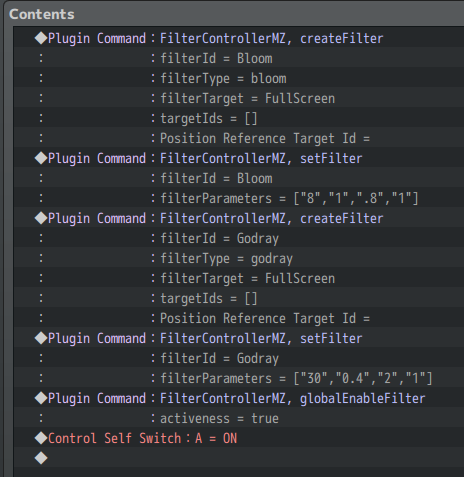
    I used map events instead of a script, I don't know how you would do this via script- but on the map you need to create the filter, set the values for it so it actually does something, and then enable it. So its 3 plugin commands to actually use it.

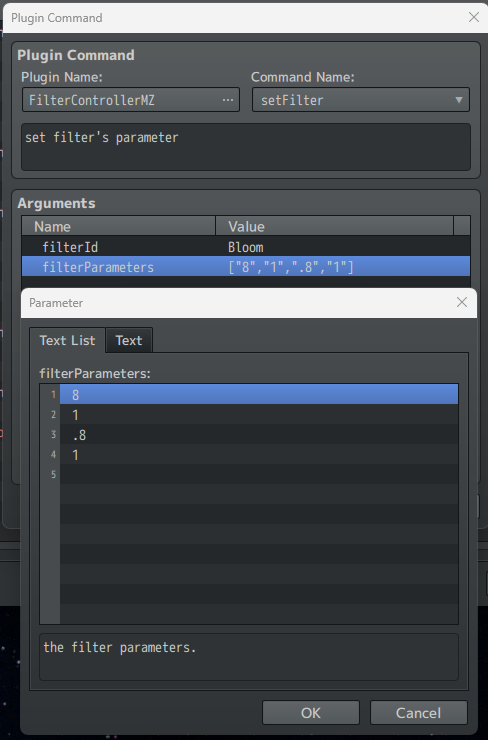
    I was also really confused about how to input the parameters initially- each number value needs to be it's own line. I kept thinking it was one line with commas, it isn't. The name is just the name YOU set for the filter you wanna change. I named the bloom one "Bloom"- but if you named the bloom filter "thing2", then you would put thing2 in the setFilter command.
    1779847717449.png
    You can stack different effects on top of each other, but you'd need to enable them all individually. (I think? I only used global enable since I want all of them running.) I used the godrays and bloom together.

    Since the Demo is no longer working, you're just gonna need to punch some numbers in and playtest the game over and over until it looks right. So that's a mild pain, but once you get it, it's done. I started with the default stuff Tsuzkimi-Neko outlined in the pdf and tweaked numbers from there since the filters were acting crazy when I tried to free ball it myself.

    Self switch A is just a blank page, so a parallel process turns it on, and then it's done.
    1779847516812.png
    This may not be the most efficient way of doing this, but that's how I managed to get this to run. The plugin admittedly seems a little overly confusing the way it's presented, but that may just be because the demo isn't available to peek at anymore lol.