Screen Effect Filter MZ (FilterControllerMZ)

● ARCHIVED · READ-ONLY
Started by Tsukimi-neko 20 posts View original ↗
  1. Screen Effect Filter MZ
    FilterControllerMZ.js

    banner.png

    ◆ Plugin Overview

    Totally
    25 types of screen effect filters ready for RPG Maker MZ!
    Just one command, and you can create/modify/delete those fancy and beautiful screen effects to brush your game up!

    Even more, this plugin fully used the new Command System in MZ,
    so that you can choose your filters and the target to be applied on intuitively by choosing from pull-down lists.

    紹介1-en.png


    ◆ Demo


    ・a preview of what screen effects you can create by this plugin


    ・Trying to reproduce DI◯'s ZA WARUDO by this plugin


    ◆ functionality
    ▶ Filter creating/erasing
    ▶ Filter parameter setting/moving
    ▶ Auto-delete filter after movements
    ▶ Delete all filters 
    new!


    ◆ Download / demo-project

    You can download the demo-project of this plugin from here:

    https://drive.google.com/file/d/1A05iDMTtXuGx9_1PZzJAkXQBDUSVH5zj

    Demo-project contains each filters' demo, how to use plugin commands, some small tips,
    so it is actually also a tutorial.
    (just start the game after downloading it!)

    Also, if you only want the plugin itself, you can download from here.

    download
    ▶ FilterControllerMZ.js
    download by pressing ctrl+s (command+s in Mac)
    https://raw.githubusercontent.com/cji3bp62000/RPGMaker-plugins/master/plugin-list/FilterControllerMZ/FilterControllerMZ.js
    Github

    ▶ Parameter list for each filter & their default values
      click me!
     ※ This plugin is a plugin updated from MV version , but currently it is not supporting RPG Maker MV.


    ◆ Terms of Use
    This plugin is released under MIT license.

    You can download it by free, make a copy, modify and redistribute it as you want. (However, you should not delete the copyright claim and the MIT license clause written inside the plugin)
    I'll be happy if you put "Tsukimi" on the credits :)


    ◆ Additional
    DI◯ in the demo video is made by default MZ's character generator.
    DI◯'s setting file
    DIOFace.png < a road roller!!!!!
    Q&A
    Q&A
    Q1: I'm using VisuMZ_1_OptionCore and an error occurs, what should I do?
    A:
    Turn the plugin-parameter "Show in Option Menu" of this plugin off.
    If you still want to show in option menu, open VisuMZ_1_OptionCore's plugin parameter, and paste below text in the picture place. (click to see larger)
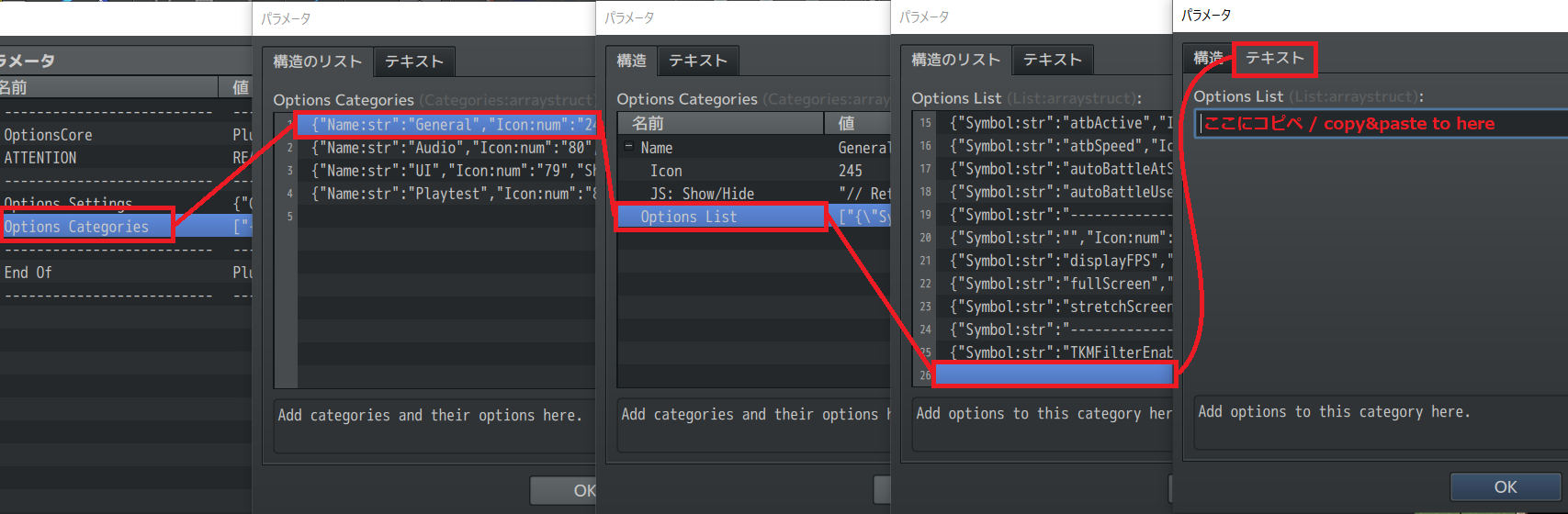
    {"Symbol:str":"TKMFilterEnabledAll","Icon:num":"0","TextStr:str":"Filter Effect","TextJS:func":"\"\"","Accessibility":"","ShowJS:func":"\"return true;\"","EnableJS:func":"\"return true;\"","ExtJS:func":"\"return 0;\"","Functions":"","DrawJS:func":"\"const symbol = arguments[0];\\nconst index = arguments[1];\\nconst title = this.commandName(index);\\nconst rect = this.itemLineRect(index);\\nconst quarterWidth = rect.width / 4;\\nconst halfWidth = rect.width / 2;\\nconst value = this.getConfigValue(symbol);\\n\\n// Draw Command Name\\nthis.resetFontSettings();\\nthis.changePaintOpacity(true);\\nthis.drawTextEx(title, rect.x, rect.y, halfWidth, \\\"left\\\");\\n\\n// Draw Status Text\\nconst off = 'OFF';\\nconst on = 'ON';\\nthis.changePaintOpacity(!value);\\nthis.drawText(off, rect.x + halfWidth, rect.y, quarterWidth, \\\"center\\\");\\nthis.changePaintOpacity(value);\\nthis.drawText(on, rect.x + halfWidth + quarterWidth, rect.y, quarterWidth, \\\"center\\\");\"","ProcessOkJS:func":"\"const symbol = arguments[0];\\nconst value = this.getConfigValue(symbol);\\n\\n// Perform Actions\\nthis.setConfigValue(symbol, !value);\\nthis.redrawItem(this.findSymbol(symbol));\\nthis.playCursorSound();\"","CursorRightJS:func":"\"// Declare Constants\\nconst symbol = arguments[0];\\nconst value = this.getConfigValue(symbol);\\nconst lastValue = value;\\n\\n// Perform Actions\\nthis.setConfigValue(symbol, true);\\nthis.redrawItem(this.findSymbol(symbol));\\nif (this.getConfigValue(symbol) !== lastValue) {\\n this.playCursorSound();\\n}\"","CursorLeftJS:func":"\"const symbol = arguments[0];\\nconst value = this.getConfigValue(symbol);\\nconst lastValue = value;\\n\\nthis.setConfigValue(symbol, false);\\nthis.redrawItem(this.findSymbol(symbol));\\nif (this.getConfigValue(symbol) !== lastValue) {\\n this.playCursorSound();\\n}\"","Data":"","DefaultJS:func":"\"\"","SaveJS:func":"\"const config = arguments[0];\\nconst symbol = arguments[1];\\nconfig[symbol] = ConfigManager[symbol];\"","LoadJS:func":"\"const config = arguments[0];\\nconst symbol = arguments[1];\\nConfigManager[symbol] = config[symbol];\""}
    紹介2.png
    update log & plans
     v1.2 (plan)
     no update plan currently
     v1.1 (current)
     add:
      ・new Filter Target "ExcludeSpecificChar" "ExcludeSpecificPicture"
      ・target-id(s), duration, filter-speed <- variable/random assignment
  2. pretty neat effect in your video there :)
  3. Looks amazing!. Thank you!.
    I'm definitely using it.
  4. Very nice work! Love the bloom & Godray effect :rwink:
    2 questions :
    1. Are they compatible with mobile devices like android and iOS?
    2. How to maximize our FPS rate? When i try Godray+bloom effect I loose more than 40 fps (60 to 20)
    Thanks!
  5. @Elgigante94
    Hello! I'm glad you like it.

    I think most of the modern mobile devices is supported. (it is using WebGL)
    Since MZ is using WebGL as it's base system as well, if the plugin doesn't work, the game will not, too.

    Edit:
    @Elgigante94
    Unfortunately, Godray and bloom are the two heaviest filters beyond them... It seems to have some space to optimize, but it will be a hard work (for me).
    I suggest only use them in Event Scenes, or only use them one at a time.
  6. @Tsukimi-neko : WebGL... It's perfect!
    Thanks for your work, All these effects are very impresive ;)
  7. Hahaha, so Dio used ZA WARUDO on himself!!! :headshake: that was ZA FAIRIA
    By the way!! Awesome plugin!!! Gonna use it on my projeft, 100% guaranteed
    :MV3:
    Once MV3d comes too on MZ.... rpgworld may tremble!!
  8. @Tsukimi-neko - Is there anyway to make the displacement effect more subtle? I tried to alter the speed on it but it didn't seem to change the effect at all.
  9. @GalacticGod
    Hello!
    It may be confusing, but displacement is not using filterSpeed, so setting speed won't do anything.
    You can choose to alter
     ・the scrolling X/Y speed
     ・the strength of the displacement
    by setting the filter parameters.
  10. Tsukimi-neko said:
    @GalacticGod
    Hello!
    It may be confusing, but displacement is not using filterSpeed, so setting speed won't do anything.
    You can choose to alter
     ・the scrolling X/Y speed
     ・the strength of the displacement
    by setting the filter parameters.
    That sounds like it is worth a try. Where would I find the settings you are talking about and how would I implement them in the plugin.

    Just to give you a better idea of what I am trying to achieve; here is what I am looking to accomplish:

    Basically, I am trying to get a ripple effect that I could use in an underwater part of the game.

    Also, I am trying to make like a subtle heatwave displacement effect that can be used in a lava level in the game.
  11. @GalacticGod
    the waterwave and heat effect is exactly what displacement filter can do!

    You can set each filter's parameter by using the "setFilter" command.
    to see what parameters each filter have,click me!
    (also, you can check out the "setFilter" tutorial and how the commands are written in editor in the demo-project.)

    also, if you want the effect only be on certain map, you can put the below tag into map's setting memo:
    Code:
    <Filter:disp-on-map,displacement,FullScreen>
    <SetFilter:disp-on-map,(X-scroll-speed),(Y-scroll-speed),(strength)>
    and replace the (X-scroll-speed),(Y-scroll-speed),(strength) to what value you want.
    (default is 1,1,20 respectively)


    at last, don't forget to put a power-of-2 DisplacementMap under the "img/picture" folder. (Check demo-project's picture folder!)
  12. @Tsukimi-neko - Got everything to work correctly now. Thank you so much for all your help. It is very much appreciated.
  13. Ok this is really cool ^^
  14. nice!
  15. Nice to see this ported over to MZ!

    I have a bug (I think) to report - when using VisuStella's Options Core, if you have "Show in Option Menu" set on, this error pops up when trying to load the options:

    "Cannot read property '0' of undefined"

    Filter Bug.png

    I don't know if this is something you'd want to look into, but I thought I'd bring it up just in case. Anyone using VisuStella's Options Core and your plugin won't be able to add the command to the options menu.
  16. @jkweath
    Hello, thank you for the bug report!

    Unfortunately, Visustella team has obfuscated their plugins, so I can't actually specify where the bug come from. (I'm too dumb, sorry...)

    ・I've find out that you can add new options by yourself using option-core.
    The Symbol of the show-filter-effect option is "TKMFilterEnabledAll", you can refer to other ON/OFF options and create the option for this plugin.
    (or I'll make a option setting string for copy-paste some day I think)

    ・Or, here's an alternative way:
    Don't turn on the "Show in Option Menu", and at the beginning of the game (or somewhere else),
    ask the player whether to show filter effects. If turn off, use the plugin command "globalEnableFilter" to turn it off. This leads to a same effect.


    (By the way, Though it has nothing to do with the bug-fixing...
    When researching through the core plugins,
    I found out that I didn't give the right format of credit to Visustella team, just updated it now.
    Sorry, VIsustella coding team ><)
  17. Tsukimi-neko said:
    Unfortunately, Visustella team has obfuscated their plugins, so I can't actually specify where the bug come from. (I'm too dumb, sorry...)

    you can contact them on Discord or somewhere and they'll help with compatibility.
  18. @Trishy
    Thanks for the information! It's important to me.
    If there are further bugs/compatibility problems, I will try to ask them.
  19. Why, you're back, @Tsukimi-neko ? :) It's good to see you back
  20. @ravenhood
    the launch of MZ took me back to game-making in rpg maker. :)
    I'll do my best to keep plugins been update!