QPlugins - Latest: QABS

● ARCHIVED · READ-ONLY
Started by Quxios 1173 posts Page 43 of 59 View original ↗
  1. Kristy, please avoid double posting, as it is against the forum rules. You can use the "Edit" function on your posts to add additional information you've forgotten or respond to multiple people. You can review our forum rules here. Thank you.


    If you want to add something after you posted, please use the 'Edit' button to do so. You can also use "multiquote" if you wnat to quote several posts.
  2. Hi, I know I am super late on this but I am trying to get the abs system to work but the keys I input does not seem to work.
  3. Hi, I know Q stopped working on MV :( but thought I would still ask on here if anyone has managed to get footstep sounds working with QMovement ? Thanks :)

    Also sorry does anyone have QPlus version 1.5.0? the latest version breaks my game xD
  4. SoSick. said:
    Hi, I know Q stopped working on MV :( but thought I would still ask on here if anyone has managed to get footstep sounds working with QMovement ? Thanks :)

    Also sorry does anyone have QPlus version 1.5.0? the latest version breaks my game xD

    I am using QPlus 1.7.1. He has the latest versions on his Master ABS Demo, or Github, I believe.

    You can also use QEvent, which runs common events, to run whenever the player moves. This also has a "cooldown" feature, so that you can only run the comment event as the player moves so many times. Here is my footstep set up using QABS, QMovement, and QEvent
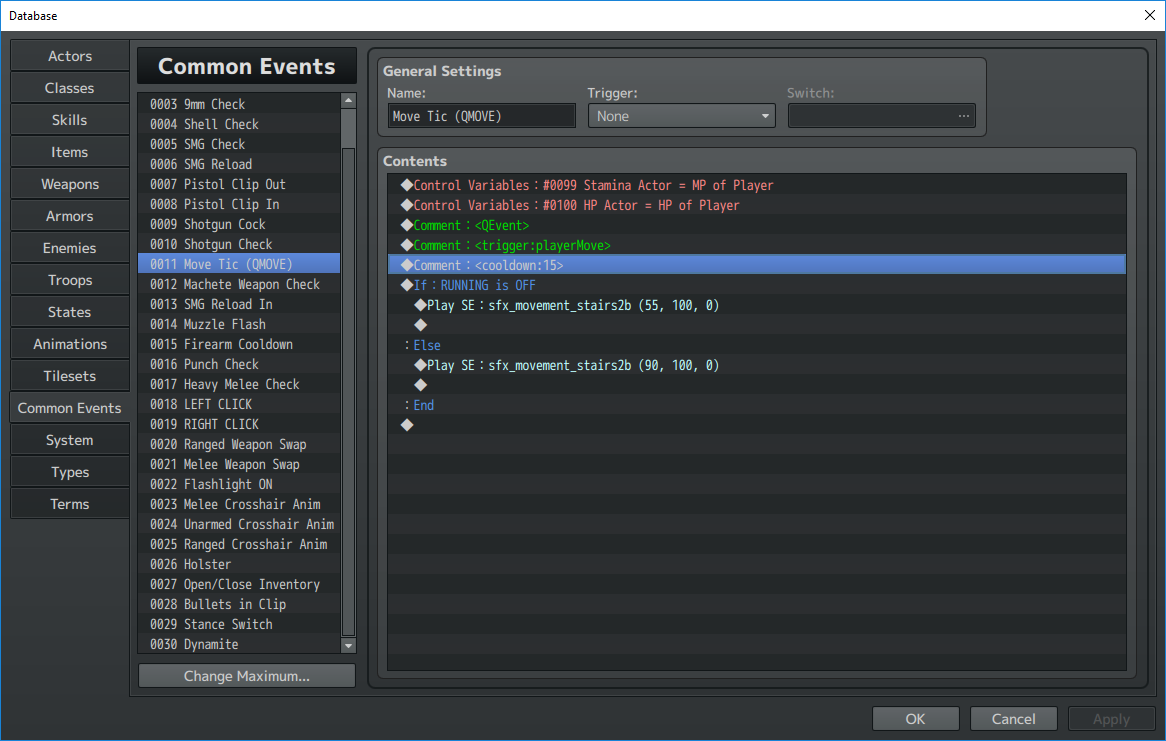
    upload_2018-8-20_10-44-8.png

    You can change the cooldown depending on the variance of your player's step. You can also use QAudio to introduce these steps to add pitch and volume variance, and run a terrain tag before each step to determine what sound to make, though I don't know how friendly that is to CPU usage.

    EDIT: Here, check this out, it's part of QEvents:

    "this.q.region // returns the regions the character is currently on"

    You can make a common event to run on a cooldown and play a sound based on the region returned. I don't know scripting, so I'd have to look into how you could check the this.q, but it's there.
  5. @spckk hey thanks pal for the info! Can’t wait to implement this into my project! I definitely will attempt to go down the region route! As be nice to have the different sounds playing for different terrain’s! Thanks again!
  6. When I try to export or save anything in QMap I get this...


    Any ideas?
  7. Hi. I don't know if this is an easy thing to solve or not, but whenever an enemy comes in contact with the player the error "this._damagePopup.push is not a function" comes up. Is there anyway to fix this? I have the <noPopup> on basically everything, because I don't care if there are popups or not.
  8. Likely too long after the fact, but QImport, while it works fine for notes in the event, doesn't seem to work at all for importing events within pages.

    I have the <importing> tag in the event note and a comment with the text <import:event,13,4,0,0> (to choose map 13 and event 4, placing it at 0,0) as an example, but no matter what I do, it won't import the event.

    Any ideas?
  9. Hello Quxios, I am very confused about qsprite.
    Oh oh , I mean I already knew how to use that app, but confused about abs sequences.

    I already edit picture and save, then which pose should I write in abs sequences then can let attack motion be suit by character direction?
    I am try side scroll 2d game, so up and down will not need.
    Thanks in advance.
    P.S. : If you see some unknow symbol, please ignore that, that is another language. Sorry for my english. :D

    Edit ok , I already know just put attack after pose if the idle named attack4 and attack6.:)
  10. You didn't paste the image properly...


    But to answer you, I guess you need at least idle2 because this is the usual position when starting for each character.
    So add an idle2 and see if it works for you.

    Btw... Quxios gave up on this project, switch to Unity some months ago, so no more support from him.
  11. Hi, I'm now using QSight together with QABS, these are great plugins. However when the enemy is ought to be dead, RM always pops out "Cannot read property '_realX' of null".
    rpg_managers.js:1949
    TypeError: Cannot read property '_realX' of null
    at Game_Event.Game_CharacterBase.sightNeedsUpdate (QSight.js:263)
    at Game_Event.Game_CharacterBase.update (QSight.js:255)
    at Game_Event.update (rpg_objects.js:8738)
    at Game_Event.update (QPopup.js:507)
    at Game_Event.into.update (QPlus.js:370)
    at rpg_objects.js:6066
    at Array.forEach (<anonymous>)
    at Game_Map.updateEvents (rpg_objects.js:6065)
    at Game_Map.update (rpg_objects.js:6025)
    at Game_Map.update (QABS.js:2337)

    So what is the problem here? How can I fix it? Can anybody help me PLEASE!
  12. How do I make enemies COMPLETELY disappear? Like removing their <enemy> notetag after they've been destroyed? It's bothering me because even after destroying them and setting the script call to disable them, they just turn invisible, I can still hit them except they won't die.
  13. Nectar said:
    How do I make enemies COMPLETELY disappear? Like removing their <enemy> notetag after they've been destroyed? It's bothering me because even after destroying them and setting the script call to disable them, they just turn invisible, I can still hit them except they won't die.

    I also want to know that, what I did are disable their qabs on their defeated page, set their collision to 0,0 , and created a parallel event to move them out to the edge of the map far away when their dead switch has been activated.
  14. Nectar said:
    How do I make enemies COMPLETELY disappear? Like removing their <enemy> notetag after they've been destroyed? It's bothering me because even after destroying them and setting the script call to disable them, they just turn invisible, I can still hit them except they won't die.

    You can make an event delete itself with this script command:
    Code:
    $gameMap.eraseEvent(this._eventId);

    However, Emperpep's technique is more advisable because you can reuse that event later if needed. Once deleted, I believe they're just gone until you restart the game or maybe leave and reenter the room.
  15. This is some amazing work, and oddly specific for what I was looking for in my game. Thanks so much for doing all this hard work for us!
  16. Hi there!
    Please someone help me.
    I'm using QPlus with Qcamera.

    When i scroll to a character, after the movement is finished. Its suppose to the camera go back to the original position before the scrolling.
    But thats not happen to me.
    In other projects, this happen. But not in this one.
    I already have all plugins disabled.
    Create a map only to test this.
    Replaced the q plus and q camera with the most updated version.
    And still, the camera go to the scroll point. But not coming back to the original point =/
    So i have to walk close to the scroll point for the camera to take the focus on the player again.
    I'm using the scrollTo command plugin.
    Anyone have this issue?
  17. Does anyone have any idea what adjustAim actually does in QABS? I imagined that it would recalculate a fired skill in order to make the projectile more accurate but it doesn't seem to have any effect. I even tried using a forceskill spell to see if it isn't meant to be used to recalculate the trajectory of an already fired projectile but it doesn't seem to do that too.
  18. Bump
  19. pajlada said:
    Does anyone have any idea what adjustAim actually does in QABS? I imagined that it would recalculate a fired skill in order to make the projectile more accurate but it doesn't seem to have any effect. I even tried using a forceskill spell to see if it isn't meant to be used to recalculate the trajectory of an already fired projectile but it doesn't seem to do that too.

    According to the official help document, this only works from an enemy.
    adjustAim
    • Recalculates the direction the skill should move. This only works when the skill is used from an enemy.
    This is a direct quote from the website. I hope that helps.
  20. Is anyone aware of any methods to cease/lock a target's ability to move/act based on a state? The Stun condition does exist, and it does prevent action, but the target can still move. I have been testing with a 15 second stun, and the enemy still moves for about 5 seconds after being hit with the stun effect, then it stops for the remaining duration.


    Update: figured out how to apply a state that stops movement, just use the <speed:X> state command. however, stopping movement via setting evasion to 100% doesn't work, despite the demo saying it should, and the "movement resist" being set to xparam(1) (which says it's evasion), anyone have any issues with this, or ideas why it may not be working?
    (yes, it's set to xparam(1), yes i have tried setting that passively on an enemy, as well as on states I then apply to those enemies, no it isn't a plugin clashing, as it doesn't even work when the only active plugins are Qmovement and QABS)