QPlugins - Latest: QABS

● ARCHIVED · READ-ONLY
Started by Quxios 1173 posts Page 42 of 59 View original ↗
  1. Soyer said:
    Question !

    Does anybody know why a map with loop Horizontaly bugs Positions of animations?
    [embedded media]
    how i can fix that?

    Hi, I think thats not fixable...

    However when you use a custommade animation and do it more little or/and go for QSprite to do your Swordskill i think it wont show in the another map.. hope that helps you

    Regards Afaryz
  2. Risen1921 said:
    @Chaos17

    Hi, Thank you for letting us know that Quixos is no longer working on these. Do you know of anyone who would be interested in looking into some of these bugs?
    Sad thing is there is rarely someone who will maintain a plugin of someone else specialy in Rpg maker communities. So unless you pay someone to do it, consider this thread dead.
  3. Chaos17 said:
    Sad thing is there is rarely someone who will maintain a plugin of someone else specialy in Rpg maker communities. So unless you pay someone to do it, consider this thread dead.

    Hi, I am willing to pay for my issue to be fixed. I just need to speak to someone who is willing to work on the issue. If you know of anyone, please let them know about this.
  4. risen1984 said:
    Hi, I am willing to pay for my issue to be fixed. I just need to speak to someone who is willing to work on the issue. If you know of anyone, please let them know about this.

    Sorry, this is my old account.

    Has i said i am willing to pay someone to fix the followers issue with the sprite not changing when dashing for followers, but the main player sprite does change. See a image below with me using 2 of the same sprite sheets for the main player and one follower. The follower does not change to the dash sprite like the main player does.

    I have searched for "dash" in the JS file for the followers and cannot find it, so it must be this file that needs looking at.
  5. @Risen1921
    You've a classified sub forum where you will be able to post your offer after having posted a number of messages.
  6. Hello, everybody.
    I didn't know where to write this, so I'm going to go here.
    I am looking for someone who is familiar with QAbs and has Javascript experience.
    I have a problem with the Absondamage>Move away command.
    The opponent always gets stuck in one direction after a time, but continues to move normally.
    I have now tested various things with Notepad, but unfortunately without success.
    if someone can help me and knows Javascript well, I would be very grateful.
    In exchange for good pay, of course. Please contact me for further information.
  7. winlu said:
    Hello, everybody.
    I didn't know where to write this, so I'm going to go here.
    I am looking for someone who is familiar with QAbs and has Javascript experience.
    I have a problem with the Absondamage>Move away command.
    The opponent always gets stuck in one direction after a time, but continues to move normally.
    I have now tested various things with Notepad, but unfortunately without success.
    if someone can help me and knows Javascript well, I would be very grateful.
    In exchange for good pay, of course. Please contact me for further information.
    Hey,

    Maybe you could tell us, what is the plan that the enemy walks away? You want something like get hit and then he goes to the ground or why that Moves? And why not jump away?

    Regards

    Afaryz
  8. The jump away is working very well.
    But it looks so unnatural.
    It's for a horror game and it looks weird when you shoot your opponent with a gun and he jumps. It's not much, depending on the weapon. With the gun I use 8 pixel move away, shotgun 28 pixel move away. That gives a nice effect.

    So I use the command

    <absOnDamage>
    target pose damage
    target move away 12
    </absOnDamage>

    After a few shots, or sometimes on the first shot, the opponent gets stuck in one direction and continues to move normally.

    In the plugin line 2031 I have now used targets.setDirectionFix(false);.
    After that, the opponent no longer gets stuck in one direction.
    However, the opponent leaves the fixed direction while still moving backwards.
    The order comes basically too soon.
    So when you shoot, your opponent does not slide backwards through the shot but turns around and walks backwards.

    This is the original plugin line 2002 to 2032.
    Normally the Fixed Direction would have to be switched off in the Route command.
    But somehow it doesn't work.

    route.list.push({
    code: Game_Character.ROUTE_DIR_FIX_ON
    });
    route.list.push({
    code: Game_Character.ROUTE_SCRIPT,
    parameters: ['qmove2(' + radian + ',' + dist + ')']
    });
    if (!targets.isDirectionFixed()) {
    route.list.push({
    code: Game_Character.ROUTE_DIR_FIX_OFF
    });
    }
    route.list.push({
    code: Game_Character.ROUTE_SCRIPT,
    parameters: ['this.setRadian(' + targets._radian + ')']
    });
    route.list.push({
    code: Game_Character.ROUTE_END
    });
    targets.forceMoveRoute(route);
    targets.updateRoutineMove();
    }
    };


    This happens in the original QABS Demo too.
    So the move away command is a little broken ^^ but I don't know how to fix it
  9. winlu said:
    The jump away is working very well.
    But it looks so unnatural.
    It's for a horror game and it looks weird when you shoot your opponent with a gun and he jumps. It's not much, depending on the weapon. With the gun I use 8 pixel move away, shotgun 28 pixel move away. That gives a nice effect.

    So I use the command

    <absOnDamage>
    target pose damage
    target move away 12
    </absOnDamage>

    After a few shots, or sometimes on the first shot, the opponent gets stuck in one direction and continues to move normally.

    In the plugin line 2031 I have now used targets.setDirectionFix(false);.
    After that, the opponent no longer gets stuck in one direction.
    However, the opponent leaves the fixed direction while still moving backwards.
    The order comes basically too soon.
    So when you shoot, your opponent does not slide backwards through the shot but turns around and walks backwards.

    This is the original plugin line 2002 to 2032.
    Normally the Fixed Direction would have to be switched off in the Route command.
    But somehow it doesn't work.

    route.list.push({
    code: Game_Character.ROUTE_DIR_FIX_ON
    });
    route.list.push({
    code: Game_Character.ROUTE_SCRIPT,
    parameters: ['qmove2(' + radian + ',' + dist + ')']
    });
    if (!targets.isDirectionFixed()) {
    route.list.push({
    code: Game_Character.ROUTE_DIR_FIX_OFF
    });
    }
    route.list.push({
    code: Game_Character.ROUTE_SCRIPT,
    parameters: ['this.setRadian(' + targets._radian + ')']
    });
    route.list.push({
    code: Game_Character.ROUTE_END
    });
    targets.forceMoveRoute(route);
    targets.updateRoutineMove();
    }
    };


    This happens in the original QABS Demo too.
    So the move away command is a little broken ^^ but I don't know how to fix it
    Well thats kinda odd,

    isnt it possible to do your dmg pose longer to get those seconds? Cuz i guess the sprite wants to move normally and the pose is the bigger shot here. So he always will do that i guess. Or does this problem only come when there is a collider, which holds him back?
  10. It has nothing to do with the pose.
    This happens in the QAbs Demo too, if I add the target move away command.
    And the pose is direction addicted.
    So there is a pose for each direction.
  11. Hi, does anyone know why the character spacing between my characters is so bad? The issue is worse when using the QMovement + QM+Followers plugins which I need. I basically use small sprites that I upscaled 3x to give more of a retro feeling where everything is more zoomed in, but this does not work at all with the plugin.

    Alternatively, I used smaller resolutions and messed around with a map zoom, but I really can't get the result I want.. 2x resolution with 1.5x map zoom and no Pixel Movement plugins is the closest to what I need, but of course I can't use collision maps and all that fancy stuff. If I enable QMovement, my characters get all squished together which is problematic.

    Examples:

    1x resolution with 3x Map Zoom (awful, 4th character cannot be seen at all, spacing is too big):
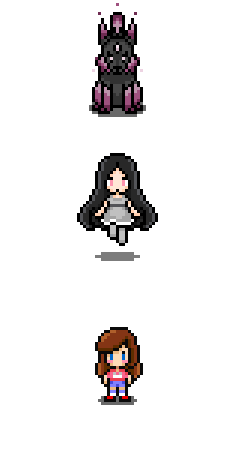
    1x.png
    2x resolution, 1.5x map zoom, with Pixel Movement (squished, no spacing):
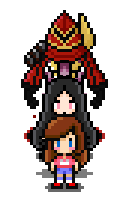
    pixel.PNG
    2x resolution, 1.5 map zoom, without Pixel Movement (best result but spacing could be better):
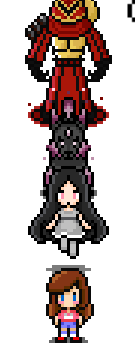
    2x.PNG

    3x resolution with Pixel Movement (stacked, no comment on that one):
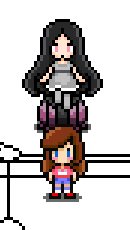
    3x.png

    Help would be greatly appreciated as I've been messing around for hours with no fix, thanks!
  12. Hi there !

    Here is a link to qPicture Plus, an optimized version of qPicture.js, which allows you to make variables handler !

    https://forums.rpgmakerweb.com/index.php?threads/qpicture-plus-click-pictures-set-variables.98371/

    Here are the brand new functionalities:
    • incVarX : Where X is the gameVariables ID, change +1 to the variable
    • decVarX : Where X is the gameVariables ID, change -1 to the variable
    • setVarX : Where X is the gameVariables ID, set the variable to ARG1
    • addVarX : Where X is the gameVariables ID, add ARG1 to the variable
    Hope it will help some of you ! :)

    ShdwRCK
  13. Hello new to rpg maker mv and javascript so sorry if this is obvious or already answered but i just installed QPLUS, QMovement QABS and QABS+Skillbar I notice it says to use the plugin command to show the skillbar but cant findout where to put the plugin command ive tried in the map notes, the actor notes and even made an event which triggers by the actor and put it in those notes but it never shows up any help on setting this up is much appreciated.
  14. Kristy said:
    Hello new to rpg maker mv and javascript so sorry if this is obvious or already answered but i just installed QPLUS, QMovement QABS and QABS+Skillbar I notice it says to use the plugin command to show the skillbar but cant findout where to put the plugin command ive tried in the map notes, the actor notes and even made an event which triggers by the actor and put it in those notes but it never shows up any help on setting this up is much appreciated.

    Hi, @Kristy
    First of all, do you setup different skills in Qabs under "default skills"?
    Next in qabs+skillbar you disabled it in the start settings?

    You can easily disable or enable it per event oder common event with plugin command.. if you dont know what this is just ask again..
    I personally work with overrides when you get the items so that you only have the skillz assigned with the skillbar, if you have the right equipment.

    Regards Afaryz
  15. Afaryz said:
    Hi, @Kristy
    First of all, do you setup different skills in Qabs under "default skills"?
    Next in qabs+skillbar you disabled it in the start settings?

    You can easily disable or enable it per event oder common event with plugin command.. if you dont know what this is just ask again..
    I personally work with overrides when you get the items so that you only have the skillz assigned with the skillbar, if you have the right equipment.

    Regards Afaryz

    Okay. now I get where this is going im not sure if this will work with my project then. my initial plan is to make it so my skills are learned from NPCs at the cost of certain items and gold all skills except the initial attack skill would be class specific. is this possible to implement with this plugin?
  16. Kristy said:
    Okay. now I get where this is going im not sure if this will work with my project then. my initial plan is to make it so my skills are learned from NPCs at the cost of certain items and gold all skills except the initial attack skill would be class specific. is this possible to implement with this plugin?
    @Kristy

    It is! You just have to assign the keys with no skillz in there. Every skill you get per npc could be an item or an event...

    In QABS search for "class override" in the help box thats what you need there!
    Now you just give different classes different skillz
    Regards
    Afaryz
  17. Afaryz said:
    @Kristy

    It is! You just have to assign the keys with no skillz in there. Every skill you get per npc could be an item or an event...

    In QABS search for "class override" in the help box thats what you need there!
    Now you just give different classes different skillz
    Regards
    Afaryz

    I think i brokes it... :( i went into qabs and set a default skill i set it to keyboard 1 and chose attack for the skill when i went to playtest i get "TypeError Undefined is not a function" what did i do wrong?
  18. Kristy said:
    I think i brokes it... :( i went into qabs and set a default skill i set it to keyboard 1 and chose attack for the skill when i went to playtest i get "TypeError Undefined is not a function" what did i do wrong?

    nevermind i figured it out i forgot to use the # when i assigned it
  19. Afaryz said:
    @Kristy

    It is! You just have to assign the keys with no skillz in there. Every skill you get per npc could be an item or an event...

    In QABS search for "class override" in the help box thats what you need there!
    Now you just give different classes different skillz
    Regards
    Afaryz

    is there a reference page to setting up on map animations for the skills?
  20. Kristy said:
    is there a reference page to setting up on map animations for the skills?

    Maybe you go on youtube search for quasi abs tutorial there is a tutorial from smrdmddude ... he explains the first Steps

    You missed to assign the skill to a class i would expect... typical mistake... look after the tutorial

    Regards

    Afaryz