OrangeGreenworks - Steam Integration with Achievements and Time Log

● ARCHIVED · READ-ONLY
Started by Hudell 347 posts Page 11 of 18 View original ↗
  1. How does the Steamwork achievements work with 1.6 update since the NW JS has been updated?

    ayannya said:
    Yeah it's quite important... Since the game is already released on Steam I don't think it's a good idea to change its signature title screen right now:kaocry:

    Also yeah, the SRD Game Update is not compatible with NW JS changes you need to disallow Game rebuilding it does. I reported this issue almost a year ago, so I'd probably not hold my breath it being fixed.
  2. Hi everyone! Hello @Hudell!

    I'm running into the same SRD Game Upgrade issue as others had before, alongside with some other stuff that's giving me a hard time right now, so maybe someone is nice enough to help me out, as I start to get really frustrated...

    I have...
    RMMV 1.5.1
    Orange Greenworks 1.2
    steamworks SDK 1.4.1
    greenworks v0.12.0 (for nwjs 0.24.4)
    nwjs 0.24.4 (also tried 0.26.6 before, with a fitting greenworks version...)
    SRD plugins (Game Upgrade etc.)

    I'm only wanting to use basic achievements, nothing else.

    Problem 1:
    I get an error in the console when playtesting.
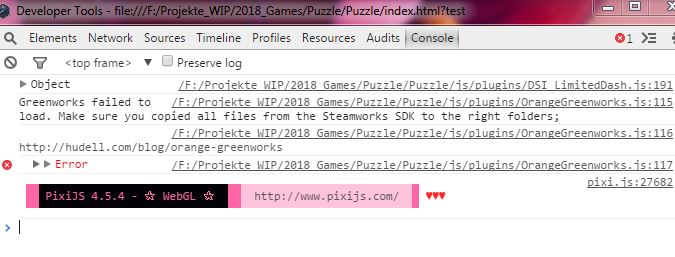
    PluginProblem.JPG
    Folders.png

    EDIT: (Deployed version)
    here
    deployed.JPG

    Did I setup something wrong? (I've redone it a few times by now... maybe I messed up along the way? XD)

    Problem 2:
    My steam doesn't connect to the project.
    (which might be part of problem 1?)

    Problem 3:
    nw.exe stays black. Which is most likely because of the SRD plugin...
    Is there any way to still make it work?
    Does anyone have found a working solution?
    I read that using orangegreenworks v1 and older nw.js files helps?
    Where can I get the old version and which nw.js/greenworks version should I use?


    Thank you!
    I hope there's a way to make it work D:
  3. Does anyone see anything I did wrong? I'm stuck. Please~
  4. I'm not familiar with this incompatibility error that some SRD plugins are causing, but have you tried using different versions of SDK, nwjs, and greenworks? It could be that some don't go well together with that plugin or each other.
    The ones I used: I tried SDK versions 1.40 and 1.42 (both seem to work ok), with nwjs 0.22.3, greenworks v 0.10, and Orange Greenworks v 1.1.
    The only SRD plugins I used were title map background and game over core.

    Interestingly, when I tested the Steam connection, the console kept saying that there isn't one (I had Steam open and all), but when playtesting the actual game on Steam, achievements unlocked fine without problems. So, sometimes the console giving an error might not be a problem at all, so long as when you test on Steam, achievements unlock fine.
  5. Thanks for the reply @Matseb2611
    I'm so confused because the plugin keeps telling me that I didn't copy all files needed. Sigh.
    But I'll use some older version and see if anything happens.

    I also looked for an older version for orangeGreenwork (like 1.0 or 1.1?) but I miiight have overlooked it?
    Because I only have 1.2, but because I only need the achievements an older one might also work?


    EDIT:
    YAY! It's working now.

    @ayannya
    If you're still having the same problem (SRD's Game Upgrade causing trouble~)
    Here's what I did:

    I downloaded orangegreenwork version 1.0
    https://raw.githubusercontent.com/H...3974fa00ac4e8477fe46cc094/OrangeGreenworks.js (Link posted by Hudell on page 7 of this thread)

    I downloaded greenworks 0.5
    https://github.com/greenheartgames/greenworks/releases?after=0.5.1
    and nw.js 0.12.1 https://dl.nwjs.io/v0.12.1/

    Also steam SDK 1.34.

    Than I followed the tutorial on hudell's blog:
    http://hudell.com/blog/orangegreenworks/

    It works with SRD's game upgrade.
    I also didn't delete any files in the main folder, just copied over the ones out of the nw.js zip and overwrote them. You can delete game.exe afterwards, because nw.exe will be the one you'll need.

    Achievements work now. But you can't use the newer functions.
  6. Glad to hear you got it working. I would guess that certain changes in newer versions can create incompatibility, so it's often worth trying the older versions to see if they work. :)
  7. There is something i think i should mention to those who are using SRD Game Upgrade plugin. It is not only compatible with NWJS changes (like some ppl mentioned above), but also skyrocketting your RAM when you start playing. Not sure if it was only me (someone else also confirmed this on SRD's site), but i used it once, and gotta removed it from my project after realizing this problem.
  8. I've followed the guide exactly and have gotten nearly everything to work. The game is in my library and I can play it no problem through Steam but for some reason Achievements aren't working. Please take a look at my screen shots and let me know if there is something I can do.

    Thanks.
  9. Hello!

    I had some problems installing the achievements. Problem seems to be the compatibility. Not every version of NW works with Greenworks.

    Here are my versions that work well together:
    • OrangeGreenworks (v. 1.2)
    • Steam SDK (v. 1.41)
    • Greenworks (v. 0.12.0-nw-v.0.26.6)
    • NW.JS (v. 0.29.4)
    I hope I could help you further!

    EDIT:

    To see the achievement in the game, the following script call must be used: OrangeGreenworks.activateGameOverlay('Achievements');

    Important: The file "steam_appid.txt" must be saved in UTF8 without Boom. Use the software "PsPad" best.


    Greetings Kojote
  10. @Hudell - I can unlock achievements, but unfortunately this is not shown to me right below. Actually, a window of Steam should open and show the achievement, if it was reached.

    Edit: Problem done!
  11. Kojote said:
    Hello!

    I had some problems installing the achievements. Problem seems to be the compatibility. Not every version of NW works with Greenworks.

    Here are my versions that work well together:
    • OrangeGreenworks (v. 1.2)
    • Steam SDK (v. 1.41)
    • Greenworks (v. 0.12.0-nw-v.0.26.6)
    • NW.JS (v. 0.29.4)
    I hope I could help you further!

    EDIT:

    To see the achievement in the game, the following script call must be used: OrangeGreenworks.activateGameOverlay('Achievements');

    Important: The file "steam_appid.txt" must be saved in UTF8 without Boom. Use the software "PsPad" best.


    Greetings Kojote

    I tried thhis combination but the achievements don't unlock.

    EDIT: Nevermind, it's fixed and working now.

    EDIT 2: New version of Greenworks has just been released. Does this add new compability with new versions or something? @Kojote
  12. I could not test so far. As far as I can find time, I will try it once a week. :)
  13. Hi, I use the last version of greenworks (0.13.0). I've questions:
    1) Is it normal that shift+tab for steamOverlay doesn't work (at least, is it working with your version ?) ?

    2) Do we need to use the script call OrangeGreenworks.activateGameOverlay('Achievements'); for each achievement or only once ?

    3) I use your method Kojote (OrangeGreenworks.activateGameOverlay('Achievements'); So achievements works but I got a big problem:
    Steam open my profil steam page when I trigger an event with this inside:
    OrangeGreenworks.activateGameOverlay('Achievements');
    OrangeGreenworks.activateAchievement('AchievementName');
    Even if the achievement is already unlocked, the profil steam page still open. How fix this issue ?

    EDIT: I got the same issue with your version too (Greenworks (v. 0.12.0-nw-v.0.26.6)). Profil steam page open when achievement is unlocked and shift + tab doesn't works...

    I can see the steam pop-up at the right corner when I launch the game but that's all.

    EDIT2: shift + tab is fixed, and players can take screenshots as well ! For that, you need to go in greenworks > Installation > Configuration. Go to Launch Options then press edit and add in --in-process-gpu to Arguments. Restart your Steam client if necessary.

    I fixed the achievement problem too: no need this line: OrangeGreenworks.activateGameOverlay('Achievements');
    (in my case, if I use this line, Steam open my page profil).
  14. Hi there!

    I used greenworks v.0.13.0, nw-v.0.30.4 and sdk 1.42.

    Thanks @Hudell for the awesome plugin!
    @Matseb2611 & @microck your tips helped me to get everything in tune.

    First I had some trouble to find the settings, which @microck mentioned. But I found it in the start options part of the menu.
    Add --in-process-gpu to arguments bring the steam overlay to live. The achievements trigger the small window in the lower right corner.
    I'm really happy about it :kaojoy:

    Just missing the window functions of the srd plugin like block the maximize button. But I'll ask about it on another thread.
    So, everybody: plugin is still working pretty well <3~

    OniGiri ~
  15. Plueschkatze said:
    Thanks for the reply @Matseb2611
    I'm so confused because the plugin keeps telling me that I didn't copy all files needed. Sigh.
    But I'll use some older version and see if anything happens.

    I also looked for an older version for orangeGreenwork (like 1.0 or 1.1?) but I miiight have overlooked it?
    Because I only have 1.2, but because I only need the achievements an older one might also work?


    EDIT:
    YAY! It's working now.

    @ayannya
    If you're still having the same problem (SRD's Game Upgrade causing trouble~)
    Here's what I did:

    I downloaded orangegreenwork version 1.0
    https://raw.githubusercontent.com/H...3974fa00ac4e8477fe46cc094/OrangeGreenworks.js (Link posted by Hudell on page 7 of this thread)

    I downloaded greenworks 0.5
    https://github.com/greenheartgames/greenworks/releases?after=0.5.1
    and nw.js 0.12.1 https://dl.nwjs.io/v0.12.1/

    Also steam SDK 1.34.

    Than I followed the tutorial on hudell's blog:
    http://hudell.com/blog/orangegreenworks/

    It works with SRD's game upgrade.
    I also didn't delete any files in the main folder, just copied over the ones out of the nw.js zip and overwrote them. You can delete game.exe afterwards, because nw.exe will be the one you'll need.

    Achievements work now. But you can't use the newer functions.
    Hi @Plueschkatze , thank you so much for the suggestions! I just got my achievement system to work. Turns out that I couldn't get it working with SRD's game upgrade anyways, but I was finally able to find some other plugins that can do the same things when put together, and after taking game upgrade out everything worked like a breeze.

    The combination you suggested works out perfectly, thank you! Also thanks @Matseb2611 and @Hudell for all the suggestions and help earlier.
  16. Was the site hosting this hacked? The link gave me some weird pop ups and I was afraid to proceed further. The link on the 1st page that says the plugin can be found “here”.
  17. It seems that the author repurposed their website and changed the domain name so it focuses solely on their game for now.
    Which results in the JS file and the blog article essentially removed from their server.

    Before the author fixes this issue:

    You can reach the blog article using Google Cache :
    http://webcache.googleusercontent.c...g/orangegreenworks/+&cd=1&hl=en&ct=clnk&gl=ca

    and the actual js file on their github:
    https://github.com/Hudell/mv-plugins/blob/master/OrangeGreenworks.js
  18. Has anyone tried this plugin with 1.6.1? I want to confirm if it still works before updating my project.
  19. I have a question, @Hudell or anyone else who might know - which of the .dll files is tied to achievements triggering?

    To explain in more detail...
    I have some people who have had trouble launching my games through Steam (the games launched fine via browser) and we've recently figured out it's to do with them having older versions of NWJS on their computers which conflict with launching of the version my games use. One of them downloaded the newest version of NWJS and replaced the NWJS-related files in the game folder with the ones of a newer version. The game launches fine for him now, but the achievements do not trigger. I think it's likely that him having replaced the NWJS-related files in the game folder has also gotten rid of whichever one was tied to triggering the achievements, but I'm not sure which one that might be. Anyone have any idea?