I might be mistaken but isn't the animated overlay plugin supposed to go below orange overlay?
Didn't test it myself by now, but that's what I would have guessed.
Orange Overlay v1.1.4 + Animated Parallax Add-On (Updated 7Jul17)
● ARCHIVED · READ-ONLY
-
-
Just like with the light errors you'll have to show me all the plugin commands you're using, and screenshot the error that Orange Overlay is showing on the game screen.
I might have an idea of the error though but you'll have to show me all the commands first. You shouldn't need the ground3 (static image) since you have the 3 animated frames. I was pretty sure we fixed this error.
I've updated the plugin to a new version, that should hopefully fix the light animated layers. So please redownload and try again.
If it still doesn't work, then try turning off Organized Folders as I've only tested it with them off. If it works then there's a problem with those folders and I'll have it looked into. It looks like you've named the files correctly though.Gif. Image

-
Question.. is it possible to do a moving fog overlay that doesn't cover the parallax map?
-
I know kaus plugin had that function but don't think orange overlay ever did.
-
Hello,
Yes I named my light this way.
Now I did what you ask.
(His ing a damn mess in my files)
All my images are in "parallaxes"
Map command
Plugin command
my file
Now in games
OrangeOverlay works Tsukitsune_animatedOverlayAddon does not work
-
Add <light> to your map notetag
-
I added <light> to note tag
notetag-----<light>
Here is what it appears
error
I add the light3
And to see well the effect I change the color of my light (blue, white, red, lol)add light3
always Nothing ;_; -
Could you show me how you do:
1) your folder or find the images
2) plugins use at the same time
3) the commands you have to use
thanks to you -
Made a demo
-
Thank you for the demo, but I surrender because even as you use 3 plugin its does not work I do not understand why the games made a mistake.
You're plugin
My plugin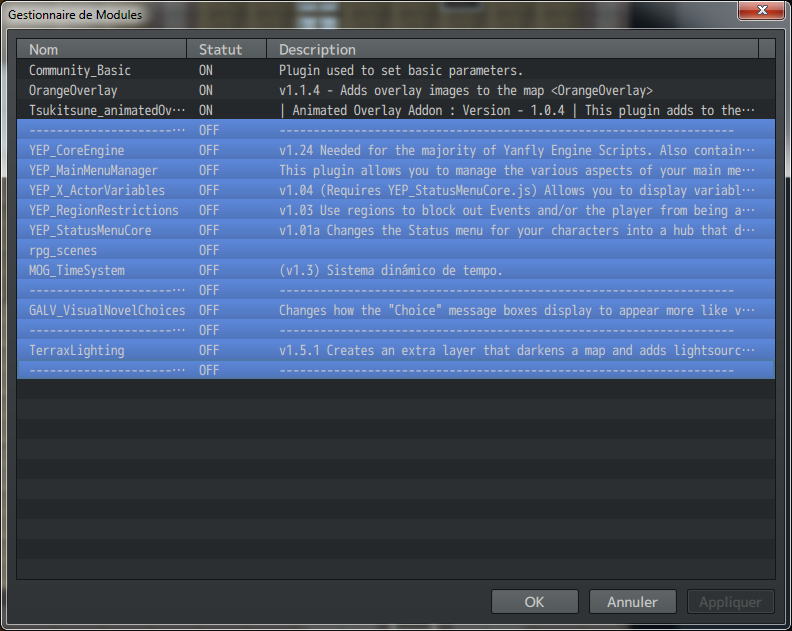
error game
On the way I have MV 1.3.4
But for the moment I'll drop, I'll come back later, thank you anyway. -
Hello again,
I was just wondering, do you think you might ever be adding the ability to have events that appear above the parallax (e.g. to make flying birds)? I saw a few people requesting it before and thought it'd be a pretty neat thing to have, maybe using notetags?
It's obviously not an essential feature, but you've already done so much to add to this amazing plugin, so I thought it'd be worth asking at least :kaoluv: -
Thank you for the demo, but I surrender because even as you use 3 plugin its does not work I do not understand why the games made a mistake.
You're plugin
My plugin
error game
On the way I have MV 1.3.4
But for the moment I'll drop, I'll come back later, thank you anyway.
I have the same problem!!!
I'm desperate!!! T_T -
I have the same problem!!!
I'm desperate!!! T_T
The plugin should be moved to the category
"In Development" and not "Releases" because it does not work 100%
But good I do not use it anymore, I stay on an old method in event -
The plugin works in the demo, which means it is working.
As you can see, the demo project is 1.5.0. Quite a few plugins don't have backwards compatibility. You need to update MV and try again in a blank project with no other plugins apart from these.
If that doesn't work, then I would think that you've probably set it up wrong. In that case, I'd suggest uploading a demo with the images you've been trying to use.
If it works until you add more plugins, then it's a plugin incompatibility, so you need to go through each plugin turning it off/on to see which is causing the issue. -
Also don't just download the animated parallax plugin but also the version of orange overlay in this thread since it is an updated version!
-
I'll try to be clearer than Mrludo but I indeed have the same error message, even tho I did copy/paste from the demo itself. Let's see if everything is in order first. The issue seems to be coming from the animated script because I'm able to show a basic ground parallax using Orange Overlay on its own.
Started a new project from scratch. MV is 1.5. Redownloaded both scripts from the links provided in the first post, I did NOT copy the script from the demo. Please note that I did try to change the Organized Folders option, it made no difference. For more simplicity I just went as the demo.
This first picture is the list of the scripts I'm using, which is just these 2.
Spoiler
The second picture is how the map is noted, this is a copy paste from the demo, with the numbers changed to match what I have.
Spoiler
This third picture is how the the files are listed in the folder.
Spoiler
And this fourth is the error message I get.
Spoiler
I must have been doing something wrong as the demo works for me.
Can someone point where my mistake is? -
I have 0 idea! It looked like you did everything correctly but you'll have to upload your demo file if I have any chance of figuring it out. I can't see anything wrong in the screenshots.
-
I have 0 idea! It looked like you did everything correctly but you'll have to upload your demo file if I have any chance of figuring it out. I can't see anything wrong in the screenshots.
Thank you for your quick response.
Here is a link which should link to a demo. It's the first time I upload something on Google Drive but it should work.
https://drive.google.com/open?id=0B6fShobDLmyTblI4LTRLUy1ZZkE
Thanks again! -
In demo problem is because you deployed project and use "Exclude unused files", that option do not check needed files for pluginsThank you for your quick response.
Here is a link which should link to a demo. It's the first time I upload something on Google Drive but it should work.
https://drive.google.com/open?id=0B6fShobDLmyTblI4LTRLUy1ZZkE
Thanks again!
You can find instruction how to avoid this in MV help file(F1 in editor)
or here is screenshot of instruction
screenshot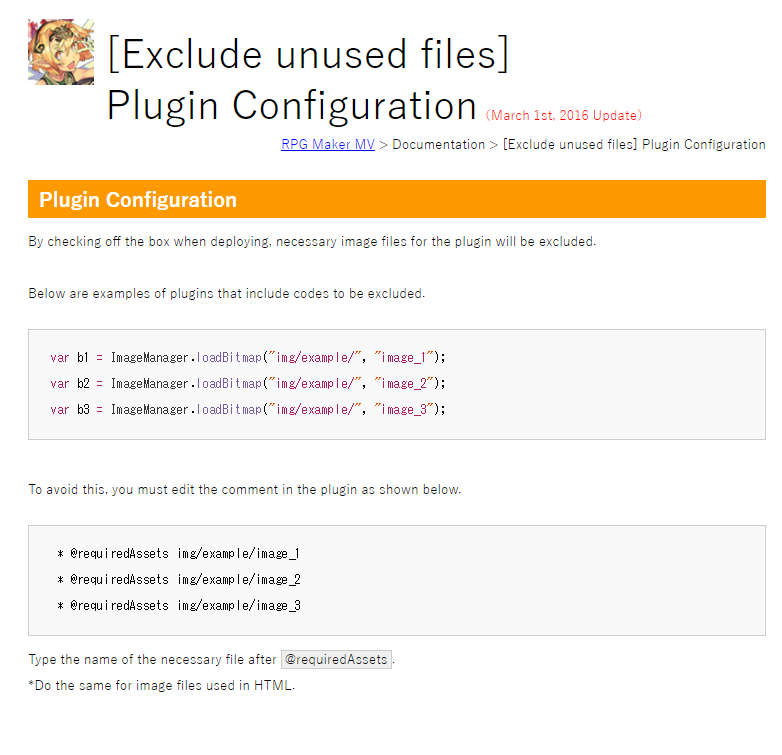
-
Well, I'll try to upload a version without this option checked. It might take a few hours tho, my Internet is very slow.
That being said, I guess one could just add any pictures in the same folder and name them properly, to see if it works, if it doesn't work but with the same message as I, or if it doesn't work for an other reason, no? Just as a ''meanwhile fix''.