OcRam - Passages plugin (MZ/MV)

● ARCHIVED · READ-ONLY
Started by OcRam 528 posts Page 11 of 27 View original ↗
  1. also the stairs going up should be 18, while 17 says when you go on a higher level, stairs up and bridges are also covered with 18
    not only 17 on stairs, if you watch the tutorial or this image: look at how the stairs are done and the bridge. passages_outdoors.png
  2. thank you both for helping out! that fixed some things that I hadn't even noticed before. I still have no idea about the follower thing, but now I also noticed that when Player is behind the stairs, they still act like stair tileset therefore the player is always facing up:

    upload_2019-9-7_10-3-59.pngsecond image just to show that the characters are facing up:upload_2019-9-7_10-4-12.png

    I imagine there is no way I can fix this with the plugin alone, right? I'm thinking about using events, on the bottom and on top of the stairs, to make Player face up, and then leaving the tileset as a normal WALK configuration. thanks for all the help
  3. This is seriously an amazing plugin, with really clear & helpful instructions!
    Will definitely plan to use for a future project! :LZSooo:
  4. @Leon_Artmann I have now fixed ladder issue you mentioned!

    Terms of Use has been slightly changed: I'm uniting Terms of Use for all of my plugins. Please check updated Terms if downloading current version of this plugin. Price for commercial use hasn't changed and it is still free for non-commercial use. Added also discounts for purchasing several licenses.

    If you have downloaded this plugin before this change to Terms of Use, you are free to follow those terms. And if you download current version please follow latest Terms of Use.
  5. great work! Just a thousand more questions and whining and I swear I'll leave you alone.

    First a question about the problem I'm having with my project, which seems to be happening only to me.

    I thought that the problem was with followers, but it happens with events too, so I guess the problem is really any tall sprite

    upload_2019-9-8_14-53-47.png upload_2019-9-8_15-4-22.png

    I thought I read something about tall sprites in the threat but now I searched "tall" and found nothing. Do tall sprites need something changed in the code? Or should it be compatible already? Cause it's possible that's something else in my project that's causing it.


    Next, I've noticed that any event that has Tile B, C, D or E graphics won't be shown in region 19. I know it's not really a problem because if necessary I can just create a char file for that graphic, but thought I should let you know

    upload_2019-9-8_15-14-40.pngupload_2019-9-8_15-14-53.png


    Finally, I'd just like to know how you guys are using this plugin with Khas Lighting. Could someone please explain a bit about it? I'm quite new to MV and sometimes regions make me crazy. I know that I can change the regions used in the parameters of both plugins, but I need more than 1 region to create shadows, because of all the different wall heights.

    Thanks for any and all help!
  6. Leon_Artmann said:
    great work! Just a thousand more questions and whining and I swear I'll leave you alone.

    First a question about the problem I'm having with my project, which seems to be happening only to me.

    I thought that the problem was with followers, but it happens with events too, so I guess the problem is really any tall sprite


    I thought I read something about tall sprites in the threat but now I searched "tall" and found nothing. Do tall sprites need something changed in the code? Or should it be compatible already? Cause it's possible that's something else in my project that's causing it.


    Next, I've noticed that any event that has Tile B, C, D or E graphics won't be shown in region 19. I know it's not really a problem because if necessary I can just create a char file for that graphic, but thought I should let you know


    Finally, I'd just like to know how you guys are using this plugin with Khas Lighting. Could someone please explain a bit about it? I'm quite new to MV and sometimes regions make me crazy. I know that I can change the regions used in the parameters of both plugins, but I need more than 1 region to create shadows, because of all the different wall heights.

    Thanks for any and all help!
    Thank you for the message,

    Tall sprites should be ok, just tested.

    I'll make sure that next version will work with event graphics from tileset B-E it is a bug that shall be fixed.

    I do not have personal experience with Khas Lighting plugin, but what I have seen here at forums is that it is working depending on plugin order.
  7. I have a question about using the overpass and underpass region ID's. I can get the plugin to do exactly what I need, such as passing underneath an autotile and moving beneath it. However, I noticed that when the player touches the underpass region ID, it forces the player to walk forwards and slow to a walk. The walking part is the only thing that I found strange, when running underneath a bridge, there will be two points at which the character slows to a walk for a moment and then starts running again. Was this intentional?
  8. @Chazareth that would be strange, while I dont have that issue.
    Do you use other region ID plugin? Like that can lower down the speed or an event that calls a region
    to change speed?
  9. Chazareth said:
    I have a question about using the overpass and underpass region ID's. I can get the plugin to do exactly what I need, such as passing underneath an autotile and moving beneath it. However, I noticed that when the player touches the underpass region ID, it forces the player to walk forwards and slow to a walk. The walking part is the only thing that I found strange, when running underneath a bridge, there will be two points at which the character slows to a walk for a moment and then starts running again. Was this intentional?

    ShadowDragon said:
    @Chazareth that would be strange, while I dont have that issue.
    Do you use other region ID plugin? Like that can lower down the speed or an event that calls a region
    to change speed?
    Indeed... it might be slippery tiles plugins for example?
  10. That's exactly it. Thanks for the response!
  11. Hey, this plugin looks really cool but it seems to be incompatible with SRD_TitleMapBackground (
    error
    TypeError: Cannot read property '_tilemap' of undefined
    at drawCharacter (OcRam_Passages.js:1300)
    at addCharBitmap (OcRam_Passages.js:1250)
    at OcRam_Passages.js:1196
    at Array.forEach (<anonymous>)
    at initSprites (OcRam_Passages.js:1185)
    at Scene_TitleMapBackground.Scene_Map.start (OcRam_Passages.js:318)
    at Scene_Title.updateMapFusionScene (SRD_TitleMapBackground.js:219)
    at Scene_Title.update (SRD_TitleMapBackground.js:205)
    at Function.SceneManager.updateScene (rpg_managers.js:2024)
    at Function.SceneManager.updateScene (SRD_QuitConfirmation.js:154)
    ). Would it be possible for you to make them compatible?

    edit: also, "Player Touch"-events with "Same as characters"-priority and <trigger_always> seems to only trigger from underpass when the player tries to walk into the event (talking seems to be fine though)
    edit2: the <higher> tag also seems to ignore the "!" prefix for the character image (for doors) thus placing the event 6 pixels higher

    maybe I seem like I'm nitpicking about the stuff in the edits in which case I apologise I don't mean to sound negative
  12. @MrCrackerplays Doors need a prefic of !$ or $! in order for not shifting up, same for some actors and chests.
    as for the other events, I cant tell really.
  13. MrCrackerplays said:
    Hey, this plugin looks really cool but it seems to be incompatible with SRD_TitleMapBackground (
    error
    TypeError: Cannot read property '_tilemap' of undefined
    at drawCharacter (OcRam_Passages.js:1300)
    at addCharBitmap (OcRam_Passages.js:1250)
    at OcRam_Passages.js:1196
    at Array.forEach (<anonymous>)
    at initSprites (OcRam_Passages.js:1185)
    at Scene_TitleMapBackground.Scene_Map.start (OcRam_Passages.js:318)
    at Scene_Title.updateMapFusionScene (SRD_TitleMapBackground.js:219)
    at Scene_Title.update (SRD_TitleMapBackground.js:205)
    at Function.SceneManager.updateScene (rpg_managers.js:2024)
    at Function.SceneManager.updateScene (SRD_QuitConfirmation.js:154)
    ). Would it be possible for you to make them compatible?

    edit: also, "Player Touch"-events with "Same as characters"-priority and <trigger_always> seems to only trigger from underpass when the player tries to walk into the event (talking seems to be fine though)
    edit2: the <higher> tag also seems to ignore the "!" prefix for the character image (for doors) thus placing the event 6 pixels higher

    maybe I seem like I'm nitpicking about the stuff in the edits in which case I apologise I don't mean to sound negative

    ShadowDragon said:
    @MrCrackerplays Doors need a prefic of !$ or $! in order for not shifting up, same for some actors and chests.
    as for the other events, I cant tell really.
    Thank you for the messages,

    I have now tested ! prefix, and it alone shouldn't shift sprites up. So I will fix this to next version.

    By default $ prefix is for single character sheets.

    I have also added SRD_TitleMapBackground compatibility to next version.

    "Player Touch"-events with "Same as characters"-priority and <trigger_always> seems to only trigger from underpass when the player tries to walk into the event (talking seems to be fine though) - I tested this and I had reverse effect for some reason, it triggered only on overpass :) But I will fix this also to next version
  14. Hello everybody!

    I'm super exited about this update! Below you see why :)

    Especially Z-index working properly and really smooth movement for FAST moving objects on higher floor level are my personal favorites in this patch!

    Latest version - (v4.00 released 2019/09/27):
    • New way to draw characters! (below you see what has changed)
    • Only 1 layer for cover tiles and characters (was 3) AND event updates called only when necessary! (performance++)
    • Got rid of internal _char array while it's no longer needed! (more free memory to other things)
    • Won't shift !prefixed sprites up any more
    • Support for tileset images on events!
    • Fixed bug: "Same as char level" with any "touch" trigger
    • Compatible now with MBS_MapZoom + SRD_TitleMapBackground
    • Character 'z' index with same priority based on Y
    • Support for character blend modes, bushes, opacity etc...
    • Special thanks to: @MrCrackerplays and @Kirimoar for reporting and @ShadowDragon for taking care of some support cases!
  15. Thank you for this awesome plugin.
    I tried to make it work for multiple levels of elevation somehow, but I couldn't.

    The only problem is that I can walk of the edge right at the place I marked with red.

    upload_2019-10-27_15-35-26.png

    I couldn't use 21 or 22 there, because they completely block me, but this was just a test.
    I am actually satisfied with just 1 layer of elevation.

    I guess it could be solved by introducing 4 new regions for each existing region, where the new regions mean the same as existing ones, but block movement in a certain direction if you are on the lower level or something like that.

    upload_2019-10-27_15-40-8.png
  16. BurningOrca said:
    Thank you for this awesome plugin.
    I tried to make it work for multiple levels of elevation somehow, but I couldn't.

    The only problem is that I can walk of the edge right at the place I marked with red.

    View attachment 126009

    I couldn't use 21 or 22 there, because they completely block me, but this was just a test.
    I am actually satisfied with just 1 layer of elevation.

    I guess it could be solved by introducing 4 new regions for each existing region, where the new regions mean the same as existing ones, but block movement in a certain direction if you are on the lower level or something like that.

    View attachment 126010
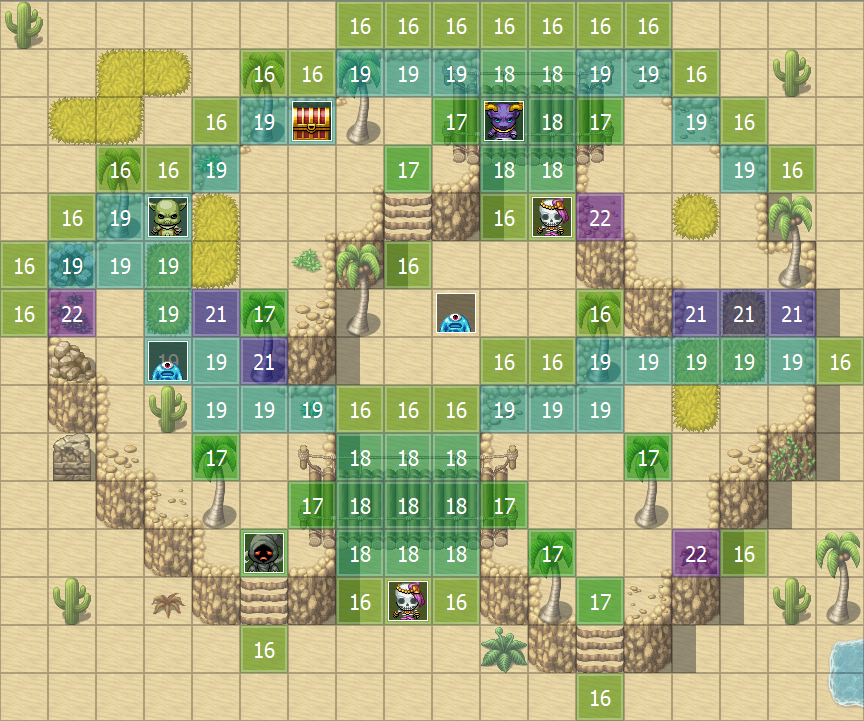
    Thank you for the message,

    Have you tried this:
    Check this
    passages_multilevel.png
  17. Actually yes:

    upload_2019-10-27_19-57-15.png
    With this I am stuck under the bridge. I can't enter the tile without a region id.
    Also I can walk to the left to walk of the cliff on the tile with region id 19.
  18. BurningOrca said:
    Actually yes:

    View attachment 126034
    With this I am stuck under the bridge. I can't enter the tile without a region id.
    Also I can walk to the left to walk of the cliff on the tile with region id 19.
    Indeed... Now this should work (I even tested it... remembered the thing other way around :))

    Here:
    It was opposite
    passage_multilevel.png
  19. this plug-in is godlike, thank you :D
  20. @OcRam Thank you, but then if I walk under the level 2 bridge while being on level 0 I'll get stuck and I can walk onto the cliff from below the bridge.
    Because we have only 1 layer of elevation, the only way to keep the illusion of having more, is to never have 2 or more elevation level between two tiles, so if I close of the edge like this and keep the regions as they were in my original post, everything works fine:

    upload_2019-10-28_6-25-29.png
    And as I already wrote, this was just a test and you don't need to implement more then 1 elevation level.
    I will just stick to the rule of not having 2 or more elevation levels between two tiles.