Hello fellow RPG Makers!
Long time since last update. Life can throw you suddenly in a way or another. Anyways now I'm back almost normally - Still very busy, but I've got few hours per week for active RPG (plugin) making.
I have been trying to get OcRam_Shadows done, but there has been a lot of need to update existing OcRam -plugins.
Rooftop masks and Passages compatibility!
OcRam_Lights is getting ready for OcRam_Shadows (some fundamental functions) and in addition to few bug fixes, it has 1 new awesome feature added. Light mask bitmaps! Now light sources can be any shape and have multiple blended colors in same mask! For just one example: This enables really cool neon lights that may glow in the night (and can also flicker etc...)!
Any shapes and any colors!
OcRam_Misc -plugin has 1 new feature "Tint BG", which will tint only background (not animations/sprites/characters etc...). Use in battles or map scenes to build-up more atmosphere!
OcRam_Battle_Core has possibility to enable/disable action timeouts! Setting timeout to -1 will enable autobattle mode.
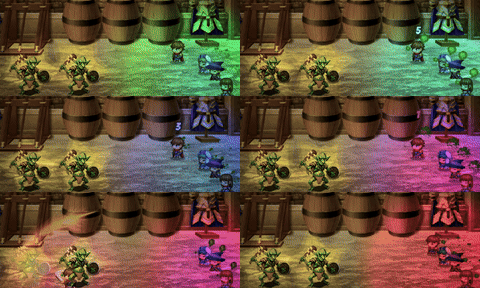
Check out the full list of changes below:
All changes
Core - v1.18
- OcRam.isSelfSwitchOff(event_id_array, switch) (Credits ZankokuNoYami)
- New method OcRam.getDirectionToCharacterFromXY4D(c, x, y)
- Compatibility patches for upcoming other OcRam -plugins
Battle_Core - v1.07
(PRE-RELEASED 2024/09/17)
- OcRam.Battle_Core.setActionTimeout() & OcRam.Battle_Core.setTimeoutAction()
- New plugin parameter section "Action Timeout" >> This also brings you option for AUTOBATTLE MODE! * ENHANCED DAMAGE POPUPS RECOMMENDED FOR VISUAL COUNTER!! (Credits to Drakhan86 for the idea of "action timeout")
Time_System - v1.13
- You may now stop bgm/bgs with dash (-) character on tileset/map notetags <bgs:...> and <bgm:...> (Credits Kylux_Wolf)
- OcRam.Time_System.getJSDate() // Returns current time in JS format (Credits: Paesant, JosephG)
- Fixed: Some null reference errors (Credits Omar_RPG_1000)
Weather_System - v1.10
- Bug fix: "Cannot set property '_icon' of null" in MENU (Credits to N0TF0UND)
- Weather Common Events! and new JS command: OcRam.Weather_System.setPower(power, fade) (Credits to VaiJack8)
- Fixed: Couldn't load "weatherundefined"
- Fixed: Some null reference errors
- When loaded a saved game file which had "Clear" weather, duration is now read from saved file (Credits drbogger)
- Weather BGS now fades in with given transition time, if BGS is new or changed (Credits drbogger)
Movement - v1.13
- Disable diagonal now works properly (Credits to Zanee) Note: You can still force diagonal move via executeMove
Events - v1.09
- Support for diagonal 'EMotions' (remember: add ! suffix)
- IN MV use <speaker>...</speaker> tag in MESSAGE field to 'simulate' speaker name as it is in MZ!
- Setting Autofill speaker to false now doesn't try to load any faces. (Credits to ZankokuNoYami)
- Game_CharacterBase setOffsetX(n), character.setOffsetY(n) and character.setOffset(x, y) methods are added to set event, player, vehicle or follower x or y offset! (Credits to several individuals who have asked this)
- New plugin parameter to automatically set offset for char sheets that has # character in it! (Credits Skurge)
Lights - v1.14
- OcRam_Lights are now ready for OcRam_Shadows!
- Possibility to use light mask bitmaps! For any shape and and colors! (NOTE: Terrain lights can't use masks!)
- New plugin parameter "Center battle light" (Credits to ZankokuNoYami for beta testing!)
- Color cycles now works longer than 255 frames cycles!
- Rotation now supports decimals (for really slooow rotate)
Title_Shuffler - v1.03
- Skipping splash screen parameter works now!
Indicators - v1.07
- Transparent BG for indicators are now working properly! (Credits to ZankokuNoYami)
- Indicators and labels now considers if character is "big" ($) char and calculates sprite height based on it!
- Set indicator offset via <indicator...> comment tag
Passages - v1.18
(v1.17 PRE-RELEASED 2024/08/19 >> hot fix for 2024/02/21 v1.16)
- New plugin parameter: "Adjust rounding error" (Credits to OMGerm)
- Chaucer Collision Altering plugin compatibility patch (Credits to Chaucer *RIP*)
- Support for OcRam_Events offsets. (Credits to Skurge)
Local_Coop - v1.10
- Common Event unlock bug fixed
Misc - v1.02
- OcRam.tintBG([r, g, b], frames) to tint ONLY background! (Support for both battle and map scenes! Tint also carry over transfer/save/load until it's cleared or changed)
As said in the beginning OcRam_Shadows is still work-in-progress, but it has "roof top" shadow bitmap masks already finished. Also ray casting (the most heaviest calculations) is pretty much done and it works really smoothly considering it is done via CPU and RAM only (medium sized map and 60 FPS even on my 4 year old laptop low/mid-range laptop). I gotta say I was pretty sceptic on performance when I started this project, but now that I see results I'm quite surprised how much you can optimize, if RAM is used to store pre-calculated variables as much as possible. Also JS is still amazing me after all these years...
So what's left todo in OcRam_Shadows? Clipping the light source based on rays and environment. Custom floor plans as JSON (if mapping is not made as required to have auto-shadows). And maybe some more optimization to boost it up to the max!
*NOTE* Please remember always to backup your project before any updates and please update all plugins at the same time. This update patch (including plugins which has no changes) is tested with RPG Maker MZ v1.9.0
All these plugins are downloadable from:
https://ocram-codes.net
Thank you for your time for reading this post. And Happy RPG Making!
And then response for latest message.
:)
Then weather variable value must be undefined or it has invalid value. Any ways weatherundefined.png means that weather is indeed undefined and usually this is because weather variable is not defined at all or its' value is controlled outside of weather system plugin.