OcRam MZ -plugins

● ARCHIVED · READ-ONLY
Started by OcRam 404 posts Page 19 of 21 View original ↗
  1. Angy1910 said:
    Where should I use that code?
    You should use it in development console. While in-game press F12 >> "Console" tab >> And check that: player AND event has same floor level (with code snippet I sent you) ...oh and please replace your_event_id with correct event id which you are about to check.

    Chaucer and I made a fix to latest OcRam_Passges plugin (before he passed away :( *RIP* ). So there shouldn't be any compatibility issues between these 2 plugins (personally I havn't tested it, but I trusted Chaucers word on that).
  2. Thank you for your help, I have verified the event is not on the same floor level.

    Sorry for my lack of expertise, how would I have the player and the event be on the same floor level to solve my issue?
  3. OcRam said:
    Chaucer and I made a fix to latest OcRam_Passges plugin (before he passed away :( *RIP* ). So there shouldn't be any compatibility issues between these 2 plugins (personally I havn't tested it, but I trusted Chaucers word on that).
    even if he made a patch, is this only in MZ version or also in MV version?
  4. Angy1910 said:
    Sorry for my lack of expertise, how would I have the player and the event be on the same floor level to solve my issue?
    You can force event via <lower> or <higher> event comments or use plugin command to set floor of player or event. See plugin documentation for more details.

    ShadowDragon said:
    even if he made a patch, is this only in MZ version or also in MV version?
    Only in MZ, but I will do it also to MV mean while you can quick fix like this (just replace whole Game_Player.prototype.startMapEvent with following script):
    Code:
    if (Imported['COLLISION ALTERING PLUGIN']) { // Moved here so no more iffing in startMapEvent...
        Game_Player.prototype.startMapEvent = function (x, y, triggers, normal) { // Start events ONLY if they are on same 'floor'
            // Chaucer: if collision altering plugin enabled, call pixel start map event.
            return this.startPixelMapEvent(x, y, triggers, normal);
        };
    } else {
        Game_Player.prototype.startMapEvent = function (x, y, triggers, normal) { // Start events ONLY if they are on same 'floor'
            // Start events ONLY if they are on same 'floor'
            if (!$gameMap.isEventRunning()) {
                var this_hl = (this !== undefined) ? this._higherLevel : false;
                $gameMap.eventsXy(x, y).forEach(function (event) {
                    if (event.isTriggerIn(triggers)) {
                        var ev_cmts = []; var trigger_always = false;
                        ev_cmts = event.getStringComments(); trigger_always = false;
                        for (var i = 0; i < ev_cmts.length; i++) {
                            if (ev_cmts[i] == "<trigger_always>") trigger_always = true;
                        } if (event._higherLevel == this_hl || trigger_always) {
                            event.start(); updateEvent(event);
                        }
                    }
                });
            }
        };
    }

    Remember to take backup before any edits and I don't know if collision altering plugin is compatible with MV (apparently it is?)
  5. OcRam said:
    Remember to take backup before any edits and I don't know if collision altering plugin is compatible with MV (apparently it is?)
    Collision Alter Plugin is for MV and MZ :) so I will add this, thank you =)
  6. Using the audio plugin and I have a character that is hitting something. But I want it to be an panned SE that you wont hear unless you get closer.

    I tried this:

    AudioManager.playDynamicSe(17, Blow2, 20, 20, auto_pan);

    Put it in the move route as a script call, but that just threw a nasty error XD: Blow2 is not defined.

    Am I doing it wrong? Can i not do it the way I need to do it? Event 17, SE = Blow 2, distance, radius, and auto_panning.
    1742187664703.png
  7. ZankokuNoYami said:
    Using the audio plugin and I have a character that is hitting something. But I want it to be an panned SE that you wont hear unless you get closer.

    I tried this:

    AudioManager.playDynamicSe(17, Blow2, 20, 20, auto_pan);

    Put it in the move route as a script call, but that just threw a nasty error XD: Blow2 is not defined.

    Am I doing it wrong? Can i not do it the way I need to do it? Event 17, SE = Blow 2, distance, radius, and auto_panning.
    View attachment 334649
    Hi,

    Firstly major problem there is SE ...SE's are objects like this:
    Code:
    let Blow2 = { name: 'Blow2', volume: 100, pitch: 100, pan: 0 };

    Another thing is radius 20 tiles and distance 20 this makes SE to be played at 100% no matter how far it is (in the distance < 20 and if further it is 0% ofc). Unless you want it that way, then it's ok.

    Also autopan parameter is boolean.

    So correct line would be (assuming you want 100% vol radius as 1 and distance as 20):
    Code:
    AudioManager.playDynamicSe(17, { name: 'Blow2', volume: 100, pitch: 100, pan: 0 }, 20, 1, true);

    EDIT: You can also ommit three last values since they are default values.
    Code:
    AudioManager.playDynamicSe(17, { name: 'Blow2', volume: 100, pitch: 100, pan: 0 });
  8. OcRam said:
    Hi,

    Firstly major problem there is SE ...SE's are objects like this:
    Code:
    let Blow2 = { name: 'Blow2', volume: 100, pitch: 100, pan: 0 };

    Another thing is radius 20 tiles and distance 20 this makes SE to be played at 100% no matter how far it is (in the distance < 20 and if further it is 0% ofc). Unless you want it that way, then it's ok.

    Also autopan parameter is boolean.

    So correct line would be (assuming you want 100% vol radius as 1 and distance as 20):
    Code:
    AudioManager.playDynamicSe(17, { name: 'Blow2', volume: 100, pitch: 100, pan: 0 }, 20, 1, true);

    EDIT: You can also ommit three last values since they are default values.
    Code:
    AudioManager.playDynamicSe(17, { name: 'Blow2', volume: 100, pitch: 100, pan: 0 });
    Yeah, I didnt quite understand what the distance vs radius really was, so I was just trying to get it to work then was going to play with the numbers until I understood it XD

    Now I get a different error... so I must be doing something else wrong. Tried copying it right in.
    1742200137097.png
    1742200150281.png
  9. ZankokuNoYami said:
    Yeah, I didnt quite understand what the distance vs radius really was, so I was just trying to get it to work then was going to play with the numbers until I understood it XD

    Now I get a different error... so I must be doing something else wrong. Tried copying it right in.
    View attachment 334683
    View attachment 334684
    Hi,

    My bad - I'm sorry, remembered it was an SE object, but you pass only SE name as string so correct snippet is:
    Code:
    AudioManager.playDynamicSe(17, 'Blow2');
  10. OcRam said:
    Hi,

    My bad - I'm sorry, remembered it was an SE object, but you pass only SE name as string so correct snippet is:
    Code:
    AudioManager.playDynamicSe(17, 'Blow2');
    That plays the SE! Just I dont notice it fading away as I get further away. I am clear on the other side and i still hear the sound. I tried setting the defaults to 10 distance and 1 radius in the plugin params.
  11. ZankokuNoYami said:
    That plays the SE! Just I dont notice it fading away as I get further away. I am clear on the other side and i still hear the sound. I tried setting the defaults to 10 distance and 1 radius in the plugin params.
    Those are for dynamic BGS only.

    Try:
    Code:
    AudioManager.playDynamicSe(17, 'Blow2', 10);
  12. ZankokuNoYami said:
    That plays the SE! Just I dont notice it fading away as I get further away. I am clear on the other side and i still hear the sound. I tried setting the defaults to 10 distance and 1 radius in the plugin params.
    I saw you use Hendrix plugins script, Im also configured the sounds and determined that the problem was in the compatibility of the plugins and the script did not work and the sound always played on the entire map. So place Hendrix Action engine above Ocrams plugins and it must be work okay with standart call from plugin description:
    AudioManager.playDynamicSe(event_id, se_name, distance, radius, auto_pan);
    for you: AudioManager.playDynamicSe(17, 'Blow2', 10, 1, true);
  13. Hello fellow RPG Makers!

    NOTE for the users who are using diagonal / offset character sheets!
    There will be new way to define diagonal and offset character sheets in this update! This makes previous !# image naming characters obsolete (the default core feature ! at the start for object sheets remains as it is). Reason why these changes were made is described below.

    As more character frames and new motions forced me to give up existing image image sheet naming policy, we have new, more modern and robust way to work with all of these (new and existing) features. Diagonal and "offset" character sheets are now defined in OcRam_Core plugin parameter called "Character meta data" along with motion and face definitions.

    I'm sorry for all users who are using OcRam diagonal/offset sheets for going through this extra work. But it should payoff with cleaner resources and more robust Project.

    You can now define various meta data for character sheets to work:
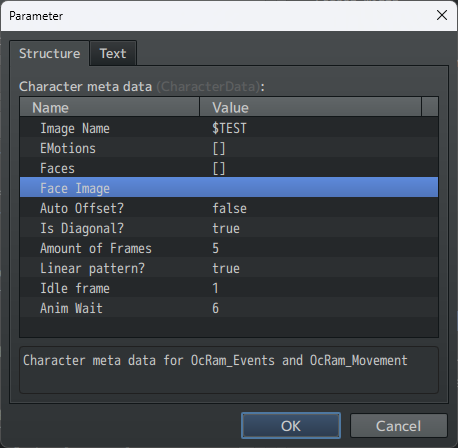
    sheet_setup.png

    In addition to automated dash, idle and hurt character sheets, OcRam_Event now has "playMotion" which can be used for example like this:
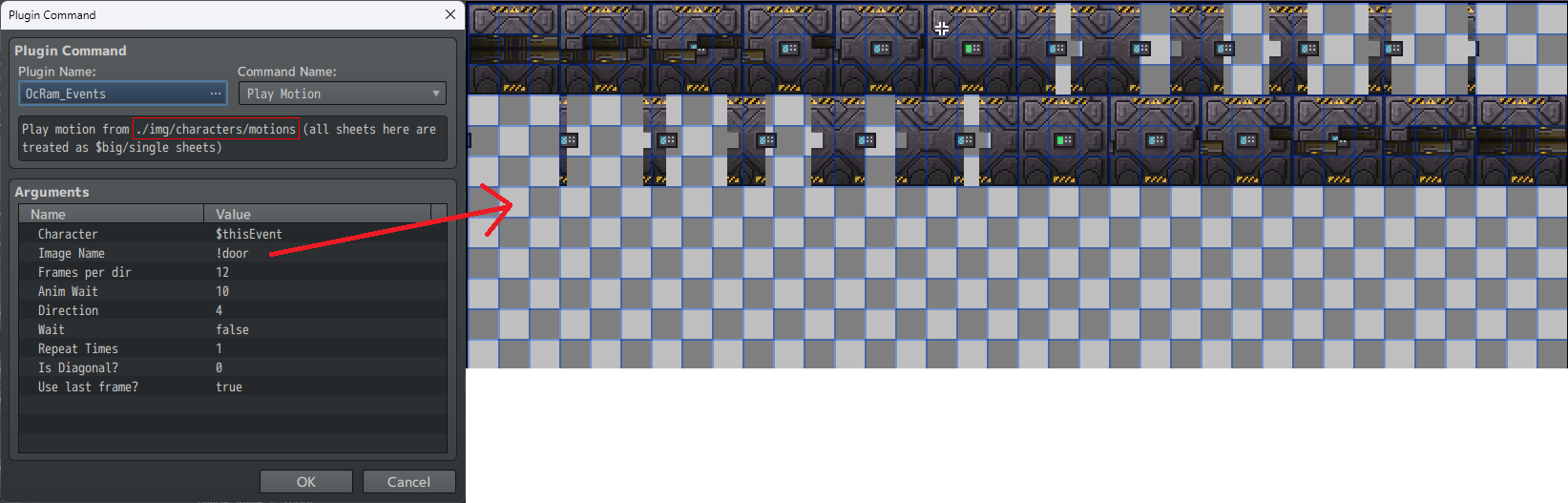
    playMotion_and_img.png

    And result would be like this:
    motions.gif

    Remember to ENABLE each motion for character sheet. Why not default enable? Not found (404) http errors would stagger your game eventually, if plugin always tries to load sheets that doesn't even exists!
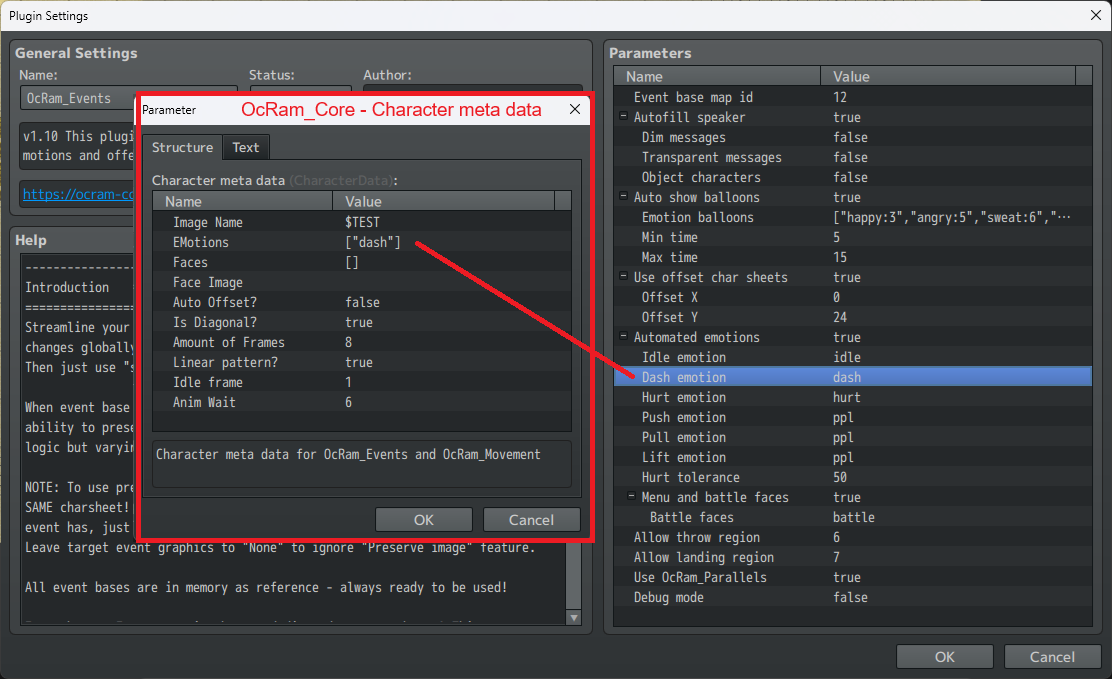
    automated_extra_motions.png
    In that example when character sheet '$TEST' is loaded those properties will be used.

    Passages cover opacity feature!
    IF YOU DO NOT WISH TO USE THIS FEATURE SET PLUGIN PARAMETER "Cover tile opacity" TO 255!

    Please note that if there's no layers behind cover tiles result might not be pretty (layer below is black and results image below):
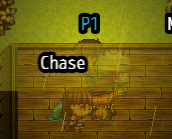
    opacity.png

    If there's grass layer behind cover tiles result is much prettier (imo):
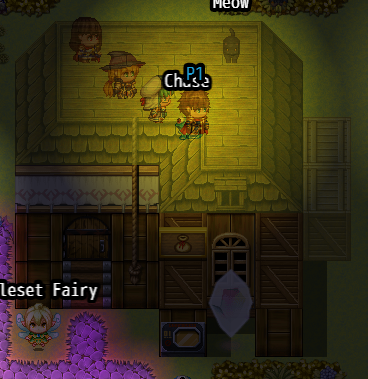
    done_right.png

    OcRam_Indicators
    In addition to new anchoring (to player/event), radius adjustment (if differs from default radius) and offset features you may now define $name$ for indicators to display EVENT NAME in it!
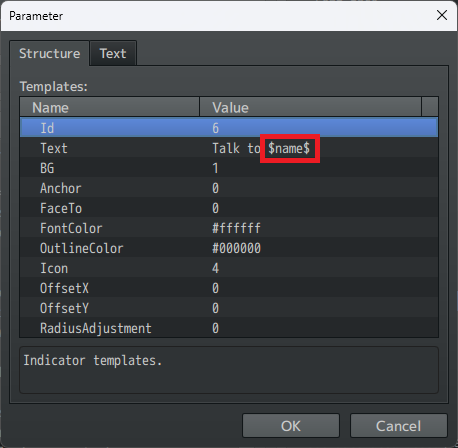
    indicator_name.png

    Result in game:
    ind_name_in_game.png

    Next big change is in OcRam_Weather_System. I guess some of you already knew this, but NOW you may have weather FORECASTS and TEMPERATURE in your OcRam_Weather_System powered projects!

    New Weather_System features:
    • Tilesets / Maps have new <temperature...> notetag (if it's missing default values are used)
    • Temperature variable! (use it for easy temperature based eventing!)
    • Weathers can have temperature requirements!
      • If requirements are not met weather can have
        • New random weather (once >> if even that doesn't meet requirements >> clear weather)
        • Clear weather
        • SUBSTITUTE weather (ie. rain>>snow and vice versa)
    • Weathers can modify base temperature (but not outside its own requirements)
    • If OcRam_Time_System is in use: Each day phase may have its own <temperature...> range (ie. desert == hot day / cold night)!
    • Weather queue limit (how many weathers can be predicted) as plugin parameter.
    • You may show new "Forecast scene" anytime via JS OcRam.Weather_System.showForecast(accuracy)
      • If accuracy is omitted default accuracy will be used
    • Forecasts are remembered (and saved) PER unique weather pools ie. "1,2,3" != "1,2,3,4"
      • Set desired amount of unique weather pools to remember via plugin parameter!
    • You may get forecast also as JSON OcRam.Weather_System.getForecast(accuracy)
      • If accuracy is omitted default accuracy will be used
    • Forecasts will (or tries to) predict time (needs OcRam_Time_System), weather, power and temperature
      • If accuracy is 1 forecasts should be 100% correct
      • If accuracy is 0.5 and queue limit is 10 each weather in queue will be 5% harder to predict then previous one
      • Current weather is always correct no matter the accuracy
    Examples from new forecast scene:
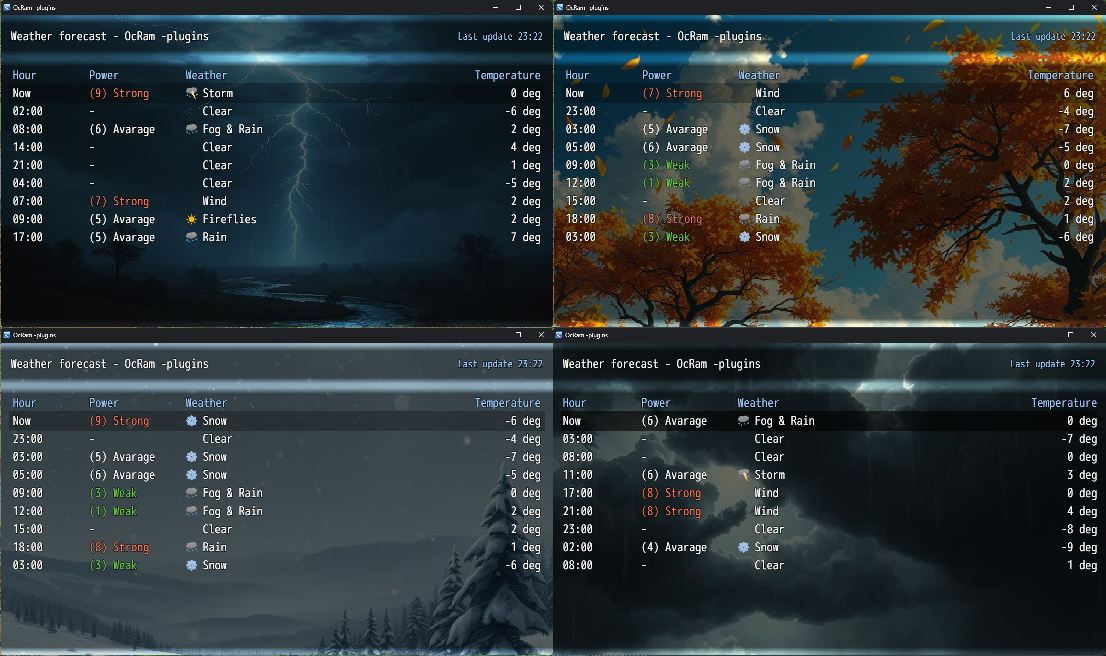
    current_weather_bg.png


    Check out the full list of changes below:

    Full list of changes
    Core - v1.19
    • Game_Character.isFacing now returns always true and Game_Event.isPlayerInRadius won't return false anymore if player is in SAME tile!
    • Fixed issue with character.setPixelMove() (used example in move routes) (Credits @Zanee )
    • Game_CharacterBase.isOnLadder is no longer overwritten
    • New parameter: "Character meta data"!
    • Game_Follower.isDashing and Game_Follower.realMoveSpeed are now overwritten so followers can now actually "dash" when player dashes (follower.isDashing())

    Battle_Core - No changes

    Battle_Troops - No changes

    Time_System - v1.14
    • Compatibility patch for latest weather system (forecasts)
    • New methods OcRam.Time_System.predictHour(mins_from_now) and OcRam.Time_System.predictDayPhase(mins_from_now)
    • 12h clock now works properly (Credits @darthKitty )

    Weather_System - v1.11
    • Bug fix: Weathers now clear on end properly even if "Use dynamic weather" is "OFF"" (Credits @VallinVl )
    • NEW feature weather forecast! (Credits to @reebunny )
    • NEW feature temperature! + temperature req. for weathers (Temperature features: variable, default range, tileset range, map range, day phase modifier, weather modifier)

    Movement - v1.14
    • New feature MORE character frames (/w 8-dir support)!
    • This will override: Window_Base.prototype.drawCharacter
    • New parameter "Region Id fix" to fix OcRam_Passges ladder issue. ($gameMap.regionId now uses Math.floor)
    • 4 dir characters now also have smart path finding! And CharacterBase.setPixelMove works again (Credits to Zanee)
    • NOTE: THIS VERSION WILL REQUIRE DEFINING DIAGONAL SHEETS AGAIN! (via OcRam_Core parameter "Character meta data")

    Events - v1.10
    • New feature: Play non-persistant motions like dodge-rolls, swing, laugh etc... with CUSTOM amount of frames!
    • New feature: (automated) Idle, dash and hurt emotions
    • NOTE: THIS VERSION WILL REQUIRE DEFINING OFFSET SHEETS AGAIN! (via OcRam_Core parameter "Character meta data")

    Followers - No changes

    Audio - No changes

    Lights - No changes

    (Shadows - NOT RELEASED YET!)

    Layers - No changes

    Title_Shuffler - No changes

    Title_Info - No changes

    Indicators - v1.08
    • New property for templates to alter DEFAULT radius when indicator will be shown (negative numbers also allowed)
    • If radius drops below 1 player must be in same tile!
    • Possibility to use $name$ to display event name in indicator text! (Credits to @Zanee )
    • Added possibility to anchor indicators to PLAYER instead of event and force facing direction per template
    • Added X/Y offset for templates also! (will be added to offsets defined in event comment notation)

    Passages - v1.19
    • New plugin parameter to adjust cover tile opacity when player is beneath cover tiles. (Credits to @Rigbydigby )
    • NOTE: Remember to set "Cover tile opacity" to 255 (if you don't want to use this feature)
    • Ladders won't force player to face up if behind cover

    NPC_Scheduler - v1.07
    • Reverted v1.06 changes to make it work again with latest and final? version of Rosedale Collision-altering plugin

    Star_Tile_Fix - No changes

    Local_Coop - v1.11
    • Support for OcRam_Passages "Cover tile opacity"
    • Support for new OcRam_Events and OcRam_Movement

    Map_Transfer - No changes

    Credits - No changes

    Misc - No changes

    Char_Converter - No changes

    Input_EX - No changes

    Map_Editor - No changes

    Thank you for your time for reading this post. And Happy RPG Making!

    EDIT: Few hours after release I noticed bug where pattern could drop below zero when swapped event pages. OcRam_Movement has been hotfixed make sure you can see following line in release history: "2025/05/25 v1.14 - Hotfix where pattern can't go below 0 anymore"
  14. First of all, great update I am having an error message when trying to use your plugins with chaucer Scene Stabilizer here is the link https://chaucer.itch.io/scenestabilizer. Below are the error messages and plugin order. I am using MV not MZ.
  15. Beachsidey0 said:
    First of all, great update I am having an error message when trying to use your plugins with chaucer Scene Stabilizer here is the link https://chaucer.itch.io/scenestabilizer. Below are the error messages and plugin order. I am using MV not MZ.
    Thank you for the report I'll see what I can do about this (might take a while though...).
  16. OcRam said:
    NOW you may have weather FORECASTS and TEMPERATURE
    This is amazing!!!!!!! Can't wait to play around with it
  17. Beachsidey0 said:
    First of all, great update I am having an error message when trying to use your plugins with chaucer Scene Stabilizer here is the link https://chaucer.itch.io/scenestabilizer. Below are the error messages and plugin order. I am using MV not MZ.
    Hello @Beachsidey0 and all other MV users!

    I have made a hotfix (same version, but different release date) for Core, Events, Lights, Movement and Weather System -plugins. All other plugins seemed to be compatible with RETRO'ED MV project.

    Also Chaucer Scene Stabilizer compatibility patch is included (make sure it's imported before OcRam_Core).

    Happy RPG Making for all!
  18. OcRam said:
    Hello @Beachsidey0 and all other MV users!

    I have made a hotfix (same version, but different release date) for Core, Events, Lights, Movement and Weather System -plugins. All other plugins seemed to be compatible with RETRO'ED MV project.

    Also Chaucer Scene Stabilizer compatibility patch is included (make sure it's imported before OcRam_Core).

    Happy RPG Making for all!
    It seemed to work for the most part but when ever I try to change weathers I get this error now. I am just trying the basic plugin command for Rain weather OcRam_Weather_System/setWeather 1 3 120 0 but it shows that error. With Scene Stabilizer off the weather plays as it is supposed to.
  19. Beachsidey0 said:
    It seemed to work for the most part but when ever I try to change weathers I get this error now. I am just trying the basic plugin command for Rain weather OcRam_Weather_System/setWeather 1 3 120 0 but it shows that error. With Scene Stabilizer off the weather plays as it is supposed to.
    Hmmm... this is strange I tried changing weathers in my development RETRO -project and everything worked there (I must update my projects to web page since they are outdated, but I must make some examples of new features first).

    Anyways it's always good to check plugin order:
    plugin_order.png

    I have also made pre-loader to weather system plugin, maybe that is why they work for me? (I have attached beta version to this message)
  20. OcRam said:
    Hmmm... this is strange I tried changing weathers in my development RETRO -project and everything worked there (I must update my projects to web page since they are outdated, but I must make some examples of new features first).

    Anyways it's always good to check plugin order:
    View attachment 342221

    I have also made pre-loader to weather system plugin, maybe that is why they work for me? (I have attached beta version to this message)
    Oh you were right I need to have Scene Stabilizer above oc core and it works perfectly now.