New Type For Item
Terms of use
You can use this pluggin for free or commercial utility.
You can add me in Crédit but not necessary.
Actually Version : Version 1.0.1
Older Version :
Version 1.0.0
Add "Loot" Menu.
Spoiler
Introduction
This plugin add new type of items, Loot Item.
For exemple, you have some monsters who drops some items like Wing Bat , ... and this item is not like Potion or something that you can use.
In many rpg, item like this are used to craft.
So with this plugin, you can separate Item and Loop.
I can explain how add more type if you ask me. Or make a plugin for your personal resquest .
If you have a problem with plugin, please, tell me.
Params
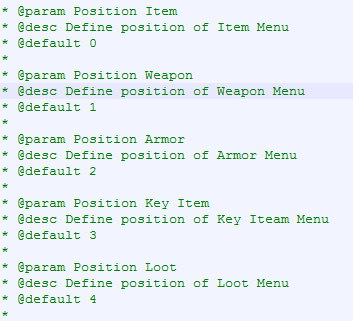
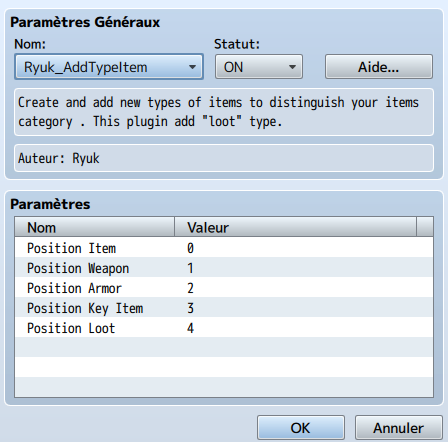
You can change the order, for example, you can put Loop before Item or Weapon. Just write 0 and change next order.
How Use It
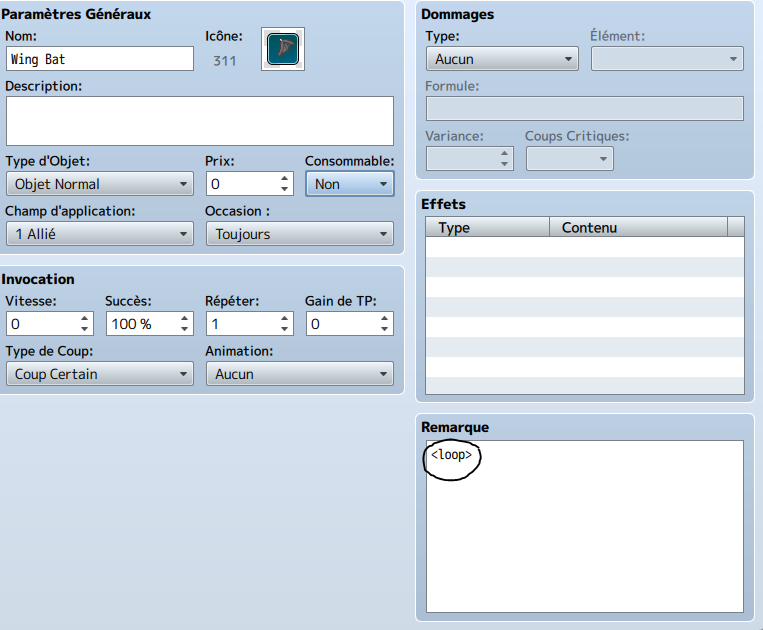
/!\ If you don't want your loop item in Item menu, put your item in "Hidden Item". Then it will be visible in Loop Menu and not in Item Menu
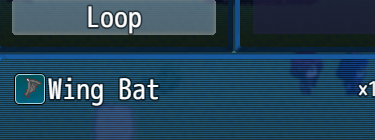
Example :
Download
http://www.mediafire.com/view/d8k5t0581n37m3p/Ryuk_AddTypeItemV_1_0_0.js
This plugin add new type of items, Loot Item.
For exemple, you have some monsters who drops some items like Wing Bat , ... and this item is not like Potion or something that you can use.
In many rpg, item like this are used to craft.
So with this plugin, you can separate Item and Loop.
I can explain how add more type if you ask me. Or make a plugin for your personal resquest .
If you have a problem with plugin, please, tell me.
Params
You can change the order, for example, you can put Loop before Item or Weapon. Just write 0 and change next order.
How Use It
/!\ If you don't want your loop item in Item menu, put your item in "Hidden Item". Then it will be visible in Loop Menu and not in Item Menu
Example :
Download
http://www.mediafire.com/view/d8k5t0581n37m3p/Ryuk_AddTypeItemV_1_0_0.js
New Version: 1.0.1
Introduction
This plugin add between 1-6 new Item Type.
This plugin add between 1-6 new Item Type.
You can choose the name, the position, and activate or desactivate.
Params
Params
There are two types of paramaters.
The first is the name of your new item type. Write the name in one of six slots.
* @param ============================= * @param Name of New Item Type * @param ============================= * @param * * @param Name Slot1 * @desc Choose the name of your new Item Type. * @default * * @param Name Slot2 * @desc Choose the name of your new Item Type. * @default * * @param Name Slot3 * @desc Choose the name of your new Item Type. * @default * * @param Name Slot4 * @desc Choose the name of your new Item Type. * @default * * @param Name Slot5 * @desc Choose the name of your new Item Type. * @default * * @param Name Slot6 * @desc Choose the name of your new Item Type. * @default The second parameter is the position . You can change all position of your Item Menu.
Code:
* @param * @param ============================= * @param Position of Item Type * @param ============================= * @param * * @param Position Item * @desc Define position of Item Menu * @default 0 * * @param Position Weapon * @desc Define position of Weapon Menu * @default 1 * * @param Position Armor * @desc Define position of Armor Menu * @default 2 * * @param Position Key * @desc Define position of Key Menu * @default 3 * * @param Position Slot1 * @desc Define position of your first new Type Item * @default false * * @param Position Slot2 * @desc Define position of your second new Type Item * @default false * * @param Position Slot3 * @desc Define position of your third new Type Item * @default false * * @param Position Slot4 * @desc Define position of your fourth new Type Item * @default false * * @param Position Slot5 * @desc Define position of your fifth new Type Item * @default false * * @param Position Slot6 * @desc Define position of your sixth new Type Item * @default false *How Use It
Code:
* @plugindesc Version 1.0.1 * You can add between 1-6 new Items Types. You can choose the name and position. * Crédit : Ryuk * * @author Ryuk * * @help Welcome to AddTypeItem. * === Introduction === * Do not like the four types of item? Want more easily to diverse the different types of item ? * You can go through this plugin add between 1-6 new types of objects with this plugin. * Easy, you can change the name and activate or desactivate your new category of item. * * === How use it === * After activate this plugin, to add your new Item Type, go in parameter and in Name of New Item Type, * write the type name you want. Then, to activate your new type. In Position of Item Type, choose the * position where you want see your new type. * * Now, your new type is created and it appear in your Item Menu. But how put item in this category? * Easy ! If you have choose Slot1, write in Note Item <slot1> * So : * Slot1 : <slot1> * Slot2 : <slot2> * Slot3 : <slot3> * Slot4 : <slot4> * Slot5 : <slot5> * Slot6 : <slot6> * * For example, I created "Loop" in Slot1 parameter type for item like Wing Bat. I want put Wing Bat in Loop Menu * when i got this item. So in note's Wing Bat, I write <slot1>. * BUT actually, your item will be in Item AND Loop, so, how do to see it only in Loop Menu? * To do it, in your Item Option, put your Item in Hidden Item A or B. And you Item will be only in Loop Menu. * * === How Delete Type === * If you want desactivate some type, write "false" in value in Position Slot<number>. * For example, if I don't want Slot1, Position Slot1 Value: false. * * === More Option === * As you can see, you can change the position of Item Menu. So if you want * put Loot Menu before Item, you need all shifted. * For example : * Loot 0 * Item 1 * Weapon 2 * Accessory 3 * Armor 4 * Key Item 5 *Download