MZ - [MZ & MV v1.9.7] Shora Lighting & Shadow System

● ARCHIVED · READ-ONLY
Started by Shora 656 posts Page 29 of 33 View original ↗
  1. Ryuukun said:
    Glad my monologue helped!

    Also, on another subject, question to Shora: are we able to use the plugin in the same way you do in your gif? (with sliders, directly In-game) or is this a dev thing only?
    That UI video is pretty old, and I don't actually have any idea for a new UI for user yet. The old one are kinda made in some hours just for showcasing, so it don't have any actual functionality like save the light into the map, etc. I would use some suggestions for how the UI would be used! I don't really decorating my lights into map that much like you all (only when debugging), so suggestion is appreciated :D
  2. BoneCollectors said:
    This light system is not fully compatible with PIXI 5.3.3, for those interested in implementing it.
    If you really need it, however, I think I could make a patch for it. Or you could make one yourself, since difference between PIXI v5 versions is not that big, so it mostly take some syntax changing to fix.
  3. twosnakes said:
    @Shora any news on next update?
    I've been working on a big refactor for a while, but it got put on hiatus since I have been busy IRL + need to do other works (commission). But the work is mostly done and ready to be published, so stay tuned! If everyone have any bugs regarding the current version, you can PM me a bug report, I will try to include the fix in the next version.
  4. Update v.1.9.5 (28/2/2024):

    - Terrain Tags for automatic shadow caster now available. You can now use terrains tags to automatically create shadow caster instead of manually using region ID each time a new building is created. To do so, you must need to set the terrain tags equal to 2 parameters in the plugin settings: Wall ID and Top ID. Please check the new demo to see how it is used.

    - Some optimization for both version (MV and MZ).

    - Fix lots of bugs, including the bug when sometime the lights shine through the wall vertically. @Splatterguy

    Please provide your feedback, any suggestions and/or problems you encounter!

    You can download the new version (and demos) at itch.io :kaohi:
  5. MV version

    Terrain Tags: Thank you for adding, working great so far!

    Optimization: I'm happy to report a large improvement compared to 1.91 performance wise. I'll do more testing over next few days, because larger maps (40x40+) appear to lag in my project...even when there are no dynamic lighting effects happening. Small maps with lots of dynamic lights and player movement + event processes perform well. I think it might be long walls on larger maps forcing dynamic light calculations even know the visually nothing is happening (since its a long wall, shadow won't change)

    Bugs: Flashlight custom light on player flickers up facing, even when not moving. (I suspect a conflict with QMovement pixel plugin that I'm using?)

    Is it possible to have an event block light (as if it was a wall)?

    This was a great update, thanks again @Shora!
  6. Hi! I'm sure there's a way to do this, but I'm so confused TwT
    Is there any way to have more than one option for shadow colors? Like, the overlay over the entire map specifically.
    There are different scenes with different lighting settings (i.e. sunset with an orange overlay, night with a dark overlay) but I can't figure out how to get multiple - let alone figure out how to call on a specific one TwT
    Thank you for any help!

    EDIT: OK, so, I figured out how to do it thanks to a lovely comment explaining that you need to change the [Default: Ambient] setting to a specific color and then use a plugin command to change the color when need-be, but... For some reason, no matter what hex code I put, the color of the map doesn't change at all??

    I have never been more confused... What am I doing wrong? TwT

    yreyre.png

    4eyreyh.png
  7. So I encountered a small quirk.

    For my game, I needed to turn on and off the lighting, so I used the $gameLighting.disable(); and $gameLighting.enable(); calls as needed. I had it disabled at the start of the game since I had multiple maps that didn't need lighting, turned it on for one cutscene on one map, turned it off once more for a second on another map, and now it won't turn the lighting back on again. I tried restarting the test game, but that only got the lighting to turn on again once, and never again since. I tried restarting MZ too and that didn't fix it either (since I remember in ace sometimes it needed a restart to get things to work right).

    So, I made a new map in the file to flip it repeatedly on and off to see if maybe it didn't like it being done repeatedly. Nada, it worked fine. So I figured that it had to be something with transferring maps in conjunction with turning the lighting on. Didn't figure the order mattered that much, but I enabled the lighting before swapping maps anyway to try it. Ding, now it works again.

    It seems that it didn't like enabling the lighting after moving to a new map, even to the point that putting in a new event on that map specifically to turn on the lighting didn't work. Only after swapping the transfer and script call commands around did it work again.

    Not sure if anyone else has encountered this, but thankfully all that it needed was a reshuffle in command order.

    @kiskutnya I had a similar issue and just gave up with using the default ambient color from the defaults panel. Mainly because it was annoying to keep reopening the test game to see if it changed or not. Personally, it ended up a lot easier to just use the script call $gameLighting.setMapAmbient('colorname', 120); to change it to whatever color I needed, and made some custom colors to call, then changed 120 to 5 so it'd change faster.
  8. @QuizicalGin its possible that most transfer the plugin is on.
    however, you can make a check to see if its on or not, or set a wait frame
    in between (if it was off, start off, wait 2 frames, turn it on and fade in.)

    this might work as work around as it doesn't happen on my end, not really
    tested on the latest version yet.
  9. @ShadowDragon I already had a wait time in there, and it hadn't worked, unfortunately. As I said though, just rearranging the order of the relevant commands fixed it thankfully. :kaophew:
    I'm using the 1.9.5 version, but it's not something I'm too worried about since it is easy to work around. I just wanted to post about the quirk and the workaround in case anyone else encountered it. :kaohi:
  10. So there's something odd I've encountered while using the plugin. Whenever I transfer maps with the character sprite set to facing left, the shadows end up offset from where they're supposed to be, as seen in the images below. I tested it multiple times in my game, and then in the 1.9.5 demo to double-check it was replicatable.
    Wonky shadows
    Screenshot_117.png
    Just a note on this image for later in the post, the flashlight with the round light around it is a modified version of the offered base flashlight graphic rather than two separate lights that it appears to be.

    Screenshot_118.pngScreenshot_123.png
    Had a slightly harder time finding a spot in the demo, but found a couple houses to use since no light and the abandoned house had the fewest lights to remove. The offset doesn't appear to be as bad as it is in my game, but still present.
    From testing, it seems the offset only happens during transfer while facing left when using the flashlight light, whereas using the circular lights doesn't have that issue. Repeated testing had it happen in both my game and the demo.
    These work fine
    Screenshot_120.pngScreenshot_122.png
  11. QuizicalGin said:
    So there's something odd I've encountered while using the plugin. Whenever I transfer maps with the character sprite set to facing left, the shadows end up offset from where they're supposed to be, as seen in the images below. I tested it multiple times in my game, and then in the 1.9.5 demo to double-check it was replicatable.
    Wonky shadows
    View attachment 300365
    Just a note on this image for later in the post, the flashlight with the round light around it is a modified version of the offered base flashlight graphic rather than two separate lights that it appears to be.

    View attachment 300366View attachment 300370
    Had a slightly harder time finding a spot in the demo, but found a couple houses to use since no light and the abandoned house had the fewest lights to remove. The offset doesn't appear to be as bad as it is in my game, but still present.
    From testing, it seems the offset only happens during transfer while facing left when using the flashlight light, whereas using the circular lights doesn't have that issue. Repeated testing had it happen in both my game and the demo.
    These work fine
    View attachment 300368View attachment 300369
    That a nice bug report! It definitely have something to do with the way lighting get rendered when the character just transferred (since optimization is not computing shadow when the character is standing still). I will take a look at this :D
  12. Hello! I'm, um...having a mild problem. (Mild in that it's slightly irritating but does not affect the actual gameplay in any way.)
    (Hopefully this isn't a really dumb question, but-)
    So, I'm trying to have a game that's cast in pitch darkness lit up by only sparse resources, but there's still battles involved, in which case I have things brighten up for visibility. This was working great...until I noticed I kept, rather inconsistently, getting an error.
    (Light version of the battlefield used just for convenience, and because my other solution for making the battlefield visible with my current settings looks rather odd. Both solutions use the exact same method, however.)

    Do you have any idea what could be causing this and how to fix it? (If it's a bit difficult to read, it says "Shora Lighting Plugin: cant remove light0")
    I've thought multiple times that I fixed it, but it's just that...sometimes it occurs, and sometimes it doesn't, for reasons I currently can't figure it out. I'm not even fully certain if it was or wasn't happening since the start, because it's entirely possible I just didn't notice.
    If I had to guess, it -might- be because I changed the lighting for the battle scene? But then, again, it occurs really inconsistently...

    Apologies if this is something you've already talked to someone else about, and I haven't noticed ///////
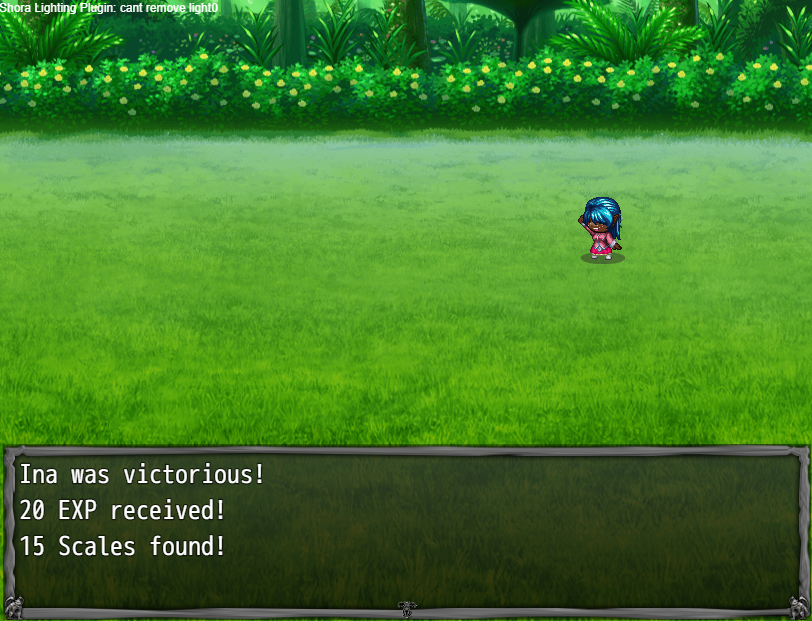
    1712219966432.png(Also, in case you're wondering or need to know, I'm just using one of the script commands to change the lighting)
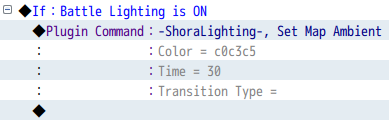
    1712220061748.png
    (Edit: Keeping the rest for ~context~ and I don't know what will or won't be needed, but further experimentation has determined that this just...occurs? after saving and continuing the game? not always immediately, but after continuing two or three times from any save, this error pops up no matter what I do. Even when I've completely cleared the saves and turned off every other plugin, even when I remove the lighting change and just let the battle scene stay dark...)
  13. Hi, how do you disable this lighting effects in the battles, on maps with the plugin enabled the battles are also dark and hard to see, thanks.
  14. How to disable shadow on other maps?
  15. Hi everyone,
    Is there a way to make a day night cycle in the way the community light plugin does ?
    Or it has to be done in parallele common event only ?
  16. @Shora I have a little question, this plugin allows me to create a moving light like a firefly?
  17. @didam890 You could use the [lighting off] in the note tags for the relevant maps if only a few of them won't have lighting. Alternatively, there's also the "$gameLighting.disable()" script call if more of your maps would have it off rather than on.

    @jackass__ I don't know how the community plugin does it sadly, but my best guess would be to use a couple common events for it (one for lighting, the other for the timer).

    @Sacrulen Yeah, you could make fireflies with the plugin. You'd probably have to adjust the light's scale to fit the size you need, though. I personally found them a little big, and had to shrink them by 50% for some of the smaller lights I needed. For a soft but warm light, tungsten may be the best to shrink down for a firefly. Additionally, there's an option to set the spread of the light too, so you could give the impression of the firefly's tail glowing on and off.
  18. QuizicalGin said:
    @Sacrulen Yeah, you could make fireflies with the plugin. You'd probably have to adjust the light's scale to fit the size you need, though. I personally found them a little big, and had to shrink them by 50% for some of the smaller lights I needed. For a soft but warm light, tungsten may be the best to shrink down for a firefly. Additionally, there's an option to set the spread of the light too, so you could give the impression of the firefly's tail glowing on and off.
    Nice, I will try to get this plugin then, will help me a lot <3
  19. QuizicalGin said:
    So there's something odd I've encountered while using the plugin. Whenever I transfer maps with the character sprite set to facing left, the shadows end up offset from where they're supposed to be, as seen in the images below. I tested it multiple times in my game, and then in the 1.9.5 demo to double-check it was replicatable.
    Wonky shadows
    View attachment 300365
    Just a note on this image for later in the post, the flashlight with the round light around it is a modified version of the offered base flashlight graphic rather than two separate lights that it appears to be.

    View attachment 300366View attachment 300370
    Had a slightly harder time finding a spot in the demo, but found a couple houses to use since no light and the abandoned house had the fewest lights to remove. The offset doesn't appear to be as bad as it is in my game, but still present.
    From testing, it seems the offset only happens during transfer while facing left when using the flashlight light, whereas using the circular lights doesn't have that issue. Repeated testing had it happen in both my game and the demo.
    These work fine
    View attachment 300368View attachment 300369
    I just update the plugin to 1.9.6, which fix some of the minor bug reported, including this one! If this bug bother you please check out the newest version to see if it work ;).
  20. Hey guys, I little doubt about the plugin.
    I am understanding how it work, I managed to create my own custom light and everything related to it. However, there is one factor I am trying to do that it isn't working.
    What is the command to turn the plugin off for only one map? I tried call the plugin command but it didn't work.