Introduction
A Lighting and Shadow plugin for RPG Maker MV/MZ, powered by pixi.js library.Features
- Create different lighting types using custom light images, with different defaults parameters easily from Plugin Manager.- Deploy your lighting in events and items, automatically using comment/note, with the ability to override the default setting on demand.
- Tons of plugin commands for both MV and MZ versions to change each light's parameters, in desired tick(s) and transition.
- Light comes with real-time shadows (optionally). With 2.5D soft shadows casted, your game can be enhanced a lot nicer. Makes the shadow caster detection happen automatically using terrain tags, or using region IDs.
- Light comes with animations (optionally). Including automatic pulse animation and flicker animation. Easily create your own light animation using plugin command and/or scripts.
-
- Both lights and shadows are deeply optimized for RPG Maker MV/MZ, specifically the PIXI.JS library. Just integrate the plugin into your game without worrying about performance.
- Always there to help you if you’ve encountered any problems, and open to any suggestions!
.
Tutorial
Plugin Installation
Grab the plugin js file from itch.io official page, and place it inside the js/plugins folder.
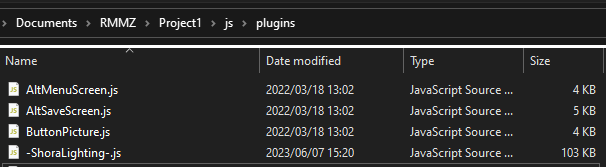
Enable the plugin inside the Plugin Manager. I suggest placing it above every other plugin.

Make a new folder named lights inside the img/ directory. This folder will store all your lighting images. If you don’t have any, a good way is just copy and paste from my demo project.
It is done!
Enable the plugin inside the Plugin Manager. I suggest placing it above every other plugin.
Make a new folder named lights inside the img/ directory. This folder will store all your lighting images. If you don’t have any, a good way is just copy and paste from my demo project.
It is done!
Lights
Simply add [light] comment to an event's page, and F5 to see if it worked correctly.
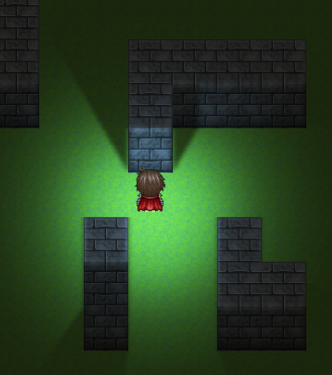
If you use the lights image directory from my demo, you should see this:
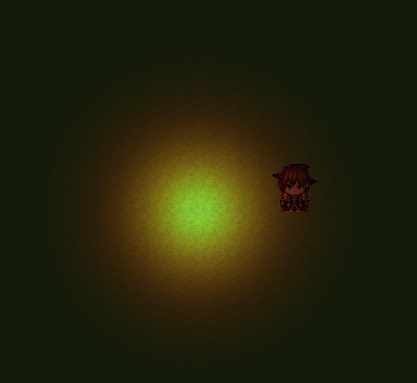
You could override the light default parameters by adding custom arguments after the name. Eg: [flashlight -r 120 -a 45] will give the event (‘s page)/ item’s note a light of name flashlight, with their radius set to 120% and angle to 45 degree. Almost every default parameter could be overridden like this.
Current light parameters include: name, images, status, radius, angle, event’s direction, color tint, color filters, offset, shadow, and animations.
If you use the lights image directory from my demo, you should see this:
You could override the light default parameters by adding custom arguments after the name. Eg: [flashlight -r 120 -a 45] will give the event (‘s page)/ item’s note a light of name flashlight, with their radius set to 120% and angle to 45 degree. Almost every default parameter could be overridden like this.
Current light parameters include: name, images, status, radius, angle, event’s direction, color tint, color filters, offset, shadow, and animations.
Shadows
There are currently 2 ways of creating shadow casters (objects that block lights): automatically using terrain tags or/and manually using region IDs. I suggest using terrain tags as you don’t need to draw regions again and again for every map, but region IDs can be useful in some cases if you want to draw it manually.
Method 1: Terrain Tags
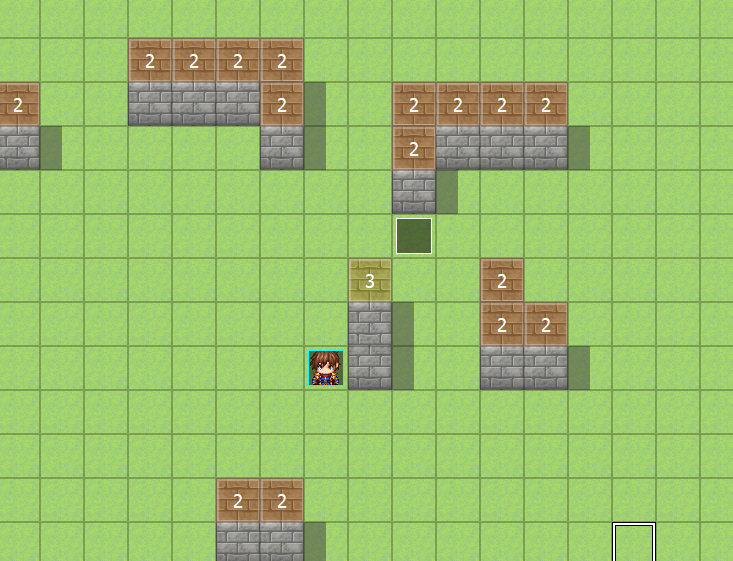
Open Database -> Tilesets -> Terrain Tags, and set all the Wall Tile to 1, and Top Wall Tile to 2. You can change those default constant value inside the Plugin Setting -> [Game: Settings]
You should have something like this:
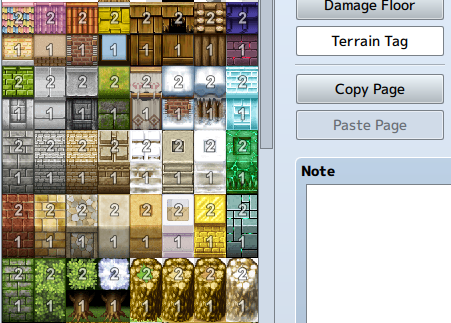
Now just draw your map normally, and the shadow caster will be automatically detected. This detection is prioritized over the region IDs, which we will talk below.
Method 2: Region IDs
If you used Khas Advanced Lighting before (which has been deprecated), you pretty well know how this works. Just place the region IDs on top of all the wall you drew as the height. You can change the region IDs range in the Plugin Settings as well.
Method 1: Terrain Tags
Open Database -> Tilesets -> Terrain Tags, and set all the Wall Tile to 1, and Top Wall Tile to 2. You can change those default constant value inside the Plugin Setting -> [Game: Settings]
You should have something like this:
Now just draw your map normally, and the shadow caster will be automatically detected. This detection is prioritized over the region IDs, which we will talk below.
Method 2: Region IDs
If you used Khas Advanced Lighting before (which has been deprecated), you pretty well know how this works. Just place the region IDs on top of all the wall you drew as the height. You can change the region IDs range in the Plugin Settings as well.
Custom Lights
You can create various custom lightings for your project, with different image and default settings, using Plugin Settings -> [Lights: Custom].
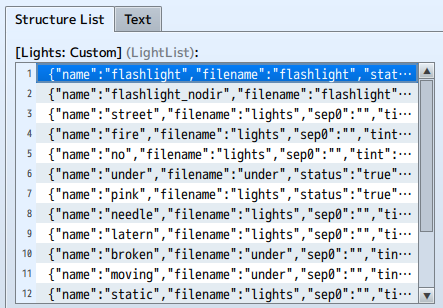
A custom light template currently look like this:
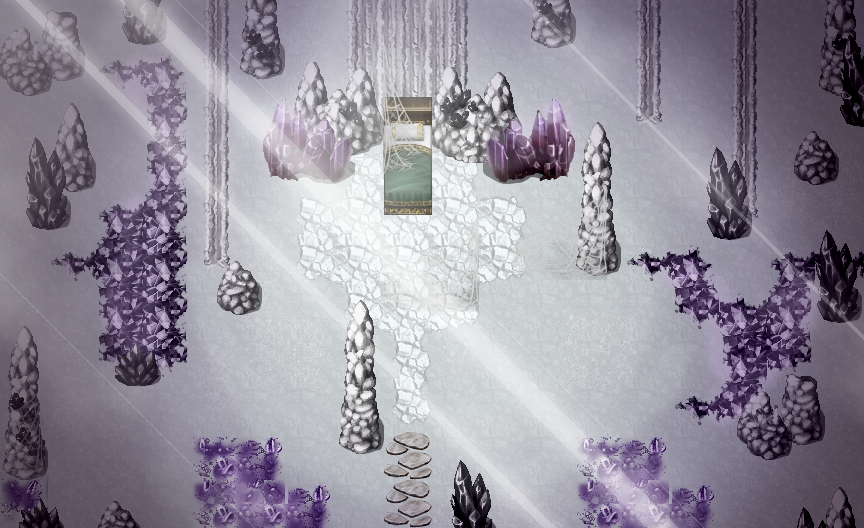
You also can just copy my custom lights to your project! Simply copy & paste it.
A custom light template currently look like this:
You also can just copy my custom lights to your project! Simply copy & paste it.
MZ Plugin Commands
MZ Plugin Command:
Set Light Parameters:
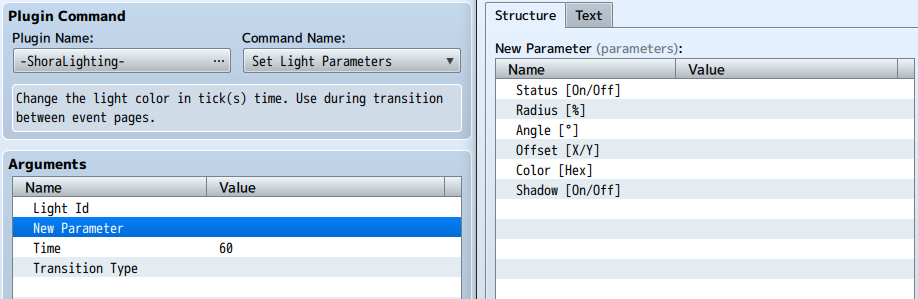
Blank settings will remain the same, transition type is optional. Leave the Light Id section blank to target the event that call this command.
Set Map Ambient:
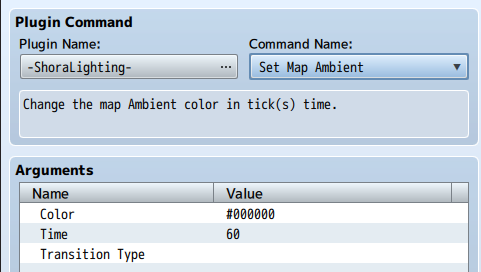
Set Light Parameters:
Blank settings will remain the same, transition type is optional. Leave the Light Id section blank to target the event that call this command.
Set Map Ambient:
MV Plugin Commands
You can shorten the eventId for the current lighting (lighting of the event which call the commands) by using a simple "=" instead of typing it id. This is the same as "leave the id blank for this event" in MZ plugin command.
ambient <color (hex)> <time (ticks)>
offset <eventId> <X> <Y> <ticks> <transition type>
offsetx <X> <ticks> <transition type>
offsety <X> <ticks> <transition type>
radius <eventId> <radius (%)> <ticks> <transition type>
angle <eventId> <angle (degree)> <ticks> <transition type>
tint <eventId> <color> <ticks> <transition type>
status <eventId> <on/off>
shadow <eventId> <on/off>
ambient <color (hex)> <time (ticks)>
offset <eventId> <X> <Y> <ticks> <transition type>
offsetx <X> <ticks> <transition type>
offsety <X> <ticks> <transition type>
radius <eventId> <radius (%)> <ticks> <transition type>
angle <eventId> <angle (degree)> <ticks> <transition type>
tint <eventId> <color> <ticks> <transition type>
status <eventId> <on/off>
shadow <eventId> <on/off>
Animations
Animation that consistently happens with lights throughout the scene. There are currently 2 implemented: Flicker and Pulse.
Flicker animation makes the light randomly flick.
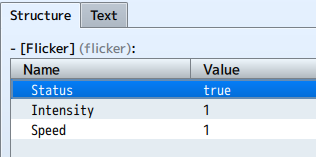
Flicker Intensity, range from 1 to 10, determines the opacity that light achieves when flickering. At 1, it is ~90% opacity.
Flicker Speed determines the frequency of light flickering.
Flicker Intensity, range from 1 to 10, determines the opacity that light achieves when flickering. At 1, it is ~90% opacity.
Flicker Speed determines the frequency of light flickering.
Pulse animation makes the light shrink constantly up and down.
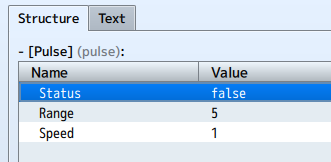
Pulse Range determines the minimum and maximum radius that light achieves. It will pulse between Radius - Radius * PulseRange / 100 and Radius + Radius * PulseRange / 100. For example, at 5 pulse range and 100 radius, light will pulse between 95% and 105%.
Pulse Speed determines the speed in which the light pulse.
Pulse Range determines the minimum and maximum radius that light achieves. It will pulse between Radius - Radius * PulseRange / 100 and Radius + Radius * PulseRange / 100. For example, at 5 pulse range and 100 radius, light will pulse between 95% and 105%.
Pulse Speed determines the speed in which the light pulse.
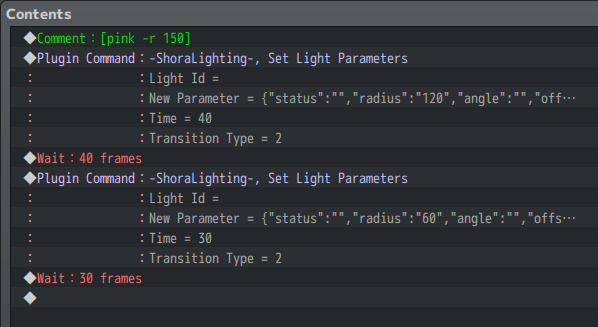
Using plugin command / scripts, you can animating your lights simplely using the Wait command. Just make sure to match the frame that the command take and the Wait command (40 in the case below).
Getting Started
Tutorial From @Enigma_Productions
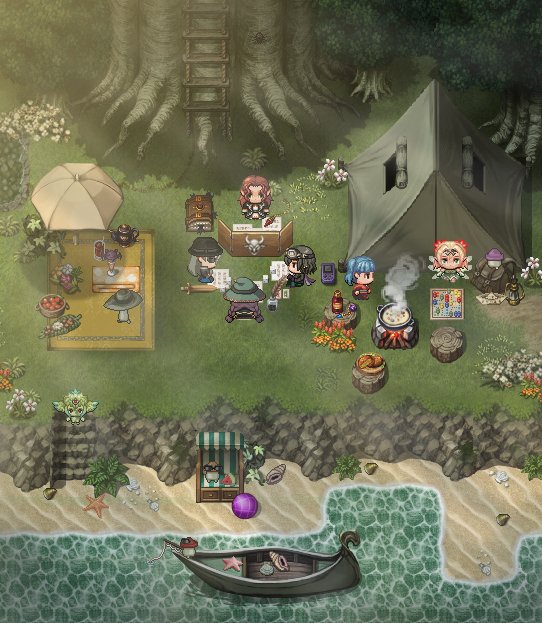
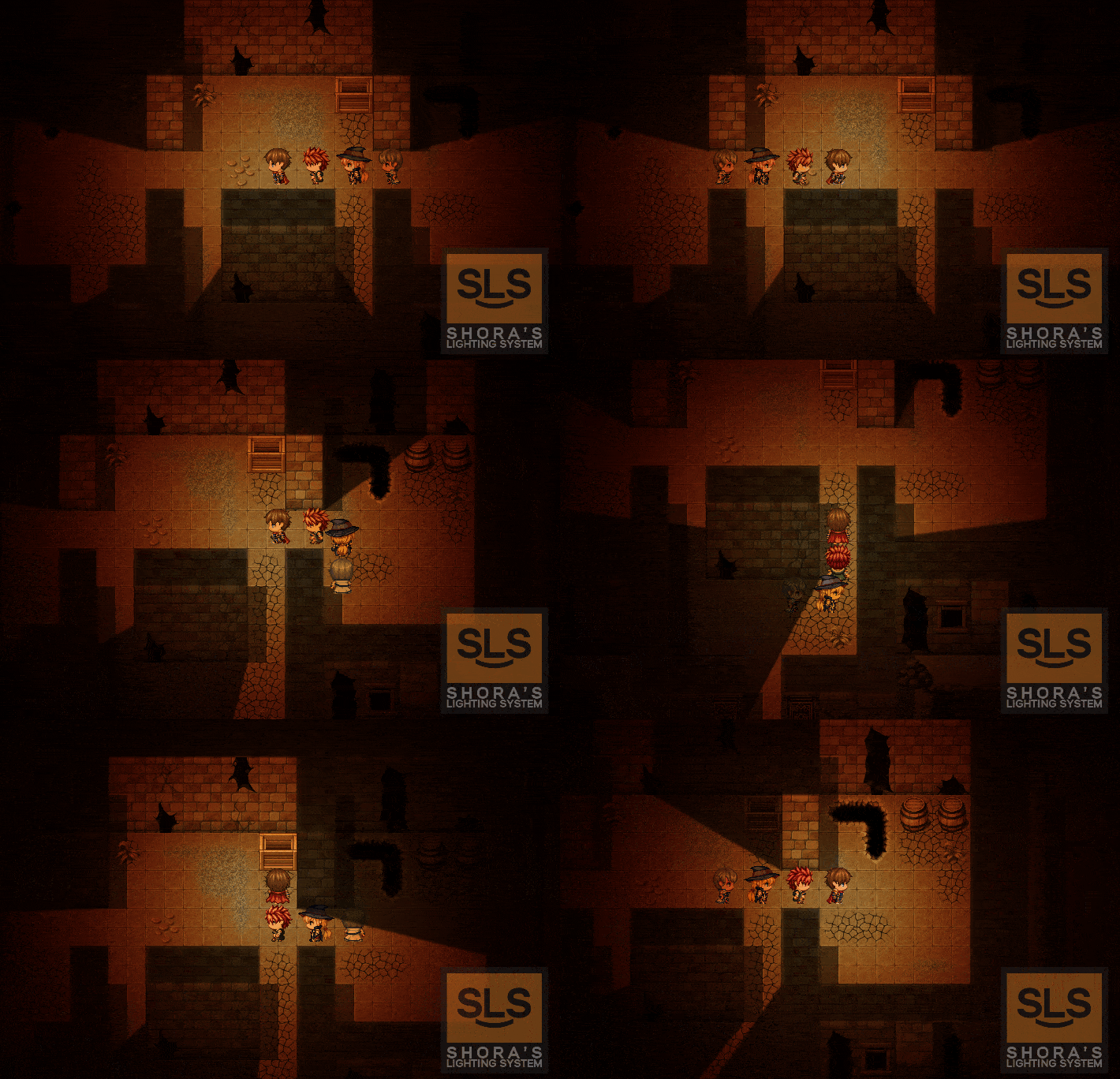
Gallery
:kaoluv:
:kaoluv:
Change-logs:
Spoiler
Update v.1.1b (13/9/2021): First public beta version released for MZ!.
Update v.1.2b (15/9/2021):
- Now included MV versions! :D
- Add new parameters: Shadow Ambient and Top Block Ambient. These two color are default choice for all light that not specified this setting. Allow user to control their light shadow ambient color and the ambient color affect top-block. Included two new plugin command to change these but only take effect on the next map.
- The MV version now will be merged to the MZ version and share their development in one plugin file. MZ version have the higher priority though, because PIXI V5 have better optimization for this plugin. MV Demo is completely converted from MZ's one.
- Fix various bugs.
Update v.1.3b (4/11/2021):
- Change the code structure to handling save/load functionality (aka fix my past suckness). Thanks @Shiko for the feedback.
- Fix some bugs include @VaiJack8 report of fps drop when changing game variables each frame.
- Get the light layer to draw above the upper layer (everything), intended to use with parallax mapping, as suggest from @Decinbr. Still need tested though (I don't know how to do parallax mapping).
This is a small update since i came back to plugin coding after my personal issues, just fixing feedbacked bugs and adding suggested feature. I'm pretty dis-motivation now so i hope eveyone can give me more feedback and suggestion :) I really appreciate that <3.
Update v.1.4b (1/10/2022):
- Re-written the shadow polygon optimization, which both fixed most weird lighting box when drawing unusual shadow shapes, and drastically reduce the shadow segments numbers by roughly 10% (which lead to faster performance).
- Re-organized the region id usage, counting from zero height so that mean now you can draw 0-height shadow caster block, or can be call as top-down-2D-block. You will need to increase the old region id by 1 though. Also now you can limited the region id block by a range instead of only start index like before (default is from 1 to 10).
- Introduce two more special block that can be specified its id (default is 50 and 51): top-roof block and ignore-shadows block. Top-roof block serve the purpose of draw top roof, which no light can be cast on it (useful when you drawing a gate, etc.) and ignore-shadow block will NOT let any shadow ray to be cast on it (can be use when you want to make the illusion of a wall that is higher than the light ray, which the shadow cannot cast to).
- Fixed some minor bugs.
Update v.1.5 (19/1/2022):
- Now preserve various parameters when the game is saved/loaded, i.e. map's ambient, light's status/offset/color. Will add more in the future.
- Add a new parameters to lighting: Status. Control the status allow you to turn on/off the light anywhere you want without need to removing/adding the light repeatedly.
- Add a new parameters to shadow: Offset. Give you control over the shadow source cast position. The shadow offset will be addition with the light offset, i.e. if you set the light offset to 48 and shadow offset to 4, then the shadow source will be calculated at 52.
- Fulfilled all the default parameters. Now you can easily install the plugin to your project without having weird bug cause by the blank parameters. Also add error throwing when you don't have the image file needed.
Update v.1.6 (27/1/2022):
- Now you can draw static lighting using plugin command/ script, by provide it light type and positions. Currently you can't modify, or even change it status, but in exchange it allow you to draw hundreds, or even thousands of static lighting on the map! Note: MV Version blending mode is NORMAL instead of ADD for technical reason (PIXIJS), and I'm gonna patch it in the future if needed.
- Added soft shadow customisation. Allow you to customize soft shadow status/strength/quality. The prefer strength/quality params is 2/1; 1/1; 1/2. All old previous version used 1/2.
- Added customizable color matrix filter to map, which allow you to higher the lights intensity and make lighting blend nicely into map. Currently only 'brightness' is visible in the plugin params, but you can use $shoraLayer.colorFilter to use all the other methods (see http://filters.pixijs.download/dev/demo/index.html)
- Change lighting registering phase. Now the new lighting type will be registered not only when you create a new game, but when the game boot up (Thanks to @Enigma_Productions).
- Fix a pretty serious memory leak when update from v1.4 to v1.5. Now it should work fine (test this by repeatingly switch between complex map).
- Fix some others minor bugs.
- Change all both demo's plugin command to use script call instead, for synchronizing easier. You can still use each's plugin commands normally.
Update v.1.7 + v.1.8 (8/2/2020):
- Performance:
+ Lighting layer now will can only be drawn to the map layer. By this, pictures are no longer affected by ambient lighting.
+ Soft shadow now use Kawase Blur instead, which much faster than the old Gaussian Blur.
+ Massive performance improvement by purely render mask texture instead of using filters. This also finally allow the radius and angle features to be added.
- Flexibility:
+ Light's state, shadow's state, radius and angle now can be both set in the plugin manager, in the comment syntax or update dynamically using plugin command/ script call.
+ Change the old comment syntax. The new syntax allow for more flexibility since you can choose whether properties to overwritten.
Example: [flashlight -angle 45 -radius 150 -x 12 -direction off]
Read more about available property in the Wiki. The old syntax ([light flashlight]) will still work, but give a warning in console. Please change to the new syntax. (Just change it to [flashlight] will work).
+ Entire plugin state can be dynamically enable/disable using script: $gameLighting.enable(), $gameLighting.disable(), $gameLighting.setPluginState(true / false).
+ Add helper parameters, which currently allow you to defined your color, and disable engine's shadow. By defined your custom color, you can quickly using the color by its name instead of it value, like [light -tint white] instead of [light -tint #ffffff].
+ You can now change the map ambient/shadow ambient/top block ambient from the map's notetags. Syntax is [ambient #333333], [shadowambient night], etc.
+ Temporary remove static lighting feature, to implement custom lighting in the next update. Custom lighting will behave the same as normal character's lighting (so you can still dynamically changes it settings), but with custom position.
- Quality?:
+ By setting radius/angle dynamically by plugin command (by tick similar to offset), you can easily create your own pulsating light/ cycling light. Repeatly changing light with shadow do impact performance, so useful to use this (don't use lots of shadow light continuously pulsating).
+ Moved both the light intensity filters and shadow soft filters to the [Advanced: Filters] section. You can dynamically turn those on/off/set it value.
Update v.1.9 (6/3/2023):
- Massive performance improvement. With Full HD resolution and 100 MOVING lighting & 560 shadow segmentI was able to have ~100 fps using my laptop, when the previous version only have ~14fps. It currently not really stable but it can guaranteed to have at least 5x fps increase on heavy dynamic lighting map. There can be even more optimization in the future since I have already have found what the bottleneck is.
- You can now rotate and scale lighting dynamically WITHOUT impact on shadow performance. Which mean you can have almost every dynamic lights in your game to pulsating for more realistic enhancement and don't need to worry about the fps. With that, the pulse animation option is now worked, you can just enable it in your custom light setting and see the effect.
- Various light parameter now working correctly. For example, you can use [light -r 120 -a 45] to have a quick default light with 120% radius and 45 degree andgle.
- Added tint animation. Now you can animate your light in almost everyway possible: rotating, moving, scaling, flickering and changing colors.
- Fixed various bugs. One important bug I encountered is that if you change paramters on one light, every other lights with the same type will have there paramaters changed (thanks for Javascript reference). It has been fixed.
- Updated the demo, with more animating examples and performance testing maps.
Update v.1.9.1 (6/6/2023):
Download from itch.io page: https://shoraaa.itch.io/shora-lighting-plugin
- Major optimization, mainly for MV version. Up from 2fps to ~50fps in 100 light 500 shadow benchmark.
- Change the pulse factor defination. Now it is the difference of original light radius. For example: Light with original radius 60 with pulse factor 25% will have their radius ranging from 60 - 60*25% to 60 + 60*25%, which is 45 to 75.
- Add a way to temporary disable the plugin on specific map. Just add [lighting off] to the map notetags instead of using event.
- Fix some minor bugs.
Update v.1.2b (15/9/2021):
- Now included MV versions! :D
- Add new parameters: Shadow Ambient and Top Block Ambient. These two color are default choice for all light that not specified this setting. Allow user to control their light shadow ambient color and the ambient color affect top-block. Included two new plugin command to change these but only take effect on the next map.
- The MV version now will be merged to the MZ version and share their development in one plugin file. MZ version have the higher priority though, because PIXI V5 have better optimization for this plugin. MV Demo is completely converted from MZ's one.
- Fix various bugs.
Update v.1.3b (4/11/2021):
- Change the code structure to handling save/load functionality (aka fix my past suckness). Thanks @Shiko for the feedback.
- Fix some bugs include @VaiJack8 report of fps drop when changing game variables each frame.
- Get the light layer to draw above the upper layer (everything), intended to use with parallax mapping, as suggest from @Decinbr. Still need tested though (I don't know how to do parallax mapping).
This is a small update since i came back to plugin coding after my personal issues, just fixing feedbacked bugs and adding suggested feature. I'm pretty dis-motivation now so i hope eveyone can give me more feedback and suggestion :) I really appreciate that <3.
Update v.1.4b (1/10/2022):
- Re-written the shadow polygon optimization, which both fixed most weird lighting box when drawing unusual shadow shapes, and drastically reduce the shadow segments numbers by roughly 10% (which lead to faster performance).
- Re-organized the region id usage, counting from zero height so that mean now you can draw 0-height shadow caster block, or can be call as top-down-2D-block. You will need to increase the old region id by 1 though. Also now you can limited the region id block by a range instead of only start index like before (default is from 1 to 10).
- Introduce two more special block that can be specified its id (default is 50 and 51): top-roof block and ignore-shadows block. Top-roof block serve the purpose of draw top roof, which no light can be cast on it (useful when you drawing a gate, etc.) and ignore-shadow block will NOT let any shadow ray to be cast on it (can be use when you want to make the illusion of a wall that is higher than the light ray, which the shadow cannot cast to).
- Fixed some minor bugs.
Update v.1.5 (19/1/2022):
- Now preserve various parameters when the game is saved/loaded, i.e. map's ambient, light's status/offset/color. Will add more in the future.
- Add a new parameters to lighting: Status. Control the status allow you to turn on/off the light anywhere you want without need to removing/adding the light repeatedly.
- Add a new parameters to shadow: Offset. Give you control over the shadow source cast position. The shadow offset will be addition with the light offset, i.e. if you set the light offset to 48 and shadow offset to 4, then the shadow source will be calculated at 52.
- Fulfilled all the default parameters. Now you can easily install the plugin to your project without having weird bug cause by the blank parameters. Also add error throwing when you don't have the image file needed.
Update v.1.6 (27/1/2022):
- Now you can draw static lighting using plugin command/ script, by provide it light type and positions. Currently you can't modify, or even change it status, but in exchange it allow you to draw hundreds, or even thousands of static lighting on the map! Note: MV Version blending mode is NORMAL instead of ADD for technical reason (PIXIJS), and I'm gonna patch it in the future if needed.
- Added soft shadow customisation. Allow you to customize soft shadow status/strength/quality. The prefer strength/quality params is 2/1; 1/1; 1/2. All old previous version used 1/2.
- Added customizable color matrix filter to map, which allow you to higher the lights intensity and make lighting blend nicely into map. Currently only 'brightness' is visible in the plugin params, but you can use $shoraLayer.colorFilter to use all the other methods (see http://filters.pixijs.download/dev/demo/index.html)
- Change lighting registering phase. Now the new lighting type will be registered not only when you create a new game, but when the game boot up (Thanks to @Enigma_Productions).
- Fix a pretty serious memory leak when update from v1.4 to v1.5. Now it should work fine (test this by repeatingly switch between complex map).
- Fix some others minor bugs.
- Change all both demo's plugin command to use script call instead, for synchronizing easier. You can still use each's plugin commands normally.
Update v.1.7 + v.1.8 (8/2/2020):
- Performance:
+ Lighting layer now will can only be drawn to the map layer. By this, pictures are no longer affected by ambient lighting.
+ Soft shadow now use Kawase Blur instead, which much faster than the old Gaussian Blur.
+ Massive performance improvement by purely render mask texture instead of using filters. This also finally allow the radius and angle features to be added.
- Flexibility:
+ Light's state, shadow's state, radius and angle now can be both set in the plugin manager, in the comment syntax or update dynamically using plugin command/ script call.
+ Change the old comment syntax. The new syntax allow for more flexibility since you can choose whether properties to overwritten.
Example: [flashlight -angle 45 -radius 150 -x 12 -direction off]
Read more about available property in the Wiki. The old syntax ([light flashlight]) will still work, but give a warning in console. Please change to the new syntax. (Just change it to [flashlight] will work).
+ Entire plugin state can be dynamically enable/disable using script: $gameLighting.enable(), $gameLighting.disable(), $gameLighting.setPluginState(true / false).
+ Add helper parameters, which currently allow you to defined your color, and disable engine's shadow. By defined your custom color, you can quickly using the color by its name instead of it value, like [light -tint white] instead of [light -tint #ffffff].
+ You can now change the map ambient/shadow ambient/top block ambient from the map's notetags. Syntax is [ambient #333333], [shadowambient night], etc.
+ Temporary remove static lighting feature, to implement custom lighting in the next update. Custom lighting will behave the same as normal character's lighting (so you can still dynamically changes it settings), but with custom position.
- Quality?:
+ By setting radius/angle dynamically by plugin command (by tick similar to offset), you can easily create your own pulsating light/ cycling light. Repeatly changing light with shadow do impact performance, so useful to use this (don't use lots of shadow light continuously pulsating).
+ Moved both the light intensity filters and shadow soft filters to the [Advanced: Filters] section. You can dynamically turn those on/off/set it value.
Update v.1.9 (6/3/2023):
- Massive performance improvement. With Full HD resolution and 100 MOVING lighting & 560 shadow segmentI was able to have ~100 fps using my laptop, when the previous version only have ~14fps. It currently not really stable but it can guaranteed to have at least 5x fps increase on heavy dynamic lighting map. There can be even more optimization in the future since I have already have found what the bottleneck is.
- You can now rotate and scale lighting dynamically WITHOUT impact on shadow performance. Which mean you can have almost every dynamic lights in your game to pulsating for more realistic enhancement and don't need to worry about the fps. With that, the pulse animation option is now worked, you can just enable it in your custom light setting and see the effect.
- Various light parameter now working correctly. For example, you can use [light -r 120 -a 45] to have a quick default light with 120% radius and 45 degree andgle.
- Added tint animation. Now you can animate your light in almost everyway possible: rotating, moving, scaling, flickering and changing colors.
- Fixed various bugs. One important bug I encountered is that if you change paramters on one light, every other lights with the same type will have there paramaters changed (thanks for Javascript reference). It has been fixed.
- Updated the demo, with more animating examples and performance testing maps.
Update v.1.9.1 (6/6/2023):
Download from itch.io page: https://shoraaa.itch.io/shora-lighting-plugin
- Major optimization, mainly for MV version. Up from 2fps to ~50fps in 100 light 500 shadow benchmark.
- Change the pulse factor defination. Now it is the difference of original light radius. For example: Light with original radius 60 with pulse factor 25% will have their radius ranging from 60 - 60*25% to 60 + 60*25%, which is 45 to 75.
- Add a way to temporary disable the plugin on specific map. Just add [lighting off] to the map notetags instead of using event.
- Fix some minor bugs.
Spoiler
Update v.1.9.5 (28/2/2024):
- Terrain Tags for automatic shadow caster now available. You can now use terrains tags to automatically create shadow caster instead of manually using region ID each time a new building is created. To do so, you must need to set the terrain tags equal to 2 parameters in the plugin settings: Wall ID and Top ID. Please check the new demo to see how it is used.
- Some optimization for both version (MV and MZ).
- Fix lots of bugs, including the bug when sometime the lights shine through the wall vertically. @Splatterguy
Update v.1.9.7 (13/9/2024):
- Fix some bugs that got reported, include:
+ Animation not working. @QuizicalGin
+ Both bugs reported by @NavHavGav. As for the first bug, remember turning off shadow is only applied to the current event page shadow. So if you turning the page to another shadow, it's shadow status need to be set again. The second bugs have been fixed.
+ Bugs reported by @Treijim on Discord, that ambient set to #000000 are bugged. Fixed.
- Added the battle lighting features. Currently the light "default will be added for all actors and enemies in the battle. I don't really know a good way of implementing an interface for everyone to use, so if you have any idea feel free to contribute it here.
- Added default lighting status and battle lighting status in the plugin parameters.
- Terrain Tags for automatic shadow caster now available. You can now use terrains tags to automatically create shadow caster instead of manually using region ID each time a new building is created. To do so, you must need to set the terrain tags equal to 2 parameters in the plugin settings: Wall ID and Top ID. Please check the new demo to see how it is used.
- Some optimization for both version (MV and MZ).
- Fix lots of bugs, including the bug when sometime the lights shine through the wall vertically. @Splatterguy
Update v.1.9.7 (13/9/2024):
- Fix some bugs that got reported, include:
+ Animation not working. @QuizicalGin
+ Both bugs reported by @NavHavGav. As for the first bug, remember turning off shadow is only applied to the current event page shadow. So if you turning the page to another shadow, it's shadow status need to be set again. The second bugs have been fixed.
+ Bugs reported by @Treijim on Discord, that ambient set to #000000 are bugged. Fixed.
- Added the battle lighting features. Currently the light "default will be added for all actors and enemies in the battle. I don't really know a good way of implementing an interface for everyone to use, so if you have any idea feel free to contribute it here.
- Added default lighting status and battle lighting status in the plugin parameters.
Terms of Use
Spoiler
If you want to use this plugin with a free RPG Maker game, you can do it for free and there's no need to contact me. I only ask you to give credit to "Shora" or "Shora Lighting System" somewhere in your game.
This plugin is NOT FREE for COMMERCIAL use. If you want to use it on a commercial title, you may buy the plugin's commercial license via itch.io. This license covers commercial use only for one of your project.
If you are the owner of the games, you can freely use it after buying the license. However if you just participate in the production of the game, not fully owning the game, you must contact me for authorization. This is to limit those from one person buying the license and fake-participate in many others game of other developers to avoid license problem.
Please note that this plugin is provided “as is”, without warranty of any kind. You are responsible for testing it and checking if it’s compatible with your game. In no event shall the author of this plugin be liable for any claim, damages or other liability, whether in an action of contract, tort or otherwise, arising from, out of or in connection with the software or the use or other dealings in the software.
This plugin is NOT FREE for COMMERCIAL use. If you want to use it on a commercial title, you may buy the plugin's commercial license via itch.io. This license covers commercial use only for one of your project.
If you are the owner of the games, you can freely use it after buying the license. However if you just participate in the production of the game, not fully owning the game, you must contact me for authorization. This is to limit those from one person buying the license and fake-participate in many others game of other developers to avoid license problem.
Please note that this plugin is provided “as is”, without warranty of any kind. You are responsible for testing it and checking if it’s compatible with your game. In no event shall the author of this plugin be liable for any claim, damages or other liability, whether in an action of contract, tort or otherwise, arising from, out of or in connection with the software or the use or other dealings in the software.