KC_Mirrors 1.5.1
by Kelly Chavez
by Kelly Chavez
Introduction
This is a plugin that adds reflections to your actors, events, and vehicles. This is done by placing tiles with transparency on your map wherever you want to show reflections. Floor reflections are drawn at the characters' feet and wall reflections are drawn on areas of the map with certain region ID(s).
This plugin was inspired by the reflection portion of Galv's Character Effects script for VX Ace. So, credits are due there for the original idea.
Features
This is a plugin that allows the developer to add reflections to actors and events. This is done by drawing sprites below the map but above the parallax layer. So, to get full usage out of this plugin, you must be using tilesets that actually show the parallax layer (i.e. tilesets with transparency). The demo uses a tileset with reduced opacity on the water tiles to achieve the water reflection effect, for example.
If you own MZ, you can also find RTP tileset graphics where water has reduced opacity in the <RPG Maker MZ Folder>/dlc/BasicResources/tilesets folder.
Character reflections can be controlled with note tags, script calls, and plugin commands! On a per-actor and a per-event basis, the developer can control whether wall reflections are enabled, whether floor reflections are enabled, and the character graphic actually used in the reflection.
Screenshots
Screenshots
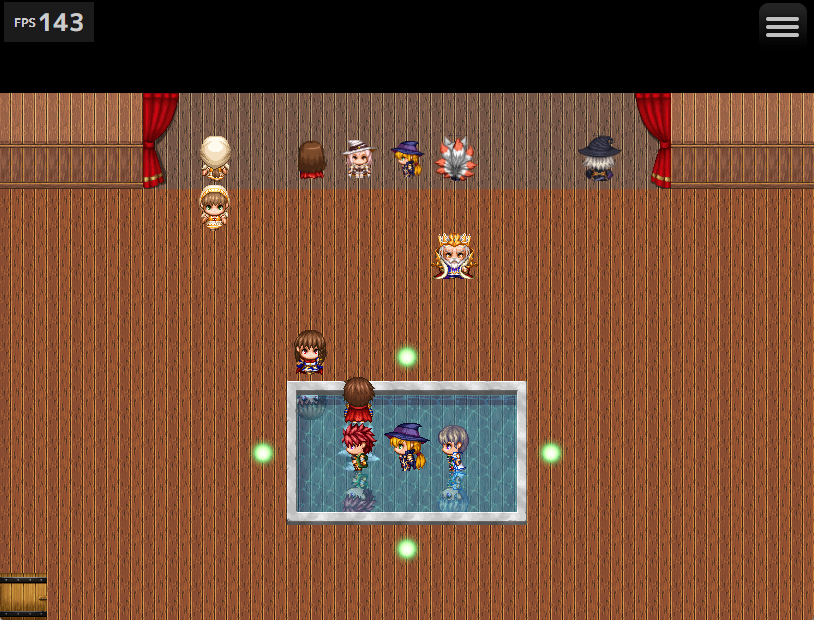
A room with the wall reflections in pseudo-perspective mode:
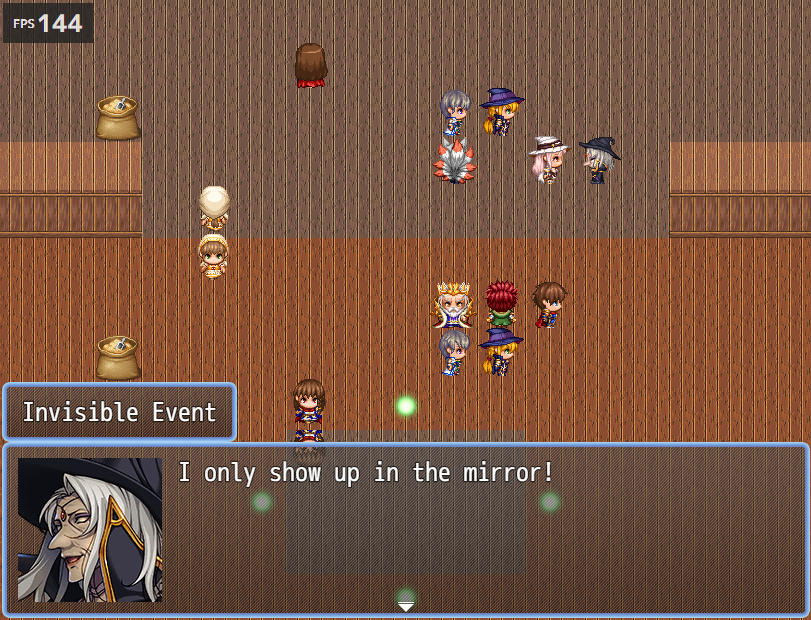
A room with the wall reflections in event-like mode (available in version 1.1.0+):
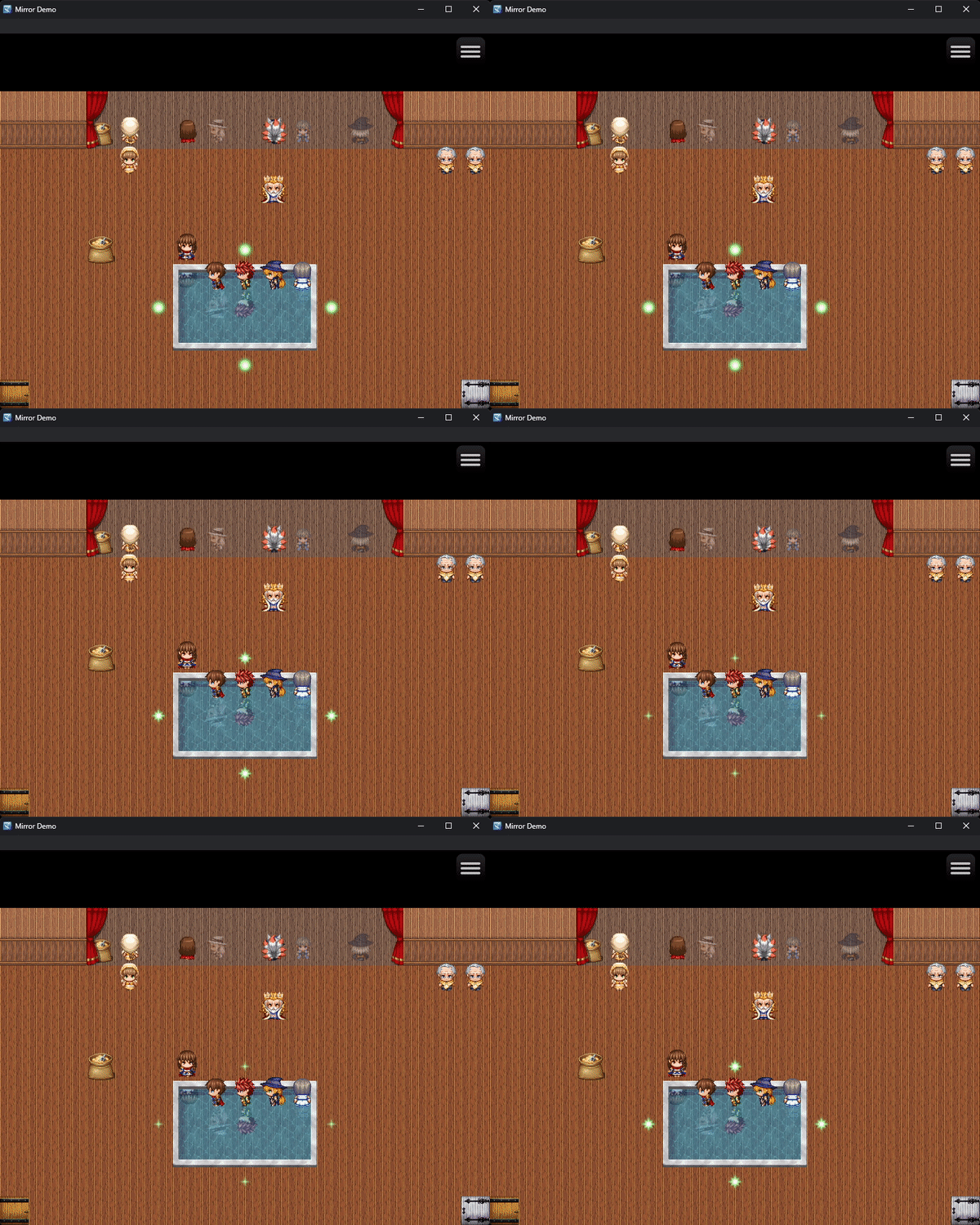
A room with a filter applied to the floor reflections (available in version 1.3.0+):
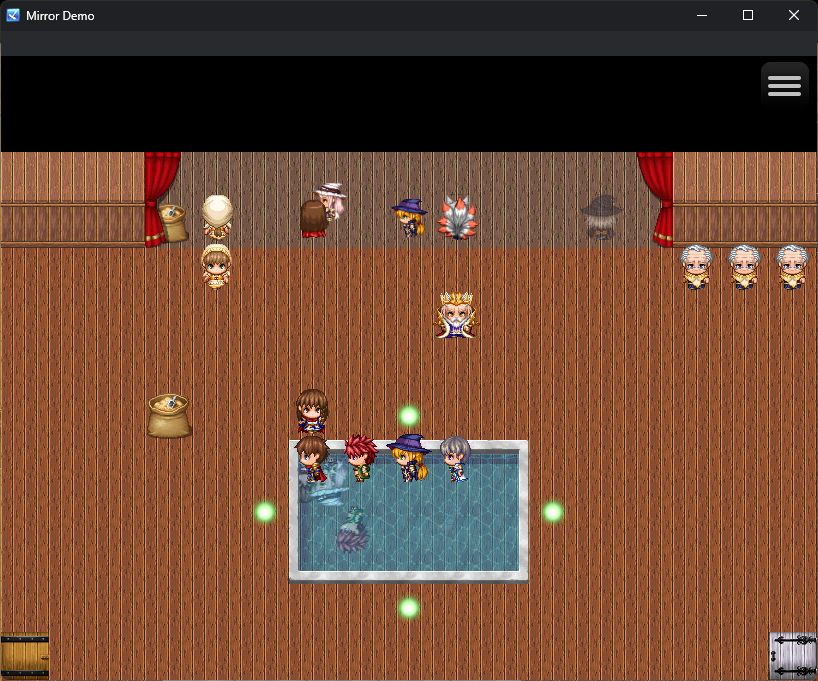
An example of characters having their floor reflections offset by an arbitrary amount (available in version 1.3.0+):
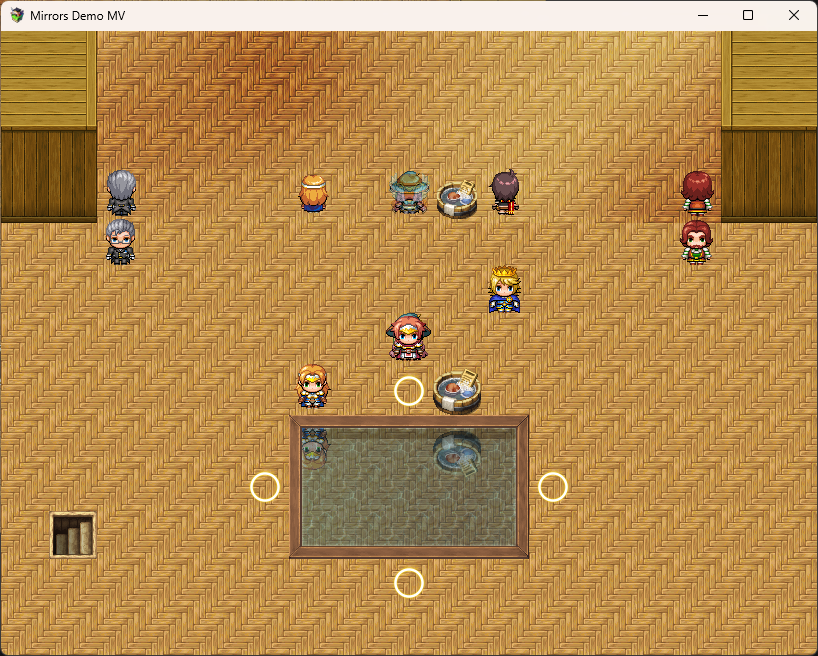
This plugin is even backwards compatible with RPG Maker MV (available in versions 1.4.0+)
A room with the wall reflections in event-like mode (available in version 1.1.0+):
A room with a filter applied to the floor reflections (available in version 1.3.0+):
An example of characters having their floor reflections offset by an arbitrary amount (available in version 1.3.0+):
This plugin is even backwards compatible with RPG Maker MV (available in versions 1.4.0+)
How to Use
To use, download and place this plugin into your plugin manager and enable it. From there, follow the instructions in the help section of the plugin and the descriptions of each command.
If you're using any of the following plugins, KC_Mirrors should be BELOW them in the plugin manager:
Plugins KC_Mirrors Should be below
- PluginCommonBase
- GALV_DiagonalMovement
- GALV_DiagonalMovementMZ
- GALV_CharacterFrames
- GALV_CharacterFramesMZ
- GALV_EventSpawner
- GALV_EventSpawnerMZ
- QMovement
- QSprite
Plugin Commands / Script Calls
MZ Plugin Commands
- Change Event Reflection
- Change the reflection parameters of a specified event. These changes are reset on map reload.
- Match Event Reflection
- Sets this event's reflection graphic to their normal top view graphic.
- Change Actor Reflection
- Change the reflection parameters of a specified actor. These changes are persistent and are included in the save file.
- Match Actor Reflection
- Sets this actor's reflection graphic to their normal top view graphic.
- Change Vehicle Reflection
- Change the reflection parameters of a specified vehicle. These changes are persistent and are included in the save file.
- Match Vehicle Reflection
- Sets this vehicle's reflection graphic to its normal top view graphic.
- Set Wall Reflection Variable
- Sets the wall reflection mode by changing the wall reflection mode variable defined in the plugin parameters. Does nothing if that parameter is 0.
- Refresh Wall Reflections
- Refreshes the wall reflection positions on the current map. Useful if tiles on the current map have their regions updated.
- Override Map Settings
- Overrides reflection settings for the current map. This can be used to quickly disable all reflections or change the perspective mode temporarily. All changes are lost upon leaving and re-entering the map.
MV Plugin Commands
Code:
Note that all of these commands are case sensitive unless otherwise noted.

If an argument is formatted as [choice1/choice2/choice3/etc], then you must
choose only one of the options without brackets.

Arguments that end in a ? are OPTIONAL

You can use \v[x] and \s[y] as arguments to substitute in the values stored
in game variable x and game switch y, respectively.

setReflectImage char_type id character?
  | Change the character reflection graphic.
  * example: setReflectImage actor 1 People2
  - char_type: [actor/event] Set whether the target is an actor or map event
  - id: ID number of the actor or event
    + If char_type is 'actor,' then 0 is the party leader, -1 is the first
      follower, -2 is the second follower, and so on
    + If char_type is 'event,' then 0 is 'this event'
  - character?: Optional argument. This is the character graphic name
  | Leave character blank to reset the reflection graphic name

setReflectIndex char_type id index?
  | Change the reflection's character ID. 0 is the top left in spritesheets
    not prefixed with $.
  * example: setReflectIndex event 5 1
  - char_type: [actor/event] Set whether the target is an actor or map event
  - id: ID number of the actor or event
    + If char_type is 'actor,' then 0 is the party leader, -1 is the first
      follower, -2 is the second follower, and so on
    + If char_type is 'event,' then 0 is 'this event'
  - index?: Optional argument. Sets the character index (0 is the first)
  | Leave index blank to make it the same as the character.

setReflectVisible char_type id reflect_type new_visibility
  | Simple on/off set for reflection visibility.
  * example: setReflectVisible actor -1 all false
  - char_type: [actor/event] Set whether the target is an actor or map event
  - id: ID number of the actor or event
    + If char_type is 'actor,' then 0 is the party leader, -1 is the first
      follower, -2 is the second follower, and so on
    + If char_type is 'event,' then 0 is 'this event'
  - reflect_type: [floor/wall/all] Determines whether the floor or wall
                  reflection is being modified. 'all' modifies both.
  - new_visibility: Set to true to make reflect_type of reflection visible
                    and to false to make reflect_type of reflection
                    invisible

setReflectOpacity char_type id reflect_type opacity?
  | Set reflection opacity.
  * example: setReflectOpacity actor 4 127
  - char_type: [actor/event] Set whether the target is an actor or map event
  - id: ID number of the actor or event
    + If char_type is 'actor,' then 0 is the party leader, -1 is the first
      follower, -2 is the second follower, and so on
    + If char_type is 'event,' then 0 is 'this event'
  - reflect_type: [floor/wall/all] Determines whether the floor or wall
                  reflection is being modified. 'all' modifies both.
  - opacity?: Optional argument. Should be a number in range 0-255,
              inclusive
  | Leaving the opacity argument blank will reset the opacity.

 setReflectAngle char_type id reflect_type angle
   | Set character reflection offset. This is added to the map angle.
   * example: setReflectAngle actor 0 floor 90
   - char_type: [actor/event/vehicle] Set what type of character the
                target is
   - id: [(number)/boat/ship/airship] identifier of the character
     + If char_type is 'actor,' then 0 is the party leader, -1 is the first
       follower, -2 is the second follower, and so on
     + If char_type is 'event,' then 0 is 'this event'
     + If char_type is 'vehicle,' then numbers are an invalid agument
   - reflect_type: [floor/wall/all] Determines whether the floor or wall
                   reflection is being modified. 'all' modifies both.
   - angle: An angle that the reflection will be offset by in degrees.
            Positive values rotate the reflection sprite clockwise.
            Negative values rotate the reflection counterclockwise.

setReflectOffset char_type id reflect_type axis offset
  | Set character reflection offset. This is added to the map offset.
  * example: setReflectOffset event 10 floor y -8
  - char_type: [actor/event] Set whether the target is an actor or map event
  - id: ID number of the actor or event
    + If char_type is 'actor,' then 0 is the party leader, -1 is the first
      follower, -2 is the second follower, and so on
    + If char_type is 'event,' then 0 is 'this event'
  - reflect_type: [floor/wall/all] Determines whether the floor or wall
                  reflection is being modified. 'all' modifies both.
  - axis: [x/y/xy] Which axis to modify. xy affects x and y.
  - offset: A number that the reflection will be offset by. Remember,
            positive x moves to the right, and positive y moves down,
            and the opposites are true

resetReflect char_type id
  | Reset a characters reflections to the current character graphic
    and index.
  * example: resetReflect actor 0
  - char_type: [actor/event] Set whether the target is an actor or map event
  - id: ID number of the actor or event
    + If char_type is 'actor,' then 0 is the party leader, -1 is the first
      follower, -2 is the second follower, and so on
    + If char_type is 'event,' then 0 is 'this event'

forceWallReflectMode mode
  | Set the current map's wall reflection mode regardless of default setting
    and map notes.
  * example: forceWallReflectMode perspective
  - mode: [perspective/event] Set the map's wall reflection type.

refreshReflectMap
  | Forces the wall reflection positions to be rebuilt. Mainly useful if
    a plugin is being used that changes map regions at runtime.
  * example: refreshReflectMap

setMapReflect reflect_type new_visibility
  | Enable or disable reflection types for the entire map.
    Disabling reflections takes priority over individual character settings.
    Enabling reflections does NOT take priority over individual settings.
  * example: setMapReflect floor false

setReflectMapAngle reflect_type angle
  | Offset all reflections on this map by angle degrees.
  * example: setReflectMapAngle all 120
  - reflect_type: [floor/wall/all] Determines whether the floor or wall
                  reflection is being modified. 'all' modifies both.
  - angle: An angle that the reflection will be offset by in degrees.
           Positive values rotate the reflection sprite clockwise.
           Negative values rotate the reflection counterclockwise.
Script calls
The script calls for this plugin are as follows.
Format your script commands as KCDev.Mirrors.<function name>
Example: KCDev.Mirrors.setEventReflect(1, 'Actor1', 0, true, false)
The functions are as follows:
Format your script commands as KCDev.Mirrors.<function name>
Example: KCDev.Mirrors.setEventReflect(1, 'Actor1', 0, true, false)
The functions are as follows:
- setEventReflect(event_id, reflection_filename, reflection_index, floor_enabled, wall_enabled, floor_opacity, wall_opacity, floor_x_offset, floor_y_offset, wall_x_offset, wall_y_offset)
- Same as Change Event Reflection command
- resetEventReflectImage(event_id)
- Same as Match Event Reflection
- setActorReflect(actor_id, reflection_filename, reflection_index, floor_enabled, wall_enabled, floor_opacity, wall_opacity, floor_x_offset, floor_y_offset, wall_x_offset, wall_y_offset, floor_angle, wall_angle)
- Same as Change Actor Reflection command
- resetActorReflectImage(actor_id)
- Same as Match Actor Reflection command
- setVehicleReflect(vehicle_name, reflection_filename, reflection_index, floor_enabled, wall_enabled, floor_opacity, wall_opacity, floor_x_offset, floor_y_offset, wall_x_offset, wall_y_offset, floor_angle, wall_angle)
- Same as Change Vehicle Reflection command
- resetVehicleReflectImage(actor_id)
- Same as Match Vehicle Reflection command
- setWallReflectMode(mode)
- Same as Set Wall Reflection Mode command
- refreshReflectWallCache()
- Same as Refresh Wall Reflections command
Demo
Grab one of the demo zip files from this GitHub release
Download
Grab KC_Mirrors.js from this GitHub release
Old Versions & Demos
GitHub Releases
Changelog
Changelog
- 2025/04/24 - v1.5.1
- Fix incompatibility with QSprite
- Fix bug in MV parameter parsing for wall reflections
- Affected commands: setReflectOpacity, setReflectVisible, setReflectAngle
- Removed JsonEx parsing cleanup
- General code cleanup and light optimization
- 2024/11/24 - v1.5.0
- Added support for vehicles
- Added rotation property to reflections
- 2024/09/18 - v1.4.3
- Fixed crash that occurred when using this plugin and Galv's Character Frames in projects created with older versions of MV
- 2024/08/18 - v1.4.2
- Fixed incompatibility with plugins that create characters without metadata (e.g. QABS)
- Fixed wall reflections not appearing if a character's x and y properties are not integers, which occurs with some pixel movement plugins
- Note metadata is now parsed again (e.g. \v[1] resolves to whatever value is stored in game variable 1)
- 2024/08/18 - v1.4.1
- MV
- Updated demo
- Made compatible with Galv's Character Frames plugin
- Made compatible with Galv's Event Spawner plugin
- MZ
- Added workaround for a performance issue that occurred when using this plugin and Galv's Character Frames and loading a map with a lot of events
- Fixed incorrect argument handling when using plugin commands without PluginCommonBase
- Both
- Miscellaneous code cleanup
- Fixed using "Load Game" on a save file without KC_Mirrors causing the game to crash
- MV
- 2024/08/16 - v1.4.0
- PluginCommonBase is still supported but is now OPTIONAL
- Added support for RPG Maker MV
- Minor bug fixes and code restructuring
- 2024/04/25 - v1.3.7
- Fix issue where events unspawned by Galv_EventSpawnerMZ do not have their reflections removed
- 2024/03/09 - v1.3.6
- Initialize Sprite_Reflection properly for compatibility with other plugins
- Consolidated internal classes Sprite_Reflect and Sprite_Reflect_Wall into single class
- Optimized y coordinate lookup for walls to perform faster and create less garbage
- 2024/03/07 - v.1.3.5
- Change how character frames are handled for reflections internally
- Made this plugin compatible with Galv's Character Frames, Diagonal Movement, and Character Animation
- Miscellaneous bug fixes and stability improvements
- 2024/02/17 - v1.3.4
- Updated plugin url to point to current Github repo
- 2023/12/01 - v1.3.3
- Fixed a bug that caused a crash when launching without FilterControllerMZ
- 2022/12/20 - v1.3.2
- Fixed bugs that caused incorrect scaling on the x axis to be applied to reflections of events using tileset sprites
- 2022/10/26 - v1.3.1
- Quick fix to CharReflections Filter Controller target
- 2022/10/26 - v1.3.0
- Added FilterControllerMZ targets
- CharReflectionsFloor - Applies filter to all floor reflections
- CharReflectionsWall - Applies filter to all wall reflections
- CharReflections - Applies filter to all character reflections
- Added new note tags to actors, characters, and maps:
- <REFLECT_FLOOR_OFFSETS:[x],[y]>
- <REFLECT_WALL_OFFSETS:[x],[y]>
- See newly updated plugin help section for details
- Added an option to fix Z-fighting under certain conditions on wall reflections in 'perspective' mode
- You probably don't need this fix unless you're using a pixel movement plugin
- Fixed a bug in the Change Event Reflect plugin command that caused the wrong event to be used as reference for unchanged parameters
- Internal code refactor
- All plugin parameters are exposed on the KCDev.Mirrors object
- Added FilterControllerMZ targets
- 2022/08/05 - v1.2.0
- Reflections of each type can now be separately toggled on and off for the entire map through note tags and a new plugin command
- New command: Override Map Settings
- New map note tag: <REFLECT_TYPE:[ALL/FLOOR/WALL]>
- The reflection mode the map uses can be changed via the map notes and the aforementioned new command
- New map note tag: <REFLECT_MODE:[PERSPECTIVE/EVENT]>
- The developer can now set the opacity of each reflection type through the updated plugin command and via new note tags
- New event and actor tags: <REFLECT_FLOOR_OPACITY:[x]>, <REFLECT_WALL_OPACITY:[x]>
- Characters that are made transparent via move route commands now also have their reflections disappear if those reflections are not using custom opacities
- For specifics on new features, see the updated 'help' section of the plugin
- Reflections of each type can now be separately toggled on and off for the entire map through note tags and a new plugin command
- 2022/07/19 - v1.1.4
- Adjusted how reflections are handled internally for compatibility with KC_MoveRouteTF
- 2022/07/16 - v1.1.3
- Fixed issue where characters using a sprite from the tileset and with a priority other than 'Below Characters' would never have reflections
- 2022/07/14 - v1.1.2
- Fixed a typo that caused incorrect behavior when setting event reflection properties via plugin command and manually selecting 'Unchanged' from the dropdown box
- 2022/07/14 - v1.1.1
- Added a few safety checks to avoid a game crash when trying to access characters that do not exist (e.g. trying to change the reflection of the third follower when the player has two followers)
- 2022/07/12 - v1.1.0
- Fixed bug where characters standing out of the maximum wall reflection range would appear on the mirror with incorrect scaling
- Added the 'event-like' wall reflection mode and renamed the mode featured in the previous version to 'pseudo-perspective' mode
- Removed restriction that caused events using tile IDs to not appear in wall reflections
- 2022/07/11 - v1.0.0
- Initial release
Terms and Credits
I've released this plugin under the MIT license. So, you can include this plugin in any project as long as you include the license with your distribution. For most projects, this requirement is fulfilled as long as you keep the license text that is at the top of the plugin's js file intact.
Also, though not strictly required, I would appreciate being credited as K. Chavez or Kelly Chavez in your games' credits.