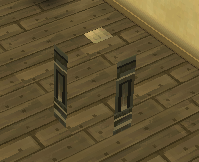
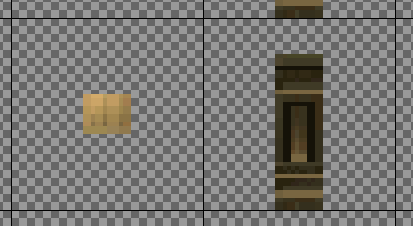
Hey everyone, I'm just wondering if it's possible to make an object that is thinner than a full tile. For example, I'm trying to make a simple fence post and I don't want it to be a wide as a full 1:1 tile space. Is there a way to bring the side inward on a y/x axis? Here's what it looks like right now in-game and as a tile.
MV3D - 3D rendering for RMMV with Babylon.js
● ARCHIVED · READ-ONLY
-
-
With y and x you can move your tile for less then one full tull tile, for example: <mv3d:y(0.51),x(0.5)>
However, if you need to do this for 4 sides + top for one fence post, you're gonna need a LOT of events. -
Hello! I just wanted to report a little graphical issue that seems to happen only with the Tileset E.
It does not matter if the tile has alpha values or not, or how much I try to fix the borders with the "Edge Fix" parameter in the Graphics settings, there are some weird white lines at the borders of the tiles that seems to be affecting only Tileset E. No other issues are found with the rest of the Tilesets. I tried disabling the Antialiasing, too, with no effect or fix.
Here are some screenshots of the issue:
The testing has been done using the demo project that comes with the plugins. -
@Arvalis
This sort of thing will be easier to do in the upcoming 0.6 update. Unfortunately it's not easy to accomplish in the current version, aside from using separate events for each face.
@Oscar92player
I think those lines are the edges of other tiles in the tileset bleeding over. I usually only have this problem at sharp angles, so I'm not sure why it's so pronounced here. The edge fix parameter was created to mitigate this, so I'm not sure why that's not helping. You might be able to solve the issue by having at least 1 pixel of empty space around each of your tiles, but I understand how this might not be ideal when working with tilesets. -
@Oscar92player
I think those lines are the edges of other tiles in the tileset bleeding over. I usually only have this problem at sharp angles, so I'm not sure why it's so pronounced here. The edge fix parameter was created to mitigate this, so I'm not sure why that's not helping. You might be able to solve the issue by having at least 1 pixel of empty space around each of your tiles, but I understand how this might not be ideal when working with tilesets.
That's the thing, there are no other pixels around of the ones that are showing there. There are empty spaces between the Mountain and Palace structures in Tile E to avoid that kind of conflicts. -
Hi guys!
I came to share a little more of the system I am developing for MV3D.
This time, I come to bring the Guns part.
Stay with the demo videos of the Shooter Battle System's Guns.
Guns Demonstration Video
Gun Skins Demonstration Video
Gun Levels Demonstration Video
A big hug! -
So I have a few problems. I'm attempting to use both QMovement and MV3D simultaneously in an attempt to achieve omnidirectional movement, but I'm having some issues.
Firstly, I have a first-person camera with smooth turning, however the flashlight that is attached to the player only turns in 8 directions. It's not game-breaking or anything, but it does look wonky if you turn in small increments. I was wondering if there's a way to implement smooth flashlight turning?
Secondly, when QMovement is enabled, everything works fine (aside from the above issue) EXCEPT for activating events on the southernmost wall. If I disable QMovement I can only turn in 8 directions, but I can still activate the events in question (doors). I'm assuming it has to do with the player's direction not being affected by the camera somehow. I've also noticed that I can activate flat events on the floor from behind me, which may have something to do with it.
It's a bit frustrating because I'm SO CLOSE to having the movement exactly how I want it, but I'm not sure how any of this stuff works behind the scenes. -
So I have a few problems. I'm attempting to use both QMovement and MV3D simultaneously in an attempt to achieve omnidirectional movement, but I'm having some issues.
Firstly, I have a first-person camera with smooth turning, however the flashlight that is attached to the player only turns in 8 directions. It's not game-breaking or anything, but it does look wonky if you turn in small increments. I was wondering if there's a way to implement smooth flashlight turning?
Secondly, when QMovement is enabled, everything works fine (aside from the above issue) EXCEPT for activating events on the southernmost wall. If I disable QMovement I can only turn in 8 directions, but I can still activate the events in question (doors). I'm assuming it has to do with the player's direction not being affected by the camera somehow. I've also noticed that I can activate flat events on the floor from behind me, which may have something to do with it.
It's a bit frustrating because I'm SO CLOSE to having the movement exactly how I want it, but I'm not sure how any of this stuff works behind the scenes.
So update, I tried out Altimit Movement instead of QMovement and the event issue is no longer a problem. I still don't know if there's a way to have a smooth flashlight though. -
@Oscar92player do you mean it only happens for when the file is set as E? If you set the same tileset image to C, for example, those lines would not be there?
-
@Oscar92player do you mean it only happens for when the file is set as E? If you set the same tileset image to C, for example, those lines would not be there?
That's exactly what I was trying right now, and almost all of the white lines disappear if I put the Tile E in one of the other tiles tab, using the same structure.
So... it seems to be an issue exclusive for the Tile E tab. -
That's exactly what I was trying right now, and almost all of the white lines disappear if I put the Tile E in one of the other tiles tab, using the same structure.
View attachment 142821
So... it seems to be an issue exclusive for the Tile E tab.
Woah... Nice Map.
Is that a custom tileset/parallax map or is it one I might find somewhere? -
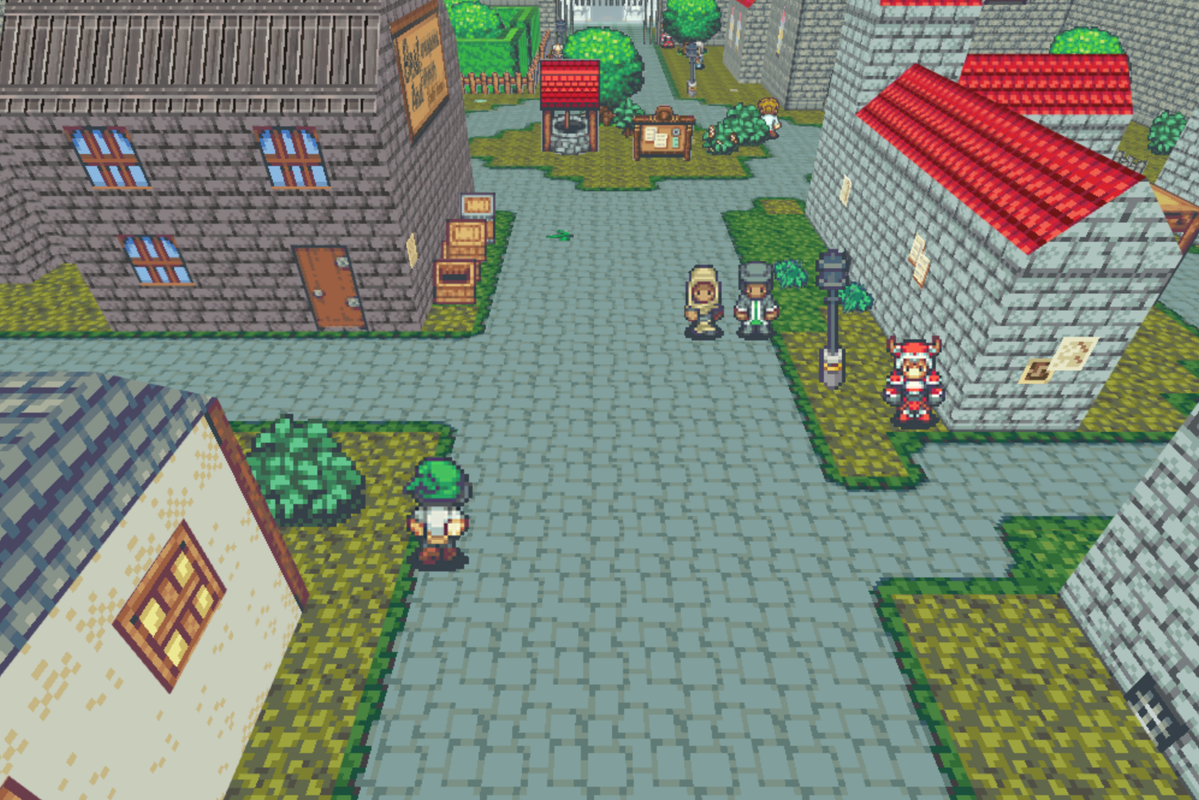
Posted this in the general screenshot thread yesterday, but thought I should post it here too, since it's all thanks to MV 3D that I can create this :)
-
Posted this in the general screenshot thread yesterday, but thought I should post it here too, since it's all thanks to MV 3D that I can create this :)
Wow, really cool map!
Are you using Time Fantasy pack? -
In version 6.0, the square base is better when it is able to adjust the side style.
Box type that appears to be lifted towards
Posted this in the general screenshot thread yesterday, but thought I should post it here too, since it's all thanks to MV 3D that I can create this :)
-
In version 6.0, the square base is better when it is able to adjust the side style.
Box type that appears to be lifted towards
Does version 0.6.0 exist? -
@CoopNinjask Yes I am, I do create some custom tiles as well, but I use Time Fantasy as the starting rtp.
@palatkorn Is 0.6.0 our yet? Also, could you elaborate a bit more. I know what you're referring too, but how exactly would the new version fix it? -
Besides the amazing job, a couple of questions:
-Is it possible to have different sides for tiles depending if it is left-side, right-side and so on?
- Also, is it possible to use rounded tiles or similar so it doesn't render minecraft-like?
Edit: a third question, is it possible to be implemented the 3d on a tactical battle system like lecode or similar?
Thanks in advance and keep on rocking -
I know the author is currently working on this.-Is it possible to have different sides for tiles depending if it is left-side, right-side and so on?
-
To clarify, 0.6 isn't out yet.
@uroboria
Thanks for letting me know about these issues. I'll have the flashlight working better for 1st person mode in the next update.
To make events on walls work properly with QMovement, you sometimes need to adjust the colliders.
Code:I think this issue still happens when mv3d is disabled, so it's not a problem with mv3d. Since mv3d makes use of events in walls like this quite a lot though, maybe I should try and make it work nicer?<colliders> collision: box, 48, 48 interaction: box, 60, 60, -6, -6 </colliders>
@Siul
Different textures for north, south, east, and west is planned for the next update.
Rounded tiles are not planned, however the 3D model import feature coming next update may be able to make your world look less cubic. -
@Siul
Different textures for north, south, east, and west is planned for the next update.
Rounded tiles are not planned, however the 3D model import feature coming next update may be able to make your world look less cubic.
Oh no... It's coming sooner than expected lol. I need to get to 3d modelling ASAP XD