MV3D - 3D rendering for RMMV with Babylon.js

● ARCHIVED · READ-ONLY
Started by Cutievirus 1560 posts Page 55 of 78 View original ↗
  1. with some scripts i have this error : error abs.PNG

    With :
    - Alpha ABS by Pheonix KageDesu

    and :

    - Chronos Engine by
    Moghunter

    So after that, I really hope you can add the custom 3D models in this amazing plugin, that the functionality that I expect the most.

    and I would like to recommend something:

    would it be possible to ensure that events can be the size of a box? Like for example making a bed or a wooden crate. I managed to do that but only with a tileset, I would like it to be possible with an event

    exemple.PNG

    I often do housing on rpg maker with my games, I would like it to work with your plugin.

    After that, i'm waiting for your 3d model functionality, i recommend compatibility with blockbench software. to keep a voxel look. I hope that custom 3d models will be possible evenement!

    between VR functionality and the functionality of 3d models, I hope that it is that of 3d models that will be privileged !
  2. I am thinking of buying this today. Does the current version work with the shadows?
  3. @jolink not sure about Alpha ABS, but I recently made a fix for this in Chrono Engine, posted it on Dread's discord.
  4. YoraeRasante said:
    @jolink not sure about Alpha ABS, but I recently made a fix for this in Chrono Engine, posted it on Dread's discord.
    on nice ! thank a lot !

    That really cool, so i really should put it in the official version this patch.
    I hope that the feature "load 3d models" will be done, I can't wait to create 3d models for rpg maker !
  5. palatkorn said:

    so I did this with the same result.
    View attachment 139211


    You have to check the Z coordinate of the rock event too.
    If the Rock is on z coordinate = chest.z coordinate + 1, then returns true to that condition.

    If the rock is on the same x and y that the chest and is equal chest z coordinate + 1, then active a switch.
    With that switch on, you create a condition that forbidden the player to open the chest.
  6. Once I understood the method, I created this as well.
    Yes, I use these conditions to create mini-phishing games as well.
    With this idea I was able to do many more things.
    Events for events that have the same coordinates


    CoopNinjask said:
    You have to check the Z coordinate of the rock event too.
    If the Rock is on z coordinate = chest.z coordinate + 1, then returns true to that condition.

    If the rock is on the same x and y that the chest and is equal chest z coordinate + 1, then active a switch.
    With that switch on, you create a condition that forbidden the player to open the chest.
  7. palatkorn said:
    Once I understood the method, I created this as well.
    Yes, I use these conditions to create mini-phishing games as well.
    With this idea I was able to do many more things.
    Events for events that have the same coordinates


    Cool idea!
    The fish is moving in a weird way, though. :unsure:
  8. The fish won't stop, so it's not easy to fall at the same spot. It will be easy if my fish runs. Circling in the same direction
    Or the same place as the game that can guess where it will fall.
    This is not a game to wait for the fish to eat the fish, of course, haha.
    But it was difficult for me to wait for the gauge and let it thrown into this fish and didn't know where the fish would go.
    Of course it can wait. But for me, I won't do it because it takes so long and I don't know when it will arrive because it is unpredictable. I think people who are not calm enough to wait for the fish to arrive will definitely not do so. It's easy to do But it's hard to wait
    CoopNinjask said:
    Cool idea!
    The fish is moving in a weird way, though. :unsure:
  9. @Kraden96
    I'm not sure what would cause lag with that plugin. Maybe I'll look into it later.

    @jolink
    Cuboid shape for events is probably coming in 0.6

    @YoraeRasante
    It probably would be good to be able to configure each event individually for falling off edges.

    Update 0.5.4.2
    • Fixed orphaned animations sticking around if you pause the game while they're playing.
    • Fixed input being reset when switching between 1st person mode.
    • (premium) fixed skybox plugin command not working on maps that don't have skybox in map note.
  10. YoraeRasante said:
    @jolink not sure about Alpha ABS, but I recently made a fix for this in Chrono Engine, posted it on Dread's discord.
    I have a probleme with your patch, i dont know how to use your patch.

    When i put your js file and the mv3d.js i have this error again :
    error abs.PNG

    i have make this :

    withpatchfile.PNG
    But if i make that :
    withpatchfileonly.PNG

    Nothing are different from the original rpg maker mv

    withpatchonly.PNG
  11. @jolink
    ok, so you clearly do not know how plugin patches work.
    this is not a big deal, you just need to be taught.

    order of plugins is important. the ones above are added to the game before the ones bellow.
    unless told otherwise, compatibility patches, extensions and the like go bellow the ones they are patching.
    in fact, many plugin incompatibilities can be fixed just changing the order between them.

    so in this case you should do babylon, mv3d, my patch.
  12. Will you add any type of WASD movement? or is it already in there?
  13. kaboth said:
    Will you add any type of WASD movement? or is it already in there?

    This was implemented a long time ago.
  14. that was actually the first type of movement. people asked to be able to remove it so there is an option not to.

    By the way,
    palatkorn said:
    Once I understood the method, I created this as well.
    Yes, I use these conditions to create mini-phishing games as well.
    With this idea I was able to do many more things.
    Events for events that have the same coordinates


    this is not the same, but it reminded me a not of the breath of fire fishing games. particularly the 3, that I played much more. but in there, while you walk around to catch the fish's attention depending on the bait, it is just to find the fish, there is a whole minigame trying to reel it after the catch.
  15. YoraeRasante said:
    @jolink
    ok, so you clearly do not know how plugin patches work.
    this is not a big deal, you just need to be taught.

    order of plugins is important. the ones above are added to the game before the ones bellow.
    unless told otherwise, compatibility patches, extensions and the like go bellow the ones they are patching.
    in fact, many plugin incompatibilities can be fixed just changing the order between them.

    so in this case you should do babylon, mv3d, my patch.
    it's true, I never used a patch in my life, it's the first time for me, thank you anyway
  16. Dread_Nyanak said:
    @Kraden96
    I'm not sure what would cause lag with that plugin. Maybe I'll look into it later.

    @jolink
    Cuboid shape for events is probably coming in 0.6

    @YoraeRasante
    It probably would be good to be able to configure each event individually for falling off edges.

    Update 0.5.4.2
    • Fixed orphaned animations sticking around if you pause the game while they're playing.
    • Fixed input being reset when switching between 1st person mode.
    • (premium) fixed skybox plugin command not working on maps that don't have skybox in map note.
    @Dread_Nyanak

    if you need 3d model, I can make it, the formats of models that I can provide are: ".OBJ" ".GLTF models" ".Json" ".Java" If you need it for testing / other

    try to make an model.PNG

    for example here is a reproduction of a computer according to a rpg maker tileset

    I use this as texture, but I can put the texture of the shape you want
    Spoiler
    modelcomputer.png
    I suggest that in case you need it for testing or trying to put custom models for your plugin
  17. YoraeRasante said:
    @jolink
    ok, so you clearly do not know how plugin patches work.
    this is not a big deal, you just need to be taught.

    order of plugins is important. the ones above are added to the game before the ones bellow.
    unless told otherwise, compatibility patches, extensions and the like go bellow the ones they are patching.
    in fact, many plugin incompatibilities can be fixed just changing the order between them.

    so in this case you should do babylon, mv3d, my patch.

    Sir :
    where is your patch ?
  18. @seaotter it was in an anex to an earlier post. not that long ago.
    not sharing it right now because working on adding more things to it not working with mv3d still - namely, state icons and enemy treasure icons
  19. YoraeRasante said:
    @seaotter it was in an anex to an earlier post. not that long ago.
    not sharing it right now because working on adding more things to it not working with mv3d still - namely, state icons and enemy treasure icons
    you said there is a discord, could i have an invitation please?
  20. Dread_Nyanak said:
    @Kraden96
    I'm not sure what would cause lag with that plugin. Maybe I'll look into it later.

    @jolink
    Cuboid shape for events is probably coming in 0.6

    @YoraeRasante
    It probably would be good to be able to configure each event individually for falling off edges.

    Update 0.5.4.2
    • Fixed orphaned animations sticking around if you pause the game while they're playing.
    • Fixed input being reset when switching between 1st person mode.
    • (premium) fixed skybox plugin command not working on maps that don't have skybox in map note.

    Hi! I tested this version and all the bugs mentioned before is done. Nice job!

    I tested a lot, looking for a solution for this small glitch:


    Initially, I thought it was related to my project, so I decided to test whether it also happened in the original MV3D demo and, unfortunately, it does.

    What I found out about this glitch:
    If you spam graphics change, eventually it will happen.
    Sometimes it happens as soon as you start spamming, sometimes it takes some time to happen.
    Once it happens, the glitch is happening several times in a row.

    * When you change the index, but the sprite sheet does not change: Glitch does not occur.
    * When you change the sprite sheet, but the index does not change: Glitch occurs.
    * When you change the sprite sheet and also change the index: Glitch occurs.

    I looked at the codes for about four days, but I couldn't find a solution, the glitch doesn't make sense to me, maybe because I don't know the code so deeply.
    Usually, when I run into a bug that doesn't make logical sense, it's related to waiting time, but I don't know if that's the case this time.

    The glitch happens with the player's sprite.
    I haven't heavy tested it for events, but in all the time I've been developing my project, I haven't seen it happen even once, so I think the glitch doesn't happen when it involves changing graphics in the events, but I may be wrong.
    I haven't tested for followers either.

    I know that graphics change spam doesn't usually happen in most games.
    But in the case of an ABS, that there is constant change of the sprites, one for each action of the character, that glitch becomes very noticeable.

    Is this an unsolvable problem?
    If anyone can help, thank you very much!

    A big hug and keep up the good work! ;)

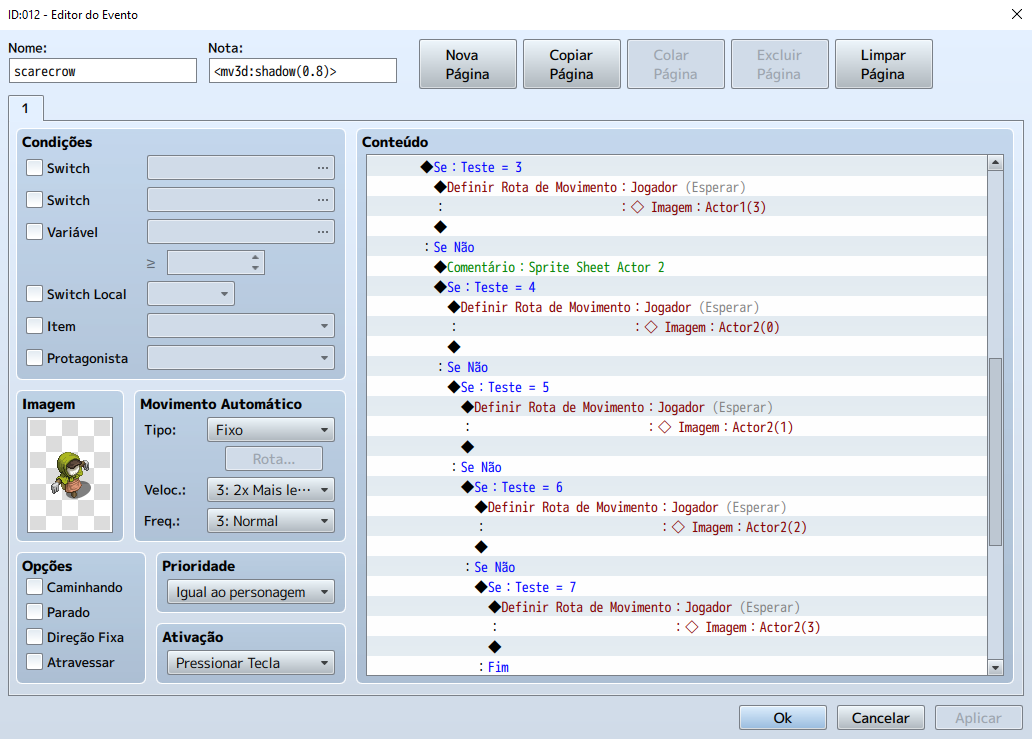
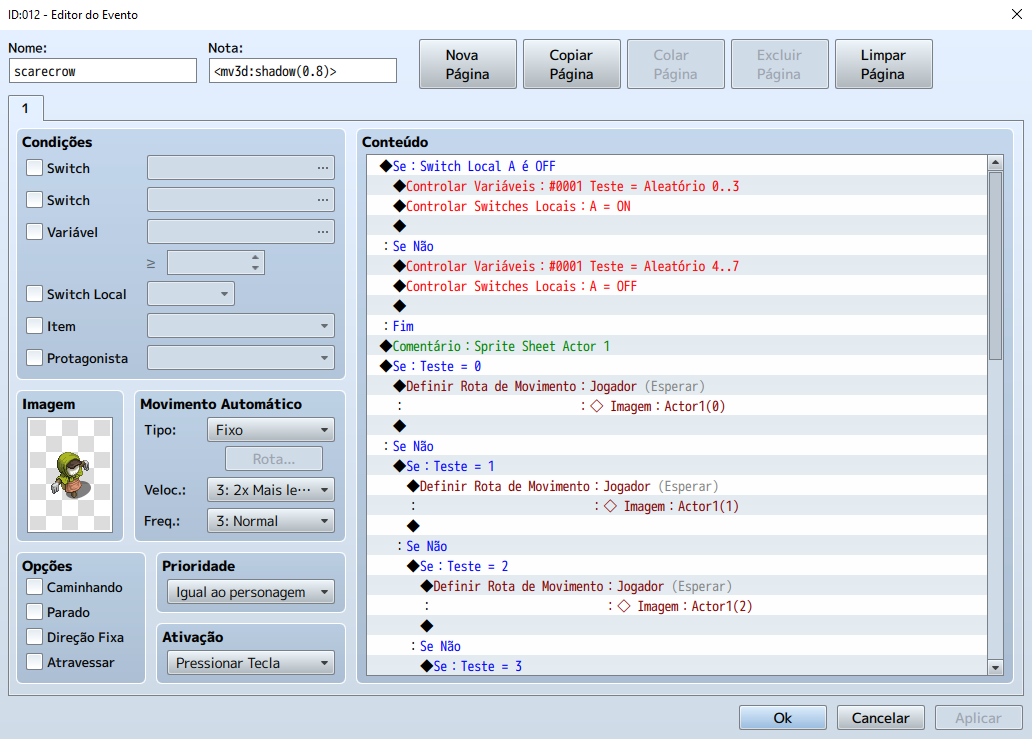
    (Scarecrow Event Page for better understanding)
    Scarecrow Events 1.png
    Scarecrow Events 2.png