MV3D - 3D rendering for RMMV with Babylon.js

● ARCHIVED · READ-ONLY
Started by Cutievirus 1560 posts Page 43 of 78 View original ↗
  1. @gRaViJa
    1 second should be 1 second.
    The reason it's not working is because at the beginning you're setting previous direction to 1, so the previous and current direction are always different.
    You want to do something like this:
    Code:
    current direction = direction of player
    if current direction != previous direction
        if player facing up
            plugin command mv3d yaw 0 1
        if player facing left
            plugin command mv3d yaw 90 1
        if player facing down
            plugin command mv3d yaw 180 1
        if player facing right
            plugin command mv3d yaw 270 1
        previous direction = current direction
  2. Really interested in purchasing this plugin, but right now I'm having this issue:

    1.png

    P.S. My game supports full HD resolution, so I configured CoreEngine accordingly. Could that be a problem?

    Also I would add some F.A.Q. document\section cause navigating this thread is just a nightmare :D
  3. Dread_Nyanak said:
    @gRaViJa
    1 second should be 1 second.
    The reason it's not working is because at the beginning you're setting previous direction to 1, so the previous and current direction are always different.
    You want to do something like this:
    Code:
    current direction = direction of player
    if current direction != previous direction
        if player facing up
            plugin command mv3d yaw 0 1
        if player facing left
            plugin command mv3d yaw 90 1
        if player facing down
            plugin command mv3d yaw 180 1
        if player facing right
            plugin command mv3d yaw 270 1
        previous direction = current direction
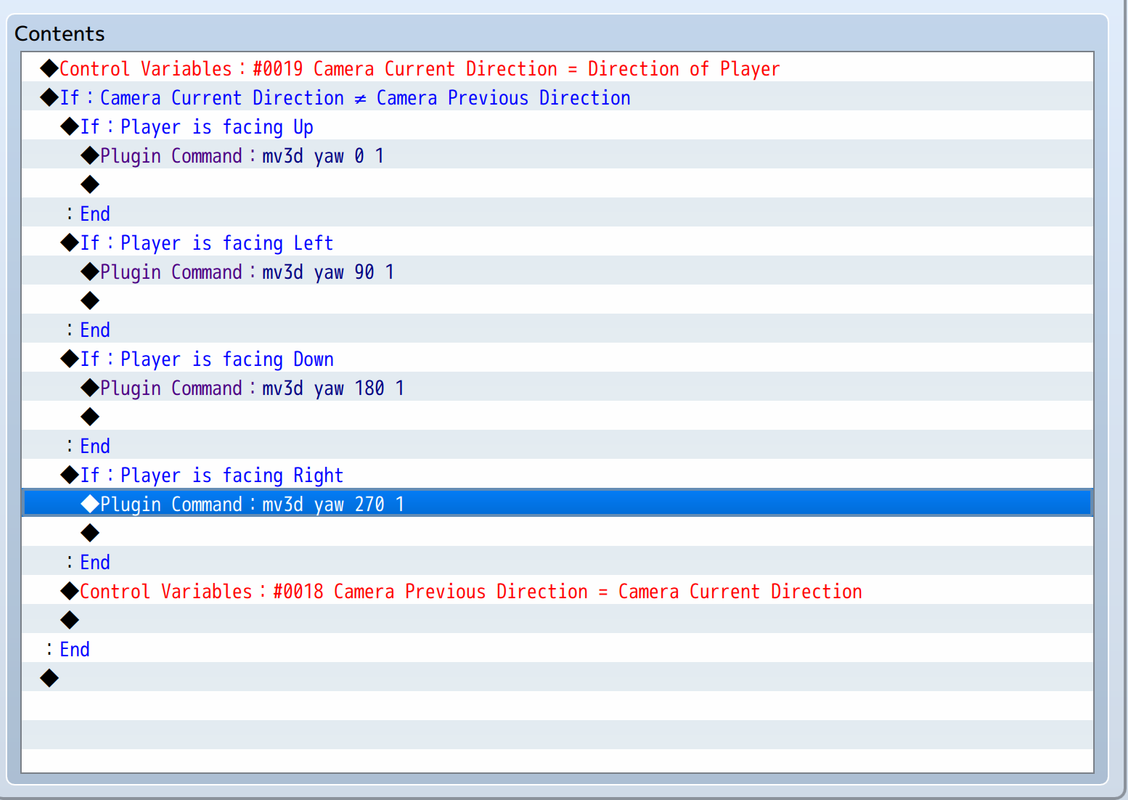
    Works now! Code as following:

    Screenshot-2020-02-28-at-10-18-06.png
  4. gRaViJa said:
    Works now! Code as following:

    Screenshot-2020-02-28-at-10-18-06.png

    As Dread said, you don't should to define "Camera Previous Direction = 1", but i'm glad she already helped you and it works. ^^

    A big hug! o/


    @KotoYama
    Resolution is not a problem, i did to scale it in 1440p.
    The FAQ/documentation is included in the plugin.
    Read the description that appears in Plugin's Manager.
  5. @KotoYama
    It looks like you renamed the plugin? You can't do that. RPG Maker MV plugin files depend on the name of the file to get the parameters.
    The file should be named "mv3d-babylon.js", whereas yours seems to be named "3D mv3d-babylon.js".
  6. Does anyone have some sort of visual guide to setting up tileset info like slopes and such? I'm having a hard time setting up the notes to make them work properly.

    Also, just bought the full version, excellent work! Keep it up!


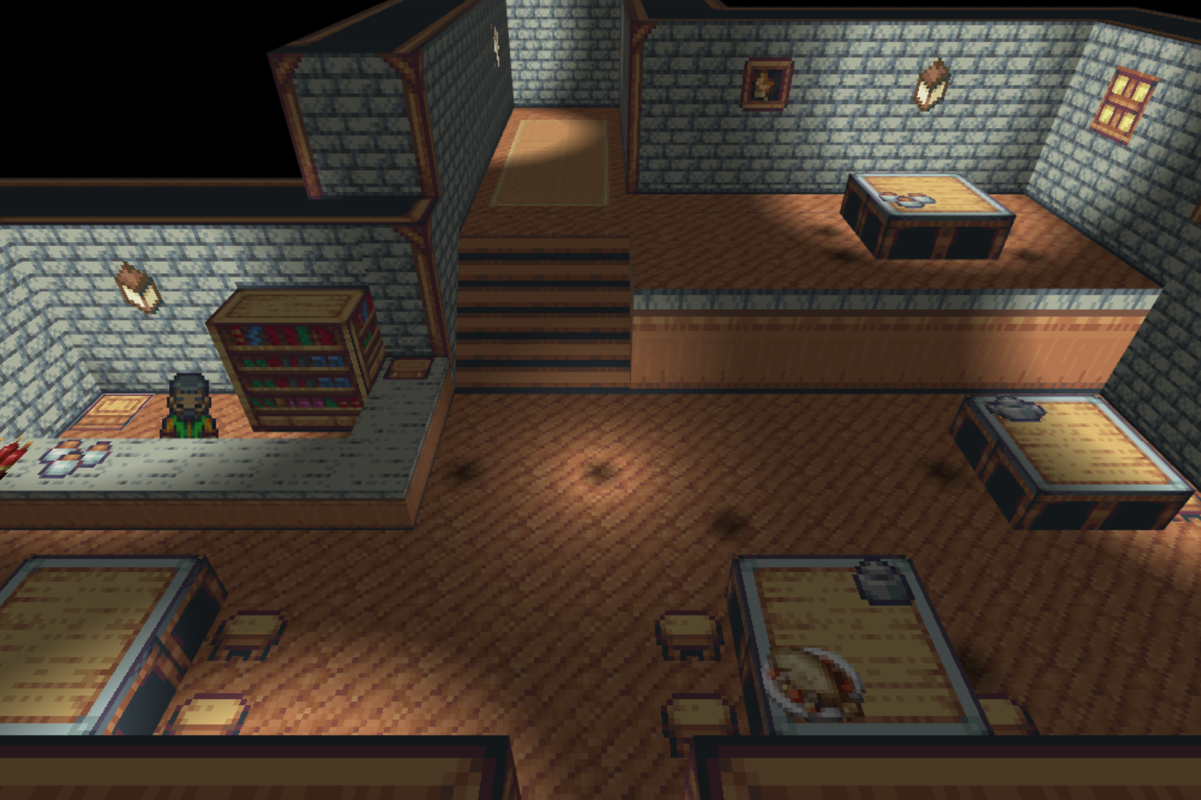
  7. Oh yeah, I also wanted to show what I've done with MV3D real quick. It's not much yet, but I've had a lot of fun constructing scenes with this!
  8. Karbonic said:


    Oh yeah, I also wanted to show what I've done with MV3D real quick. It's not much yet, but I've had a lot of fun constructing scenes with this!


    Nice work, my bro! :ewink:
    Do you know any good character busts generator?
  9. @Karbonic
    It looks really good!
    All I can recommend for learning tile configuration is to look at how it's done in the demo project and to read through the help file. I might make some video tutorials in the future though.

    Update 0.5:
    - renamed plugin to mv3d.js
    - fix light per mesh limit
    - Diagonal Movement
    - Support QMovement
    - Support Altimit Movement
    - separated lamp height & offset from flashlight
    - Increase priority for shadow pen on slope direction
    - Made automatic slope direction more reliable
    - Changed how wall textures are affected by adjacent slope
    - Configure regions in map note
    - Configure tileset in map note
    - Configure individual actors
    - shadow, error, and bushAlpha textures are set in parameters so they don't get excluded during deployment.
    - Changed how input is handled.
    - WASD controls now optional.
    - Events without a graphic can be triggered from any height.
    - Added option to make all events triggerable from any height.
    - fixed shake screen not working outside map scene
    - Added mv3d configure plugin command

    Edit: v0.5.0.1 Fixed error caused by followers without an actor.


    As you'll notice by the first change on this list, I've renamed the plugin from mv3d-babylon.js to mv3d.js. The three.js version has been gone for a while, so I didn't feel like keeping babylon in the name was necessary.
    This does mean that you'll have to re-enter your plugin parameters, but if you don't want to do that I've made it so the plugin should still work if you rename it to mv3d-babylon.js.

    I've made it so lightsources build inclusion lists so they only affect meshes that are close enough to be lit. This will allow you to have more light sources on the map, but the amount you can have per cell is still limited. Just make sure you don't have too many light sources clustered too close together and you shouldn't have a problem.

    I've added built-in support for diagonal movement. This makes moving around with non-cardinal camera angles feel more natural. I might also add built-in support for 8-directional sprites in the future.

    In combination with either QMovement or Altimit Movement, omnidirectional movement is now possible.

    You can now configure actors in the actor note, and you can configure regions and tiles in the map note by using <mv3d-regions> and <mv3d-tiles>.

    The new configure plugn command lets you change a character's configuration. For example:
    mv3d @p configure scale(2)
  10. Sounds awesome! Look like some of the updates might fix the compatibility issues I currently have (with MOG), so I'll dive into this as soon as I can!
  11. Wow! That's is a update! o_O
  12. After updating, most of my events are not showing and other events are now showing up flat though they were sprites before. I also don't get why the guy behind the counter does show while an identical event 3 tiles beside him, doesn't show. Windows show, while doors don't and they are also identical. Shadow spots is where events should be.

    Once I interact with the event, for example a chest, the graphic is restored for good. Same with the player: once i change the graphics, it stays ok forever.

    (i'm using MOG's Chrono Engine with this btw, that might be the origin for these bugs. Not expecting a cookie cutter solution, but hopefully there's a way to fix this somehow through the parameters for example.)

    Screenshot-2020-03-02-at-21-33-16.png
  13. I haven't tried the new version yet, but I just noticed the premium version is causing a ton of extra lag in battle, my fps is constantly jittering between 40~50 in battles with 16+ battlers and barely any states, turning it off it's gone.

    Also seems based off the map before the battle, doesn't lag on small maps that start it but a big 182x169 with thousands of trees is where I get that lag. Also looks at render distance on same map with 25 distance I get no lag but with 60 is where that lag happens.
  14. Is this plugin compatible with the Pixi Filter Controller plugin?
    Another question, is it possible to use an ABS plugin with MV3D?
  15. glaphen said:
    I haven't tried the new version yet, but I just noticed the premium version is causing a ton of extra lag in battle, my fps is constantly jittering between 40~50 in battles with 16+ battlers and barely any states, turning it off it's gone.

    Also seems based off the map before the battle, doesn't lag on small maps that start it but a big 182x169 with thousands of trees is where I get that lag. Also looks at render distance on same map with 25 distance I get no lag but with 60 is where that lag happens.

    I tested with multiple distances and 30 seems to be the sweet spot.
    Bigger than 30 generates problems with the shadows (Premium) too.
  16. @gRaViJa
    It was being caused by MOG_CharPoses. The characters weren't actually invisible, just very tiny. It should be fixed now. I'm calling updateBitmap before I calculate scale now to make sure all of the bitmap properties are set up properly.
    I'm not sure why some of your events are flat though, I haven't seen anything like that on my end.

    @glaphen
    It sounds like the source of the lag is the shadow generator. It's more laggy with higher render distances. I definitely need to do some optimization so it isn't causing lag when it's not being used though.

    @Gabezin
    I don't know if the pixi filter plugin is compatible or not. The only way to know for sure is to try it out.
    ABS plugins will work with mv3d. It depends on the plugin though, of course.

    Update 0.5.1:
    fix tiny/invisible characters with MOG_CharPoses.
    added plugin command to change camera roll
  17. CoopNinjask said:
    I tested with multiple distances and 30 seems to be the sweet spot.
    Bigger than 30 generates problems with the shadows (Premium) too.

    Ehh it was opposite for me, large mountains with large shadows from low sun would cut the shadows that were from out of render range in weird ways.

    30 Render Distance 80/80 sun

    70 Render Distance 80/80 sun
  18. Dread_Nyanak said:
    @gRaViJa
    It was being caused by MOG_CharPoses. The characters weren't actually invisible, just very tiny. It should be fixed now. I'm calling updateBitmap before I calculate scale now to make sure all of the bitmap properties are set up properly.
    I'm not sure why some of your events are flat though, I haven't seen anything like that on my end.

    Update 0.5.1:
    fix tiny/invisible characters with MOG_CharPoses.
    added plugin command to change camera roll
    Thanks! That should fix it. The flat events are weird, but i'll see if i can find a way to fix it.

    Also, this is probably intended behavior, but in the previous version, the lights were "full power" from the start. Now they are dim first and slowly increase in strength. Probably can edit that through notetags?
  19. ClipBoard-1.png
    About the latest UPDATE: fix invisible characters bug with chrono engine ...

    CHRONO ABS's tricks have all turned into black and black ...
  20. First of all, I would like to thank you for the great job.
    The new features are amazing and the bug with SumRndmDde Question Windows is gone.
    So thank you very much!

    But there is something I need to show:
    Here comes the new bugs! (Imagine Street Fighter's narrator voice here XD)

    1) The character sprites bugs has back!
    The blink problem is here again and it shows some strange white squares sometimes.
    Besides that, there seems to be a new bug due to the way that MV3D reads character sprites in version 0.5.1. Sometimes a miniature version of the entire sprite file appears, it is very strange.
    There is also a glitch that reads the wrong sprite index at certain times. In the video I recorded, this happens when the character reloads the weapon in the last frame of the animation.
    I activated version 0.4.8 on the same project to see how it would work and that was perfect.

    2) This is not exclusive to version 0.5.1, as in previous ones it also happened.
    The greater the rendering distance, the more noticeable bugs involving dynamic shadows become.
    If the tone of the screen is normal, it does not happen, but if there is a change in the tone of the screen, it becomes quite noticeable.
    For example: In my system, when it is in the afternoon or at night, you can see, very clearly, black stripes on the floor caused by the shadow.
    While an obvious workaround is to lock the render distance at 30 and prevent the player from changing that, I believe that was not the original intention.

    3) The lamp has disappeared!
    And the flashlight no longer illuminates the looped map points.
    In MV3D 0.5.1, the flashlight is simply cut off when it is at a looping point on the map.
    Sorry for not include that in the video, but i think you can imagine or test it by yourself.

    I uploaded a video demonstrating the mentioned bugs.