MV3D - 3D rendering for RMMV with Babylon.js

● ARCHIVED · READ-ONLY
Started by Cutievirus 1560 posts Page 42 of 78 View original ↗
  1. CoopNinjask said:
    Hi @gRaViJa!

    The flashlight system in my demo is made by Common Event with plugin commands, not via event note tags.
    Take a look in the image to understand better.

    View attachment 135093

    I hope this help you! ^^


    I know :) But just like any other light related code/plugin command/notetag it doesn't work from the moment I put it in my project or a fresh demo. So i restarted from the beginning, just the fresh demo and even the default event that was put in the demo, the demo on top of the forrest, should have light event on it, the code was put in there by Dread_Nayak, but it doesn't work for me. Water_guy also looked in it for me and hasn't found a solution either why not a single light related event works for me, yet your flashlight event does.

    But want to keep it to the basics and want to learn why the demon on fop of the forest is not showing the light event that it should show. As i said before, just a fresh demo project.
  2. gRaViJa said:
    I know :) But just like any other light related code/plugin command/notetag it doesn't work from the moment I put it in my project or a fresh demo. So i restarted from the beginning, just the fresh demo and even the default event that was put in the demo, the demo on top of the forrest, should have light event on it, the code was put in there by Dread_Nayak, but it doesn't work for me. Water_guy also looked in it for me and hasn't found a solution either why not a single light related event works for me, yet your flashlight event does.

    But want to keep it to the basics and want to learn why the demon on fop of the forest is not showing the light event that it should show. As i said before, just a fresh demo project.

    Really, if everything goes as you said, the problem is inexplicable!
    The most impressive thing is, even so, keep working on my demo.
    It must be a paranormal force! XD
  3. So I have what may be a unique problem here. Right now I'm generating a roguelike level using some calls to rot.js, then displaying this through mv3d. The problem is mv3d isn't updating with the tile changes (to generate a rogulike you do a lot of $mapData changing, basically recreating the entire map that the script is called on). Now to be clear, it is updating some of the map, and I've tested from the console, and RMMV is convinced the tiles are there from a data pull, just they aren't being displayed. It's likely due to the nature of synchronous execution of .js files, meaning the level is likely getting rendered AS it is getting generated. Is there any way to refresh the display through mv3d? Are there any other possible solutions I haven't thought of? I've doubled checked the map data that is getting generated, and to top it off, I can move around the invisible map. I also double checked to be sure the minimap plugin in the bottom of this screen shot wasn't the cause. Seriously at a loss on this. I'm a fair amateur programmer but I think this problem may be a little beyond my depth.

    1582613805571.png
  4. CoopNinjask said:
    It must be a paranormal force! XD
    It certainly feels like it! If anyone else has input on this, it would be greatly appreciated :)
  5. @Charles_Odinforce
    You need to clear the map cells so they can be regenerated.
    To clear the whole map:
    JavaScript:
    mv3d.clearMapCells();
    mv3d.updateMap();
    To clear just one cell:
    JavaScript:
    mv3d.cells["0,0"].dispose();
    delete mv3d.cells["0,0"];
    mv3d.updateMap();


    @gRaViJa
    I'm not sure exactly what's wrong in your case, but there's only two things I can think of.

    In the current version there's still a bug that prevents you from having too many lights. (for me the bug happens at 12 lights. Other people seem like they have other limits.) Since you said it's a fresh demo project I don't think this is the case.

    Other than that, I can't tell from the screenshot if your configuration functions are surrounded by the <mv3d: > tag or not. Make sure they are.
    <mv3d:flashlight(white,2,6,30)>
  6. Excellent, that's solved all my issues! Thank you!
  7. I've been trying to make a fence but no matter what I do the edges keep getting cut off, I tried shift clicking, tried using terrains, tried using A2 but it turns it into cross no matter what. Is it supposed to be doing this?
    Fence.png
    For that right side I just put only the top part next to it and it turned out like that.

    Tried adding a different tile to the end but one part turned into cross for no reason?
    Fence2.png

    Tried a single block fence and it turns into a weird opposite cross?
    Fence3.png
  8. @glaphen
    Fences work best with autotiles, particularly A2 tiles. The autotile fences do have crosses in places to make the fence posts visible from different angles. The fence shape is intended to be used with tiles arranged like the rtp fences.

    It does look like non-autotile fences are a bit inconsistent. The way they tile horizontally is different from how they tile vertically, which isn't intended.
  9. Dread_Nyanak said:
    @gRaViJa
    I'm not sure exactly what's wrong in your case, but there's only two things I can think of.

    In the current version there's still a bug that prevents you from having too many lights. (for me the bug happens at 12 lights. Other people seem like they have other limits.) Since you said it's a fresh demo project I don't think this is the case.

    Other than that, I can't tell from the screenshot if your configuration functions are surrounded by the <mv3d: > tag or not. Make sure they are.
    <mv3d:flashlight(white,2,6,30)>

    Thanks for the reply :)

    Only 1 light source on the map and this is the code for the tag (is the standard code in the demo project):
    <mv3d:flashlight(white,2,6,30),dirfix(true)>

    I'll keep looking into this from time to time to find out why it isn't working.

    Edit: So, I get it to work by adding the plugin command mv3d ambient #222222. Is it supposed to work only with this ambient? Because it does mess with the normal tint screen of the map.
  10. gRaViJa said:
    Thanks for the reply :)

    Only 1 light source on the map and this is the code for the tag (is the standard code in the demo project):
    <mv3d:flashlight(white,2,6,30),dirfix(true)>

    I'll keep looking into this from time to time to find out why it isn't working.

    Edit: So, I get it to work by adding the plugin command mv3d ambient #222222. Is it supposed to work only with this ambient? Because it does mess with the normal tint screen of the map.

    Really, this is the ambient color that i use in my demo!
    Because of this, it was working then...
    That's curious!
    What a strange bug!
  11. I found a error!

    I'm using SumRndmDde Window Upgrade to gererate Question Windows that works as a menu.
    But, in first person maps, the MV3D controls overwrites the Question Window controls, so i can't input arrow keys to left or right to select the menu options.
    There is a way to, when the Question Windows are active, the controls of Question Windows get priority over the MV3D one?
    Obs: In not first person maps, there is no compatibility problems. I put a cameraLock = true plugin command to prevent camera to rotate, but it was happening too. These menus appear in GameMap scenes.

    Can someone help me?
    Thanks in advance!

    [embedded media]
  12. CoopNinjask said:
    Really, this is the ambient color that i use in my demo!
    Because of this, it was working then...
    That's curious!
    What a strange bug!
    Yup, I got it from your demo, and only with that, the light events work for me. Not sure if that's intentional or not.
  13. Wish I could help Coopninjask, but alas :)

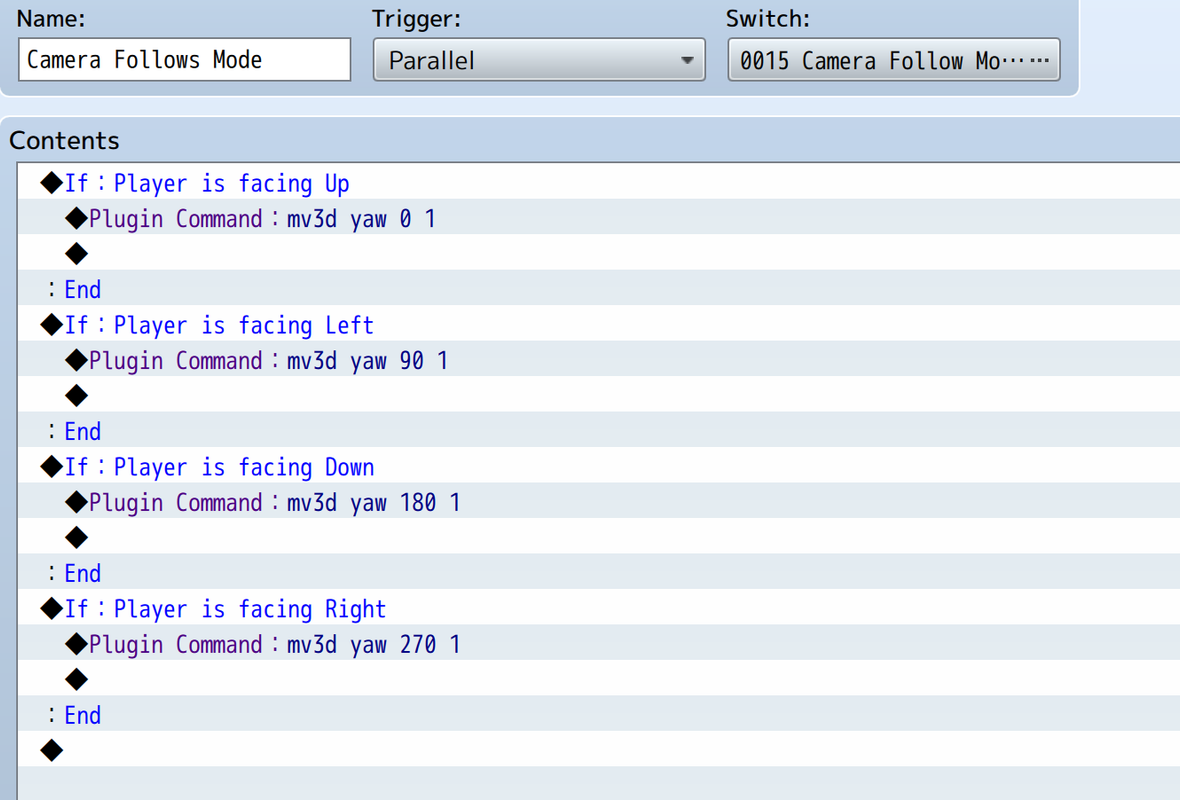
    Have another small question myself: I'm testing to see if it's user friendly to have the camera follow the player he/she turns left/right/up/down like it does in 1st person mode, but then in normal 3rd person mode. This set-up works, but the camera turns really slow, almost 10 seconds. Somewhat okay at teh start but it slows down really fast.

    Is there a way to make the camera move faster? Like it does in 1st person mode? I also added the plugin command "mv3d camera target @Player 1" afterwards, but that didn't change anything.
    Screenshot-2020-02-26-at-23-21-14.png
  14. Seems odd, but during battle the plugin seems to stop the shake screen function from working. It will work on map but not battle scenes. I removed all plugs except for babylon/mv3d-babylon and can restore the battle screen shake by toggling the plugins off.
  15. gRaViJa said:
    Wish I could help Coopninjask, but alas :)

    Have another small question myself: I'm testing to see if it's user friendly to have the camera follow the player he/she turns left/right/up/down like it does in 1st person mode, but then in normal 3rd person mode. This set-up works, but the camera turns really slow, almost 10 seconds. Somewhat okay at teh start but it slows down really fast.

    Is there a way to make the camera move faster? Like it does in 1st person mode? I also added the plugin command "mv3d camera target @Player 1" afterwards, but that didn't change anything.

    Screenshot-2020-02-26-at-23-21-14.png

    The plugin commands are right.
    I believe the problem is in Parallel Process and the way you build the conditions.
    This way, while the person is in a direction, It will be rotating the camera. This is like it is rotating the camera multiple times to the same direction.
    You have to build the conditions in a way to execute this command only once when you change your direction.

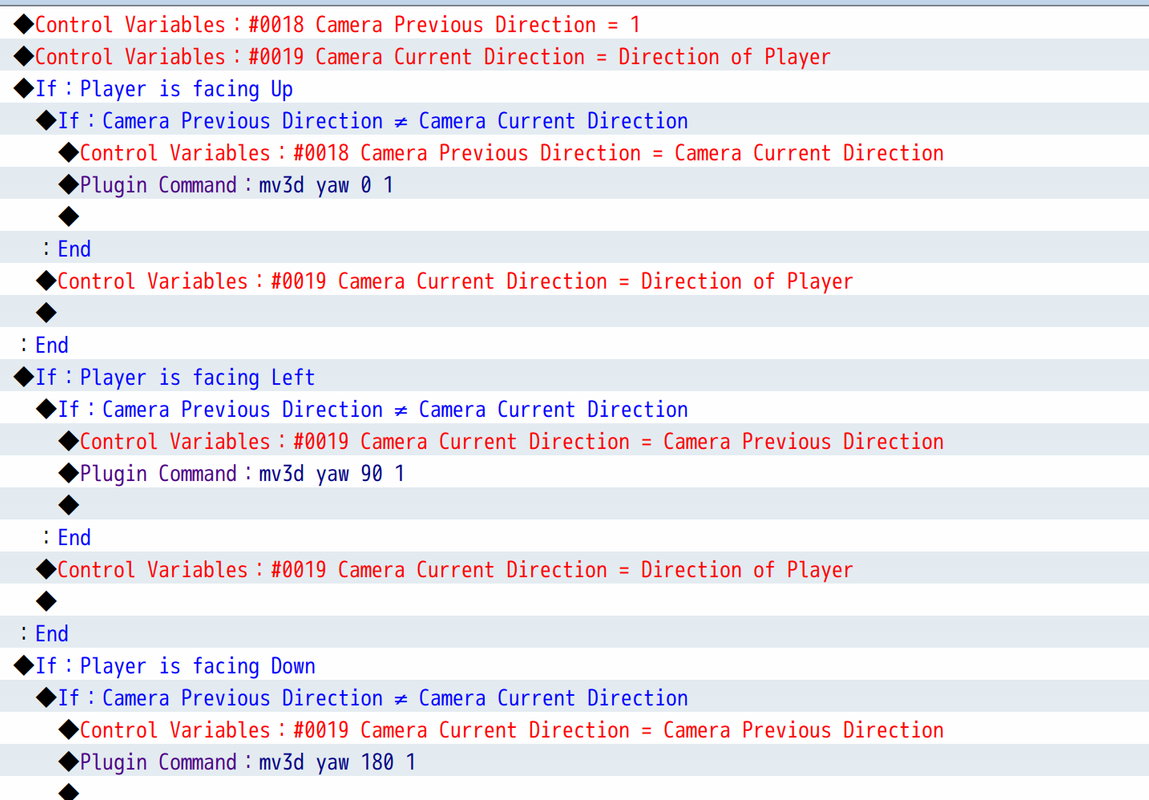
    There is a way that i can think:
    Put a condition with a:

    If (Player Direction)

    If Variable "Previous Direction" is different of Variable "Direction" then:

    Variable "Previous Direction" = Variable "Direction"

    Plugin Commands to camera yaw

    End

    Variable "Direction" = (Player Direction)

    End


    Explaining:

    Let's imagine that you facing down (Direction = 2)

    When you start the game, the Variable "Direction" will store the direction of the player. (= 2)

    So, when you get in a direction, the game will check If the Variable "Previous Direction" is different of Variable "Direction", and It will be true. (Previous Direction = 0)

    So the Variable "Previous Direction" will get the value from Variable "Direction" and them will be equal. (Both = 2)

    You will run the plugin command to refresh the camera yaw.

    The Variable "Direction" will get (Player Direction). This has to stay out of Previous Direction != Direction condition, because the Variable Direction has to update this value always.

    This way, the plugin command to camera yaw will not run while you keep in the same direction.
    If you turn in a different Direction, the Variable "Direction" will get a new value and be different of the Variable "Previous Direction", that will get the new Variable "Direction" value and this will update the camera.

    Try this and see If will solve the problem. Give me feedback If It works please!
  16. @CoopNinjask Yup, that makes sense! Shouldn't be a problem from here on. Thanks for the help! (Will try this tonight and post the working event code here)
  17. @CoopNinjask
    This is because in 1st person mode the left and right buttons are mapped to rotating the camera instead of moving. Using the strafe keys should act as left and right though.
    The way I'm mapping input sometimes causes problems like this. I'm considering changing the way I handle input to avoid these problems.

    As for fixing problem, I think the only way in the current version would be to get rid of the dynamic controls. This would make the first person controls be the same as the 3rd person controls.
    Unfortunately I don't have an option to do this yet, but you can do it by adding this code in a plugin after mv3d.
    JavaScript:
    mv3d.setupInput=function(){};


    @CattleDog
    That's a bug. I'll add a check to make it so the new shake screen behavior is only used in the map scene.
  18. CoopNinjask said:
    Try this and see If will solve the problem. Give me feedback If It works please!

    This is my code now, and while it works as it should mechanic-wise, the slow moving of the camera is still in effect, exactly like it was with the shorter code:

    Screenshot-2020-02-27-at-20-39-40.png
  19. gRaViJa said:
    This is my code now, and while it works as it should mechanic-wise, the slow moving of the camera is still in effect, exactly like it was with the shorter code:

    Screenshot-2020-02-27-at-20-39-40.png

    It's because you have 1 on the end, that means 1 second for it to complete movement, change it to a lower time.
  20. @glaphen, that actually did it. So 1 second is actually 10 seconds and 0.3 feels like it should be: +- 1 second.