MV3D - 3D rendering for RMMV with Babylon.js

● ARCHIVED · READ-ONLY
Started by Cutievirus 1560 posts Page 12 of 78 View original ↗
  1. DMJohn0X said:
    So the issue is, I'd love to use this plugin for cut-scenes but if im understanding correctly, this plugin will entirely break any pixi.js plugin? And I use several of those in my main game.
    depends.
    it has no effect in battle or menus, for one.
    it breaks plugins that are based on something's (x,y) location on the screen. if it is a filter, however, like most pixi effects I saw around, I'm not sure they would still work on the events, but they should work fine if it applies to the whole screen at once. probably won't break your game either way, too.
  2. A good addition would be a z or height coordinate for player and events on map, it could be useful for conditions or whatever.
    I've noticed during testing that height differences between player and event do not effect touch/action triggers so if an event is 10 levels higher the player can still trigger it if he is facing it from the ground.
  3. For those having errors loading saves using Yanfly's Save Core plugin:

    I've noticed that loading a save while currently in a game results in freezing, but MooCow9M has discovered a workaround/edit in Yanfly's Save Core at lines 19:

    Code:
    * @param ---MC9M - Mod---
    * @default
    *
    * @param MapID
    * @parent ---MC9M - Mod---
    * @type number
    * @default 1

    528:


    Code:
    Yanfly.Param.MapID = Number(Yanfly.Parameters['MapID']);

    1253:


    Code:
        Scene_File.prototype.terminate = function() {
        Scene_MenuBase.prototype.terminate.call(this);
        if (this._loadSuccess) {
            $gameSystem.onAfterLoad();
            let id = $gameMap.mapId();
            $gamePlayer.reserveTransfer(Yanfly.Param.MapID, $gamePlayer.x, $gamePlayer.y, $gamePlayer.direction(), 2);
            $gamePlayer.performTransfer();
            $gamePlayer.reserveTransfer(id, $gamePlayer.x, $gamePlayer.y, $gamePlayer.direction(), 2);
            $gamePlayer.performTransfer();
        }
    };


    Current Workaround:
    In the Scene_File.prototype.terminate function of the core file inside the if statement,
    Teleport the player to an unused map and then teleport them back to force the MV3d script to fix itself
    Example:
    let id = $gameMap.mapId(); $gamePlayer.reserveTransfer(<Your Map id here>, $gamePlayer.x, $gamePlayer.y, $gamePlayer.direction(), 2); $gamePlayer.performTransfer(); $gamePlayer.reserveTransfer(id, $gamePlayer.x, $gamePlayer.y, $gamePlayer.direction(), 2); $gamePlayer.performTransfer();

    Credit to MooCow9M
  4. It does not work anymore. Parallaxes
    5ABR
  5. @Grilled Mormons
    For now you can get player and event's z coordinate with $gamePlayer.mv3d_sprite.z

    @palatkorn
    Thanks for reporting the bug with all this information. It's a problem with parallax when plugin is disabled. It will be fixed in the next update.

    EDIT:
    Uploaded a new version.
    Parallax bug fixed.
    Event configurations in plugin parameters are now more powerful.
    Dynamic Shadows now available on Patreon.
  6. Awesome, constant stream of new features, thanks for your hard work!

    I have a "request" which could be interesting to add to the tiles. Don't know how hard it'd be to achieve, though.
    A bevel modifier would do great to make some parts of the environment look more organic, such as cave walls, cliffs and etc.

    I was thinking about having a configuration like (tile):bevel, <number of divisions>, <depth>.

    me being over ambitious
    I worked on a company earlier this year and we were working on a functional 3d tile system and man, was it a pain connecting everything together... The back-and-forth between the art team (me lol) and the code team was taxing
    AKA I wanted actually to ask about having 3d tile presets for use within the engine (kind of like a 3d autotile that'd auto-slap the appropriate textures according to the tile configs) but having the 3d tile presets to begin with is likely going to be a painful ordeal, as it took us weeks to get a working setup >.>'

    Definitely something to keep in mind for a later, way later version of the plugin methinks? But a bevel modifier, if as relatively simple to implement as my nooby brain hopes it is, would be a real nice addition!

    Actually, in addition to a regular Bevel modifier... some auto-generated patterns on top of the tiles could look really nice... Hmm...
    Let me illustrate.
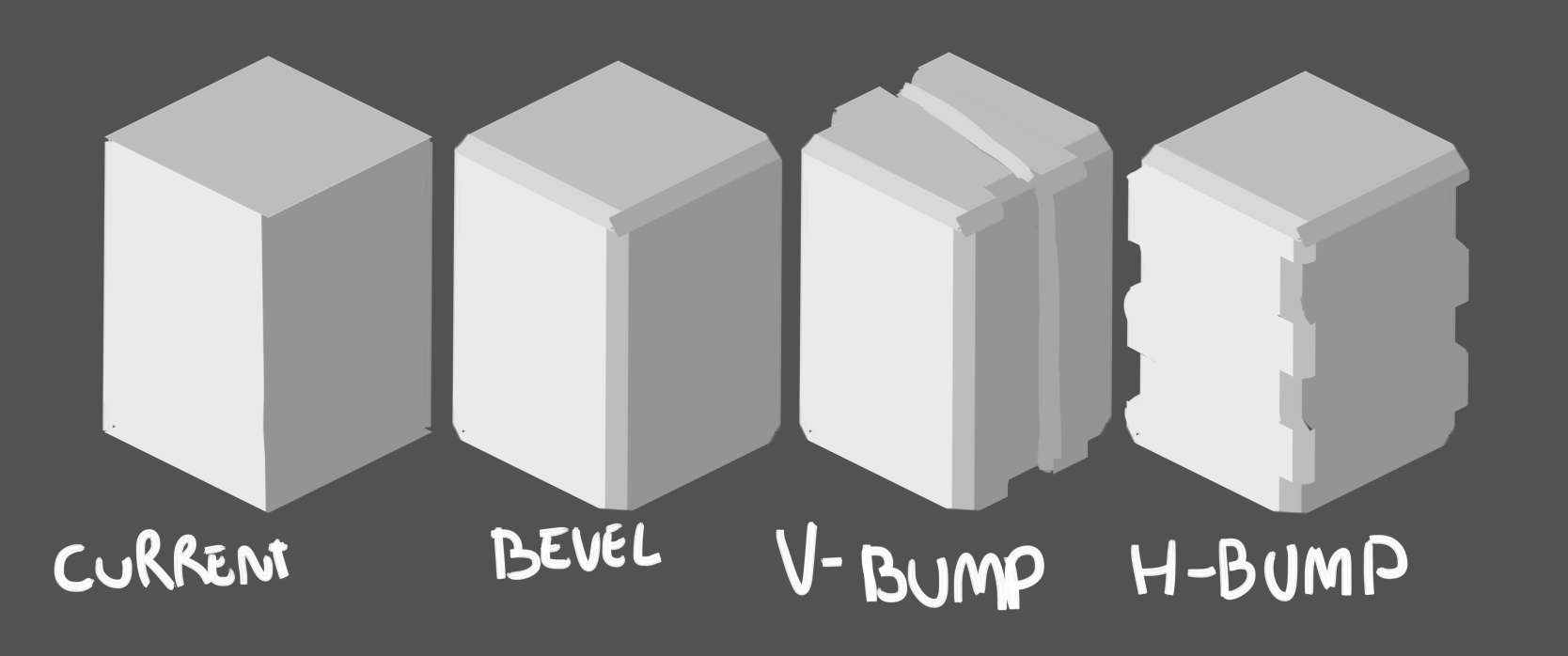
    upload_2019-12-11_5-47-43.png

    A simple bevel would make the edges rounder by adding a subdivision, v and h bumps (prolly has a better name) subdivides the tile by a X amount of subdivisions then shifts these subdivisions alternately (and adds the bevel on top of them), mixing V and H bumps would create a wavy grid or something

    But yeah this is likely very time consuming so idk just an idea have a nice day bye lol
  7. My first reaction when I've seen the first screenshot:
    WOWW!!

    I always wanted a 3D like that for my game, I hope that you finish this awesome project and implement the navigating with mouse and touch as you listed on the possible future updates list!!

    Keep up the good work!! If you have a patreon, I may support you with 1$~5$/mo.
  8. Weird bug?? game still tries to load the geometry of the last map after teleporting, oddddddddd
    bug.gif
  9. @JosephSeraph
    The bevel would definitely be hard to implement.

    For the bug, I don't know why that's happening. It looks like the materials are being disposed, but not the geometry? I don't have that problem on my end, so if you can figure out how to reproduce the bug please tell me. Or you could send me the project file.

    @HuskyTrooper
    I'm glad you like the plugin. I do have a Patreon. The link can be found in the Github Readme or Plugin Help text.
  10. I figured it out and it was pretty dumb on my end! it was the Cell Size. I noticed increasing it caused the engine to run much smoother, but I don't understand what it actually does so I cranked it all the way up lol. Indeed it makes running single, large maps incredibly smooth but I don't understand how, why or why it causes the cells not to dispose. I think we're supposed to set this as the minimum map size in the game? After I set the value to lower than the map I was previously (lol) it properly disposed of the geometry when transitioning.

    I recommend adding a small description to the cell size field and the help file! Thanks :D
    Also sorry if i'm speaking too much or making too many requests or mentioning too many things i'm clearly hyped about this and i'm enjoying it very very very much lmao
  11. Okay, I know the problem. With a big cell size the mesh ends up having too many vertices, so the merge function fails.
    Cellsize is the size of the chunks the map is divided into. A larger cellSize means less total meshes, which is probably why it performs better. But if the cell size is too close to the map size then map looping won't work right.

    The problem will be fixed in the next update. Until then I recommend keeping cellSize smaller than about 40.
  12. Dread_Nyanak said:
    @HuskyTrooper
    I'm glad you like the plugin. I do have a Patreon. The link can be found in the Github Readme or Plugin Help text.
    Done, glad to support you. For now this is what I can contributed since my economy is very limited, but in the future I'll try to go up to 5$/mo or even more if I can.
    This kind of work needs a lot of support to continue living, otherwise a lot of wonderful projects becomes paralyzed and go unknown because, even the work "for free", needs money, all projects needs more or less time sacrificing.

    I don't know if is allowed to post Patreon link on the Project Topics, but if it isn't, moderators should reconsider such prohibition, in the end, the engine continues living thanks to the resource developers of the community, and their time and dedication needs and deserves money, I hope that all of you gets enough support to, between all of us, make RPG Making awesomer every day and making it shining.

    Also I hope that the future RPG Maker releases still use the same javascript language, more or less optimized, but similar at the end to allow developers continue their projects on those future releases and make them require less time to sacrifice to re-adapt their work, maybe by providing some kind of converter for adapt possible new functions in the less time possible. Kadokawa/Degica/Enterbrain are big business, but individuals are who less resources has and more support needs at the end.

    Good job.
  13. I'm currently have problem with the player flashlight. I would like to enable it once I picked up the lantern but when I picked, nothing happens. ;-; Annotation 2019-12-13 002816.png
    Annotation 2019-12-13 002913.png
    Annotation 2019-12-13 002938.png
  14. @sameul13579
    Leaving the room and coming back seems to make the flashlight work. I'll try to get the bug fixed for the next update.

    Edit: The bug is related to the lights per mesh limit, which reminds me that I still need to fix that.
  15. Hi, this is great! I have been looking for something like this for a long time! :) Just want to ask a few things as I haven't been able to figure out how to fully utilise this plugin.

    1) Is speech bubbles/ icon bubbles available yet? Tried with Yanfly plugin but did not work and i read an earlier post that plugins that involves x and y coordinates might not work.

    2) Is there any way to place a block/platform in the air (z coordinate) instead of increasing the height? I understand it is top view down so i may be hard to implement. I was thinking something along this kind of options (object height z:3 to 5) where the cell has a height from 3 to 5 and the bottom is open. This way it can but things like bridges or open gates without the need of events.

    3) is there a way to fog at the end/edge of the maps? Or limit camera to within the limits of the map? At certain angles the regional height can be seen and sometime it isn't the most visual appealing material :X

    Overall this is an excellent plugin and I do hope to be able to (with my limited skill) use it and do it justice.
  16. LeeRyuto said:
    3) is there a way to fog at the end/edge of the maps? Or limit camera to within the limits of the map? At certain angles the regional height can be seen and sometime it isn't the most visual appealing material :X
    Do you mind sharing screenshots of what you mean? On one hand, I think I know what it is, and the system could maybe use, eventually, some "smart camera" features (it's hard use a low camera tilt unless you plan maps with no camera movement), but on the other hand it's a set of limitations that if you properly work around them, produce charming results.

    BTW, I found out that if you use a parallax map with the same color as your fog, it'll look like your objects are fading into the flat color. Oh, that brings me to a simple, but possibly effective feature request, @Dread_Nyanak !
    Right now I'm creating Parallax images with a single pixel, containing the relevant color for the fog. For a big game, that'd be kind of cumbersome, but perfectly doable. Now, if we could setup something like fog_parallax(true), and that made the engine create a 1px parallax image on the fly with the color of the fog, it'd look pretty cool and be pretty streamlined! Or it could be something like: parallax_color(#FF2255), parallax_color(teal), parallax_color(fog).
  17. New update out. Light limit is fixed, and added options to the options menu. Player can now set their own render distance, toggle mipmapping, and change shadow quality. Also added Alpha Fog for patrons.

    @LeeRyuto
    I can probably add support for balloon icons when I do animations. It's not trivial to add, but animations are pretty close on my todo list.
    For the speech bubble plugin, I'll add that the the list of plugins I want to support.

    To place a tile in the air, you can use star passage and the fringe function. But you won't be able to walk on these tiles.
    To make a tile in the air you can walk on, you can give it a height and then remove the side texture with side(B,0,0).
    Those are the only ways for now I think. There's no way to make a bridge you can both walk on and under for now. That's something I'd like to add eventually, but I might have to rewrite a lot of the movement and collision code to make it happen.

    Putting fog at the edge of the map would be really cool. I could probably write a shader to do that. Thanks for the idea.

    @JosephSeraph
    Right now the clear color is always transparent so you can see the parallax image behind it. But What I could do is make it so if you don't have a parallax image then the clear color is set to be the same as the fog.
  18. Hey there !

    I been testing the dinamic light plugin.... and the resoult is trully awesome, still had problems the times when i want to create caves/closet rooms, so i think maybe would be usefull to can disable and enable the source of light on the dinamic light plugin via map notes or plugin commands ( the one who is located on the up corner by default) to disable it when you make caves and closed rooms , and the ability to alterate the position of that source of light ( so if, as an example you wanna make a closed room, and on the front part theres a window who would let the sun light goes inside the room )

    i been kinda playing with the slopes to see what can i achieve, still think is really important the (Y) rotation tool for the events, cause the tiles only can face 4 directions while the events can have horizontal rotation 360 degrees , when you try to do something like..idk, a huge palm leaf, it looks less organic to made them only face 4 directions ^^

    this..is really turning into one of the best plugins on rpg maker mv btw , awesome job ^^!
  19. @k333
    In the newest update I made it so the light doesn't shine through the ceiling. There's a new parameter in the ceiling function to get the old behavior back. ceiling(A4,0,0|2,true). In future updates you'll be able to change the color and direction of the sunlight.
  20. @Dread_Nyanak
    Glad that you like the idea. Just a few other things that got me stuck.

    1) I can't put multiple stairs together (upwards or downwards). I meant I can put them but they don't function properly. I cam walk up the first flight and then i can't move forward anymore. So far able to rectify this by putting a flat ground in between but thought i should let you know.

    2) I can rotate the screen with Q and E keys, however is there a way to speed up/slow down rotation for cut scene purposes? Something like a delay rotation for 60 frames etc.

    3) Not sure as I cannot find a tutorial anywhere, but is there anyway to make the camera look upwards or downwards?

    4)Anyway to stack more than 2 height for trees? Currently 'cheating by using platforms on the back trees to make them seems taller.

    On the plus side I was able to use the slope function to make triangle roofs. :) If there is a tutorial or a help file do let me know where can i find it, still trying to figure out many of the codes/functions.