Changing the camera distance does not change the relative size of the character to the tile they're standing on.
MV3D - 3D rendering for RMMV with Babylon.js
● ARCHIVED · READ-ONLY
-
-
uhm... I don't get what you mean then.
I'm testing this plugin on my project on a default-sized window, not widescreen, but the images are pretty much sized properly for me. -
Actually I have been planning to replace some of the existing default character parameters with one that takes configuration functions, similar to what I did with regions and terrain tags. This would let you change default for event size and any of the other event settings too.
Alpha fog will be a lot harder to implement, but that's something I've been wanting too. I think I can do it with a postprocessing effect where I render a depth map of the scene and use that to set the alpha. I think I could also use that depth map to add ambient occlusion. I've never messed with postprocessing before though, so I've got some learning to do before I can add that stuff.
Also plugins that add screen overlays should work fine with my plugin as long as there don't use the map layer. Like you said though, testing is required.
It looks like the 4 light limit is something imposed by Babylon, but it can be increased so in the next update I'll have to set a higher default and make it configurable. -
I'm running the resolution at around 240p, which is much lower than the default sized window. That's why the sprites are being squished down, since it's expecting the default resolution but is getting something less than half of that, thus squishing the sprites to less than half of their original size as well to compensate.I'm testing this plugin on my project on a default-sized window, not widescreen, but the images are pretty much sized properly for me.
Awesome! That's exactly what I meant / thought you'd do! It's consistent, flexible and powerful. :DActually I have been planning to replace some of the existing default character parameters with one that takes configuration functions
I can see the alpha fog being hard to implement. By the way, I do think gradient mapped fogs would be interesting too and potentially easier than alpha fog, but it still doesn't quite play nice with anything but a pure color background (such as the fade to white being pretty noticeable on the "world map".)
but it can be increased so in the next update I'll have to set a higher default and make it configurable.
Awesome! It's a nice thing to make configurable since different settings end up with different resource consumptions. By the way, what was the configuration that made the light effects "blockier" again? It was light subdivision, right?
(I meant this:)

I can't quite find it in the newer version. Blocky lights are reallly reminiscent of PS1 games too, lol.
Is it unavailable in the new library (?) (i really don't understand javascript very well...)
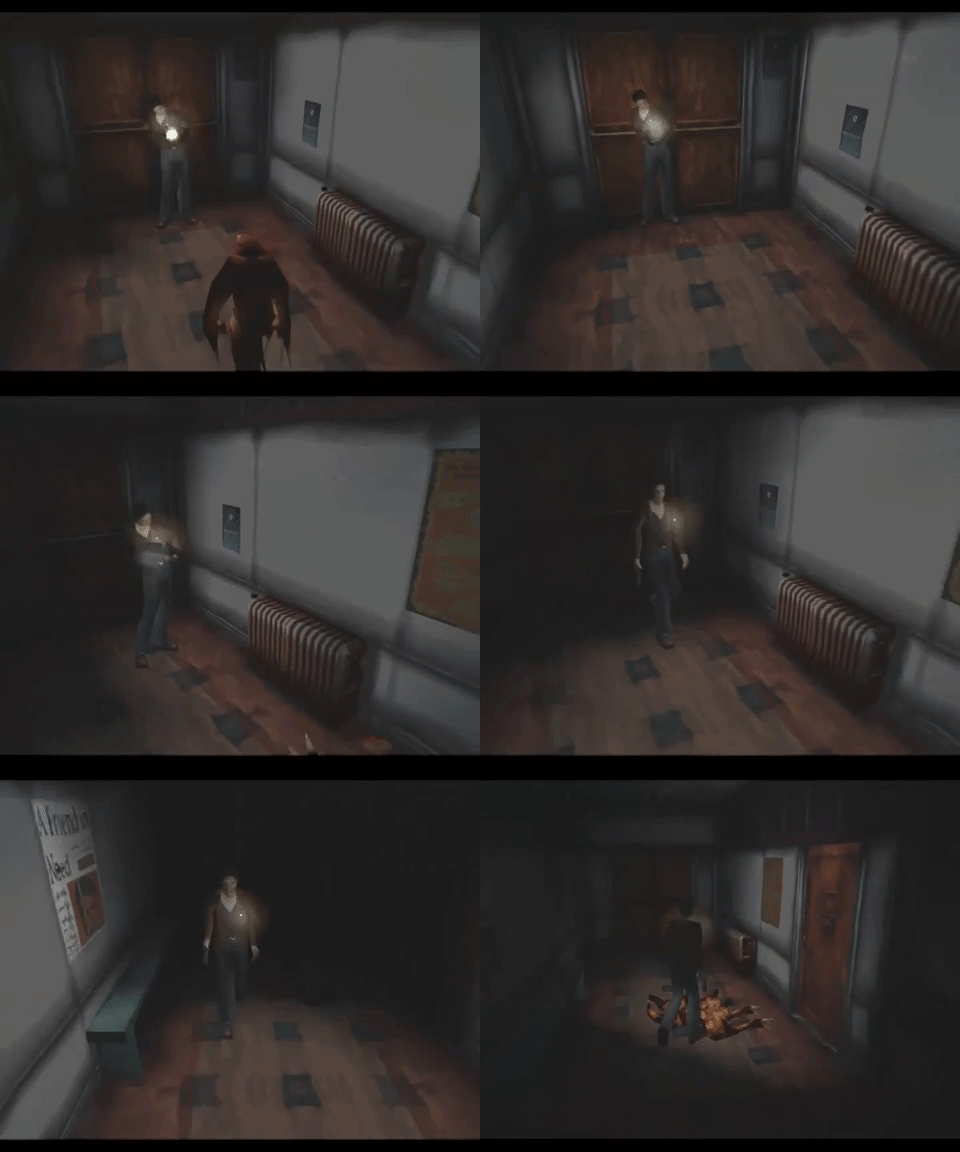
(PS1 blocky lighting at its peak)
Also yeah. I'm determined to make this look as PS1 as possible lmfao. -
Unfortunately the subdivision feature isn't available in the new versions. Lighting works differently in Babylon, so the lights look smooth even on low poly meshes. I think I'd have to load in some custom shaders if I wanted to bring back the old look. I don't think Babylon comes with regular lambert shaders. I'll probably mess with the shaders eventually, so I'll see about it then.
That reminds me though, I should probably edit the first post and put some fresh screenshots in there. -
I see! On one hand it's a shame it's not available, on the other hand, it works so smooth right out of the box it's super duper impressive.
I'm looking forward to see what you do with shaders if/when you get to that stage, but shaders are probably very low in the priority list.
Anyway, I haven't been this hype about a new script in a very long while! -
All chars are bugged like this
I do not know what is happening

-
Hey, since you are doing presets now, I have a suggestion...
Adding 1st person as both a map setting and a plugin command. Settings like the camera height could be set as plugin parameters but changed on the map. Also, a function that we can check on a conditional branch's script box for seeing if we are on first person view or not.
Because as far as I can tell from the demo the way it is done right now is with the plugin commands on the common event to just move it, and unless I check on the code itself for how the buttons check for rotation mode "auto" I have no way right now of checking what the player is using.
@Edilsonsoares
the map itself, it looks weird because you are setting it a bit wrong.
the characters...
is your mv's (and project's) version 1.6.1 or upwards? Because the first page says it is only being tested for those.
If your mv/project IS of the newer versions, is your mv original?
If both are true... what exactly did you change in the parameters? Because I tested it in a brand new project on my pc and it worked fine.
But it is not the first time this error was reported here, @Ludo_gamer earlier had a similar problem when some people played his game in some deployment modes... but not everyone, and not all modes... maybe it is a requirement to play we are not aware of yet? -
This is a greate plugin!, this is making a huge change on rpg maker games on development , thanks for your awesome work!
just as a random idea, looking at the rotation option on the events, it is horizontal yush? - rot(0) - , would be nice to add a rotation tool but vertical , what i mean is kinda like... a Yrot and a Xrot , that way we can make really nice figures like roofs and all that kind of stuff without needing the 3d object ^^!
also the choice to decide how thick a structure could be would be nice too ^^, what i mean is, by default the squares are 48x48 , but having the choice to make them a bit smaller would made nice columns or even better trees , kinda like..idk, in the tileset choice the center of the figure(so you can choice the position inside the 48x48 square), then the deepth and large ( kinda like how you choice the deepth and how tall are the figures right now ) that would create a huge world of choices on the structure creation side of things ^^
this were just random ideas , i hope you found something interesting between them , and again..really thanks for such amazing work -
Super awesome plugin, thank You!
I wonder it it's possible to change the default tileset tiles size to something larger than 48x48? -
Is there a way to change height for the player or events with like a script or anything, in Ultra Mode 7 with
https://forums.rpgmakerweb.com/index.php?threads/character-anchors.105599/
I could use this.setAnchorY() to change it in a move route and check its current with this._character.anchorY() in a conditional branch. -
We have slopes now.

The slope tiles automatically try to figure out which way they should be facing, but if you need to you can prevent them from facing a certain direction with directional collision.
@Waterguy
mv3d.is1stPerson() is to check if in 1st person. It's used a lot internally, but you can use it in conditional branches too.
To set 1st person in map settings you just need <mv3d>camera(dist:0)</mv3d>. To set yaw, pitch, and height too at the same time use <mv3d>camera(0,90,dist:0,height:0.75)</mv3d>
The 1st person common event in the demo project is what triggers the zoom in on the back of the player's head. It just sets the pitch to 90, sets yaw to player's facing direction, and sets dist to 0 over 1 second.
@k333
Adding a vertical rotation option for events should be easy enough. Of course for sloped roofs though the new slopes feature is ideal.
@Edilsonsoares
I don't know what's causing it, but if you send me the bugged project file maybe I can figure it out.
@piksalh
I haven't tested it yet with a plugin that changes tile sizes, but you're free to give it a try.
@glaphen
That's a nice suggestion. Currently you can only change a character's height/elevation when switching event pages, but it would be good to be able to do it with a plugin command or something. So you could make a bird that lands and takes off for example. -
We have slopes now.
The slope tiles automatically try to figure out which way they should be facing, but if you need to you can prevent them from facing a certain direction with directional collision.
That's insane, thanks! -

i was thinking on the posible uses for the Y rotation texture ^^, thanks to the ability to move an event from his position, you could create complex textures without needing to use the tileset, but events instead , also kinda was thinking on a posible structure important on the plugin, those two kind of slopes would be important in case someone would want to creare a hill, like on, as an example a forest, would help to construct the natural terrain ^^, why i think its important the y rotation tool is to give flexibility to create trully complex structures for cosmetic stuff , the things the player would not really need to step on, but would look nice on the map, as in this picture i made, you would be able to create all kind of figures, like a tree, a mushroom, or even like that complex anubis kinda building , all created with events textures ^^, without taking space from the tileset ... i hope the pictures are usefull to explain myself <.< -
Dread Nayak, this is amazing, but do you think you could add a switch of sorts to enable/disable the plugin? Im thinking itd be quite stunning to enable this for cutscenes, but go back to traditional 2d rendering after a cutscene ends.
-
This is likely a perfectly doable request, but I have a hard time believing your maps will look good in the top-down perspective they're built in the editor, since MV3D requires you to bake a lot of info into notetag configs and whatnot.
Unless you plan to have some maps be 3D and some not -- specifically, to make alternate versions of the maps, rebuilt to look good in orthographic 2D.
BTW, I've been playing around with this thing.
I really love it so much. More than I should. I'm letting it consume too much of my time lmfao -
@k333
Yes this would be great to add customization for textures. I made a similiar post earlier about how to implent this aswell. -
@DMJohn0X
as @JosephSeraph mentioned, you can't just use a normal map for maps using this plugin. You don't put actual walls, just the ceiling and the walls grow from it. You don't put two-tiles-high tiles one over the other, you put them in the same tile.
As such, a map made for use with this plugin is extremely different than a normal one. So disabling the plugin mid-map is... not the best idea.
You can, however, disable the plugin for a specific map putting a notetag in it. -
@DMJohn0X
Disable per map with map config:
<mv3d>disable()</mv3d>
Or disable mid map with plugin command:
mv3d disable
mv3d enable
Note that disabling the plugin mid map probably won't look good. I recommend having separate maps for the 3D parts and 2D parts.
Or, instead of disabling the plugin you can use the orthographic camera instead.
Set camera mode in map config:
<mv3d>camera(mode: orthographic)</mv3d>
<mv3d>camera(mode: perspective)</mv3d>
Set camera mode with plugin command:
mv3d camera mode orthographic
mv3d camera mode perspective
@JosephSeraph
Nice stuff! I can't wait to see more get made with the plugin. -
@DMJohn0X
Disable per map with map config:
<mv3d>disable()</mv3d>
Or disable mid map with plugin command:
mv3d disable
mv3d enable
Note that disabling the plugin mid map probably won't look good. I recommend having separate maps for the 3D parts and 2D parts.
Or, instead of disabling the plugin you can use the orthographic camera instead.
Set camera mode in map config:
<mv3d>camera(mode: orthographic)</mv3d>
<mv3d>camera(mode: perspective)</mv3d>
Set camera mode with plugin command:
mv3d camera mode orthographic
mv3d camera mode perspective
@JosephSeraph
Nice stuff! I can't wait to see more get made with the plugin.
So the issue is, I'd love to use this plugin for cut-scenes but if im understanding correctly, this plugin will entirely break any pixi.js plugin? And I use several of those in my main game.