Lighting and Time Editor - Continued!

● ARCHIVED · READ-ONLY
Started by Feelzor 262 posts Page 3 of 14 View original ↗
  1. matt_dev said:
    Yep, I disabled all the other except those three.
    BUT now it works after the update, even the second issue is resolved. Wow :D
    Thanks a lot, sorry I wan't too clear, but now everything's good to go ;)
    I'm glad it solved the two problems! Do not hesitate to come back here if you need help for anything else! :D
  2. I'm getting an error with this group of plugins.
    Followed the instructions, poked around the plugin parameters, tried starting up the game. Got this error:
    Spoiler
    QS8UV1I.png
  3. Hello !

    I'm sorry to hear you're having issues with the plugin.
    Try disabling all the other plugins and launch again. If it works correctly, close the game, enable one plugin, then launch it again, and do so again and again until it crashes, then tell me what plugin seems to cause the problem ^-^
  4. Can you make it compatible with TDDPs bind picture plugin please?

    r6at83r.png
  5. The way it is done makes it incompatible with TDDPs Bind Picture Plugin, I'm sorry for that :/
  6. Version 1.3.3 is out ! It's just a little update, but it may be nice to some of you ^-^
    + Added an "Incompatibility" mode for those using, for example, "TDDP Bind Pictures To Map" plugin. This plugin has to be below the problematic plugin in order to function correctly.

    I'm not sure that "Incompatibility" mode will work properly. It won't crash, but as I changed the rendering order to render the light after the weather for that mode, it may have unexpected behavior. I didn't test it, though, so feel free to report me any weird thing!
  7. Hey! Really excited about this. Got some problems though.
    First, I had a black screen on game start that will lock the game forever so I couldn't even close it without task manager.
    I managed to "fix" this by turning incompatibility mode on.
    Now I can place the lights in TAB mode, however I can't edit them. Clicking the lights does nothing at all. HUD for light editing doesn't show up at all (only the basic light button and 3 preset lights buttons).
    Btw, also would be nice if the lighting plugin didn't require the time plugin to work, since I would prefer to just use the lighting and not to have unnecessary plugins.
  8. Hello !
    I'm sorry to hear you're experiencing problems with the plugin.

    Do you have TDDP Bind Pictures To Map plugin? If so, it won't work without the incompatibility mode on. If not, can you please give me a list of all the plugins, so I can see what other plugin is incompatible with LNM Lighting plugin?

    I must admit I don't really know where your bug may be coming from. So please disable all other installed plugins and check if it works with only LNM plugins. If it does work, enable your other plugins one by one, checking every time if it still works. When it doesn't, it may be this plugin that causes the incompatibility. Please report me its name so I can try to see what the problem is.

    I know it would be nice to get rid of the time plugin. I added an option to disable the time for now, until I try to remove that dependency. I hope you understand that this isn't the main priority yet, but I'll give it a look, maybe is it easier than I think it is.
  9. Great plugin, I'm not using the in-game editor because ive disabled mouse input for my project, but is there a way I can turn on/off lights ive setup as events. I see the documentation mentions a light ID in the editor, but what about lights weve setup as events how do we work out their ID?
  10. Hey !
    Yet you cannot use the turn on / turn off on the lights created with events. I'm working on implementing that. Sorry ^^'
  11. Feelzor said:
    Hello !
    I'm sorry to hear you're experiencing problems with the plugin.

    Do you have TDDP Bind Pictures To Map plugin? If so, it won't work without the incompatibility mode on. If not, can you please give me a list of all the plugins, so I can see what other plugin is incompatible with LNM Lighting plugin?

    I must admit I don't really know where your bug may be coming from. So please disable all other installed plugins and check if it works with only LNM plugins. If it does work, enable your other plugins one by one, checking every time if it still works. When it doesn't, it may be this plugin that causes the incompatibility. Please report me its name so I can try to see what the problem is.

    I know it would be nice to get rid of the time plugin. I added an option to disable the time for now, until I try to remove that dependency. I hope you understand that this isn't the main priority yet, but I'll give it a look, maybe is it easier than I think it is.
    Thanks for your reply! Keep up the good work.
    No, I don't use this exact plugin. I do use hundreds of others, though, so it will be a pain to find the relevant one LOL! I'll get back to you if I manage to find out. Could it be a bug from Thomas Edison or Terrax lighting? Maybe I'll check later.
  12. Oh, yeah, I see, it'd be a pain, that's right.

    I must admit I don't know which plugin may cause the incompatibility, as I don't know what these plugins do (or how they are designed). May I ask why do you need two lighting plugins (Terrax and LNM ones) ?
  13. Hello, what's the proper way of using the Light LIMIT command If I want the lights to turn on and off automatically?
    The command(s) should go in a parallel event or just need to run once?
    I use an autorun event using multiple LIGHT LIMIT commands for the lights in the map (eg. Light LIMIT 21:00 6:00 0) and then turn on a self switch to switch to a blank page so It only run once.
    It works well, the lights turn off at 6:00 and turn on at 21:00 automatically, but whenever I exit from the menu or a battle the lights turn on when they shouldn't, this happens when using the only run once event, and then when I try it in a parallel event, the lights turn on for a milisecond(when they shouldn't) whenever I exit from menu or a battle.
    Could be a bug? a plugin conflict? Hope you can answer :)
  14. Hello !
    Well, it sounds like a bug. I can't give an answer yet why it does that, but it's probably a bug. I'll test it with my own installation and try to solve it if I can make it happen. Thanks for reporting that !
  15. i really love this plugin .
    real useful but i think it has some little bugs.
    sometimes i have a bad performance but when i press "tab" then its back to normal .
    and when i try to the save the game its the same thing .

    can u help me please ?

    i can make a video if needed to show you what i mean exactly
  16. Hey ^^
    I'm glad you enjoy the plugin !

    If you can make a video, it'd be pretty good, as I haven't experienced these performance issues ^^'
  17. okayno problem i have made a video for u.
    and here a few information , i am working on a i 7 laptop with amd radeon graphics. the hardware should be really a problem ^^"

    https://sendvid.com/7ewf7hcb
    plugin list:

    i only have this issue with the light engine plugin on :(

    UOIIT8N.png

    thank u very much for your help.
    when u need something else please say it
  18. Hello !

    Indeed, these are strange lags. Could you please give me a copy of the project you're working on so I can see if I experience it by myself, and see where it comes from?

    If you can't, here are a few steps that I would like you to do:
    1. Export the game and see if the release version has the same problems. Then tell me if it does.
    2. Disable all the other plugins, and start the game again. Does it still lag? If so, there's a huge issue on LNM's plugin. If not, try enabling all the plugins one by one until the performance issues appear again. When you've done that, please disable all the plugins but LNM plugins and the one that seems to cause performance issues. If you still experience lags, then you know which plugin causes an incompatibility.

    I advise you not to do these tests on your project. You should copy it in case it breaks the whole thing. Or send me a copy of it so I can do the tests by myself.

    Thanks for reporting that, it means a lot to have you guys help me by reporting all the problems you experience.
  19. i think this is no problem i will send you a copy by pm .
    but i had testet this also on a new project and enable plugin one by one.
    its really annoying i hope you can fix it for me because i am working a long time on this project .
    give me a moment i will create a downloadlink for you


    edit: ah and one thing i forgot to tell you . when u want start a "test battle " there will be a error. but when u try to this on the map and then ingame its no problem . its really strange.
  20. Okay, I will post the problem here, so everyone knows it.
    I realize that I really need to update the demo. I will do that soon, because some things aren't clear enough, and I'm sorry for that, I couldn't think of a more elegant way to do that.

    So, about the Time LIMIT command, a bad use will make the game slow as hell, because it would create a lot a limits that needs to be checked every frame. For example, with the demo that Daisetsu sent me (thanks a lot to him for that), in 11 seconds it would create 7236 limits. You can imagine that after a few seconds, the lags would make the game unplayable.

    I just want to say that it's not Daisetsu's fault. His way of thinking wasn't bad, it just doesn't fit the way I created the plugin.

    So, let's go step by step.
    Set the time limit
    upload_2017-12-29_13-51-33.png
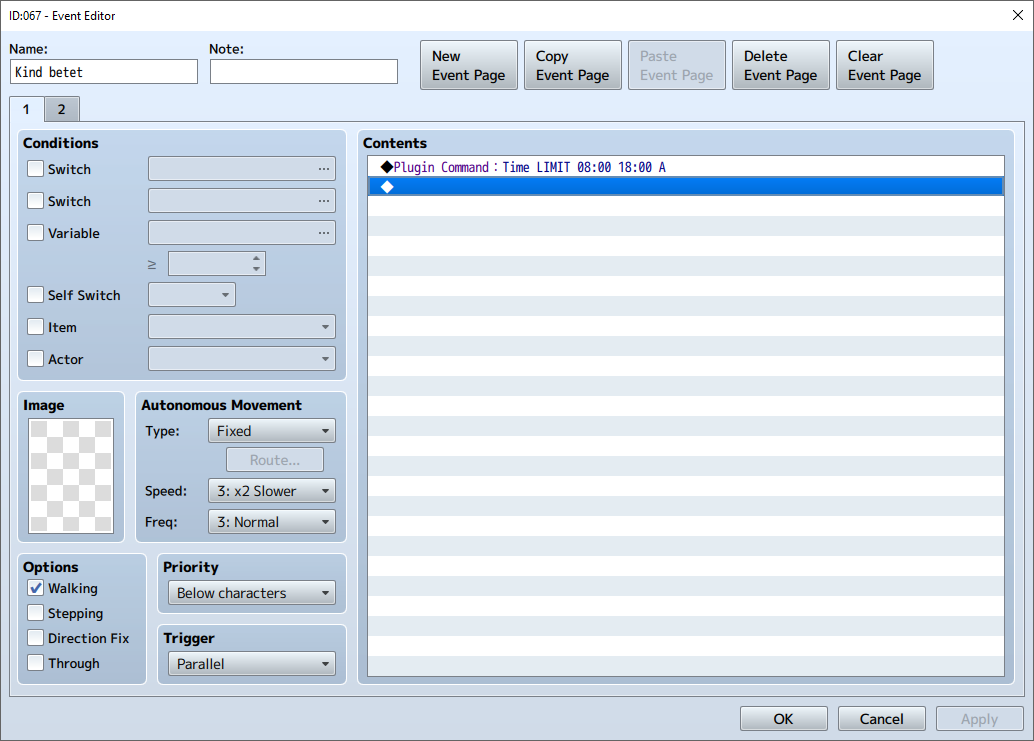
    Here's the mistake. There's a time limit set from 8am to 6pm that will turn the switch A on, it's ok. There's no actual problem with that. The problem comes after. There is nothing, and that's the problem. And as the event is set to parallel, it will, in parallel to the game, ask my plugin to create a new Time LIMIT from 8am to 6pm a lot. I don't know exactly how many times a second, but it should be near 60 times a second, I guess, as the game runs at 60fps when it's smooth.

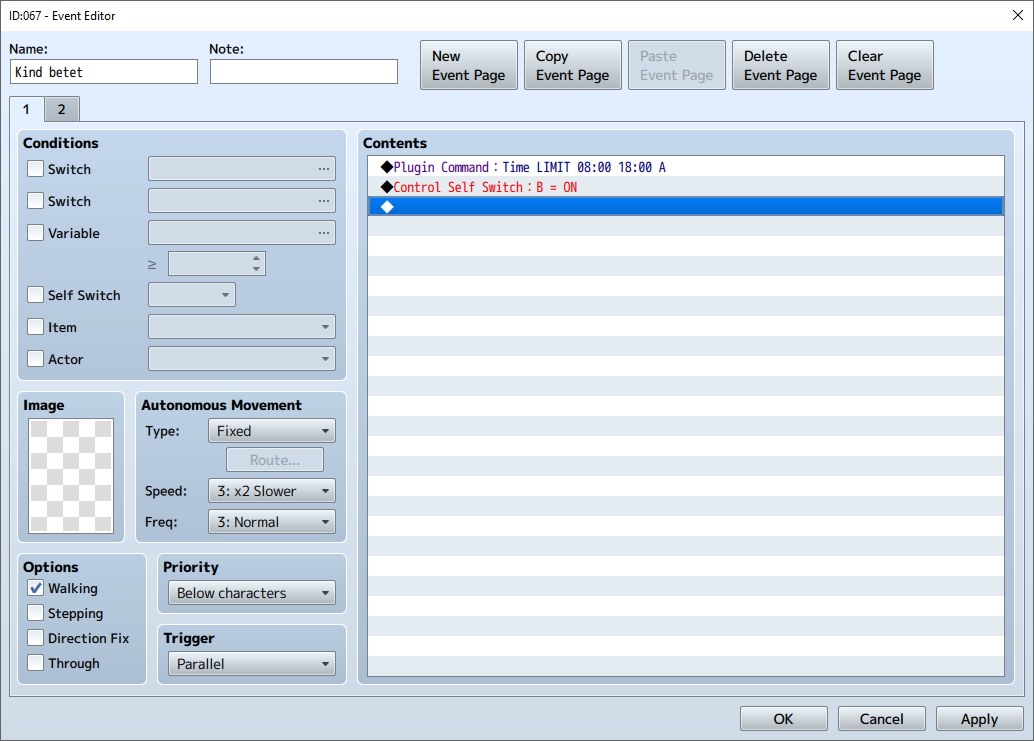
    So, to solve the problem, you should just turn on the switch B, like that :
    upload_2017-12-29_13-55-10.png
    Page 1 is correctly set, now.

    Page 2
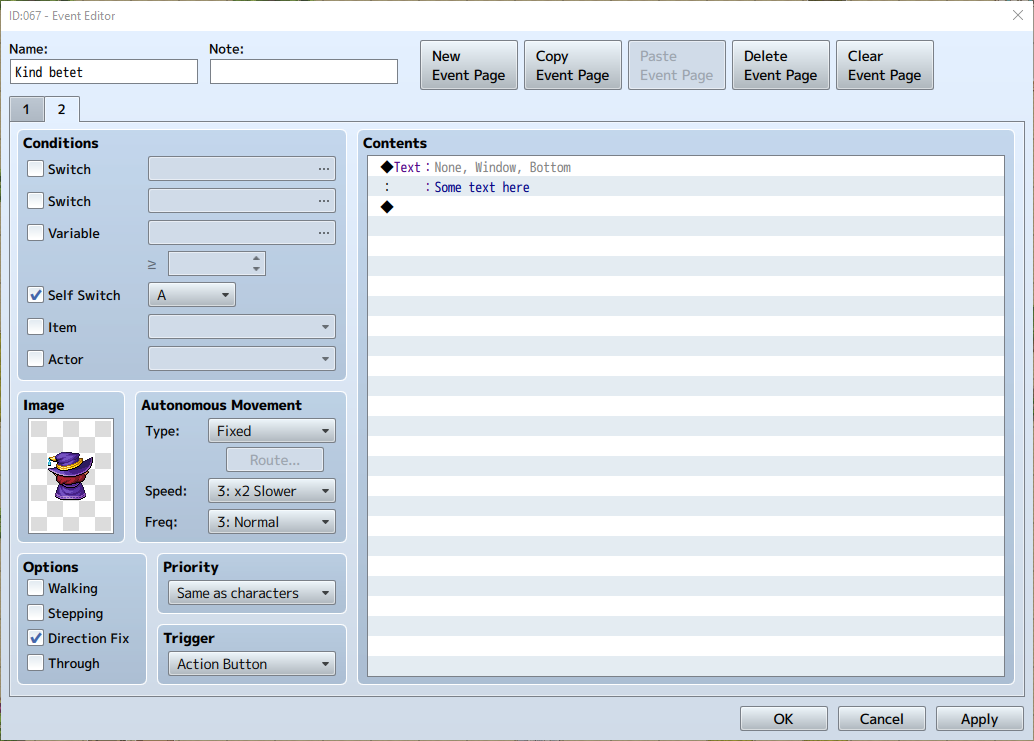
    For the second page, here's Daisetsu's page: (I just changed the contents)
    upload_2017-12-29_13-57-21.png
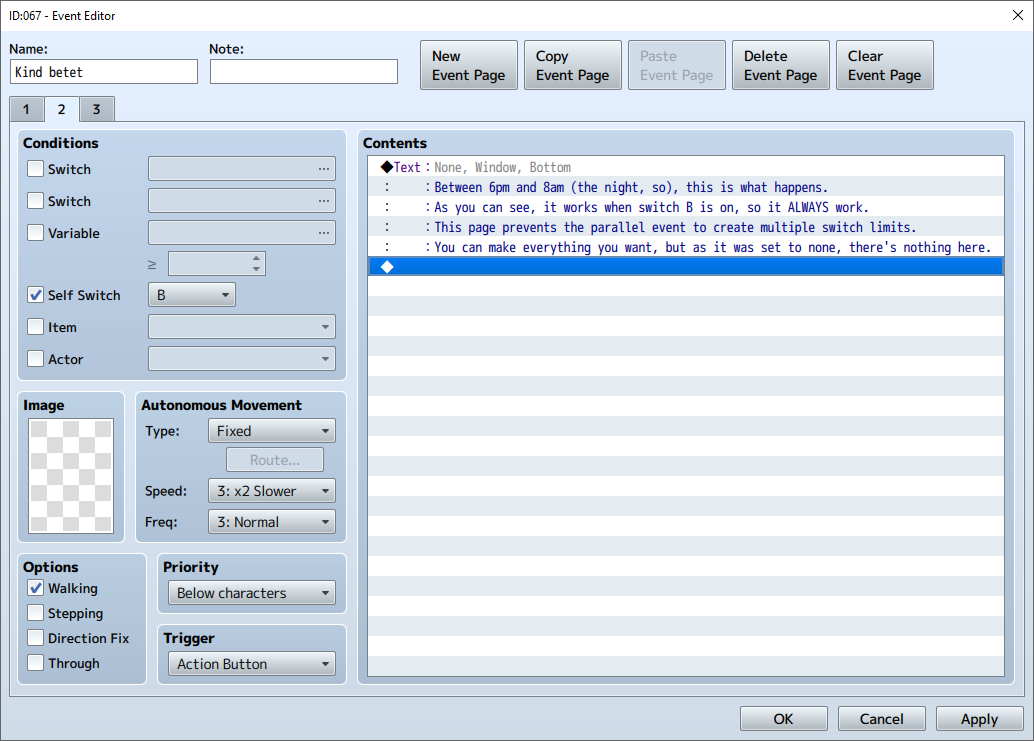
    As you can see, page two is what happens when the switch A is turned on (so between 8am and 6pm). This should be the 3rd page. As you should know, RPG Maker will take the page on the very right first, and if it can't, it goes left, and left, and left, and so on until page 1. So, as this page won't always be available but the switch B will always be on, you should make the page 2 as what happens when the switch A isn't on and the page 3 as what happens when the switch A is off. An example is better than words, so here's what I mean:
    upload_2017-12-29_14-2-33.png
    As you can see here, the switch B is the condition to reach this page. That means that page 1 will be executed one time as a parallel event, then it will switch to page 2, so it creates only one switch.
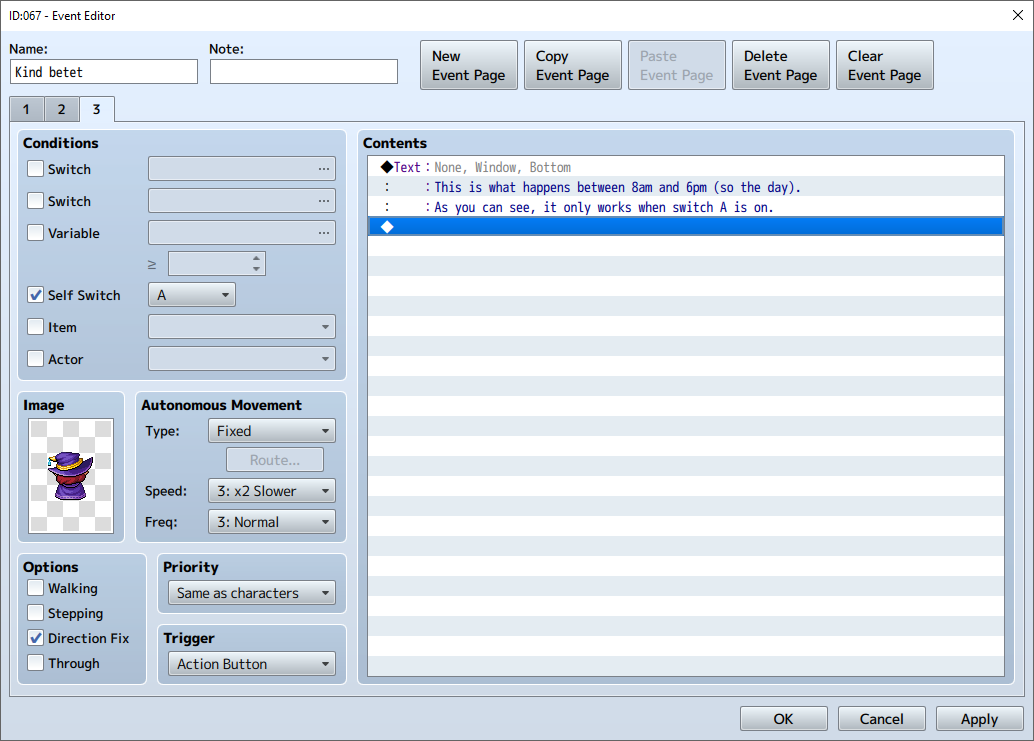
    upload_2017-12-29_14-4-6.png
    And here, you can see that switch A is the condition to reach this page (I chose switch A here because the plugin command says that it will turn on and off switch A). So between 8am and 6pm, it will change the event to a woman that shows us her back, with an action button that makes her speak to us and show the text. Nothing really hard, but it explains pretty well how the plugin command works.

    I hope it's clearer now, and I wish you a great game making and I hope it will solve some performance issues you're having !

    EDIT : V 1.3.4 out!
    * Solved a bug where Light LIMIT would turn on lights again after a battle, even if they aren't supposed to be turned on.