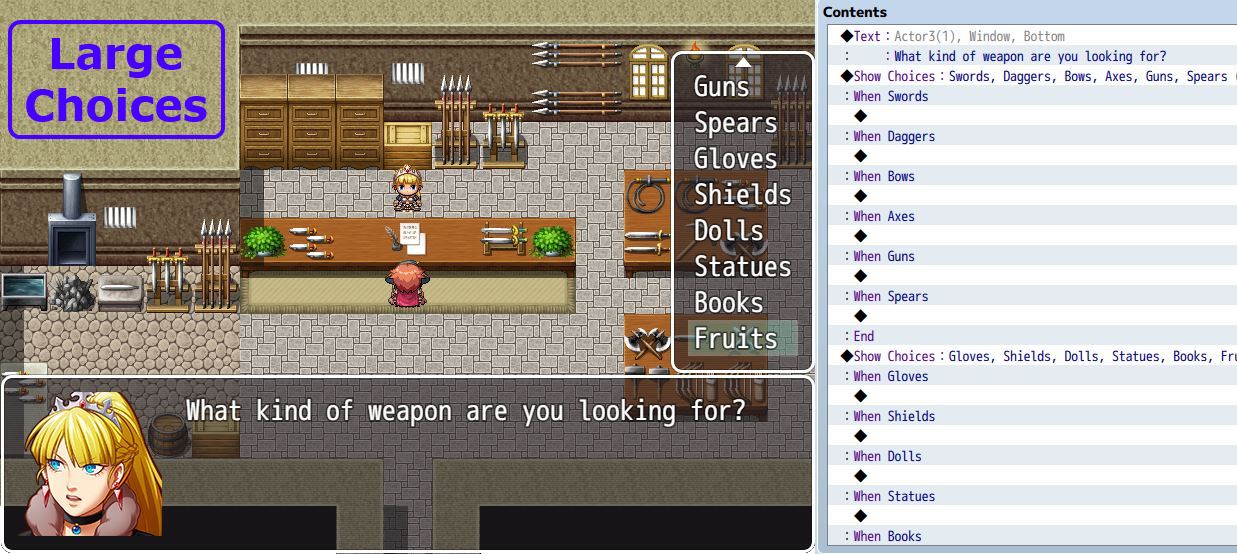
Large Choices

● ARCHIVED · READ-ONLY
Started by Tsukihime 32 posts Page 1 of 2 View original ↗
  1.  
    The Show Choice event command allows you to present players with a set of options that they can choose from. Depending on their selection, your event would respond according to their choice.
     
    By default, RPG Maker provides you with a maximum of 6 choices when you create Show Choice commands. This means that, at anytime, you may present up to 6 choices.
     
    However. what happens if you would like to display 7 choices? Or 8? Maybe more? You would need to come up with a method that will allow players to view all selections, but at the same time work around the 6-choice limitation.
     
    Rather than having to figure out how to do that, this plugin makes your job easier by directly allowing you to create choice selections with more than 6 options:
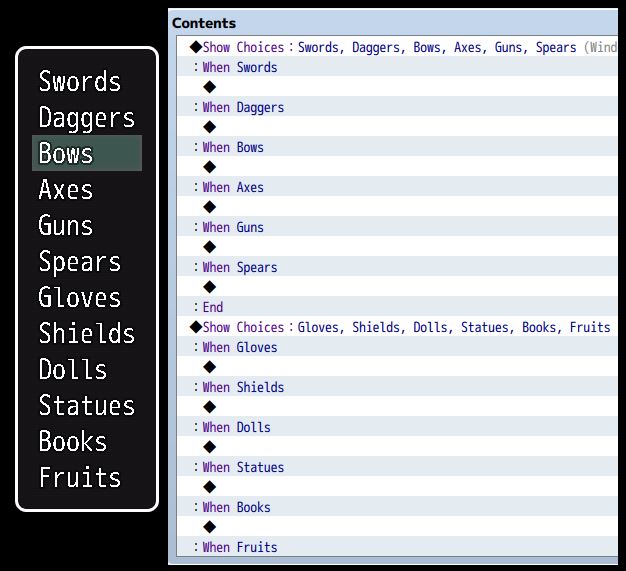


    Need more than 6 choices? Download the plugin and try it out!
     

    For more information and downloads, go to HimeWorks
     ​
    You may also be interested in the following plugins:

    This is my first javascript plugin so I will need to look at how to clean it up a bit.
    Hopefully it works on all platforms.
  2. Well, if they don't work, i'm sure you'll figure out how to fix em. Scripting is something you seem to be quite good at.

    Also, I can see that fruits are now going to be a recurring joke, aren't they? : D

    EDIT: Actually, Tsuki, wouldn't it make more sense to just have a pre-made .js file, instead of the old standard of putting text in?

    Especially since there isn't a script editor in MV anymore?

    EDIT2: ....whoops. I see. I left-clicked instead of right-clicking....
  3. Silent Darkness said:
    Well, if they don't work, i'm sure you'll figure out how to fix em. Scripting is something you seem to be quite good at.


    Also, I can see that fruits are now going to be a recurring joke, aren't they? : D


    EDIT: Actually, Tsuki, wouldn't it make more sense to just have a pre-made .js file, instead of the old standard of putting text in?


    Especially since there isn't a script editor in MV anymore?


    EDIT2: ....whoops. I see. I left-clicked instead of right-clicking....
    I think depending on browser settings, the file won't be downloaded automatically.


    I have provided a note for download instructions just in case.


    I'm not sure if there's a way for me to force users' browsers to download it directly, but I don't know if that would be ideal either.


    So I'll just let the browser figure out what their owner wants.
  4. Or you could put a thing in the forum post saying that if a file download doesn't take place when you left-click, right-click and hit save as, or something similar.
  5. Since you are basically just stitching the choices together, Is there a way to make this work with IF statements tossed into the mix?

    So...

    Show Choices

    1. Option 1

    IF X Switch is on

    Then

    Show Choices

    1. Option 2

    Else

    IF Y Switch is on

    Then 

    Show Choices

    1. Option 3

    Else

    This way we could have a dynamic list of options based on switches?

    You would likely have to add a function to 

    "Start Choice List"

    and

    "End Choice List"

    so it stitches all choice lists in between those, after evaluating the if/then/elses.
  6. Blue001 said:
    Since you are basically just stitching the choices together, Is there a way to make this work with IF statements tossed into the mix?


    So...


    Show Choices


    1. Option 1


    IF X Switch is on


    Then


    Show Choices


    1. Option 2


    Else


    IF Y Switch is on


    Then 


    Show Choices


    1. Option 3


    Else


    This way we could have a dynamic list of options based on switches?


    You would likely have to add a function to 


    "Start Choice List"


    and


    "End Choice List"


    so it stitches all choice lists in between those, after evaluating the if/then/elses.
    For conditions, I was thinking of going the same route as what I did in Ace for choice options


    But that required you to make script calls and may not be as user-friendly. However it's definitely compact if you figure out how to make your script calls.


    One possible solution I have thought of is, like you said, to use conditional branches.


    Prjt69N.jpg


    You could then have "hide" conditions, "disable" conditions, and so on, using a combination of a comment followed by a conditional branch.


    But I'm not sure how that would work out in practice.


    It might be cleaner to just say this


    ZEGUhqN.jpg


    Thoughts?


    I like the idea of wrapping conditional branches around show choices as well.


    OvkClKB.jpg


    But then it gets a bit complex when you want to mix and match different special options.
  7. Honestly, the Ace method of script calls was just fine when I tinkered around with it.

    Although now, you may want to use Plugin Command, not script call.
  8. Silent Darkness said:
    Honestly, the Ace method of script calls was just fine when I tinkered around with it.


    Although now, you may want to use Plugin Command, not script call.
    Do you have any thoughts on how users would specify it in a plugin command?
  9. I assumed Plugin Commands were for calling static commands (IE: Open Custom Menu) that a plugin developers adds themselves for a user to call when needed, and not something the end user can alter to fit their needs.

    As for how you could do conditionals, I would say make it as user friendly as possible. I liked the option the third image you showed. Not sure what you mean by mix and match... The event list may get long if you have a lot to check and change based on the situation, but I feel like it would still work. You would still need a way to start and end a choice list, so the engine understands when you want it to stop gathering options in case you need to add another non-connected choice list in the same event page.
  10. Congrats on (what looks like) your first MV Plug-in!  This was definitely one of the scripts I was hoping you'd port over (along with the insanely useful Page Conditions, Large Script Command, and other Options scripts).  Thanks for all you do for us game makers! :D
  11. Blue001 said:
    I assumed Plugin Commands were for calling static commands (IE: Open Custom Menu) that a plugin developers adds themselves for a user to call when needed, and not something the end user can alter to fit their needs.
    What I mean is, you might for example say

    disable_choice 1 switch 2 trueAnd I would take those inputs and then determine what to do with it.plugin command isn't suitable for writing formulas because it assumes arguments are separated by spaces.

    While this would work, I would have to provide a list of all the possible conditions you might want to make, which simply isn't possible because you could come up with arbitrary conditions like "actor 1 and actor 2 in party" or any combination of conditions.

    So I'd stick with script calls because then users can figure out what they want to say without any intervention on my part.

    As for how you could do conditionals, I would say make it as user friendly as possible. I liked the option the third image you showed. Not sure what you mean by mix and match... The event list may get long if you have a lot to check and change based on the situation, but I feel like it would still work. You would still need a way to start and end a choice list, so the engine understands when you want it to stop gathering options in case you need to add another non-connected choice list in the same event page.
    The choice options script for example provides 4 different types of "choice options" (or settings) based on a custom condition:

    1. Disabling a choice

    2. Hiding a choice

    3. Changing Text

    4. Changing Color

    So you might want to disable a choice, and use a custom disable color. Or you might want to disable a choice, and provide a custom text to go with it.

    Or perhaps you want a choice to be hidden when switch 1 is ON, but disabled when switch 2 is ON.
  12. Do it whatever way you can. Honestly, as long as the function exists I would be happy. :)

    I've always enjoyed your scripts. Keep up the amazing work!
  13. When using this script, when ever you select a choice, then go back to the same event and open the choices again, the LargeChoices adds the 2nd "block" of choices AGAIN to the bottom of the list. It keeps adding it as many times as you open the choices.

    Ex:

    {Activate Event}

    Hello! Please Choose One:

    [Choices]

    Red

    Blue

    Green

    Yellow

    White

    Black

    7th Choice

    8th Choice

    9th Choice

    {Activate Event Again}

    Hello! Please Choose One:

    [Choices]

    Red

    Blue

    Green

    Yellow

    White

    Black

    7th Choice

    8th Choice

    9th Choice

    7th Choice

    8th Choice

    9th Choice
  14. wrigty12 said:
    When using this script, when ever you select a choice, then go back to the same event and open the choices again, the LargeChoices adds the 2nd "block" of choices AGAIN to the bottom of the list. It keeps adding it as many times as you open the choices.
    I thought I had addressed the issue when I first saw it while testing, but when I looked at my code again the changes weren't there.

    I've updated the plugin with a version that corrects this.

    Code in question for anyone that is interested:

    Code:
    /* IMPORTANT If we don't clone this, we will modify the event permanently */this._list = this._list.clone()
    Needs to be a deep-clone. Something like

    Code:
    /* IMPORTANT If we don't clone this, we will modify the event permanently */this._list = JSON.parse(JSON.stringify(this._list))
  15. This will be very useful, thanks!

    Tsukihime said:
    .....

    So I'd stick with script calls because then users can figure out what they want to say without any intervention on my part.


    The choice options script for example provides 4 different types of "choice options" (or settings) based on a custom condition:

    1. Disabling a choice
    2. Hiding a choice
    3. Changing Text
    4. Changing Color

    So you might want to disable a choice, and use a custom disable color. Or you might want to disable a choice, and provide a custom text to go with it.

    Or perhaps you want a choice to be hidden when switch 1 is ON, but disabled when switch 2 is ON.
    I think having those options would be great, and agree that having them activated by script calls sounds like the best method for flexibility.
  16. It's always nice to have the option of having more options. =) Thanks, Hime!
  17. Just an update on disabling choices.


    It has been created as a separate plugin.


    You can find it here: http://forums.rpgmakerweb.com/index.php?/topic/48734-disabled-choice-conditions/


    The other options that were requested will likely follow as separate plugins as well.


    A tutorial is available under the "additional reading" section of the script page explaining how to disable large choices.
  18. Hidden choices have been released as a separate plugin and is compatible with Large Choices.


    You can get it here
  19. I'm curious. In your screenshot you have 12 choices showing on the screen at once. Mine only lets me see 7 and then I have to scroll down to see more.

    Is the number listed dependant on Font Size? I have so much more window space left, but It only takes up like 30% of the vertical space.

    I've even used Yanfly Message Core to make the message window displayed along with the choice to only be 1 line.

    Any chance for an option to control how many choices are on screen, and maybe an X,Y offset for the choice window itself?
  20. MV is hardcoded to show only 8 by default, and scrolls the rest.

    I can write a plugin to for positioning and other options, but I will have to come up with something appropriate.

    Like maybe a script call or plugin command before showing the choices.

    Code:
    choice_window_position(100, 200)