I’ve spent a lot of time on this and had smarter folks than I check the js of the plugin. Long story short, the error isn’t specific to this plugin. It’s just an indicator that it’s taking too long to complete what’s being asked of the program.
There’s no code fix as far as I know, but I have learned that smaller maps, and (in my situation) disabling layer plugins on maps where you want to use this plugin helped.
Khas Advanced Lighting v4.2 Ultra (now with real-time shadows!)
● ARCHIVED · READ-ONLY
-
-
Wondering if it's possible to exclude an event from being lit. For example, I have an event with an image with a priority that is 'above character'. If I have player lantern turned on while the player is passing underneath, then the image gets lit up, which I don't want.
Any clever ideas? I thought about and tried using a region id but that just tends to make it look worse.
Thank you. -
The download link doesn't works
:( -
File folder on MEGAThe download link doesn't works
:( -
Thanks ^^
-
From what I understand, that is probably not possible.Wondering if it's possible to exclude an event from being lit. For example, I have an event with an image with a priority that is 'above character'. If I have player lantern turned on while the player is passing underneath, then the image gets lit up, which I don't want.
Any clever ideas? I thought about and tried using a region id but that just tends to make it look worse.
Thank you.
The plugin basically creates a black overlay to darken the map, then merges that with the light sprites to create the illumination effect.
In order for those to light up the map entirely, all of these sprites are merged on a canvas that's set higher than any of the tiles & events.
If one would want a light effect to only affect objects beneath above layer, than you'd need the sprites to be set between the same layer and the above layer, which means you'd have to merge layers at that level, excluding all above layer sprites from being included in the effect, which the plugin does not do.
If it did, new problems pop up: if the merged layer as between same and above, then no light would ever lighten up any above layer tile and no darkness would ever darken any above layer tile. So overhanging objects at night would not be darker, because they're excluded from the layer.
Making two layers isn't a solution either. It would not only double the load for the image drawing process, but two darkness layers would make everything on same layer or below much darker than intended. Sprites that don't have a presence on the above layer would still be affected by the above layer's darkness and thus unnaturally darkened.
TLDR; no way I can imagine it being possible, even if you recode the plugin. -
Is there anyway to get this to work with Orange Overlay? (Parallax). The Shadows don't work and give me a error.
-
Any idea to get this working on MZ?
-
Khas stopped making plugins a long time ago. So unless someone decides to port it or he decides to return to making plugins, I don't think it's happening.
-
If he retires, it is okay for him, but not for us users. Now how can I contact him to buy this plugin for my commercial game? :dizzy:Khas stopped making plugins a long time ago. So unless someone decides to port it or he decides to return to making plugins, I don't think it's happening.
-
@JamesRyan some uses it for commercial and keep trying to find a way to contact him.
alternative ways (outside teh dynamic shadows part), you can try ocram_Lights or
community_Lights, Ocram is a really good one, but has no dynamic shadows like khas,
which many like.
Ocram is exspensive, but he is active and fix problems when needed, you can either use
it for free or take an alternate plugin if you want it commercially. -
I really want to use an alternative plugin, but it requires a lot of rework. So I don't really want to do that.@JamesRyan some uses it for commercial and keep trying to find a way to contact him.
alternative ways (outside teh dynamic shadows part), you can try ocram_Lights or
community_Lights, Ocram is a really good one, but has no dynamic shadows like khas,
which many like.
Ocram is exspensive, but he is active and fix problems when needed, you can either use
it for free or take an alternate plugin if you want it commercially. -
The only thing we can do is find a developer and he looks into the code and trys to debug.I really want to use an alternative plugin, but it requires a lot of rework. So I don't really want to do that.
This is an very easy solution i guess, but i dont really know someone here. -
My game is still in development. In case the game is finished before I can contact Khas, I may release it as a free game with an optional donation :|The only thing we can do is find a developer and he looks into the code and trys to debug.
This is an very easy solution i guess, but i dont really know someone here. -
I found this:
TypeError: Cannot set property 'x' of undefined
Code:Eventually someone can figure out the problem.TypeError: Cannot set property 'x' of undefined at Khas_LightingFilter.setResolution (KhasAdvancedLighting.js:984) at Khas_Lighting.initialize (KhasAdvancedLighting.js:902) at new Khas_Lighting (KhasAdvancedLighting.js:891) at Khas_Graphics.newScene (KhasAdvancedLighting.js:870) at Spriteset_Map.initializeKhasGraphics (KhasGraphics.js:142) at Spriteset_Map.createWeather (KhasGraphics.js:131) at Spriteset_Map.createLowerLayer (rmmz_sprites.js:3367) at Spriteset_Map.Spriteset_Base.initialize (rmmz_sprites.js:3124) at Spriteset_Map.initialize (rmmz_sprites.js:3345) at new Spriteset_Map (rmmz_sprites.js:3338) -
You do realize this is the MV plugin section, not the MZ plugin section, right?at Spriteset_Map.createLowerLayer (rmmz_sprites.js:3367)
I seriously doubt this plugin will work with MZ unless someone modifies the code to make it work. Unfortunately Khas hasn't been around in the past couple of years and I'm not sure what their policy is regarding modifying their plugins code is. -
Hey all,
Small problem here - when I save on a map that has a lighting effect on it, then go to reload it, the lighting effect is gone. If I leave the map and return, the effect also returns, but is there a way to keep that effect persistent between loads? Using the notebox is likely out of the question for my current issue as the effect is driven by a variable based on the player's location within a questline.
Edit: This can be disregarded, I figured out how to make this work. -
Hey @Veno , what file is this that's being changed? I am using the most current version of Khas' plugins and I can't find the line to be removed in any of the 5 plugins (KhasCore, KhasGraphics, KhasAdvancedFog, KhasHintSystem, KhasUltraLighting), although the problem certainly still exists.The issue with that is it doesn't look right when switching maps, as for a split second then you lose your lighting entirely.
Originally, I had paid for a fix for this. And it was working for a long time, but now I have issues when loading the game that the issue still occurs (but this seems to help fix it in many occasions for map switches)
For reference, my original fix was
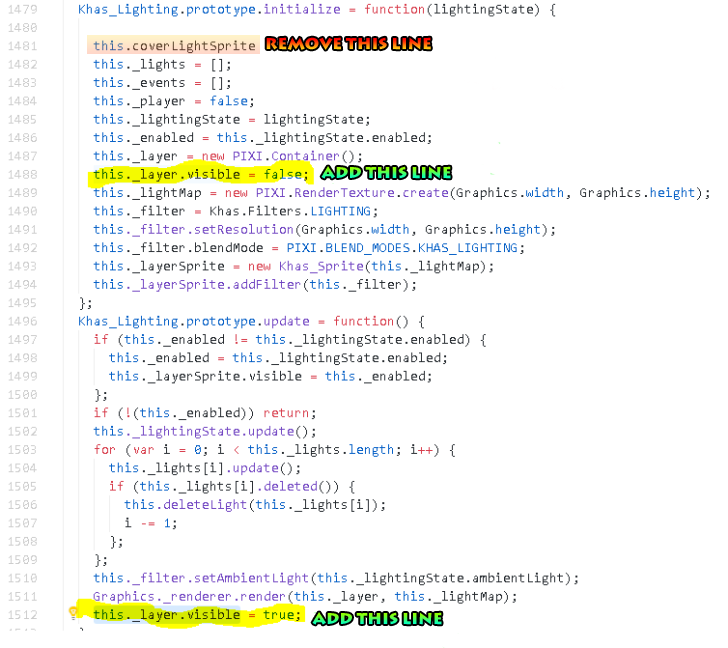
What that did was hide the "lights" layer until it was finished loading. But it doesn't appear to work entirely now... Anyways, the line that is removed seemed to be a cover for this exact purpose, but was never finished and doesn't do anything.
Again, it sure does help, but doesn't entirely solve the problem, specifically for loading the game from a saved state, but helps during map transfers.
Hopefully someone who's a better coder can help with this. -
The dynamic light provokes multiple errors.
Cannot read property '26' of undefined
Cannot read property '27' of undefined
Cannot read property '28' of undefined
Cannot read property '30' of undefined
All that depending on where you position your plugin. -
Could you post a screenshot of the console with the whole error? I've seen/had lots of 'cannot read property length of undefined' but never things like this. Did you edit it in any way?