Khas Advanced Lighting v4.2 Ultra (now with real-time shadows!)

● ARCHIVED · READ-ONLY
Started by Khas 437 posts Page 17 of 22 View original ↗
  1. Dusttt said:
    Found in on his website:
    If you want to use this plugin with a free RPG Maker game, you can do it for free and there's no need to contact me. I only ask you to give credit to "Khas" or "Khas Custom Scripts" somewhere in your game. You may include my blog url if you want.

    This plugin is NOT FREE for COMMERCIAL use. If you want to use it on a commercial title (any game that you may sell), you must pay a one-time $15 USD fee (payable via PayPal only - please send me an e-mail, see Contact page on my blog). This license covers commercial use for your current and future projects, and it allows you to use all my plugins.
    What about it? If you mean why we're trying to get in touch with Khas, it's because we want to purchase a license to release games commercially.
    If you're asking what the license agreement means, it means if you are going to make any money while using his plugins, you have to purchase a license for his plugins. If you aren't making any money in any games that use his plugins, all you have to do is credit him instead.

    Here's the problem, we want to purchase the license, but he isn't to be found anywhere. I've tried contacting him via e-mail, like he asks in his website, but he isn't responding. I hope he's okay at least.
  2. Dusttt said:
    Found in on his website:
    If you want to use this plugin with a free RPG Maker game, you can do it for free and there's no need to contact me. I only ask you to give credit to "Khas" or "Khas Custom Scripts" somewhere in your game. You may include my blog url if you want.

    This plugin is NOT FREE for COMMERCIAL use. If you want to use it on a commercial title (any game that you may sell), you must pay a one-time $15 USD fee (payable via PayPal only - please send me an e-mail, see Contact page on my blog). This license covers commercial use for your current and future projects, and it allows you to use all my plugins.

    He did not reply the email. It is like he has disappeared from the internet, and the only way to deal with this is to meet him in person, which is most likely unable for us.
  3. Could anyone help me out with something that I'm not really sure if it's possible? I would bet that it isn't, but it' worth a try:

    in 4.2, Can I make the shadows that are created by regions look pixelated? I've used a pixelate effect in the "torch.png" file and I like the result, but I realize that the shadows created by regions use a different system, I guess

    I appreciate any feedback here
  4. I wonder if we make commercial game without buy license from Khas (Because we can't contact him) it will any problem ?

    So give me some advice or any idea please.
  5. keizz said:
    I wonder if we make commercial game without buy license from Khas (Because we can't contact him) it will any problem ?

    So give me some advice or any idea please.
    I've been wondering the same thing. Not that I am in a rush to release a game or anything right now since I still have a lot of things to do, but we don't know if he's completely gone from the internet or if he'll be coming back anytime soon...
  6. keizz said:
    I wonder if we make commercial game without buy license from Khas (Because we can't contact him) it will any problem ?

    So give me some advice or any idea please.

    I think you can create lightning's plugin for sharing us?
    Also need work with Orange Overlay and Mog Time System too if you can do! i believe in you! :)
  7. EDIT: Let me chage my question yet again. Is it possible for me to use the plugin command that changes ambientlight tint AND the plugin command that changes ambientlight intensity at the same time, but not instantly? For example:

    Plugin Command: Ambientlight FF5D00 120
    Plugin Command: Ambient light 30 120

    I want both of these commands to run at the same time (because the "wait" command between them kinda ruin things), but if I leave like this, the second AmbientLight command cuts the first one, so I get a darker screen, but no color change. Any ideas?
  8. ArcKaarisun said:
    @Kenode Well that did fix that issue. Thank you. Now it seems I have another issue.
    I have all of these in order. They are all active. Lights folder is in "Img" folder of my game. My current issue is that I am following Khas's advanced light tutorial to the T, but I cannot get the ambient light to work either way that he suggests. I don't know what else to do. http://arcthunder.blogspot.com/p/tutorial-advanced-lighting.html Also, WebGL is permitted and active on my PC/browser if that matters at all.
    One thing Khas didn't specify is you need images in the lights folder specific to his plugin; download his demo, copy that lights folder, and slap it in your img folder. I literally just ran through that. Hope it helps!
  9. Hey guys, would love some help, I think it's pretty simple, not sure what I'm doing wrong.

    I can't seem to get the size of the player light to change. I have a parallel run event with:

    Plugin Command : PlayerLantern halogen
    Comment : [light_size 200]

    The initial PlayerLantern command works great, but the light size comment doesn't seem to work. What am I doing wrong here?

    Thanks (and if Khas ever sees this, thanks! The plugin is great!)
  10. Hahasea said:
    The initial PlayerLantern command works great, but the light size comment doesn't seem to work. What am I doing wrong here?
    Comments generally only work for the "event" itself rather than applying it to "player" lights. Instead, you can modify any-and-all lights (and add new ones) in the KhasUltraLighting.js plugin file after line 173 (I suggest getting something like Notepad++ when making modifications). For example...

    flashlight2: {
    fileName: "flashlight",
    intensity: 100, variation: 0, size: 200,
    offset_x: {2: 0, 4: 0, 6: 0, 8: 0 }, offset_y: {2: 0, 4: 0, 6: 0, 8: 0 },
    syncWithDirection: true
    },

    The "size" modifier is based on a percentage scale. A value of 200 will "double" the lights size while a value of 50 will be "half" instead (I would suggest to avoid using obsurd values like 1000 or more as someone might accidentally think Gondor is calling for aid).
  11. Hello everyone,
    I have a problem with the Plugin, when I transfer my hero from one card to another, while loading a flash appears with the lights. I can not delete them.

    I need help please.
  12. @Roult It happens to me too. How about showing a black image after the transfer? The image can hide the lights. After a wait if like 200 frames, remove the image.

    Edit: I haven't tried it. If images don't work, try tinting/fadinv to black.
  13. Wait. Can i attach lighting to a state with this? I have a state called illuminate and think this would be great for it
  14. Thank for your answer @Hyouryuu-Na, I tested fadein/fadeout in black or white or nothing, and place a black picture but nothing resolve the problem :/
  15. It's good I have made a solution :D

    In transfert event, place fadeout screen, then command "Lighting OFF", then the transfert, then command "Lighting ON", then Fadein.
    Tell me if i resolve for you too.

    @Hyouryuu-Na
  16. The issue with that is it doesn't look right when switching maps, as for a split second then you lose your lighting entirely.

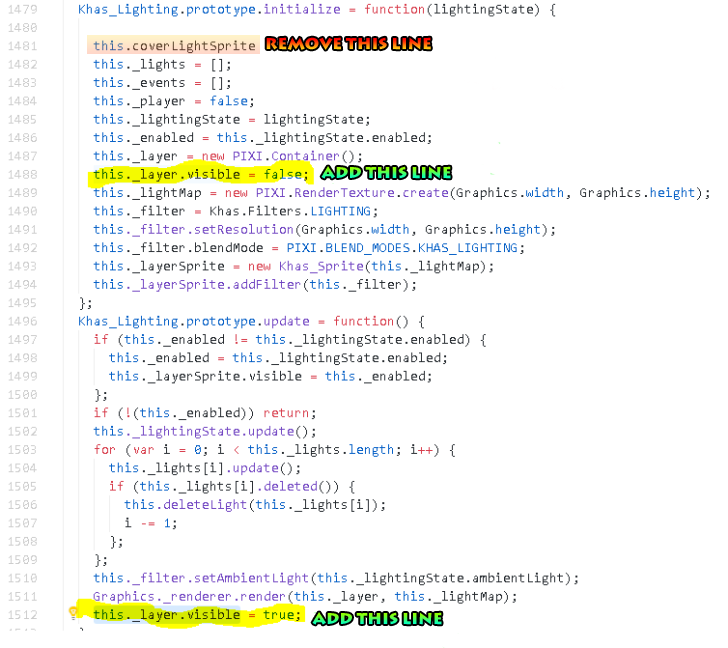
    Originally, I had paid for a fix for this. And it was working for a long time, but now I have issues when loading the game that the issue still occurs (but this seems to help fix it in many occasions for map switches)

    For reference, my original fix was

    lightfail.png
    What that did was hide the "lights" layer until it was finished loading. But it doesn't appear to work entirely now... Anyways, the line that is removed seemed to be a cover for this exact purpose, but was never finished and doesn't do anything.

    Again, it sure does help, but doesn't entirely solve the problem, specifically for loading the game from a saved state, but helps during map transfers.

    Hopefully someone who's a better coder can help with this.
  17. @Veno thank for your answer,
    unfortunately I'm not good at coding yet, my solution work perfectly without editing plugin (my game is not finished yet).
    It's a pity that Khas has disappeared, do you have any news? I would like to buy the plugin for a sales my game
  18. it's unfortunate, how to pay for the rights of the plugin, I also use the Fog.
    I think marketing anyway by making a message, I pay him when I have an answer.