Game Time - Time system

● ARCHIVED · READ-ONLY
Started by DK 74 posts Page 2 of 4 View original ↗
  1. jeys_li said:
    конечно, вотView attachment 210267
    А если переименовать файл в DK_Game_Time, то проблема остается ?
  2. DK said:
    А если переименовать файл в DK_Game_Time, то проблема остается ?
    Нет, ошибки больше нет! Я так рада, спасибо вам большое, за вашу работу, помощь и отклик!!! Это просто невероятно. Я не знаю почему при добавлении появилось (1), до этого я удалила, а потом скачала плагин. Но это не важно, я очень вам благодарна!!!!
  3. Version 2.5.1:
    • Fixed bug in GameTimeChangeSelfSwitch plugin command in RPG Maker MV.
  4. DK said:
    Title: Game Time
    Version: 2.6.0
    Author: DKPlugins
    Description: Time system.
    Want to create a merchant that only appears on weekdays during certain hours? Easily!
    Want to create holidays in the game? Easily!
    Looking to create a time-based building system? Easily!

    Compatibility:

    • RPG Maker MV: 1.5+
    • RPG Maker MZ: 1.0+
    Features:
    • Use preset time or real time from the player’s device
    • Display a window with time while playing
    • Change time/date through plugin commands, script calls
    • Write time/date to variables
    • Control switches with time/date based conditions
    • Events wait using time instead of waiting with frame count
    • Change switches, self switches and variables with a time/date based timer
    Planned features:
    • Support for Lighting
    • Support for Weather
    Add-ons:
    add-ons
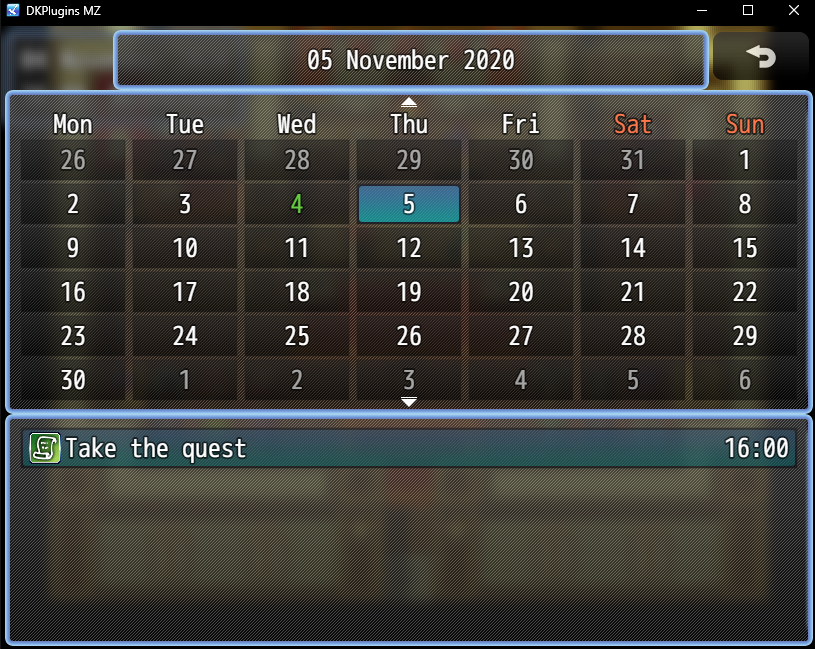
    1. Game Time Calendar – Calendar system. Adds a calendar and event system.

    Features:
    • Create holidays and events and view them in the calendar
    • When an event occurs, the specified switch is turned on
    • Ability to delete created events
    • Option to disable calendar via plugin command

    ShooterScreenshot-104-28-11-20.png
    ShooterScreenshot-105-28-11-20.png

    "Help" languages: English, Russian

    Terms of use
    You can:
    -To use the plugin for your non-commercial projects
    -Change code of the plugin

    You cannot:
    -Delete or change any information about the plugin
    -Distribute the plugin and its modifications

    Details on obtaining a commercial license on my website

    Plugin page:
    https://dk-plugins.ru/game-time/
  5. Version 2.6.0:
    • Added a plugin command to run a common event after a certain time.
    • Added a plugin command to add a temporary state to a character that will automatically disappear after a certain time.
  6. Added a new add-on "Game Time Day/Night".
    First post updated.
  7. Hi mate, I'm curious to see how this plugin runs as I'm after something that can hopefully modify how weather and lighting operates, however the links provided for the plugins keep prompting my security for risks, sometimes of which the link's don't work.

    Are you able to provide these plugins by other means?
  8. Skurge said:
    Hi mate, I'm curious to see how this plugin runs as I'm after something that can hopefully modify how weather and lighting operates, however the links provided for the plugins keep prompting my security for risks, sometimes of which the link's don't work.

    Are you able to provide these plugins by other means?
    Dropbox - Error - Simplify your life
  9. Hello, i'm pretty new to plug ins and RPG Maker, would you please let me know how can i make time specific events using your plug in? for example: you're able to do a event only at a specific time/day and after it's done you go back to regular time.

    If this can work i would love to pay for a commercial licence for your hard work
  10. Version 2.6.1:
    • Fixed a bug when setting January as the starting month

    XtremeeGhost said:
    Hello, i'm pretty new to plug ins and RPG Maker, would you please let me know how can i make time specific events using your plug in? for example: you're able to do a event only at a specific time/day and after it's done you go back to regular time.

    If this can work i would love to pay for a commercial licence for your hard work
    Sorry for the late reply.
    If still relevant:
    1. Use the plugin settings to set the switches to work based on time and date (Switches in Other settings section)
    2. Add a new setting, specify the necessary switch and the conditions under which it will be automatically enabled.
    As an example, the screenshot shows the conditions for turning on the switch from 12:00 to 18:00 daily.
    screenshot
    Screenshot_1.png
  11. Updated help, plugin version has not changed
  12. Heya. Cool system. Is there any method for adding a recurring holiday which is the same date each year? From my guess the way at the moment is to set up some Common Event and use the Script Calls? But I am wondering if there is a simpler way.
  13. bigsmiles said:
    Heya. Cool system. Is there any method for adding a recurring holiday which is the same date each year? From my guess the way at the moment is to set up some Common Event and use the Script Calls? But I am wondering if there is a simpler way.
    Holidays are supported in the Calendar add-on. You can set one-time, monthly, yearly events.

    P. S.
    You can also configure the switch control in the time plugin in the settings (section Other settings). Just specify the desired day and month in the conditions, and then the switch will turn on on this day every year.
  14. DK said:
    Holidays are supported in the Calendar add-on. You can set one-time, monthly, yearly events.

    P. S.
    You can also configure the switch control in the time plugin in the settings (section Other settings). Just specify the desired day and month in the conditions, and then the switch will turn on on this day every year.
    Thankyou that is exactly the information I needed.

    This is SO COOL. I am making a Holiday for each God which will make the Skill types of the related Elements more powerful on the holidays XD Possibilities later for adding things making the world more alive are limitless. Nice clean layout makes it easy for player to view ahead all timed quests, calling up specific date so easily to show deadlines when quest is received, it is just great for so many things.
  15. Hi there! Really love this plugin, I plan on using it for this life sim game idea I have. Wanted to ask about a few things in terms of customization. I'm using the real time mode in MV :) Thanks!
    • Would it be possible to add an option to fade out the time window while the player is moving, and fade in when the player stops moving for a set amount of time (like a second)? Parameters to adjust the fade in/out speed and the delay before the window shows up again would be a really nice additional touch to this.
    • Also maybe a parameter to hide the window during dialogues or events? I know there's a plugin command to hide or show it, but having a default param would be really convenient.
    • It would be cool if there were an AM/PM display option for when the clock is set to 12 hour mode.
  16. NikkiKaji said:
    • Would it be possible to add an option to fade out the time window while the player is moving, and fade in when the player stops moving for a set amount of time (like a second)? Parameters to adjust the fade in/out speed and the delay before the window shows up again would be a really nice additional touch to this.
    • Also maybe a parameter to hide the window during dialogues or events? I know there's a plugin command to hide or show it, but having a default param would be really convenient.
    Good idea :)

    NikkiKaji said:
    It would be cool if there were an AM/PM display option for when the clock is set to 12 hour mode.
    you need to add am/pm display to time window (see format section in plugin instructions)
  17. DK said:
    Good idea :)


    you need to add am/pm display to time window (see format section in plugin instructions)
    oooh i see! missed that the first time haha. thanks for the quick reply! looking forward to future updates ^^
  18. Version 2.7.1:
    • Added 3 settings to hide the time window on the map during dialogue/event/player movement.
    • Just fixed the name of the constant JULE -> JULY
  19. So I am trying to understand how this plugin work and am still new to this because of Ruby scripts (Am new to MV because I have mainly worked with Vx ace). So I want an npc to show up or a shop to open at 12:00 pm and I also want the game to be irt. How would I set this up exactly? Do I have to have variables for the hours, minutes, and seconds? I want it to read the specific time so as it hits exactly 12 pm, the npc shows up or the store opens. However when it hits 8 pm the npc is gone or the shop closes.