Game Time - Time system

● ARCHIVED · READ-ONLY
Started by DK 74 posts Page 1 of 4 View original ↗
  1. Title: Game Time
    Version: 2.8.0
    Author: DKPlugins
    Description: Time system.
    Want to create a merchant that only appears on weekdays during certain hours? Easily!
    Want to create holidays in the game? Easily!
    Looking to create a time-based building system? Easily!

    Compatibility:

    • RPG Maker MV: 1.5+
    • RPG Maker MZ: 1.0+
    Features:
    • Use preset time or real time from the player’s device
    • Display a window with time while playing
    • Change time/date through plugin commands, script calls
    • Write time/date to variables
    • Control switches with time/date based conditions
    • Events wait using time instead of waiting with frame count
    • Change switches, self switches and variables with a time/date based timer
    Planned features:
    • Support for Lighting
    • Support for Weather
    Add-ons:
    add-ons
    1. Game Time Calendar – Calendar system. Adds a calendar and event system.

    Features:
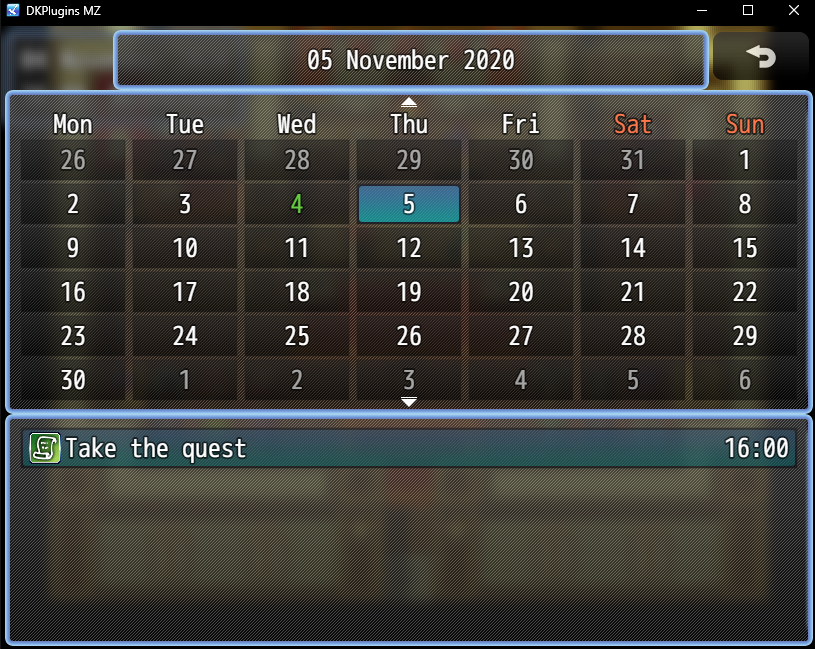
    • Create holidays and events and view them in the calendar
    • When an event occurs, the specified switch is turned on
    • Ability to delete created events
    • Option to disable calendar via plugin command

    ShooterScreenshot-104-28-11-20.png
    ShooterScreenshot-105-28-11-20.png

    2. Game Time Day/Night – Simple cycle of day and night.

    ShooterScreenshot-175-13-08-22.png
    ShooterScreenshot-176-13-08-22.png
    ShooterScreenshot-177-13-08-22.png

    "Help" languages: English, Russian

    Terms of use
    You can:
    -To use the plugin for your non-commercial projects
    -Change code of the plugin

    You cannot:
    -Delete or change any information about the plugin
    -Distribute the plugin and its modifications

    Details on obtaining a commercial license on my website

    Plugin page:
    https://dk-plugins.ru/game-time/
  2. Version 2.2.1
  3. Version 2.3.1:
    • Fixed bug with plugin commands

    Version 2.3.0:
    • Added plugin command SetGameTimeMapButtonEnabled to control button availability on the map
    • Some code fixes
  4. Calendar add-on updated!

    Version 1.1.2:
    • Added the ability to hide holidays from the calendar.

    Version 1.1.1:
    • Fixed bug with monthly holidays.
  5. Version 2.4.0:
    • Added 4 new settings that are responsible for the periods of the day: morning, day, evening, night. For each period, you can specify the name, start hour and end hour.
    • Added new format %DP for displaying the name of the period of the day in the time window.
    • Added new format %dd for displaying the short name of the day of the week in the time window.
    • Added a new property dayPeriod - the period of the day. It can be used in scripts like other time and date properties.
    • Removed properties dayWeekName, dayWeekShortName, monthName, seasonName.
    • Added constants for convenience (more details in the help).
    • Added new methods (more details in the help).
    • Added a new setting that is responsible for the change timer number. When using the GameTimeChangeSwitch, GameTimeChangeSelfSwitch, GameTimeChangeVariable commands or script calls, an internal timer is created, its number is stored in the variable that you specify in this setting.
    • Added plugin command to remove change timer.
    • Added the ability to specify note tag items, weapons, armor, skill, which sets the rules of use.

    Version 2.4.1:
    • Fixed a bug with %dddd format.
  6. is it just me or am I the only one who can't access the website fomr DKP plugins?
  7. thenerdmansion said:
    is it just me or am I the only one who can't access the website fomr DKP plugins?
    Are you using vpn or have you tried logging in using vpn?
  8. Can I use this plugin on a commercial game?
  9. I have a problem witch plugin. When i start the game, an error occurs1633075760306.png1633075749739.png
  10. KnyaZZ said:
    I have a problem witch plugin. When i start the game, an error occursView attachment 202814View attachment 202813
    Try to go to the plugin settings to apply the standard settings for the new parameters (periods of the day) that were added in the last update
  11. DK said:
    Try to go to the plugin settings to apply the standard settings for the new parameters (periods of the day) that were added in the last update
    It works, thanks
  12. Version 2.5.0:
    • Added the ability to assign 4 keys that are responsible for the following actions: pause, continue (speed 1), accelerated flow of time (speed 2), fast flow of time (speed 3).
    • Added plugin commands and script calls to change the speed of the passage of time.
    • Help updated.
  13. You wrote how to fix this problem above, but I don't understand it. Where can I change the parameters of the day period?
    (Как я понимаю вы русский разработчик, если вам не трудно опишите решение проблемы на русском)
    Снимок.PNG
  14. jeys_li said:
    You wrote how to fix this problem above, but I don't understand it. Where can I change the parameters of the day period?
    (Как я понимаю вы русский разработчик, если вам не трудно опишите решение проблемы на русском)
    View attachment 210071
    Необходимо зайти в параметры плагина, ничего не менять и нажать кнопку Ок. Ошибка возникает, потому что с обновлением были добавлены новые настройки.
  15. DK said:
    Необходимо зайти в параметры плагина, ничего не менять и нажать кнопку Ок. Ошибка возникает, потому что с обновлением были добавлены новые настройки.
    Извините, возможно я слишком глупая для этого плагина. Я сделала как вы сказали, в параметрах автоматически изменились названия переменных с сокращенных на полное, я ничего не меняла, но ошибка осталась((((
  16. jeys_li said:
    Извините, возможно я слишком глупая для этого плагина. Я сделала как вы сказали, в параметрах автоматически изменились названия переменных с сокращенных на полное, я ничего не меняла, но ошибка осталась((((
    Прошу прощения, исправил ошибку, перекачай плагин с сайта. В параметрах плагина сверху должен появиться новый раздел настроек "Настройки даты" с разными периодами дня, достаточно нажать Ок, чтобы эти новые параметры сохранились, и сохранить проект перед запуском игры.
  17. DK said:
    Прошу прощения, исправил ошибку, перекачай плагин с сайта. В параметрах плагина сверху должен появиться новый раздел настроек "Настройки даты" с разными периодами дня, достаточно нажать Ок, чтобы эти новые параметры сохранились, и сохранить проект перед запуском игры.Д
    Я скачала снова плагин, действительно появились новые параметры, но теперь он выдаетunknown.png это ошибку(((
  18. jeys_li said:
    Я скачала снова плагин, действительно появились новые параметры, но теперь он выдаетView attachment 210266 это ошибку(((
    Можете при запуске игры нажать F12 и в открывшемся окне сверху выбрать Console, и прислать оттуда скриншот ?
  19. DK said:
    Можете при запуске игры нажать F12 и в открывшемся окне сверху выбрать Console, и прислать оттуда скриншот ?
    конечно, вотСнимок.PNG