#Ask
Good evening, I may ask How do I enter a character as an enemy like that scene ...? (Make battle like this looks) in rpgmaker MV
Please answer ...
Game & Map Screenshots 10
● ARCHIVED · READ-ONLY
-
-
edit: nvm I think u meant sth different..
-
edit: nvm I think u meant sth different..
With plugin ... but i'm still newbie. So how to make enemy like that? I can only use default enemies like bat alone. please tell me how -
-
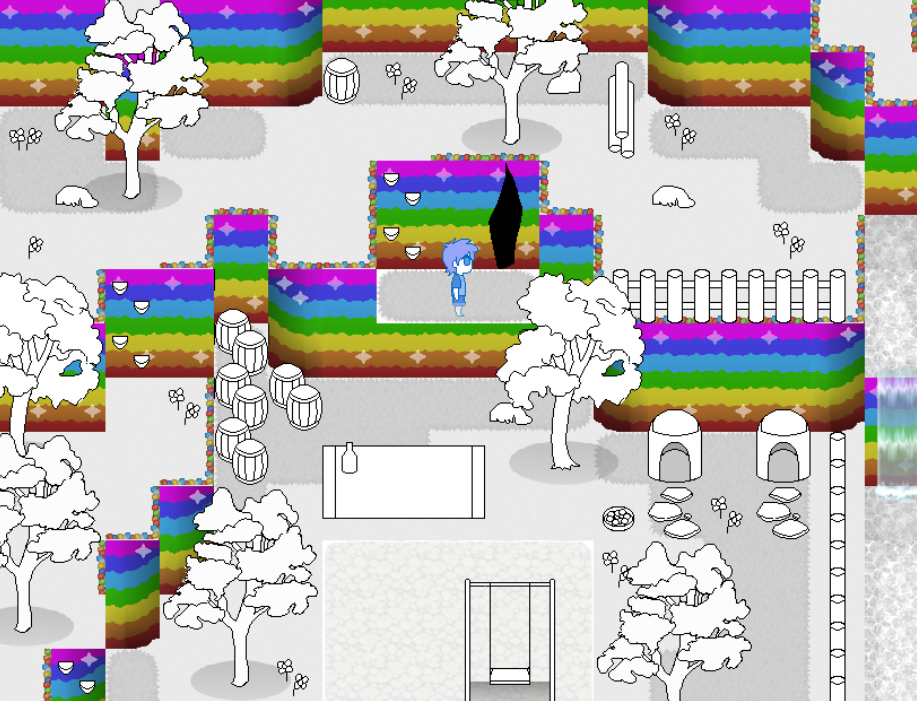
My most recent game: Rainbow city! [Also you can play the demo >here<]
I remaking the walls and adding more stuff. This is the backyard of White's house
What do you think?
-
@Kato-A Your corner pieces for your cliffs require more work. The tiles clearly are trying to convey a curved structure, but the top edge is a hard 90 degree angle. The clash is unfortunate. Your top corners need a tile with just a filler stone where the horizontal line of stones meets (or rather doesn't meet) the vertical.
I think your post fencing should be moved up a few pixels at least. To have them right at the very edge of the cliff, so that they overlay the 'stones' looks odd. -
@Kato-A Your corner pieces for your cliffs require more work. The tiles clearly are trying to convey a curved structure, but the top edge is a hard 90 degree angle. The clash is unfortunate. Your top corners need a tile with just a filler stone where the horizontal line of stones meets (or rather doesn't meet) the vertical.
I think your post fencing should be moved up a few pixels at least. To have them right at the very edge of the cliff, so that they overlay the 'stones' looks odd.
@Kes Yes, I know about those problems. I have not fixed it because I have 8 different colors of grass. I must make 8 different corners that join the violet above with the edge. and another 8 to make the corner join with the different colors that may have the floor below. Sometimes I have to put the top part on a single wall corner (which would end in green). and for that I would have to make another 8 corners that combine the green with the curve of the corner. and another 8 to combine it with the grass below. tilsets sheet is not enough for me. that's why I decided to leave it like that even if it looks a little weird. -
Part of the intro. (Colors are a little off due to GIF compression.)
-
@Lorenze I like the underwater effect with the different background colour shades of blue and purple. Makes me think the actor's going to go through the mirror somehow.
-
Super minor update, trying to polish up the game by making custom sprite effects.
So now instead of having characters slide around - there's some slight stretching using the sprite zoom calls. Which I think is subtle, but I like it.

And now, I do have the freedom of choosing which sprite effect plays during an attack - thanks to some scripting help. Which is why the dog jumps during his attack. -
It's a really nice effect, I like it!
-
Super minor update, trying to polish up the game by making custom sprite effects
I love it, well done! And great graphics too!!! :kaoluv: -
What do you think about my map
-
I don't know much about mapping (I still suck at it), but this gives me Silent Hill/Resident Evil vibe, without all the blood that is.
-
ok but do you think its ok like is it ugly
Edit: Im doing a lovecraftian game. -
It's certainly a lot better than I can do!
I can't tell if it's just the shadows, but something looks off with the upper staircases.
Keep it up! :) -
The top-left set of stairs is missing its shading, but other than that, it looks great. Better than any of my maps.
However, that purple carpet leads to what I can't stop seeing as a face (2 torches for eyes, open mouth) -
OH YEAH THANK YOU DIDNT notice it
-
Part of my Incognito Cat-Girl Battle Machines Game project. Actor becomes the target scope while parallel events track locations of the squids. If they are shot, they reset and start over. if they reach the boat then it starts taking damage. Depth Charge basically sends the "die" command to all onscreen squids.
-
@shadonokia I've merged your thread with the Game & Map screenshots thread. You also double posted (= posting right after yourself). I've merged those posts together for you, but in the future please use the 'Edit' button if you want to add something after you posted.