Galv's Jump Ability

● ARCHIVED · READ-ONLY
Started by Galv 48 posts Page 2 of 3 View original ↗
  1. Galv said:
    If you set the event to "Through", would that work for you?


    Just tried that and it doesn't work. Sounds like this behavior is unintentional.
  2. Turning 'through' on in the event works, however - perhaps something conflicting in your project but not sure why it would.


    I have added to my to-list to fix the behavior of jumping on a passable event and will get to it when I have time.
  3. Galv said:
    Turning 'through' on in the event works, however - perhaps something conflicting in your project but not sure why it would.


    I have added to my to-list to fix the behavior of jumping on a passable event and will get to it when I have time.

     
    Just letting you know I also tried disabling literally every other plugin including the ones that are extremely unlikely to conflict and the issue persists. So it doesn't seem like its an issue with my project.

    EDIT: I just realized why it wasn't working. I have two maps in this project that are identical to one another. I forgot to set it on both maps.

    Still this needs to be fixed as a person shouldn't have to set an event to through for them to be able on to the tile especially when it is set to below characters IMO.
  4. Yup, I agree, it will be fixed as I said


    EDIT: I believe this to be fixed now, please test it out.


    I apologise to those who have requested changes, I have not forgotten about them (jump bonuses and conditions for jumping (eg. mp cost)). They will be done eventually, I am currently prioritising bugs before I get to the requests.
  5. Hi there!
    Is there a way to use the jump with a script call or plugin command or comment tag? Any of them will be great to me. Because i want to assign this in a common event. Then assign this common event in a picture (to make a jump button for android).
  6. Hi! Love your plugin. Is there a way to trigger events when jumping? I'm making a platformer with it, and I want to make a bat enemy that flies between gaps, but I couldn't figure out how to make the Player Touch trigger trigger mid-jump. You have any solutions for that n such?
  7. When I place this plugin in my current project, the jump ability doesn't work for some reason.
  8. Sorry to ask a newbie q.. but for some reason I can't get this to work with Galv jump plugin.. like if I set jump to 'c' on the keyboard, assigning a button to 'c' doesn't make the jump happen. am i missing something? thanks!
  9. Scottascott said:
    Sorry to ask a newbie q.. but for some reason I can't get this to work with Galv jump plugin.. like if I set jump to 'c' on the keyboard, assigning a button to 'c' doesn't make the jump happen. am i missing something? thanks!
    I'm not sure, but often "C" in RPG Maker context means Symbol C, which corresponds to Enter, Space, and/or Z on your keyboard. Try hitting those and see if the jump works. (Symbol B corresponds to X and/or Escape, and I think Symbol A is Shift.)
  10. @Galv ,

    Would you be willing to modify your plugin where we could add <blockJump> to a map’s ‘Note’ field to prevent jumping on world maps?

    Also, can the plugin be modified to allow the ‘cancel’ button to trigger the jump action on any platform, i.e., phone port, PC gamepad, and keyboard? Typing ‘cancel’ into the Keys field of the plugin did not work when I tried it on your demo. Neither did A, B, etc. I can only get the keyboard keys to respond when inputting the keys into the “Keys” field in the plugin.

    Forgive me if this was already mentioned.

    Thank you!
  11. Guy_Fightmaster said:
    @Galv ,

    Would you be willing to modify your plugin where we could add <blockJump> to a map’s ‘Note’ field to prevent jumping on world maps?

    Also, can the plugin be modified to allow the ‘cancel’ button to trigger the jump action on any platform, i.e., phone port, PC gamepad, and keyboard? Typing ‘cancel’ into the Keys field of the plugin did not work when I tried it on your demo. Neither did A, B, etc. I can only get the keyboard keys to respond when inputting the keys into the “Keys” field in the plugin.

    Forgive me if this was already mentioned.

    Thank you!
    Bump
  12. Guy_Fightmaster said:
    Would you be willing to modify your plugin where we could add <blockJump> to a map’s ‘Note’ field to prevent jumping on world maps?
    There are already multiple ways you could achieve this.

    You could place a region that's listed in the plugin parameters as blocking jumping.

    Or you could place an autorun event that uses the included JUMPACTION FALSE plugin command.

    Guy_Fightmaster said:
    Also, can the plugin be modified to allow the ‘cancel’ button to trigger the jump action on any platform
    There's no such input as a "cancel" button with keyboards. That's only mapped for gamepads.

    On keyboard, the key that cancels out of menus is the same key that opens the main menu to begin with. That's why Galv specifically excluded Escape and Insert from the keys that can be mapped in this plugin.
  13. ATT_Turan said:
    There are already multiple ways you could achieve this.

    You could place a region that's listed in the plugin parameters as blocking jumping.

    Or you could place an autorun event that uses the included JUMPACTION FALSE plugin command.


    There's no such input as a "cancel" button with keyboards. That's only mapped for gamepads.

    On keyboard, the key that cancels out of menus is the same key that opens the main menu to begin with. That's why Galv specifically excluded Escape and Insert from the keys that can be mapped in this plugin.
    Ah, okay, Turan to the rescue again :). The JUMPACTION FALSE is perfect. I cannot believe I overlooked that command in the plugin, or didn't think of the simple eventing option.

    The second part of my request will take some brainstorming. I need to come up with something that would allow a "jump" button for all three control options, keyboard, gamepad, and eventually, phone port.

    Sigh....

    Thank you for the assistance!
  14. Galv said:

    Jump Ability - Version 1.4
    RPG Maker MV Plugin
    Galv


    Introduction
    A basic plugin for now with plans to enhance it to add jump bonuses in future.


    Screenshot
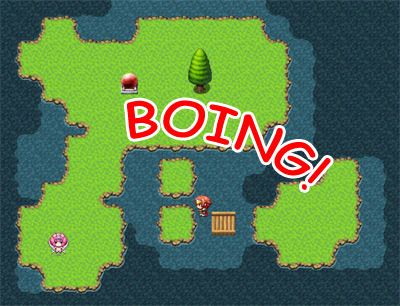
    jump-ability_zpstrskmwbt.jpg


    Features
    Allows the player to jump with the press of a button.
    Control jump accessibility using regions and events that can block/unblock as required.


    How to Use
    - Copy the "GALV_JumpAbility.js" file into your project's /js/plugins/ folder.
    - Activate plugin using the 'Plugin Manager'
    - Read the 'HELP' documentation (also found in plugin manager) for more details and try the demo if you don't understand.


    Plugin
    Get it here


    Credit and Thanks
    - Galv


    Terms
    Free to use in any RPG Maker MV project including commercial. Please credit "Galv". :)


    Updates


    2016-02-01 - Version 1.4 - Fixed a bug that blocked jumping on an event that was "under" the player


    2015-11-15 - Version 1.3 - Fixed a bug that crashed when jumping toward an event with no page conditions met. Added encounter steps to jumping.
    2015-11-15 - Version 1.2 - Fixed a bug with region blocking code
    2015-11-13 - Version 1.1 - Fixed bug in jump distance and for jumping off maps
    2015-11-13 - Version 1.0 - Release
    Hey Galv, are you planning on creating another version of this for RPG maker MZ?
  15. KUBATAIGA said:
    Hey Galv, are you planning on creating another version of this for RPG maker MZ?
    Galv seems to be retired, but you could try and see if the MV plugin works in MZ anyway and if not Eli/Hakuen Studio has a jump system for MZ
  16. I'm around, but with little time for creating plugins these days - pretty much retired at the moment.
  17. Galv said:
    I'm around, but with little time for creating plugins these days - pretty much What retired at the moment.
    What is taking up so much of your time?
  18. KUBATAIGA said:
    What is taking up so much of your time?
    That ain't none of yo business
  19. Haha, pretty much anything could take priority over making free plugins: work, family, kicking back and playing vidya, etc.
  20. I maybe super late but is this compatible with rpgmaker mz?