Galv's Action Indicators

● ARCHIVED · READ-ONLY
Started by Galv 67 posts Page 1 of 4 View original ↗

  1. Action Indicators - Version 1.4
    RPG Maker MV Plugin
    Galv

    ​


    Introduction
    For the player to know what the action button is going to do before they press it.


    Screenshot
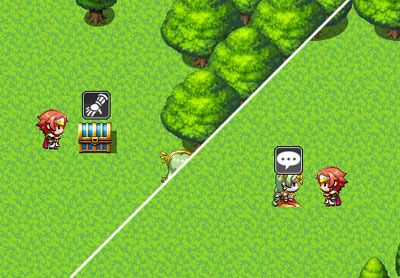
    action-indicators_zps1h62phzu.jpg


    Features
    Enables you to display an icon above the event the player is facing. This icon has a floating up and down movement and is determined using a tag inside a comment anywhere on an event's active page. The idea for this is to be used to indicate to the player what the action key will do before they press it.


    How to Use
    - Copy the "GALV_ActionIndicators.js" file into your project's /js/plugins/ folder.
    - Activate plugin using the 'Plugin Manager'
    - Read the help file to see how it works. Examine the demo if you don't understand.


    Plugin
    Get it here


    Credit and Thanks
    - Galv


    Terms
    Free to use in any RPG Maker MV project including commercial. Please credit "Galv". :)


    Updates
    2017-05-26 - Version 1.4 - fixed issue with same icon on different event not popping up
    2016-03-06 - Version 1.3 - now works with counters and events that are 'under' the player.
    2015-12-08 - Version 1.2 - Added options for enabling/disabling, auto hiding when events are running and Z value
    2015-12-07 - Version 1.1 - fixed a bug causing crash when events were removed.
    2015-12-04 - Version 1.0 - Release
  2. Simple yet awesome plugin.

    Would it be possible to use animated icons or balloons?
  3. I seem to be having issues with icons displaying on the proper event.  Sometimes when facing an event the icon displays on completely different event. Also, is there any way to make these icons show up ABOVE the "bind map above characters" from the bind pictures to map plugin?

    Also, I get the following console error if you try to interact with an item that would push the icon offscreen:

    TypeError: Cannot read property 'screenX' of undefined
        at Sprite_ActionIcon.update (file:///C:/Users/Jowey/Documents/Games/The%20Long%20Road/js/plugins/GALV_ActionIndicators.js:173:70)
        at file:///C:/Users/Jowey/Documents/Games/The%20Long%20Road/js/rpg_core.js:3915:19
        at Array.forEach (native)
        at Tilemap.update (file:///C:/Users/Jowey/Documents/Games/The%20Long%20Road/js/rpg_core.js:3913:19)
        at file:///C:/Users/Jowey/Documents/Games/The%20Long%20Road/js/rpg_core.js:3290:19
        at Array.forEach (native)
        at Sprite.update (file:///C:/Users/Jowey/Documents/Games/The%20Long%20Road/js/rpg_core.js:3288:19)
        at file:///C:/Users/Jowey/Documents/Games/The%20Long%20Road/js/rpg_core.js:3290:19
        at Array.forEach (native)
        at Spriteset_Map.Sprite.update (file:///C:/Users/Jowey/Documents/Games/The%20Long%20Road/js/rpg_core.js:3288:19)
        at Spriteset_Map.Spriteset_Base.update (file:///C:/Users/Jowey/Documents/Games/The%20Long%20Road/js/rpg_sprites.js:2135:29)
        at Spriteset_Map.update (file:///C:/Users/Jowey/Documents/Games/The%20Long%20Road/js/rpg_sprites.js:2265:37)
  4. Soryn said:
    Simple yet awesome plugin.


    Would it be possible to use animated icons or balloons?
     
    Currently no, but that would be cool - I will add to my To-Do list when I come back to this one.

    LeoHeart said:
    I seem to be having issues with icons displaying on the proper event.  Sometimes when facing an event the icon displays on completely different event. Also, is there any way to make these icons show up ABOVE the "bind map above characters" from the bind pictures to map plugin?


    Also, I get the following console error if you try to interact with an item that would push the icon offscreen:


    TypeError: Cannot read property 'screenX' of undefined


        at Sprite_ActionIcon.update (file:///C:/Users/Jowey/Documents/Games/The%20Long%20Road/js/plugins/GALV_ActionIndicators.js:173:70)


        ...
    I will look at that bind plugin to see how it works when I make changes/fixes.


    For now, though, I can't seem to replicate the icon displaying on a different event issue or the icon offscreen crash.


    Could you please try to replicate these in the demo so I can see what the cause is?
  5. Figured out a work around, you just have to copy and paste all your events back into the map after installing.  Thanks!
  6. Hmmm interesting - knowing that helps, thanks - I will do tests to try and replicate.


    That bug has been fixed - version 1.1
  7. Awesome work thanks Galv!

    Do you know if there is any way to make the icons appear above all other layers?

    I'm also having difficulty getting the icons to disappear when there is a message window, any suggestions?

    Thanks so much! I'll be looking into your patreon soon!
  8. Thanks, I have also just updated the plugin to include options for Z value, auto-hiding the icons when events are running and enabling/disabling them with a plugin call


    (Version 1.2)
  9. Do you know of a way to make it so that they only come up while facing certain directions? 

    EDIT: Unless you plan on considering it: this will require Yanfly's Region Events.

    • Make common event "x" to enable icons.
    • Put it in front of the event as the region assigned to it.
    • Make common event "y" disable icons.
    • Surround the region you inserted with common event "y"'s region
    • Surround  region "y" with common event "x" region.
  10. Not currently but it's a good idea. Will add it to my To-Do list
  11. Can't make it work... Maybe it's because I'm using parallax mapping? the indicator just doesn't show up.
  12. Should work fine with parallax mapping. 


    Make sure to start a new game instead of loading a game that was saved prior to adding the plugin.


    Also a list of other things to check:


    http://galvs-scripts.com/errors-using-plugins/
  13. I did start a new game, made everything like the demo, followed a tutorial on youtube, and still, it just doesn't show when I use it in my parallax map.
  14. I added a link to help you. It includes other things you could check. If you take a little time to follow it and do some tests in your project, it could reveal why it's not working for you.


    I cannot do anything for you if you don't even try that :(
  15. Ok figured it out, it's the plugin TDDP_BindPictureToMap. which actually messes my game up cause I need it for my parallax :s
  16. Hi Galv,


    Very nice plugin!


    A quick thing, how hard would it be to get it to pop the icon up when the mouse is being hovered over that event? When playing with the mouse you're very rarely going to be facing the event for long before initiating it as you'd normally click the event you want to interact with and the character would just run there. Would the pop on mouse hover be a possibility?


    Obviously not essential as this is a great plugin regardless but it would add a nice little touch :D
  17. wolfyttv said:
    Ok figured it out, it's the plugin TDDP_BindPictureToMap. which actually messes my game up cause I need it for my parallax :s

    Try moving the plugins in your plugin list to have this plugin below that BindPictureToMap plugin. If still doesn't work, please link to where you found that plugin and I'll take a look when I can.

    beenbaba said:
    Hi Galv,


    Very nice plugin!


    A quick thing, how hard would it be to get it to pop the icon up when the mouse is being hovered over that event? When playing with the mouse you're very rarely going to be facing the event for long before initiating it as you'd normally click the event you want to interact with and the character would just run there. Would the pop on mouse hover be a possibility?


    Obviously not essential as this is a great plugin regardless but it would add a nice little touch :D

    That's actually a good idea... I neglect the mouse functionality too much still in MV haha. I'll add it to my to-do list 
  18.  And thanks for the reply, your plugins are a necessity for my game :)
  19. Did you try moving them in your plugin list as I suggested? :(


    r0xMRHc.png


    Because I went in, downloaded and did a test and this worked for me. This was one of the points on my error trapping page... :(
  20. Thanks Galv. When native mouse support was announced for MV I didn't think I would use it, now I don't seem to use anything else haha. Thanks again.