hello, I realized that this plugin may have strong lags when in ver. 1.3.1.
Bind Pictures To Map
● ARCHIVED · READ-ONLY
-
-
Is this plugin incompatible with Terrax Lighting system?
-
Hey! I've tried using the plugin before and it worked, but now for some reason it doesn't.
Basically the character keeps going over the overlay layer no matter what I do.
Does it have anything to do with the recent update to 1.3.1?
Thanks!
Spoiler
-
Is this plugin incompatible with Terrax Lighting system?
I've actually had some trouble with this script and Terrax Lighting system.
The error I get is:
TypeError: Cannot read property 'addChild' of undefined
at Spriteset_Map.createDestination (TDDP_BindPictureToMap.js:123)
at Spriteset_Map.createLowerLayer (TerraxLighting.js:1599)
at Spriteset_Map.Spriteset_Base.initialize (rpg_sprites.js:2124)
at Spriteset_Map.initialize (rpg_sprites.js:2257)
at Spriteset_Map.initialize (TDDP_BindPictureToMap.js:149)
at new Spriteset_Map (rpg_sprites.js:2250)
at Scene_Map.createSpriteset (rpg_scenes.js:534)
at Scene_Map.createDisplayObjects (rpg_scenes.js:527)
at Scene_Map.onMapLoaded (rpg_scenes.js:383)
at Scene_Map.isReady (rpg_scenes.js:373)
Here is an image of the errors since there may be errors in the code I wrote above. (it wouldn't let me copy paste)
Here is the way I have the plugins set up in my RPG Maker file:
If I place the TerraxLighting above the TDDP_BindMapToPictures plugin, the game runs but TerraxLighting plugin lighting effect does not appear in the game.
I think it might be a layering issue and the pictures are being drawn on top of TerraxLighting effect, but I'm not entirely sure. -
@Galenmereth
Its possible add, move (bindpicture).
Or some have trick to move bind picture ?in the map ?
Tank you friend.
And good jobs with this plugin , is awesome. ! -
How do i download it? I click on the link and all I get it a wall of script.
-
@jto1217 right-click the link and save as
-
Thank you for the info :)
-
@Galenmereth I had an issue with your plugin. I used traditional tiles for bottom layer, then added a picture as the top layer. The problem is that the picture is not locked to the map. It moves along with the camera like being part of a HUD.
Is that because of any MV updates since your plugin release or am I doing something wrong?
I mean I read the instructions, I followed them step by step and still it doesn't work for me.
Thans in advance if you find the time to reply to this. -
@Galenmereth I had an issue with your plugin. I used traditional tiles for bottom layer, then added a picture as the top layer. The problem is that the picture is not locked to the map. It moves along with the camera like being part of a HUD.
Is that because of any MV updates since your plugin release or am I doing something wrong?
I mean I read the instructions, I followed them step by step and still it doesn't work for me.
Thans in advance if you find the time to reply to this.
you need use this.
set to 0 for unbind
this.bindPictureToMap(pid, 1, 'below_characters');
for me all work. -
you need use this.
set to 0 for unbind
this.bindPictureToMap(pid, 1, 'below_characters');
for me all work.
Will try it! thanks mate! -
Since I am using tall sprites, how would I make it so that certain layers appear beneath the player sprite while on the tile beneath them yet otherwise appear over a character when the character is on the tile above?
-
Hi, I'm trying to see if I can have pictures binded to specific tiles on a map screen but I am unsure if this is the right plugin for it.
So if for example i wanted to place a picture on tile 50,40 how could I do something like that? -
So if for example i wanted to place a picture on tile 50,40 how could I do something like that?
Bind your picture to map and then set position x = 50 * your tile size; y = 40 * your tile size -
Just to avoid confusion what would the plugin command look like?
The plugin discussion/instructions page is confusing to me. -
Just to avoid confusion what would the plugin command look like?
Like this
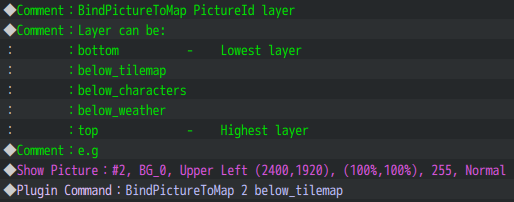
2400x1920 == 50x40 in tiles
You can calculate it by yourself or use variables for that
Other bind picture to map commands you can find in documentation -
I have emulated those commands but the image still floats with the screen instead of the location on map.
Could there be something missing with this? -
@Skurge did you trigger the event?
For me it works without problems
Spoiler
Maybe there is plugin conflict in your project, i can't say for sure -
I have it running in a parallel trigger.
I tried this also:
-
Try to disable all other plugins and test only with bind to map plugin. Because as i say i don't do any specific actions and all good for me.
@Skurge oh i look closer to your screen, you have mistake there
not BingPictureToMap
change it to BindPictureToMap